
הקדמה
Thank you for choosing BESTISAN GM06 Computer Gaming Speakers. These speakers are designed to provide a superior audio experience for various entertainment scenarios, including gaming, movies, and music. Featuring dynamic RGB illumination, multiple sound modes, and broad compatibility, the GM06 speakers are a versatile addition to any desktop setup.
פּעקל אינהאַלט
ביטע טשעק די פּאַקעט פֿאַר די פאלגענדע זאכן:
- BESTISAN GM06 Computer Speakers (2 units)
- מאַכט אַדאַפּטער
- 3.5 מם צו 3.5 מם אַודיאָ קאַבלע
- באַניצער מאַנואַל

Image: BESTISAN GM06 speakers, 3.5mm audio cable, power adapter, and user manual.
שליסל פֿעיִקייטן
- העכער אַודיאָ פאָרשטעלונג: Equipped with 2x 2.75-inch mid-bass drivers and 2x 1-inch silk dome tweeters, delivering 50W peak power for a broad and detailed sound stage.
- ברייט קאַמפּאַטאַבילאַטי: Supports 3.5mm AUX, Bluetooth 5.3, and Type-C sound card inputs for connection to PC, Mac, PS4, Xbox, CD players, laptops, TVs, and mobile phones.
- עטלעכע געזונט מאָדעס: Three professional EQ modes (Gaming, Movies, Music) allow seamless switching for an optimized auditory experience in different entertainment scenarios.
- Dynamic RGB Illumination: Features 8 RGB backlit options to create a unique ambiance and personalize your entertainment experience.
- Delicate Design: Unique diamond-shaped cabinet with a 5-degree elevation, 0.7L isometric cavity, matte panel, metal laser engraving logo, silicone buttons, and anti-slip foot pads.

בילד: אן עקספלאדירטע view of the speaker showing the 2.75-inch mid-bass driver and 1-inch silk dome tweeter, highlighting the 50W total peak power.
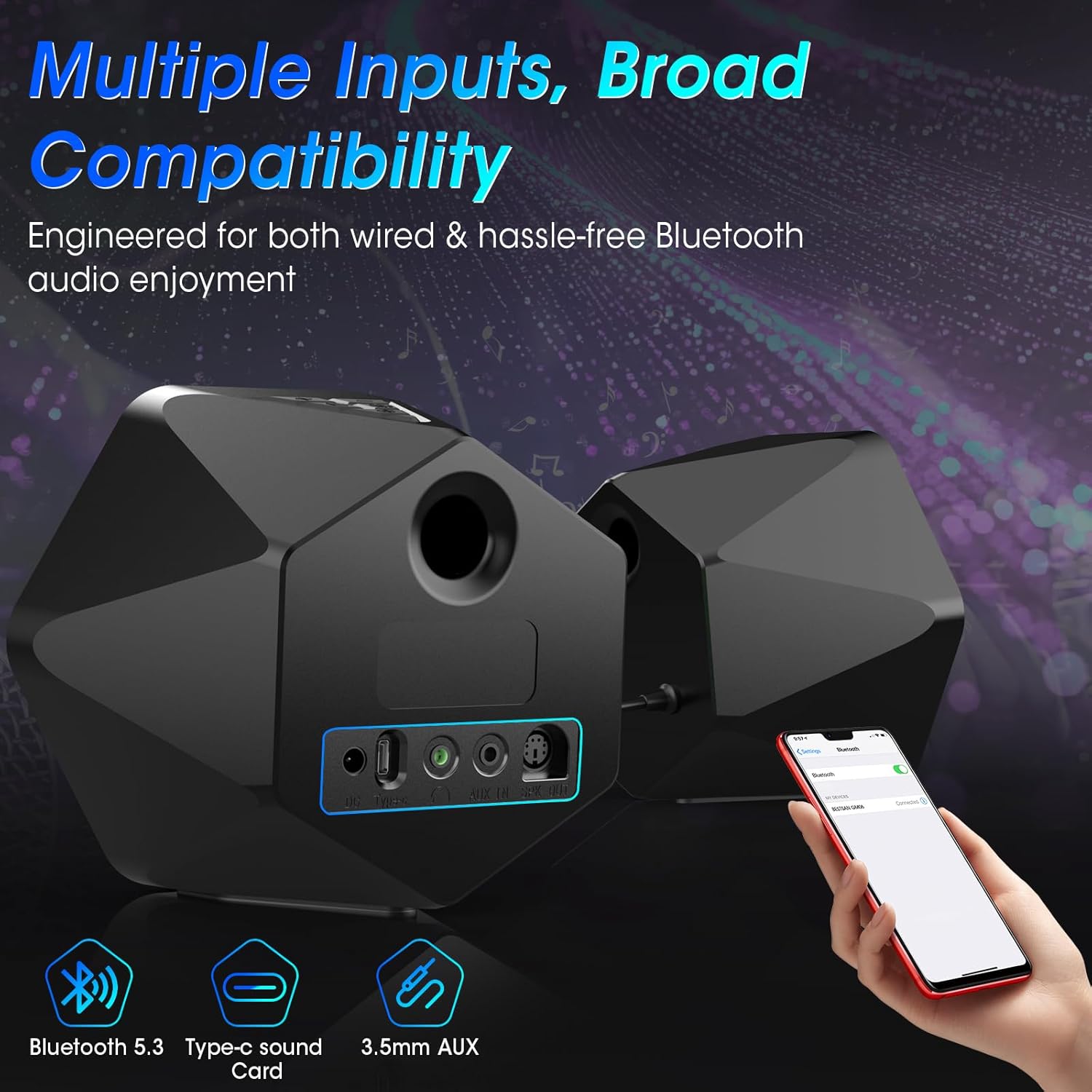
בילד: הינטערשטע view of the speakers illustrating the Bluetooth 5.3, Type-C sound card, and 3.5mm AUX input options, emphasizing broad compatibility.

Image: Visual representation of the three EQ modes (Game, Movie, Music) with corresponding usage scenarios, powered by a Digital Signal Processor (DSP).

Image: Two BESTISAN GM06 speakers flanking a monitor, showcasing the vibrant RGB lighting effects that enhance the desktop aesthetic.

Image: A user wearing headphones connected to one of the BESTISAN GM06 speakers, illustrating the convenient headphone jack for private listening.
סעטאַפּ אינסטרוקציעס
- פֿאַרבינדן רעדנערס: Connect the main speaker (with controls) to the secondary speaker using the provided PS2 cable.
- מאַכט קשר: Connect the power adapter to the main speaker's power port and then to a power outlet.
- אַודיאָ קאַנעקשאַן: קלייַבט אייער בילכערדיקע אַודיאָ אַרייַנשרייַב מעטאָד:
- 3.5 מם AUX: Connect the 3.5mm audio cable from your device's audio output to the AUX IN port on the main speaker.
- בלועטאָאָטה: Power on the speakers. The speakers will automatically enter Bluetooth pairing mode (indicated by a flashing blue light). On your device, search for "BESTISAN GM06" in the Bluetooth settings and pair.
- טיפּ C: Connect your device to the Type-C port on the main speaker using a compatible Type-C cable.
- פּאָזיציע רעדנער: Place the speakers on your desktop or desired surface, ensuring optimal sound projection. The 5-degree elevation is designed for improved audio direction.
אַפּערייטינג ינסטראַקשאַנז
The main speaker features intuitive controls for easy operation:

בילד: אויבן view of the main speaker showing the silicone buttons for On/Off, RGB lights switch, Volume/Track control, and Sound Source/EQ switch.
- מאַכט אויף / אַוועק: Press and hold the Power/Mode button (labeled with power symbol and 'M') for 3 seconds.
- Switch Input Mode: Short press the Power/Mode button to cycle through AUX, Bluetooth, and Type-C input modes.
- באַנד קאָנטראָל: Use the Volume Lever (labeled with '+' and '-') to increase or decrease the volume.
- שפּור קאָנטראָל: Long press the '+' button for the next track, and long press the '-' button for the previous track (in Bluetooth mode).
- RGB לייטינג: Press the RGB lights switch button (labeled with a lightbulb symbol) to cycle through 8 different RGB lighting modes.
- עק מאָדע: Press the EQ button (labeled with 'EQ') to switch between Gaming, Movies, and Music sound modes.
- שפּיל / פּויזע: Press the Play/Pause button (labeled with play/pause symbol) to play or pause audio (in Bluetooth mode).
Video Tutorial: GM06 Gaming Speaker's Button/Backlight/Interface Details
Video: An official BESTISAN US video demonstrating the functionality of the buttons, backlight, and interface details of the GM06 Gaming Speaker.
ספּעסאַפאַקיישאַנז
| מאָדעל נאָמען | GM06 |
| רעדנער טיפּ | ביכערשעלף |
| קאַנעקטיוויטי טעכנאָלאָגיע | Auxiliary, Bluetooth 5.3, Type-C |
| רעדנער מאַקסימום רעזולטאַט מאַכט | 50 וואטס (פּיקס) |
| אָפטקייַט ענטפער | 20 KHz |
| סיגנאַל-צו-נויז ראַטיאָ | 80 דב |
| וואָאָפער דיאַמעטער | 2.75 אינטשעס |
| טוועעטער דיאַמעטער | 1 אינטשעס |
| פּראָדוקט דימענשאַנז | 6.3"ד רענטגענ 4.3"וו רענטגענ 5.7"ה |
| פּונקט וואָג | 3.3 פונט |
| ספּעציעלע שטריך | LED Light (8 RGB Modes) |
| קאָנטראָל מעטאָד | ריר |
וישאַלט
To ensure the longevity and optimal performance of your BESTISAN GM06 speakers, please follow these maintenance guidelines:
- רייניקונג: Use a soft, dry cloth to wipe the speaker surfaces. Avoid using abrasive cleaners, waxes, or solvents as they may damage the finish.
- אָרט: Place speakers on a stable, flat surface to prevent accidental falls. Ensure adequate ventilation around the speakers.
- ויסמיידן נעץ: Keep the speakers away from water, excessive humidity, and direct exposure to rain or splashes. These speakers are not waterproof.
- טעמפּעראַטור: Avoid exposing the speakers to extreme temperatures (hot or cold) or direct sunlight for extended periods.
- קאַבלע זאָרגן: Handle cables gently. Avoid bending, twisting, or pinching them, which can damage internal wiring.
טראָובלעשאָאָטינג
If you encounter any issues with your BESTISAN GM06 speakers, please refer to the following common solutions:
- קיין קול:
- זייט זיכער אַז די רעדנערס זענען אנגעצונדן און די וואָלומען איז הויך.
- Verify that the correct input mode (AUX, Bluetooth, Type-C) is selected.
- Check all cable connections (power, speaker interconnect, audio input) are secure.
- Confirm your device's volume is not muted or too low.
- פאַרקרימט סאָונד:
- Lower the volume on both the speakers and your connected device.
- Check for interference if using Bluetooth. Try moving the speakers closer to the device or away from other electronic devices.
- Ensure audio cables are fully inserted and not damaged.
- בלועטאָאָטה פּערינג ישוז:
- Ensure the speakers are in Bluetooth pairing mode (flashing blue light).
- אויסלעשן און אנשטעלן בלועטוט אויף אייער דעווייס, און פרובירן נאכאמאל צו פארבינדן.
- Forget/remove "BESTISAN GM06" from your device's Bluetooth list and re-pair.
- RGB לייץ נישט ארבעטן:
- זיכער מאַכן אַז די רעדנערס זענען אנגעצונדן.
- Press the RGB lights switch button to cycle through modes or turn them on.
וואָראַנטי & שטיצן
The BESTISAN GM06 Computer Gaming Speakers come with a Limited Warranty. For specific details regarding warranty coverage, duration, and terms, please refer to the warranty card included in your package or contact BESTISAN customer support.
For technical support, troubleshooting assistance, or any inquiries regarding your product, please visit the official BESTISAN website or contact their customer service team through the contact information provided in your user manual.