
1. הקדמה
This manual provides detailed instructions for the setup, operation, and maintenance of your POLONO PM220S Label Maker Machine. Please read this manual thoroughly before using the device to ensure proper function and longevity.
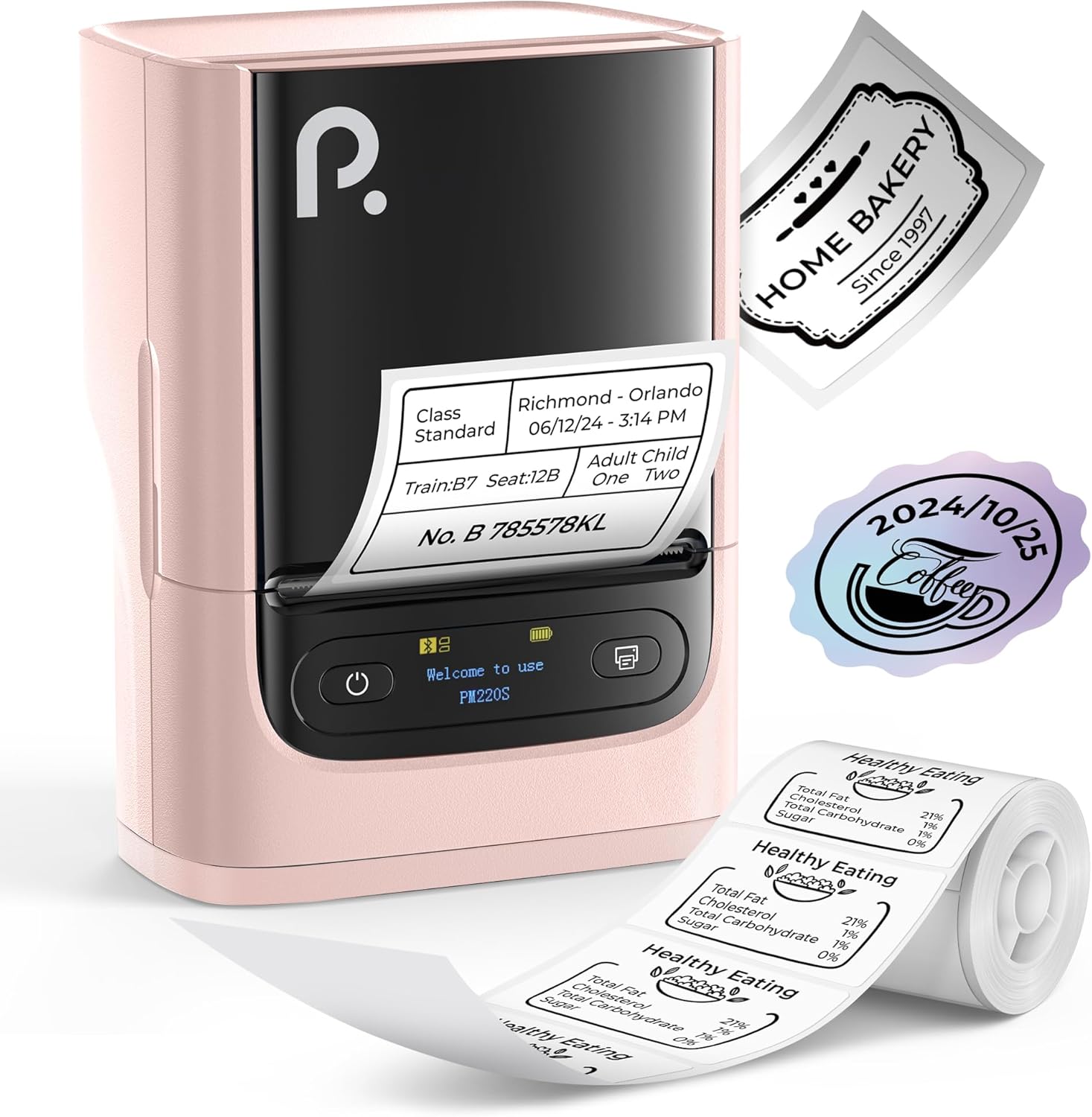
Figure 1: POLONO PM220S Label Maker Machine with sampדי עטיקעטן.
2. פּראָדוקט איבערview
2.1 אַרייַנגערעכנטע קאָמפּאָנענטן
- POLONO PM220S Label Maker Machine
- Label Tape (50x30mm, pre-installed or included)
- וסב טשאַרדזשינג קאַבלע
- באַניצער מאַנואַל (דעם דאָקומענט)
2.2 שליסל פֿעיִקייטן
- בלועטאָאָטה קאַנעקטיוויטי: Seamless connection with iOS, Android, and PC devices.
- Intuitive LED Screen: Displays battery level, Bluetooth connection status, and alerts for paper shortages or timed shutdowns.
- Feature-Rich "Labelnize" App: Offers label templates, supports QR codes, barcodes, tables, text, icons, 90+ fonts, 14+ languages, and 450+ material presets.
- Premium Thermal Printing: BPA-Free Direct Thermal Technology with 203 DPI for high-definition, inkless printing.
- ברייט לאַבעל קאַמפּאַטאַבילאַטי: Supports label widths from 23-54mm (0.91"-2.12").
- פּאָרטאַטיוו פּלאַן: Compact and lightweight for easy transport and use in various environments.
3. סעטאַפּ אינסטרוקציעס
3.1 טשאַרדזשינג די מיטל
Before first use, fully charge the label maker using the provided USB cable. The LED screen will indicate charging status.
3.2 App Installation and Driver Download
For mobile devices (iOS/Android), download the "Labelnize" app from your respective app store. For PC users, visit polono.com to download the necessary driver and application.

Figure 2: Universal compatibility with smartphones and laptops for app and driver installation.
3.3 קאַנעקטינג דורך בלועטאָאָטה
- Ensure the PM220S is powered on.
- On your mobile device, open the "Labelnize" app.
- Within the app, search for and connect to the PM220S via Bluetooth. Do not connect directly via your device's Bluetooth settings for mobile devices.
- For PC, ensure the driver is installed, then connect through the downloaded application.
3.4 לאָדן עטיקעט טייפּ
- עפֿנט דעם דעקל פֿון דעם עטיקעט־אָפּטייל.
- Insert the label roll with the printing surface facing upwards.
- Adjust the paper slot guides to secure the tape according to its width (23-54mm) for precise alignment.
- נאָענט די דעקל.

Figure 3: Proper loading of label tape into the PM220S.
4. אַפּערייטינג ינסטרוקטיאָנס
4.1 Using the "Labelnize" App
- Open the "Labelnize" app on your connected device.
- Select from various pre-designed templates or create your own custom labels.
- The app allows you to add text, barcodes, QR codes, tables, icons, and more.
- Customize labels using a selection of over 90 fonts and 14 languages.
- Utilize the 450+ material presets for different label applications.
- וויכטיק: For optimal results, use specialized POLONO labels. Avoid tearing the green back sticker to prevent printing issues.
4.2 Understanding the LED Screen Display
The integrated LED screen provides real-time feedback on the printer's status:
- באַטערי מדרגה: ווײַזט אָן די איצטיקע אָפּצאָל פֿון דעם מיטל.
- בלועטאָאָטה קאַנעקשאַן: Shows if the device is successfully connected via Bluetooth.
- פּאַפּיר שאָרtagE Alert: Notifies when the label roll is low or empty.
- טיימד שאַטדאַון: Displays countdown for automatic power-off to conserve battery.

Figure 4: LED screen display functions for real-time status monitoring.
4.3 דרוקן אַן עטיקעט
- Design your label within the "Labelnize" app.
- Review די לייבל פאַרview צו זיכער מאַכן אַקיעראַסי.
- Tap the "Print" button in the app.
- The label maker will print the label using thermal technology.
- Carefully tear off the printed label.
5. וישאַלט
5.1 אַלגעמיינע קער
- האַלטן די מיטל ריין און פריי פון שטויב און דעבריס.
- ויסמיידן יקספּאָוזינג די מיטל צו עקסטרעם טעמפּעראַטורעס אָדער דירעקט זונשייַן.
- האַלט דעם אַפּאַראַט אין אַ טרוקענעם אָרט ווען נישט אין באַנוץ.
5.2 רייניקן דעם דרוק קאָפּ
If print quality degrades, the thermal print head may need cleaning:
- Turn off the label maker and disconnect it from any power source.
- עפענען די פירמע אָפּטייל.
- Gently wipe the thermal print head with a cotton swab lightly dampמיט יסאָפּראָפּיל אַלקאָהאָל.
- לאָזט דעם דרוק קאָפּ גאָר טרוקן איידער איר מאַכט דעם דעקל און הייבט ווידער אָן עס צו ניצן.
6. טראָובלעשאָאָטינג
| פּראָבלעם | מעגלעך סיבה | לייזונג |
|---|---|---|
| די מיטל טוט נישט מאַכט אויף | נידעריגע באַטעריע אָדער פּראָבלעם מיט מאַכט. | Charge the device fully. Ensure the power button is pressed correctly. |
| קענען ניט פאַרבינדן דורך בלועטאָאָטה | Incorrect connection method or app issue. | Ensure you are connecting through the "Labelnize" app, not directly via phone settings. Restart both the device and the app. For PC, verify driver installation. |
| Poor print quality / Faint printing | Dirty print head, incorrect label type, or low battery. | Clean the print head (see Section 5.2). Ensure you are using thermal labels. Charge the device. |
| Labels are misaligned or jammed | Improper label loading or paper slot adjustment. | Open the cover, remove any jammed labels, and reload the tape ensuring the paper slot guides are adjusted correctly for the label width. Avoid tearing the green back sticker. |
| "Paper Shortage" alert | Label roll is empty or incorrectly loaded. | Replace the label roll or re-seat it correctly. |
7. ספּעסאַפאַקיישאַנז
| סאָרט | פּאָלאָנאָ |
| מאָדעל נאָמען | PM220S |
| קאַנעקטיוויטי טעכנאָלאָגיע | בלועטאָאָטה |
| דרוק טעכנאָלאָגיע | טערמאַל |
| מאַקסימום דרוק רעזאָלוציע | 203 דפּי |
| מאַקסימום דרוק גיכקייט (מאָנאָכראָם) | 45.0 מם/ס |
| שטיצט מעדיע סיזעס | 23-54mm (0.91"-2.12") width, 50x30mm included |
| פּראָדוקט דימענשאַנז | 3.3" ד x 4.4" ב x 2.5" ה (8.4 x 11.2 x 6.4 ס"מ) |
| פּונקט וואָג | 13.4 אונסעס (380 ג) |
| ספּעציעלע שטריך | Portable, Inkless Printing, LED Display |
8. וואָראַנטי און שטיצן
For warranty information, technical support, or to purchase accessories and replacement labels, please visit the official POLONO webפּלאַץ בייַ polono.com or contact POLONO customer service directly.
ביטע האַלטן דיין דערווייַז פון קויפן פֿאַר וואָראַנטי קליימז.