
1. הקדמה
This manual provides detailed instructions for the installation, operation, and maintenance of your UNITOPSCI 8 Core 4G+64G Android 15 Car Stereo. Please read this manual thoroughly before using the product to ensure proper function and safety. Keep this manual for future reference.
2. זיכערקייַט אינפֿאָרמאַציע
- פאַכמאַן ינסטאַלירונג רעקאַמענדיד: Installation of this car stereo requires technical knowledge and experience. It is highly recommended to have it installed by a qualified professional.
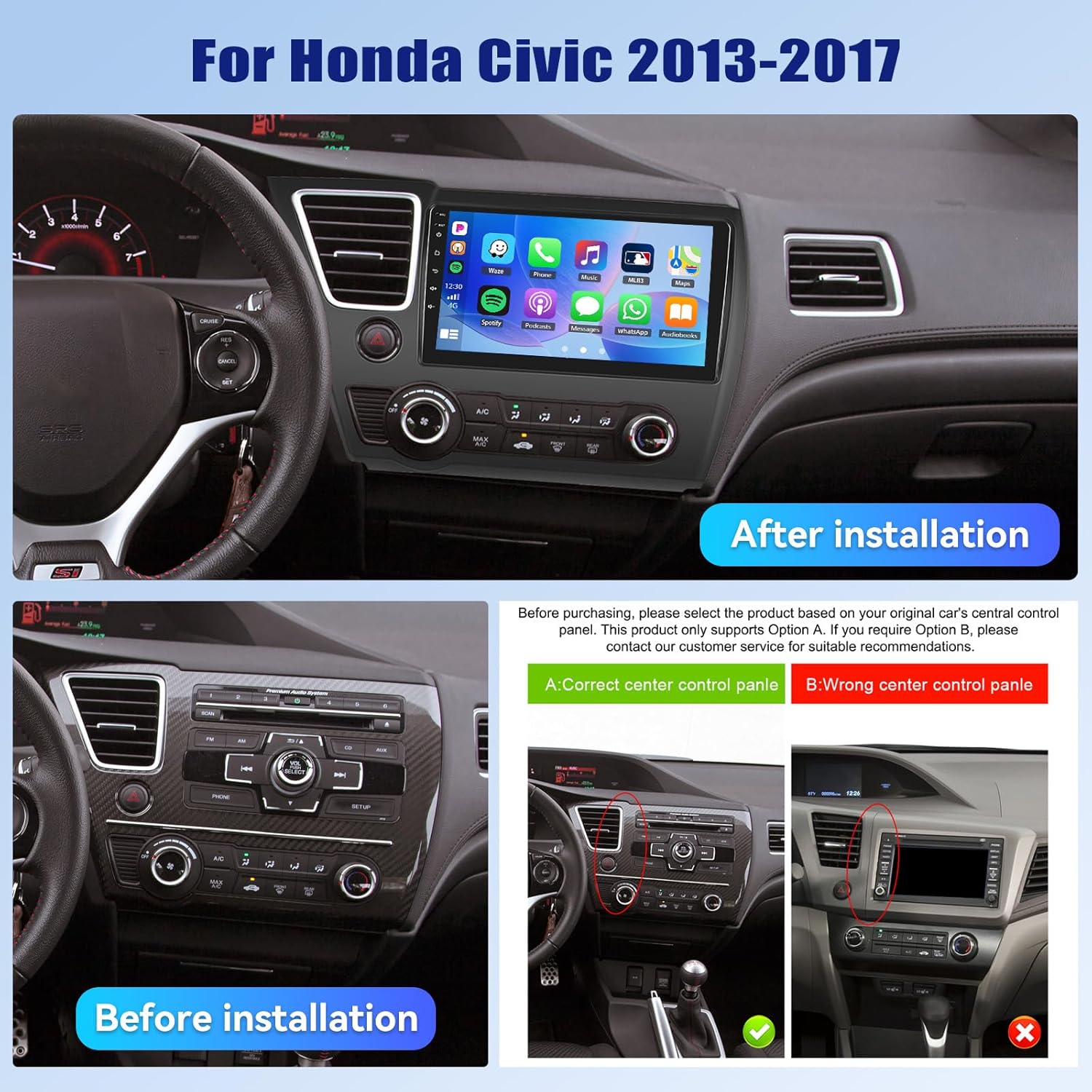
- פאָרמיטל קאַמפּאַטאַבילאַטי: This unit is designed specifically for Honda Civic models from 2013 to 2017. Verify compatibility with your vehicle's center console before installation.
- מאַכט צושטעלן: Ensure the vehicle's power supply is disconnected before beginning installation to prevent electrical shock or damage.
- וויירינג: Follow the provided wiring diagram carefully. Incorrect wiring can cause damage to the unit or vehicle.
- אָפּעראַציע בשעת דרייווינג: ניצט נישט דעם אַפּאַראַט אויף אַ וועג וואָס זאָל אייך אָפּלענקן פֿון פֿאָרן. שטעלט שטענדיק אין פֿאָרויס זיכערקייט אויף דער גאַס.
- טעמפּעראַטור: פֿאַרמײַדן אויסצושטעלן דעם אַפּאַראַט צו עקסטרעמע טעמפּעראַטורן אָדער דירעקטער זון פֿאַר פֿאַרלענגערטע פּעריאָדן.
3. פּעקל אינהאַלט
באַשטעטיקן אַז אַלע זאכן זענען פאַראַן אין פּעקל:
- 1 x Car Radio
- 1 x מאַכט קאַבלע
- 1 רענטגענ מאַשין דערציען View אַפּאַראַט
- 1 x Installation Tool Set
- 1 רענטגענ גפּס אַנטענע
- 1 x הינטערשטע קאַמעראַ אַרייַנשרייַב קאַבל
- 1 קס RCA קאַבלע
- קסנומקס רענטגענ וסב קאַבלע
- 1 x באַניצער מאַנואַל
- 1 x מיקראָפאָן
- 1 x Original Car USB & Radio Adapter Cable
- 1 x Canbus Decoder

4. פּראָדוקט איבערview
4.1 שליסל פֿעיִקייטן
- אַפּערייטינג סיסטעם: אַנדרויד 15
- פּראַסעסער: Qualcomm 8-Core Chip
- זכּרון: 4 גיגאבייט באַראַן + 64 גיגאבייט ראַם
- ווייַז: 9-inch 1280x720P IPS Capacitive Touchscreen
- קאַנעקטיוויטי: Bluetooth 5.1, Dual-Band WiFi (2.4GHz & 5GHz)
- סמאַרטפאָנע ינטעגראַטיאָן: Wireless/Wired Apple CarPlay, Wireless/Wired Android Auto, Mirror Link
- אַודיאָ: Built-in DSP (Digital Sound Processor)
- נאַוויגאַציע: GPS Navigation (supports online and offline maps)
- ראַדיאָ: FM/RDS ראַדיאָ
- אַפּאַראַט שטיצן: AHD Backup Camera (included)
- נאָך פֿעיִקייטן: Steering Wheel Control (SWC), Built-in Cooling Fan, Picture-in-Picture, Customizable UI.


5. ינסטאַללאַטיאָן גייד
5.1 פאַר-ינסטאַלירונג טשעק
Before proceeding with installation, ensure your Honda Civic's center console matches the compatible design. Refer to the image below for guidance.
5.2 וויירינג דיאַגראַמע
A detailed wiring diagram is typically included with your product. Connect the power cable, speaker wires, GPS antenna, USB cables, rear camera input, and other accessories according to the diagram. Ensure all connections are secure to prevent malfunctions.
5.3 גשמיות ינסטאַלירונג
- Carefully remove the original car stereo and trim panels.
- Connect the new car stereo's wiring harness to the vehicle's existing harness, matching colors and connectors.
- Install the GPS antenna in a location with a clear view פון הימל.
- Route the rear camera cable and install the camera (if applicable).
- Mount the new car stereo securely into the dashboard opening.
- צוריקשטעלן אַלע טרים פּאַנאַלז.
- Reconnect the vehicle's power supply.
6. ערשט סעטאַפּ
Upon first power-on, the system may guide you through an initial setup process. This typically includes:
- שפּראַך סעלעקציע: קלייַבן דיין בילכער שפּראַך.
- צייט און דאַטע: שטעלט איין די ריכטיגע צייט זאָנע, דאַטע און צייט.
- WiFi קאַנעקשאַן: Connect to a stable Wi-Fi network to enable online features and app downloads.
- GPS Calibration: Allow the GPS system to acquire satellite signals for accurate positioning.
7. אַפּערייטינג ינסטרוקטיאָנס
7.1 User Interface Customization
The car stereo offers various customization options for its user interface.
- Shaderlab Topics: Adjust the UI color and font color to your preference.
- Window Design: Select from different themes (Card, SplitView, Wallpaper) and layouts for easy operation.
- 3D Car Dynamic Effects: Customize the displayed 3D car model, including its color and type (Car, MPV, SUV).


7.2 בלועטאָאָטה 5.1
Connect your smartphone via Bluetooth for hands-free calling, music playback, and access to your phone's contacts and call history. Bluetooth 5.1 offers improved range and stability.

7.3 FM/RDS ראַדיאָ
Tune into your favorite radio stations. The RDS (Radio Data System) feature provides additional information such as station name, song title, and traffic updates where available.

7.4 וויירלעס קאַרפּליי און אַנדרויד אויטאָ
Connect your iPhone or Android smartphone wirelessly or via USB to access CarPlay or Android Auto. This allows for hands-free calls, navigation, music streaming, and voice commands (Siri or Google Assistant).

Video 7.1: Wireless CarPlay Radio Operation Guide with Qualcomm Chips. This video demonstrates the setup and usage of the Wireless CarPlay feature on the UNITOPSCI car stereo, highlighting its responsiveness and ease of use.
7.5 שפּיגל לינק
Mirror Link allows you to display your smartphone screen directly onto the car stereo. Android users can also control their phone applications directly from the car's touchscreen.
7.6 גפּס נאַוויגאַציע
The unit supports both online and offline navigation. Connect to Wi-Fi for real-time traffic updates and precise route guidance. Pre-installed maps or downloadable map applications can be used.

7.7 די-עס-פי אודיאָ פּראַסעסינג
The built-in Digital Sound Processor (DSP) allows for advanced audio tuning. Adjust equalization, sound field modes, and speaker settings to achieve strong bass, soft midrange, and clear treble for a personalized audio experience.

7.8 Cooling Fan Settings
The integrated cooling fan system helps maintain optimal operating temperature for the radio. You can monitor the temperature and adjust fan settings (e.g., Auto/On) to ensure stable performance.
7.9 בילד-אין-בילד (PIP)
The Picture-in-Picture feature allows you to view video content simultaneously while performing other operations, such as navigation or music playback.
7.10 AHD באַקאַפּ קאַמעראַ
The included AHD wide-angle backup camera provides clear night vision and is waterproof. It assists with parking by displaying a real-time view of the area behind your vehicle with parking guidelines. Note: Does not support original car camera.

7.11 שטייער ראָד קאָנטראָל (SWC)
Utilize your vehicle's existing steering wheel buttons to control various functions of the car stereo, such as adjusting volume, changing tracks, and answering calls. This enhances convenience and safety while driving.

7.12 שפּאַלטן סקרין
The split-screen function allows for simultaneous display of two applications, such as navigation and music, for convenient multitasking.
8. טראָובלעשאָאָטינג
| פּראָבלעם | מעגלעך סיבה | לייזונג |
|---|---|---|
| דער אַפּאַראַט טוט נישט מאַכט אויף | נישט ריכטיקע וויירינג; דורכגעבלאָזן פיוז; נישט גענוגיקע מאַכט צושטעל. | Check power connections and fuses. Ensure proper voltage. Consult a professional if unsure. |
| קיין געזונט | רעדנער דראָטן אפגעטיילט; וואָלומען צו נידעריק; שטום פונקציע אַקטיוו. | Verify speaker connections. Increase volume. Deactivate mute. Check DSP settings. |
| בלועטאָאָטה איז נישט קאַנעקטינג | Bluetooth off on phone/unit; Device not in pairing mode; Interference. | Ensure Bluetooth is enabled on both devices. Put unit in pairing mode. Try pairing in a different location. |
| GPS signal lost/inaccurate | GPS antenna obstructed; Antenna faulty; Software issue. | Relocate GPS antenna to a clear area. Check antenna connection. Update navigation software. |
| טאָוטשסקרעען ניט ריספּאַנדאַבאַל | System frozen; Screen calibration needed. | Restart the unit. If issue persists, perform a factory reset (refer to settings menu). |
| הינטערשטע קאַמעראַ ווייזט זיך נישט | Camera cable disconnected; Camera faulty; Incorrect settings. | Check camera input cable connection. Verify camera power. Ensure reverse gear signal is connected. |
9. ספּעסאַפאַקיישאַנז
- נומער וואָג: 4.36 פונט
- פּעקל דימענשאַנז: 15.35 X 9.65 X 3.35 אינטשעס
- ווייַז גרייס: 9 אינטשעס
- פאַרשטעלן גרייס: 9 אינטשעס
- אַפּערייטינג סיסטעם: אַנדרויד
- זכּרון סטאָרידזש קאַפּאַציטעט: 64 גיגאבייט
- פאַרבינדן פאַרשטעלן טיפּ: קאַפּאַסיטיווע
- קאַנעקטיוויטי טעכנאָלאָגיע: בלועטאָאָטה, ווי-פי
- מאַפּע טיפּ: צפון אַמעריקע, וועלטווייט
- אַודיאָ רעזולטאַט מאָדע: סטערעאָ
10. וואָראַנטי און שטיצן
UNITOPSCI offers the following support for this product:
- וואָראַנטי: 1-Year Manufacturer's Warranty.
- געלט-צוריק גאַראַנטירן: 30-day money-back service.
- פאַרבייַט סערוויס: 12-month replacement service.
- נאָך סאַלעס שטיצן: Dedicated 24/7 professional after-sales team available to assist with installation or usage inquiries.
For online support, please contact: UNITOPSCI@126.com