
ARCADE1UP MSP-A-405629
Arcade1Up פרוי פּאַק-מען קלאַסיק SE אַרקאַדע מאַשין באַניצער מאַנואַל
סאָרט: ARCADE1UP | מאָדעל: MSP-A-405629
1. הקדמה
This manual provides essential instructions for the assembly, operation, and maintenance of your Arcade1Up Ms. Pac-Man Classic SE Arcade Machine. Please read this manual thoroughly before use to ensure proper function and safety.

Image 1: The Arcade1Up Ms. Pac-Man Classic SE Arcade Machine, featuring vibrant blue and pink artwork with Ms. Pac-Man characters.
2. זיכערקייַט אינפֿאָרמאַציע
ביטע אָבסערווירן די פאלגענדע זיכערקייַט פּריקאָשאַנז:
- Keep the arcade machine away from water or excessive moisture.
- פאַרזיכערן אַז די מאַכט שנור איז נישט דאַמידזשד אָדער פריי.
- Do not attempt to open or modify the machine. Refer all servicing to qualified personnel.
- שטעלט די מאַשין אויף אַ סטאַבילן, גלייכן ייבערפלאַך צו פאַרמייַדן עס צו איבערקערן.
- השגחה אויף קינדער בעת באַניץ.
3. פּעקל אינהאַלט
Your Arcade1Up Ms. Pac-Man Classic SE Arcade Machine package includes:
- Arcade Machine Cabinet
- מאַכט אַדאַפּטער
- ינסטרוקטיאָן מאַנואַל (דעם דאָקומענט)
Note: An optional riser may be sold separately.
4. סעטאַפּ
4.1 פֿאַרזאַמלונג
The Arcade1Up Ms. Pac-Man Classic SE Arcade Machine requires some assembly. Follow the detailed instructions provided in the separate assembly guide included with your product. Ensure all screws and fasteners are securely tightened before use.

Image 2: Dimensions of the Arcade1Up Ms. Pac-Man Classic SE Arcade Machine, showing its height of 45.4 inches without a riser and indicating an optional riser is sold separately.
4.2 מאַכט קאַנעקשאַן
- Locate the power input port on the back of the arcade machine.
- Connect the provided power adapter to the machine.
- צאַפּן די מאַכט אַדאַפּטער אין אַ נאָרמאַל עלעקטריקאַל ווענטיל.
- Ensure the power switch (if present) is in the 'OFF' position before plugging in.
ווידעא 1: אן איבערview of the Arcade1Up Ms. Pac-Man Classic SE Arcade Machine, demonstrating its features and setup in a home environment. This video is provided by the seller.
5. אַפּערייטינג ינסטרוקטיאָנס
5.1 פּאַוערינג אויף / אַוועק
Locate the power switch on the control panel. Flip the switch to 'ON' to power on the machine. Flip to 'OFF' to power off.
5.2 שפּיל אויסוואַל
Upon powering on, you will see a game selection menu. Use the joystick to navigate through the available games. Press the 'Start Game' button to select and launch your desired game.
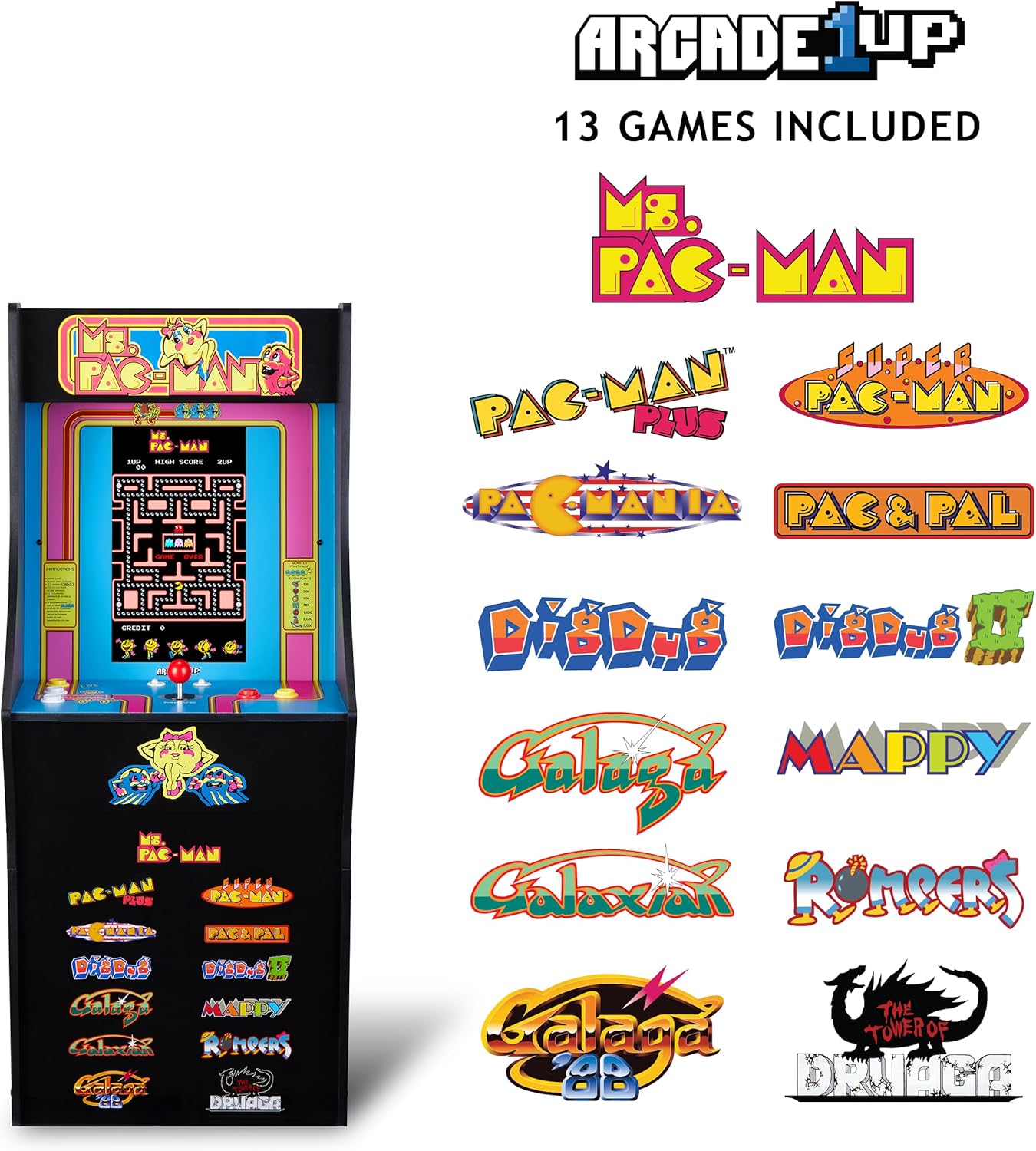
Image 3: The Arcade1Up Ms. Pac-Man Classic SE Arcade Machine displaying the list of 13 included games, such as Ms. Pac-Man, Dig Dug, and Galaga.
5.3 קאָנטראָלס
- דזשויסטיק: Used for character movement in games.
- Start Game Button: Initiates a game or confirms selection.
- קאַמף קנעפּלעך: Used for specific in-game actions (e.g., firing, jumping).
- באַנד קאָנטראָל: Adjust the game sound level using the dedicated volume buttons.
- To return to the game selection menu or save a high score, hold the 'Start Game' button for 5 seconds.
- To reset a game, hold the 'Start Game' button for 5 seconds.

בילד 4: א דעטאלירטע view of the control panel, highlighting the joystick, start game button, and other action buttons for gameplay.
5.4 Included Games
Your Arcade1Up Ms. Pac-Man Classic SE Arcade Machine includes 13 classic games:
- פרוי פּאַק-מאַן
- PAC-MAN PLUS
- SUPER PAC-MAN
- PAC & PAL
- PACMANIA
- גראָבן געגראָבן
- DIG DUG 2
- גאַלאַגאַ
- גאַלאַקסיאַן
- GALAGA 88
- מאַפּי
- ראָמפּערס
- THE TOWER OF DRUAGA
5.5 WiFi Leaderboards
Connect your arcade machine to WiFi to access online leaderboards and compete for high scores globally. Refer to the on-screen prompts for WiFi setup and leaderboard access.
Video 2: Gameplay footage of the Arcade1Up Ms. Pac-Man Classic SE Arcade Machine, showcasing the classic arcade experience and the online leaderboard feature. This video is provided by the seller.
6. וישאַלט
- רייניקונג: Use a soft, dry cloth to wipe down the cabinet and screen. Avoid abrasive cleaners or excessive moisture.
- סטאָרידזש: האַלט די מאַשין אין אַ קיל, טרוקן אָרט אַוועק פון דירעקט זונשייַן און עקסטרעמע טעמפּעראַטורן.
- מאַכט שנור: קעסיידער דורכקוקן די מאַכט שנור פֿאַר קיין וואונדער פון שעדיקן.
7. טראָובלעשאָאָטינג
| פּראָבלעם | מעגלעך סיבה | לייזונג |
|---|---|---|
| די מאַשין גייט נישט אָן. | עלעקטרישע שנור נישט פארבונדן; די ווענטיל ארבעט נישט. | זיכער מאַכן אַז דער עלעקטרישער שנור איז גוט איינגעשלאָסן. פּרוביר די אַוטלעט מיט אַן אַנדער מיטל. |
| קיין געזונט. | Volume turned down; speaker issue. | Check volume settings on the control panel. If problem persists, contact support. |
| דאָס שפּיל פֿרירט זיך אָדער קראַשט. | ווייכווארג פראבלעם; צייטווייליגע טעות. | Power off the machine, wait 10 seconds, then power back on. |
8. ספּעסאַפאַקיישאַנז
| שטריך | דעטאַל |
|---|---|
| מאָדעל נומער | MSP-A-405629 |
| דימענשאַנז (H X W X D) | 45.4" x 17.35" x 45.4" (without riser) |
| פאַרשטעלן גרייס | 15.6 Inches IPS Color Monitor |
| נומער פון גאַמעס | 13 |
| קאָנטראָללער טיפּ | דזשויסטיק |
| מאַכט מקור | קאָרדעד עלעקטריק |
| מאַטעריאַל | פּלאַסטיק, אַקרילאָניטרילע בוטאַדיענע סטירענע (אַבס) |
| פּונקט וואָג | 47 פונט |
| פאַבריקאַנט רעקאַמענדיד עלטער | 10 יאר און העכער |
| קאַנעקטיוויטי | WiFi Leaderboards |
9. וואָראַנטי און שטיצן
For warranty information, technical support, or service inquiries, please refer to the official Arcade1Up webזייטל אדער קאנטאקט זייער קאסטומער סערוויס דעפארטמענט. האלט אייער באווייז פון קויפן פאר גאראנטיע טענות.
אָנליין שטיצן: www.arcade1up.com
Ask a question about this manual
Ask about setup, troubleshooting, compatibility, parts, safety, or missing instructions. Manuals+ will review the question and use this page’s manual context to help answer it.