
1. הקדמה
This manual provides essential information for the safe and efficient use of your iiyama G-Master GB3290QSU-B1 31.5-inch QHD Gaming Monitor. Please read these instructions thoroughly before operating the device and retain them for future reference. This monitor features a 31.5-inch QHD (2560x1440) IPS panel with a 240Hz refresh rate and 1ms response time, designed for high-performance gaming and professional use.
2. זיכערקייַט אינפֿאָרמאַציע
- מאַכט צושטעלן: Use only the power cord provided with the monitor. Ensure the power outlet is properly grounded.
- ווענטילאַטיאָן: בלאָקירט נישט די ווענטילאַציע עפענונגען. לאָזט גענוג פּלאַץ אַרום דעם מאָניטאָר פֿאַר געהעריקן לופטפלוס צו פאַרמייַדן איבערהיצונג.
- אָרט: Place the monitor on a stable, flat surface. Avoid direct sunlight, heat sources, and excessive moisture.
- רייניקונג: Disconnect the power cord before cleaning. Use a soft, dry cloth. Do not use liquid or aerosol cleaners directly on the screen.
- האַנדלינג: Avoid dropping or subjecting the monitor to strong impacts. Do not attempt to disassemble or repair the monitor yourself. Refer all servicing to qualified personnel.
3. פּעקל אינהאַלט
באַשטעטיקן אַז אַלע זאכן זענען פאַראַן אין פּעקל:
- iiyama G-Master GB3290QSU-B1 Monitor
- מאָניטאָר שטאַנד (באַזע און האַלדז)
- מאַכט קאַבלע (ס)
- HDMI קאַבלע
- DisplayPort קאַבלע
- וסב טיפּע- C קאַבלע
- וסב אַפּסטרים קאַבלע
- Quick Start Guide / Safety Guide

Image: Included power, HDMI, USB Type-C, and DisplayPort cables.
4. סעטאַפּ
4.1 צוזאַמענשטעלן דעם שטאַנד
- נעמט פֿאָרזיכטיק אַרויס דעם מאָניטאָר פֿון זײַן פּאַקעט, האַלטנדיק עס באַשיצט.
- Attach the stand neck to the back of the monitor. Ensure it clicks securely into place or is fastened with screws if applicable.
- באַפעסטיקט דעם שטאַנד באַזע צום שטאַנד האַלדז, באַזײַטיקנדיק עס מיט די צוגעשטעלטע שרויף.
- Place the assembled monitor on a stable surface.

בילד: הינטערשטע view of the monitor with the stand attached, showing the VESA mount area and port locations.
4.2 קאַנעקטינג די מאָניטאָר
- מאַכט קשר: Connect the power cable to the monitor's AC IN port and then to a power outlet.
- ווידעא קשר: Connect one end of the HDMI, DisplayPort, or USB Type-C cable to the corresponding port on your computer's graphics card and the other end to the monitor. For optimal performance, use DisplayPort or USB Type-C for 240Hz QHD resolution.
- יו-עס-בי כאַב פֿאַרבינדונג (אָפּציאָנעל): To use the monitor's integrated USB hub, connect the USB upstream cable (USB-A to USB-B) from your computer to the monitor's USB upstream port.
- אַודיאָ קאַנעקשאַן (אַפּשאַנאַל): Connect external speakers or headphones to the 3.5mm audio output jack on the monitor.

בילד: נאָענט-אַרויף view of the monitor's main connectivity ports, including HDMI, DisplayPort, and USB ports.

בילד: דעטאַלירט view of the monitor's side ports, including USB Type-C and 3.5mm audio jack.
5. אַפּערייטינג ינסטרוקטיאָנס
5.1 מאַכט אויף / אַוועק
דריק דעם מאַכט קנעפּל וואָס געפינט זיך אויפן מאָניטאָר צו עס אנצינדן אָדער אויסלעשן. די מאַכט אינדיקאַטאָר ליכט וועט זיך אָנצינדן ווען דער מאָניטאָר איז אַקטיוו.
5.2 אויף-סקרין ווייַז (אָסד) מעניו
דאָס OSD מעניו דערמעגלעכט אײַך צו סטרויערן פֿאַרשידענע מאָניטאָר סעטטינגס. ניצט די קאָנטראָל קנעפּלעך (געוויינטלעך געפֿונען אויף דער הינטערשטער אָדער אונטערשטער רעכטער זײַט פֿון מאָניטאָר) צו נאַוויגירן אין מעניו.
- צוטריט צו די OSD: Press one of the OSD buttons to bring up the main menu.
- נאַוויגאַציע: ניצט די ריכטונג קנעפלעך צו באַוועגן זיך דורך מעניו אָפּציעס.
- סעלעקציע: דריק דעם אויסקלייב קנעפל צו אריינגיין אין א אונטער-מעניו אדער באשטעטיגן א שטעלונג.
- אַרויסגאַנג: Use the exit button to go back to the previous menu or close the OSD.
5.3 בילד סעטטינגס
Key settings you can adjust in the OSD menu include:
- ברייטנאַס / קאַנטראַסט: אַדזשאַסטירן די קוילעלדיקע לומינאַנס און קאָנטראַסט פאַרהעלטעניש.
- קאָליר סעטטינגס: מאָדיפֿיצירן קאָליר טעמפּעראַטור, גאַמאַ, און יחידישע RGB לעוועלס.
- אַרייַנשרייַב אויסקלייַבן: Manually switch between HDMI, DisplayPort, and USB Type-C inputs.
- דערפרישן קורס: Ensure your graphics card and monitor are set to 240Hz for the smoothest experience.
- ענטפער צייט: Adjust overdrive settings for optimal pixel response.
5.4 Adaptive Sync (FreeSync)
The iiyama G-Master GB3290QSU-B1 supports FreeSync technology. To enable it:
- Ensure your graphics card supports FreeSync and has the latest drivers installed.
- Connect the monitor using a DisplayPort or compatible HDMI cable.
- Enable FreeSync in the monitor's OSD menu (if available as an option).
- Enable FreeSync in your graphics card control panel (e.g., AMD Radeon Software).
6. וישאַלט
6.1 רייניקן דעם עקראַן
ווישט אָפּ דעם עקראַן מיט אַ ווייכן, לינט-פֿרײַעם שטאָף. פֿאַר שווערע פֿלעקן, ווישט לײַכט.ampen the cloth with water or a specialized screen cleaner, then wipe dry immediately. Avoid applying pressure to the screen.
6.2 רייניקן דעם Casing
ניצט אַ ווייכע, טרוקענע שטאָף צו ווישן דעם מאָניטאָרasing. Do not use abrasive cleaners or solvents, as these can damage the finish.
7. טראָובלעשאָאָטינג
- קיין בילד: Check if the power cable is securely connected and the monitor is turned on. Verify that the video cable (HDMI, DisplayPort, USB-C) is properly connected to both the monitor and the computer. Ensure the correct input source is selected in the OSD menu.
- פליקער בילד: Check the video cable connection. Ensure the refresh rate is set correctly in your computer's display settings. Try a different video cable.
- אומרעכטע פארבן: Reset color settings to factory defaults in the OSD menu. Check your graphics card drivers.
- קיין קול: Ensure speakers or headphones are properly connected to the monitor's audio output. Check the volume settings on both the monitor and your computer.
8. ספּעסאַפאַקיישאַנז
| שטריך | באַשרייַבונג |
|---|---|
| סאָרט | iiyama |
| מאָדעל נומער | GB3290QSU-B1 |
| פאַרשטעלן גרייס | 31.5 אינטשעס |
| האַכלאָטע | QHD ברייט 1440p (2560 x 1440 פּיקסעלס) |
| דערפרישן קורס | 240 הז |
| ענטפער צייט | 1 מיליסעקאַנדז |
| ווייַז טעכנאָלאָגיע | LED, IPS technology |
| אַספּעקט פאַרהעלטעניש | 16:9 |
| קאַנעקטיוויטי | HDMI, DisplayPort, USB, 3.5mm audio, USB 3.2 Gen 1, USB Type C |
| אַדאַפּטיוו סינק | FreeSync |
| נומער דימענשאַנז (ד רענטגענ וו רענטגענ ה) | 11.42"ד רענטגענ 28.11"וו רענטגענ 18.03"ה |
| קאָליר | שוואַרץ |

Image: EU Energy Label for GB3290QSU-B1 monitor. For more details, visit the official EPREL database: EPREL פּראָדוקט בלאַט
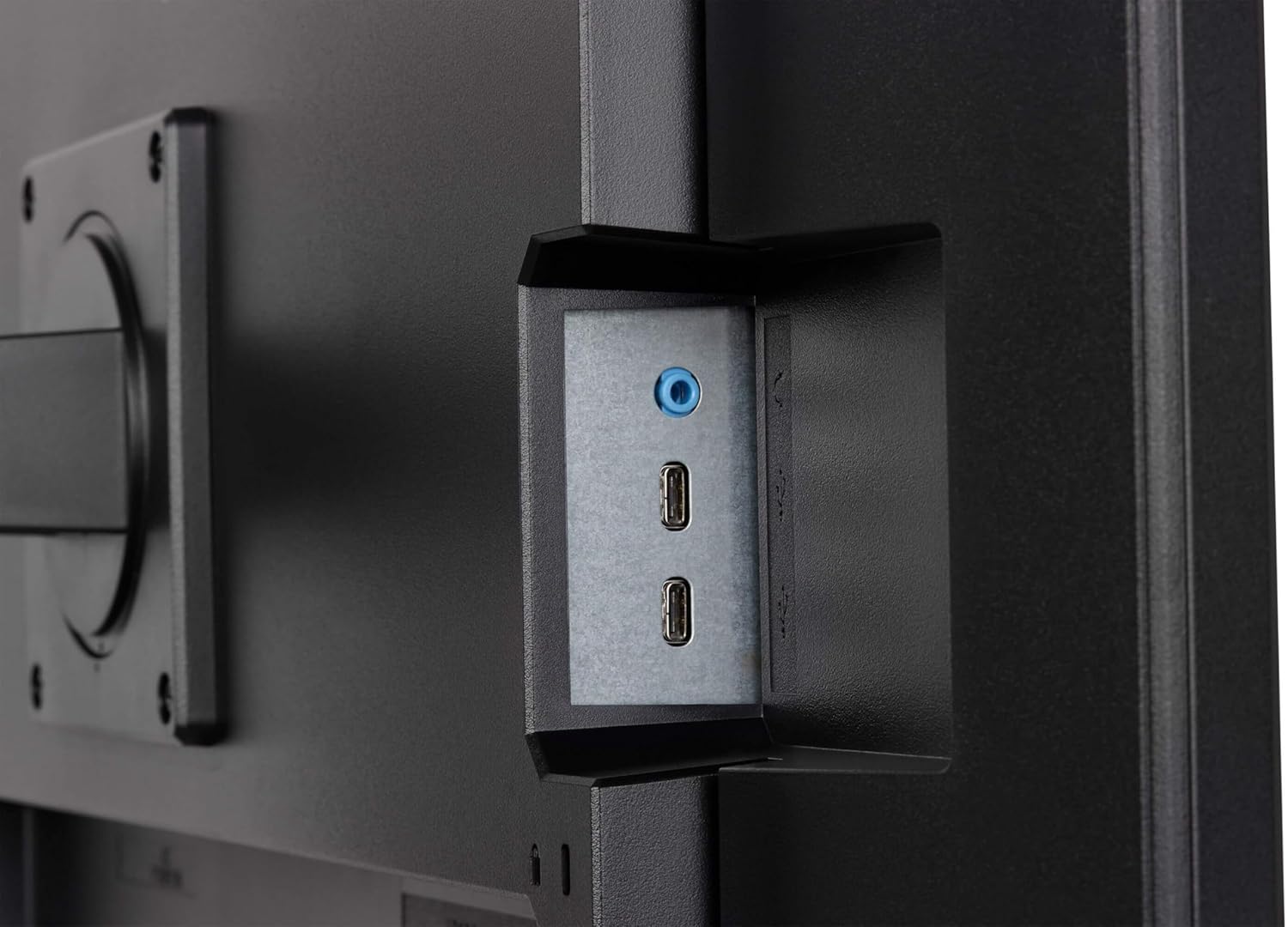
Image: Product Information Sheet for GB3290QSU-B1 monitor. Further details available via the EPREL link: EPREL פּראָדוקט בלאַט
9. וואָראַנטי און שטיצן
Your iiyama G-Master GB3290QSU-B1 monitor is covered by a manufacturer's warranty. Please refer to the warranty card included in your package or visit the official iiyama webוועבזייטל פֿאַר דעטאַלירטע וואָראַנטי טערמינען און באַדינגונגען ספּעציפֿיש פֿאַר אייער געגנט.
For technical support, customer service, or further inquiries, please contact iiyama directly:
- באַאַמטער Webפּלאַץ: https://www.iiyama.com/
- קונה סערוויס בליצפּאָסט: annie.hsu@iiyama.com