
1. פּראָדוקט איבערview
The Noble FoKus Apollo headphones are designed to deliver high-fidelity audio with advanced features for an enhanced listening experience. They incorporate a unique hybrid driver system, active noise cancellation, and versatile connectivity options.
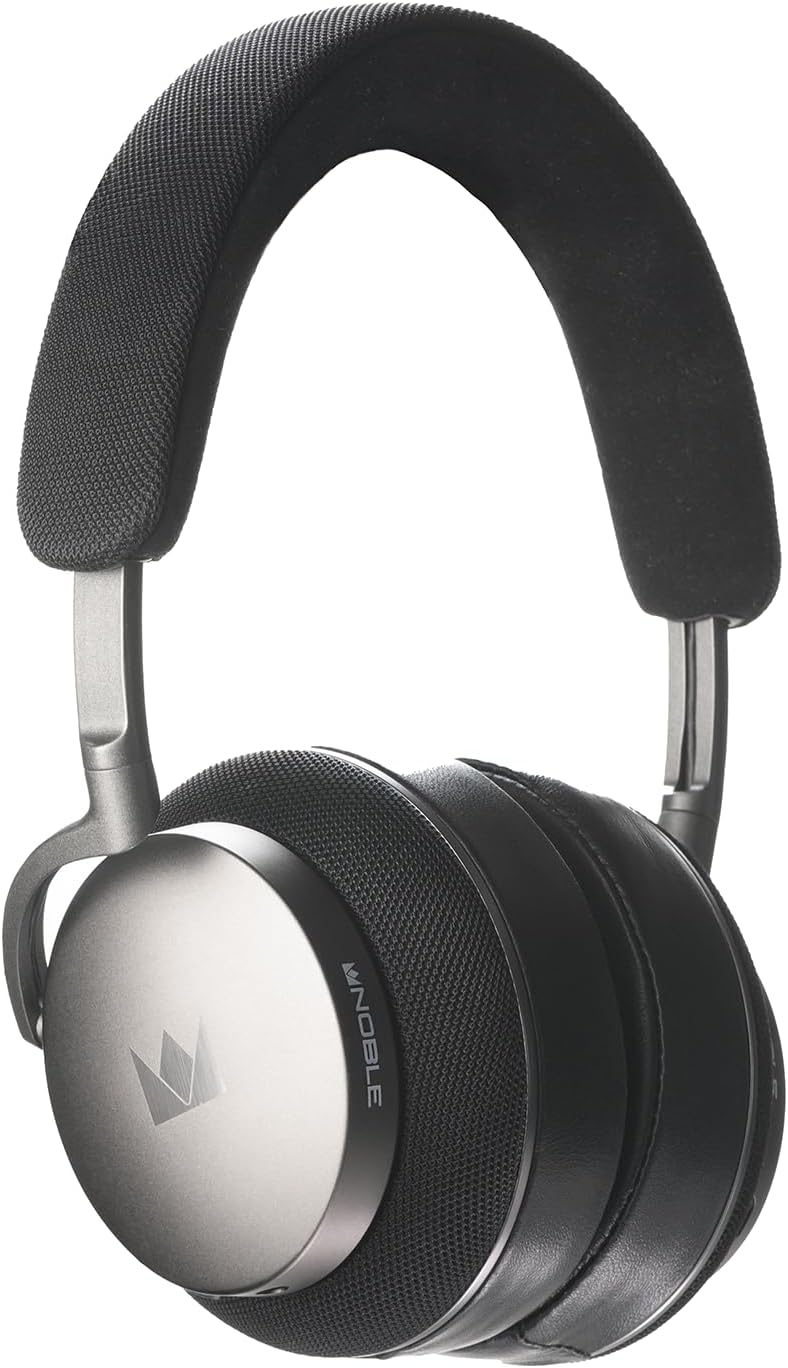
בילד 1.1: פראָנט view of the Noble Fokus Apollo Over-Ear Wireless Headphones.
2. פּעקל אינהאַלט
באַשטעטיקן אַז אַלע זאכן זענען פאַראַן אין פּעקל:
- Noble Fokus Apollo Over-Ear Wireless Headphones x 1
- EVA Carrying Case x 1
- 3.5mm Auxiliary Cable x 1
- 3.5 מ״מ צו 4.4 מ״מ אַדאַפּטער x 1
- וסב-C טשאַרדזשינג קאַבלע X 1
- Two-Prong Airline Adapter x 1
- 1/4" Adapter for Headphone Amplifiers x 1
- Detachable Boom Microphone x 1
3. שליסל פֿעיִקייטן
- Hybrid Driver System: Features a 40mm dynamic driver and a 14.5mm planar magnetic driver for balanced audio reproduction.
- היבריד אַקטיוו ראַש קאַנסאַליישאַן (ANC): Reduces ambient noise by up to -35dB.
- הויך-האַכלאָטע אַודיאָ שטיצן: Compatible with LDAC, aptX HD, and AAC codecs.
- בלועטאָאָטה 5.3: Provides stable wireless connectivity and multi-point support.
- לאנג באַטאַרייע לעבן: Up to 80 hours of playback without ANC, 60 hours with ANC.
- אָפּנעמבאַר בום מיקראָפאָן: Enhances call clarity with an onboard mute switch.
- ווייערד קאַנעקטיוויטי: Supports 3.5mm auxiliary cable connection.
- פּרעמיום מאַטעריאַלס: Constructed with an anodized aluminum frame, memory foam, protein leather earpads, and Alcantara headband.
- Noble FoKus App Compatibility: Allows for sound customization, including EQ and hearing test features.
4. ערשט סעטאַפּ
4.1 אויפלאָדן די קאָפּהערער
Before first use, fully charge the headphones. Connect the supplied USB-C cable to the charging port on the headphones and the other end to a USB power source (e.g., computer, wall adapter).
- די געפירט גראדן וועט ווייַזן די טשאַרדזשינג סטאַטוס.
- א פולע אויפלאדונג נעמט געווענליך בערך 2-3 שעה.
4.2 פּאַוערינג אויף / אַוועק
- צו מאַכט אויף: Press and hold the Power button for 3 seconds until the LED indicator lights up.
- צו מאַכט אַוועק: דריקן און האַלטן די מאַכט קנעפּל פֿאַר 5 סעקונדעס ביז די געפירט גראדן טורנס אַוועק.
5. אַפּערייטינג ינסטרוקטיאָנס
5.1 בלועטאָאָטה פּערינג
- מאַכן זיכער אַז די כעדפאָונז זענען פּאַוערד אַוועק.
- דריק און האלט דעם פּאַוער קנעפּל פֿאַר אַרום 5-7 סעקונדעס ביז דער LED אינדיקאַטאָר בלינקט בלוי און רויט, וואָס ווײַזט אויף פּערינג מאָדע.
- אויף אייער דעווייס (סמאַרטפאָן, טאַבלעט, קאָמפּיוטער), אַקטיווירט בלועטוט און זוכט פֿאַר פֿאַראַן דעווייסעס.
- Select "Noble FoKus Apollo" from the list.
- נאָך די פֿאַרבינדונג, די געפֿירט גראדן סלאָולי בלאַס.
The headphones support מולטיפּאָינט קשר, allowing simultaneous connection to two devices. To connect a second device, repeat the pairing process while already connected to the first. The headphones will automatically switch between devices based on audio playback.
5.2 אַקטיווע ראַש קאַנסאַליישאַן (ANC) און טראַנספּעראַנסי מאָדע
The headphones feature a dedicated button to cycle through noise control modes:
- Press the ANC button once to activate אַקטיוו ראַש קאַנסאַליישאַן.
- Press the ANC button again to switch to דורכזעיקייַט מאָדע, which allows ambient sounds to pass through.
- Press the ANC button a third time to turn off noise control.
5.3 ווייערד קאַנעקשאַן
For wired listening, connect the supplied 3.5mm auxiliary cable to the headphone's audio jack and your audio source. The headphones can be used passively in wired mode even when powered off or out of battery.
- Use the 3.5mm to 4.4mm adapter for compatible audio sources.
- Use the 1/4" adapter for headphone ampליפערז.

בילד 5.1: זייט view of the headphones, highlighting the audio input ports.
5.4 Using the Detachable Boom Microphone
Attach the boom microphone to the designated port on the left earcup for enhanced voice clarity during calls or gaming. The boom mic includes a physical mute switch.
- Slide the switch on the boom mic to mute or unmute your voice.
- The headphones also feature an integrated 6-mic system for calls when the boom mic is not attached.

Image 5.2: Close-up of the earcup, showing the port for the detachable boom microphone.
5.5 Noble FoKus App
Download the Noble FoKus app from your device's app store to access additional features, including:
- Customizable Equalizer (EQ) settings.
- Personalized hearing test for optimized sound profiles.
- Firmware דערהייַנטיקונגען.
6. קער און וישאַלט
- רייניקונג: Use a soft, dry cloth to clean the headphones. Avoid abrasive materials or harsh chemicals.
- עאַרפּאַדס: The protein leather earpads are user-replaceable. Refer to Noble's official website or support for replacement instructions and parts.
- סטאָרידזש: Store the headphones in the provided EVA carrying case when not in use to protect them from dust and damage.
- טעמפּעראַטור: פֿאַרמײַדן אויסצושטעלן די כעדפאָונז צו עקסטרעמע טעמפּעראַטורן אָדער דירעקט זונשײַן פֿאַר פֿאַרלענגערטע פּעריאָדן.
7. טראָובלעשאָאָטינג גייד
| אַרויסגעבן | מעגלעך סיבה | לייזונג |
|---|---|---|
| קיין מאַכט | נידעריק באַטאַרייע | לאָדט אויף די כעדפאָונז מיטן USB-C קאַבל. |
| קען נישט צוזאמענשטעלן דורך בלוטוט | Headphones not in pairing mode; device Bluetooth off; interference | זיכער מאַכן אַז די כעדפאָונז זענען אין פּערינג מאָדע (בלינקען בלוי/רויט). מאַכט די בלועטוט אויף דעם מיטל און דאַן אָנגעצינדן עס. גייט נענטער צום מיטל. |
| קיין קלאַנג אין דראָט מאָדע | Cable not fully inserted; incorrect adapter | Ensure the 3.5mm cable is fully inserted into both the headphones and the audio source. Verify correct adapter usage. |
| Poor call quality with boom mic | Mic muted; mic not fully inserted | Check the mute switch on the boom mic. Ensure the boom mic is securely attached to the headphone port. |
| ANC נישט עפעקטיוו | ANC not activated; improper fit | Press the ANC button to activate ANC. Adjust headphones for a snug fit over your ears. |
8. טעכניש ספּעסאַפאַקיישאַנז
| שטריך | באַשרייַבונג |
|---|---|
| מאָדעל נאָמען | FoKus Apollo |
| דרייווער טיפּ | Hybrid (1x 40mm Dynamic + 1x 14.5mm Planar Magnetic) |
| ראַש קאָנטראָל | היבריד אַקטיוו ראַש קאַנסאַליישאַן (ביז -35dB) |
| בלועטאָאָטה ווערסיע | 5.3 |
| שטיצט קאָדעקס | LDAC, aptX HD, AAC, aptX, SBC |
| באַטעריע לעבן (ANC אויסגעלאָשן) | אַרויף צו 80 שעה |
| באַטעריע לעבן (ANC אן) | אַרויף צו 60 שעה |
| קאַנעקטיוויטי | Bluetooth, 3.5mm Jack, USB-C |
| ימפּידאַנס | 32 אָהמס |
| סענסיטיוויטי | 102 דב |
| אָפטקייַט ענטפער | אַרויף צו 40 KHz |
| מאַטעריאַל | Aluminum, Protein Leather, Alcantara |
| וואָג | 3.08 פונט (אומגעפער 1.4 ק"ג) |
9. אפיציעלע פּראָדוקט ווידעאָ
ווידעא 9.1: אן אפיציעלע פראדוקט ווידעא ווייַזונגasing the Noble Fokus Apollo Over-Ear Wireless Headphones, highlighting key features and design elements.
10. וואָראַנטי און שטיצן
Noble provides a limited warranty for the FoKus Apollo headphones against defects in materials and workmanship. For detailed warranty information, product registration, and technical support, please visit the official Noble Audio webפּלאַץ אָדער קאָנטאַקט זייער קונה דינסט.
The Noble FoKus app also serves as a resource for product information and support features.