
1. הקדמה
Thank you for choosing the FOHERE Professional Bill Counter H-A16. This device is designed to efficiently count banknotes and detect counterfeits, making cash handling faster and more secure. It is ideal for various environments such as retail stores, banks, businesses, and restaurants. This manual provides detailed instructions for setup, operation, maintenance, and troubleshooting to ensure optimal performance and longevity of your bill counter.
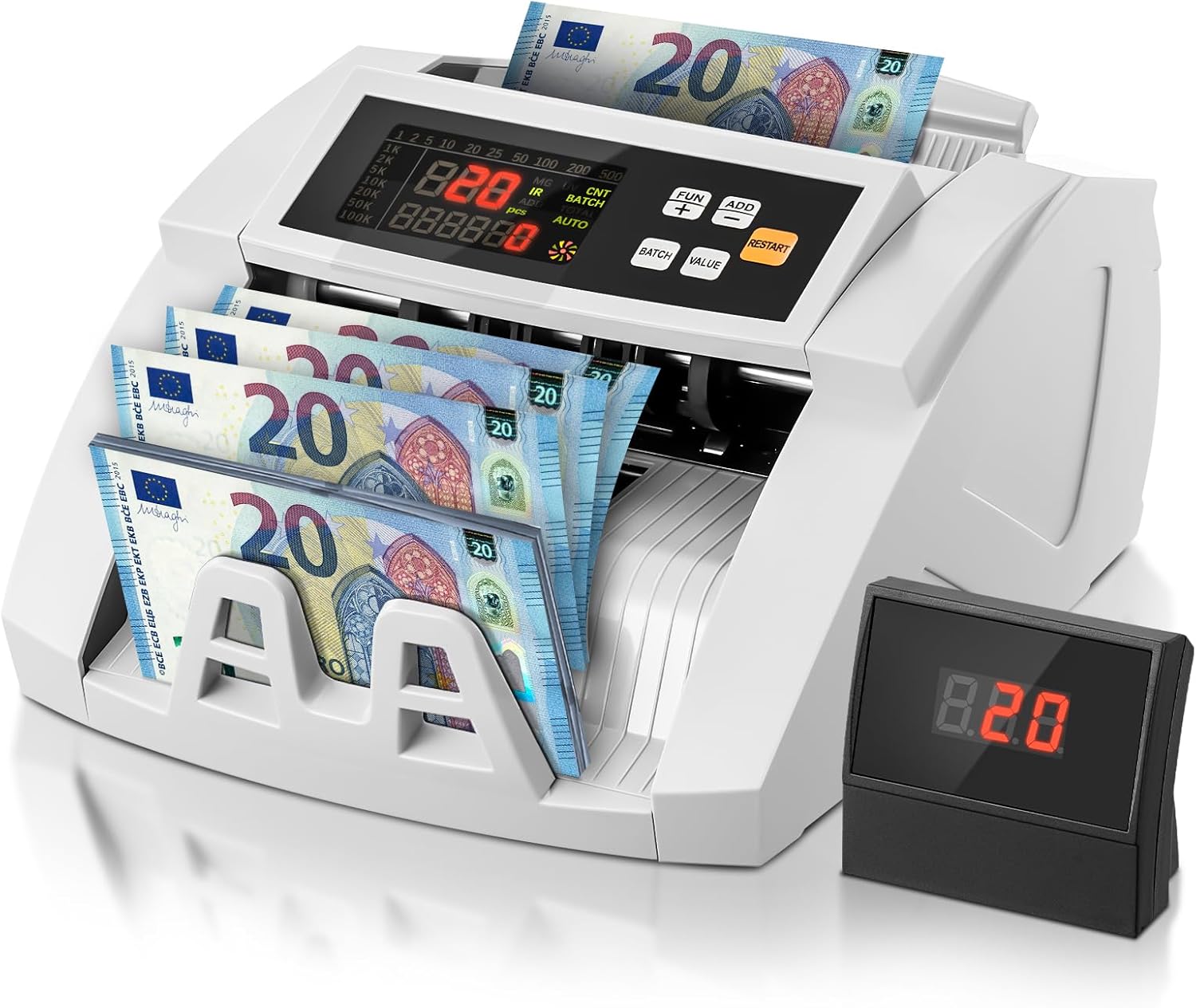
Image 1.1: FOHERE Bill Counter H-A16 processing Euro banknotes. The main LCD display shows counting information, and an external display unit is visible on the right.
2. זיכערקייַט אינסטרוקציעס
- לייענען אַלע ינסטראַקשאַנז איידער אַפּערייטינג די מיטל.
- האַלט דעם אַפּאַראַט אַוועק פון וואַסער אָדער אַנדערע פליסיקייטן צו פאַרמייַדן עלעקטרישע קלאַפּ.
- נישט עפענען דעם אפאראט casinז. איבערגעבן אלע סערוויסינג צו קוואַליפֿיצירטע פּערסאָנעל.
- ניצט נאָר דעם צוגעשטעלטן מאַכט אַדאַפּטער און קאַבל.
- פאַרזיכערן אַז די מאַכט ווענטיל שוועבעלעך די וואַלtagדי באדערפענישן פון די מיטל.
- נעמט ארויס דעם אפאראט פון דער עלעקטריע איידער איר רייניגט עס אדער ווען עס איז נישט אין באנוץ פאר לענגערע צייטן.
- Keep hands and loose clothing away from the bill feeding mechanism during operation.
3. פּעקל אינהאַלט
ביטע טשעק די פּאַקעט פֿאַר די פאלגענדע זאכן:
- 1 x FOHERE Professional Bill Counter H-A16
- 1 x מאַכט קאַבלע
- קסנומקס רענטגענ רייניקונג באַרשט
- 1 x עקסטערנאַל LCD דיספּליי
- 1 x באַניצער מאַנואַל (דאָס דאָקומענט)

בילד 3.1: איבערview of the FOHERE Bill Counter H-A16 dimensions and included accessories.
4. פּראָדוקט איבערview
The FOHERE H-A16 Bill Counter features a user-friendly design with a clear LCD display and intuitive controls. Key components include:
- כאַפּפּער: Where bills are loaded for counting.
- סטאַקער: Where counted bills are collected.
- קאָנטראָל פּאַנעל: Buttons for mode selection, batch settings, and other functions.
- LCD ווייַז: Shows counting results, error messages, and mode indicators.
- External Display Port: פֿאַר פֿאַרבינדן דעם אַרייַנגעשלאָסענעם עקסטערנעם דיספּלעי.
- סענסאָרס: UV, MG, IR, DD for counterfeit detection.

Image 4.1: Design features emphasizing efficiency and durability, including high-strength materials, user-friendly controls, and an improved bill rotor.
5. סעטאַפּ
- אַנפּאַק: פֿאָרזיכטיק אַרויסנעמען דעם ציילער און אַלע אַקסעסאָריעס פֿון דער פּאַקאַדזשינג.
- אָרט: Place the device on a stable, flat, and dry surface, ensuring adequate ventilation.
- מאַכט קשר: Connect the power cable to the device's power input and then plug it into a suitable electrical outlet.
- פונדרויסנדיק ווייַז (אָפּטיאָנאַל): If desired, connect the external LCD display to the designated port on the back of the bill counter.
- מאַכט אויף: Press the power switch, usually located on the back or side of the machine. The device will perform a self-test, and the display will light up.
6. אַפּערייטינג ינסטרוקטיאָנס
The FOHERE H-A16 offers multiple counting modes and advanced counterfeit detection.
6.1 גרונטלעכע ציילן
- Ensure the machine is powered on and in the default counting mode (usually AUTO).
- Fan out the bills to prevent them from sticking together.
- Place the stack of bills neatly into the hopper. Ensure they are aligned correctly and not folded or crumpled.
- The machine will automatically start counting. The count will be displayed on the LCD screen.
- אַמאָל די ציילונג איז פֿאַרטיק, נעמט אַרויס די געלט פֿון דעם שטאַפּלער.
6.2 צייל מאָדעס
Use the control panel buttons to select different operational modes:
- אַוטאָ מאָדע: The default mode for continuous counting.
- BATCH מאָדע: Allows you to count bills in specific quantities. Press the 'BATCH' button, then use the numeric keys or '+' / '-' buttons to set the desired batch size (e.g., 10, 20, 50, 100). The machine will stop after counting the set number of bills.
- ADD מאָדע: For cumulative counting. Each new count is added to the previous total. Press the 'ADD' button to activate.
- ווערט מאָדע: Calculates the total monetary value of a stack of bills. וויכטיק: This mode only works accurately for bills of the same denomination. Manually separate bills of different denominations and count them individually in this mode. Press the 'VALUE' button and select the denomination.

Image 6.1: Illustration of the four professional counting modes: Count, Add, Batch, and Value calculation.

Image 6.2: Display in Value Counting Mode, showing the quantity of bills and their total value. Note: Only count one denomination at a time for accurate value calculation.
6.3 פאַלש דעטעקשאַן
The FOHERE H-A16 is equipped with multiple detection technologies:
- UV (אולטראוויאָלעט): דעטעקטירט UV פֿעיִקייטן וואָס געפֿינען זיך אין עכטע באַנקנאָטן.
- MG (מאַגנעטיש): Scans for magnetic ink patterns on bills.
- אינפֿראַרויט (IR): טשעקט פֿאַר אינפֿראַרויט זיכערהייט פֿעיִקייטן.
- דימענסיע דעטעקציע (DD): Verifies the physical dimensions of the banknotes.
If a suspicious bill is detected, the machine will automatically stop, display an error message on the screen, and emit an audible alarm. Remove the suspicious bill and press 'RESTART' to continue counting.
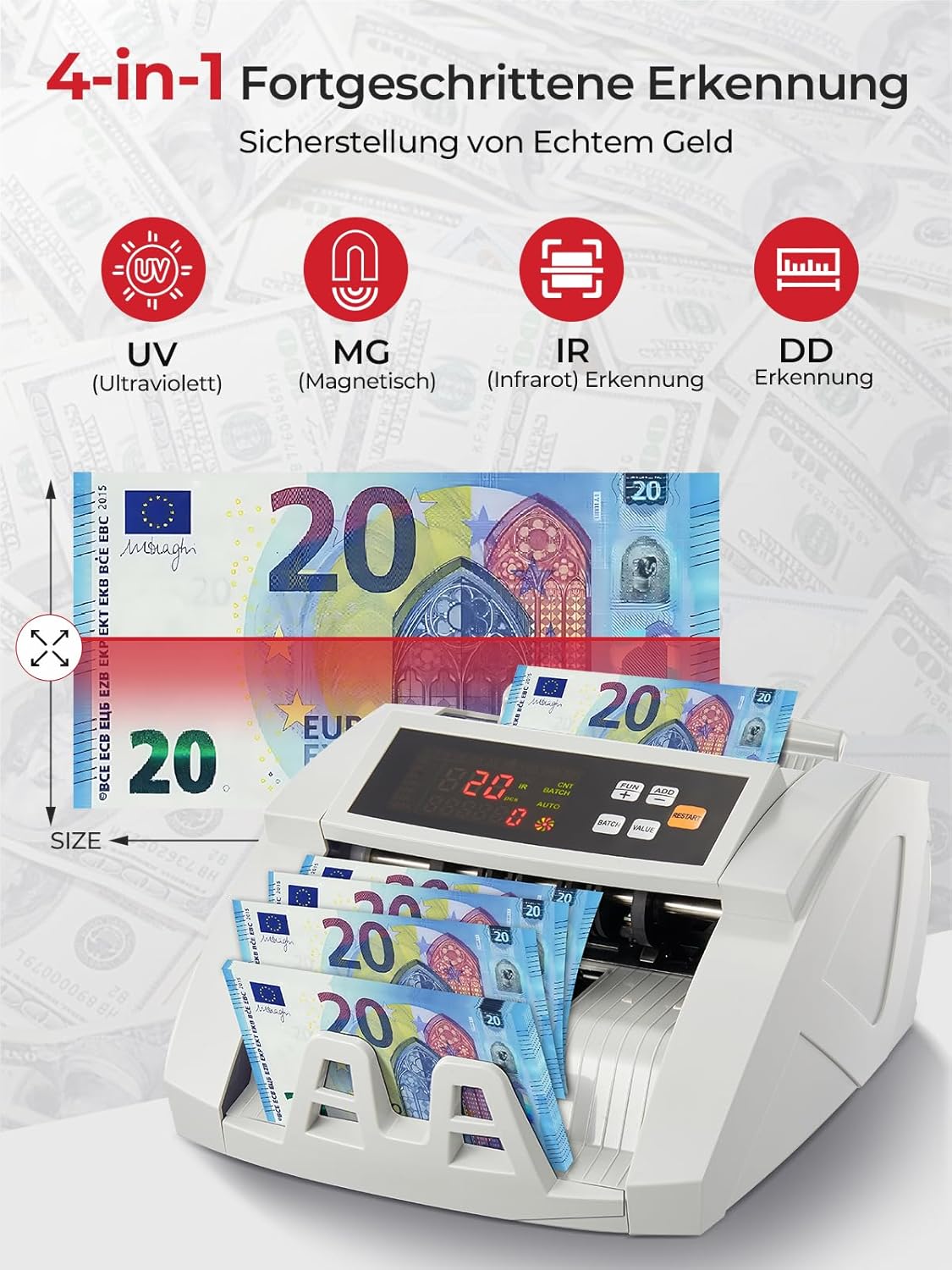
Image 6.3: Visual representation of the 4-in-1 advanced counterfeit detection system (UV, MG, IR, DD).
7. וישאַלט
Regular maintenance ensures the accuracy and longevity of your bill counter.
7.1 רייניקונג
- מאַכט אַוועק: שטענדיק אויסלעשן און ארויסנעמען די מאשין פון עלעקטרישן פלאטפארמע איידער איר רייניגט.
- באַזייַטיקונג פון שטויב: Use the provided cleaning brush or a soft, dry cloth to gently remove dust and debris from the hopper, stacker, and internal sensors.
- סענסאָר רייניקונג: Pay special attention to the UV, MG, and IR sensors. Accumulated dust can affect detection accuracy. Use a soft, lint-free cloth, possibly lightly dampened with isopropyl alcohol, to clean the sensor surfaces. Ensure they are completely dry before powering on.
- עקסטעריע: ווישט אָפּ די אויסערלעכע זייט פון דער מאַשין מיט אַ ווייכן, טרוקענעם שטאָף. ניצט נישט קיין שרײַבנדיקע רייניגער אָדער סאָלווענטן.
7.2 סטאָרידזש
When not in use for extended periods, store the bill counter in a clean, dry place, away from direct sunlight and extreme temperatures.
8. טראָובלעשאָאָטינג
זעט די פאלגנדע טאבעלע פאר אלגעמיינע פראבלעמען און זייערע לייזונגען:
| פּראָבלעם | מעגלעך סיבה | לייזונג |
|---|---|---|
| מאַשין טוט נישט מאַכט אויף | Power cable not connected; Power switch off; Power outlet issue | Check power cable connection; Ensure power switch is ON; Try a different power outlet. |
| רעכענונגען שטעקן זיך אָפט אָן | Bills not fanned out; Bills are crumpled/folded; Dust on rollers/sensors | Fan out bills before loading; Straighten bills; Clean rollers and sensors as per maintenance section. |
| Inaccurate counting results | Dust on sensors; Bills not inserted correctly; Worn rollers | Clean all sensors; Re-insert bills properly; Contact support if rollers appear worn. |
| פאַלשע דעטעקציע ערראָרס | Dust on UV/MG/IR sensors; Bills are heavily worn or damaged | Clean UV, MG, and IR sensors; Try counting the bill manually or with another known genuine bill for comparison. |
| External display not working | Cable not connected properly; Faulty display unit | Check the connection cable; Test with another external display if available, or contact support. |
9. ספּעסאַפאַקיישאַנז
| שטריך | באַשרייַבונג |
|---|---|
| סאָרט | FOHERE |
| מאָדעל נומער | ה-אַ16 |
| קאַונטינג ספּיד | ביז 1100 רעכענונגען/מינוט |
| פאַלש דעטעקשאַן | UV (Ultraviolet), MG (Magnetic), IR (Infrared), DD (Dimension Detection) |
| כאַפּער קאַפּאַציטעט | 200 ביללס |
| סטאַקער קאַפּאַסיטי | 200 ביללס |
| ווייַז | LCD, External Display |
| פּראָדוקט דימענשאַנז (L x W x H) | 28 X 23.5 X 16 סענטימעטער |
| פּונקט וואָג | 3.05 קילאָגראַמס |
| Countable Banknote Size | 50 X 100 מם צו 90 X 170 מם |
| מאַכט צושטעלן | 220 וו 50 הז |
| מאַכט קאַנסאַמשאַן | <80 וו |
| קאָליר | ווייַס |

Image 9.1: Performance metrics of the FOHERE Bill Counter, including counting speed and capacities.
10. וואָראַנטי און שטיצן
FOHERE products are manufactured to high-quality standards. For warranty information, please refer to the documentation provided with your purchase or contact your retailer. If you encounter any issues or have questions regarding the operation or maintenance of your FOHERE Professional Bill Counter H-A16, please contact FOHERE customer support for assistance.