
1. הקדמה
The PEICHENG Q2SPRO is a 7-inch tablet designed for a smooth and responsive user experience, powered by the Android 15.0 operating system. It features an IPS display, ample memory and storage, and dual cameras, making it suitable for various daily tasks from browsing to media consumption. This manual provides essential information for setting up, operating, maintaining, and troubleshooting your device.
2. פּעקל אינהאַלט
ביטע קאָנטראָלירט די אינהאַלט פון דער פּאַקעט ווען איר נעמט עס אויס. אויב עס פעלט עפּעס אָדער עס זענען צעבראָכן, קאָנטאַקטירט קונה סערוויס.
- PEICHENG Q2SPRO 7-inch Android 15.0 Tablet
- Protective Case with Foldable Stand
- וסב-C טשאַרדזשינג קאַבלע
- מאַכט אַדאַפּטער (קען זיין אַנדערש לויט ראַיאָן)
- באַניצער מאַנואַל (דעם דאָקומענט)
3. מיטל אויסלייג
Familiarize yourself with the physical components of your PEICHENG Q2SPRO tablet.
This image shows the PEICHENG Q2SPRO tablet from both the front, displaying its screen, and the rear, highlighting the camera and overall design.

א זייט view of the PEICHENG Q2SPRO tablet, illustrating the placement of its various ports and buttons, such as the USB-C port, power button, and volume controls.
- פראָנט אַפּאַראַט: Located above the screen.
- דערציען אַפּאַראַט: Located on the back panel.
- מאַכט קנעפּל: Typically on the side, used to turn the device on/off or wake/sleep.
- באַנד קנעפּלעך: אַדזשאַסטירן אַודיאָ לעוועלס.
- וסב- C פּאָרט: פֿאַר טשאַרדזשינג און דאַטן אַריבערפירן.
- רעדנער: פֿאַר אַודיאָ רעזולטאַט.
- מיקראָסד קאָרט שפּעלטל: פֿאַר יקספּאַנדאַבאַל סטאָרידזש.
4. סעטאַפּ
4.1 ערשט טשאַרדזשינג
Before first use, fully charge your tablet. Connect the USB-C cable to the tablet's charging port and the other end to the power adapter. Plug the adapter into a wall outlet. The charging indicator will show the charging status.
4.2 מאַכט אויף / אַוועק
- צו מאַכט אויף: Press and hold the Power button until the PEICHENG logo appears on the screen.
- צו מאַכט אַוועק: Press and hold the Power button until the power options appear, then select "Power Off."
- צו שלאפן/אויפוואכן: דריקן בעקיצער די מאַכט קנעפּל.
4.3 ערשטע סעטאַפּ וויזאַרד
Upon first power-on, the Android 15.0 setup wizard will guide you through essential configurations:
- שפּראַך סעלעקציע: קלייַבן דיין בילכער שפּראַך.
- Wi-Fi קאַנעקשאַן: Connect to a wireless network to access the internet. The tablet supports WiFi6 (2.4G+5G).
- גוגל אקאונט: לאָג אַרײַן מיט אײַער גוגל אַקאַונט אָדער שאַפֿט אַ נײַעם צו צוקומען צו גוגל באַדינונגען ווי די פּליי סטאָר, דזשימעיל און גוגל דרייוו.
- טאָג און צייט: שטעלט איין דעם ריכטיקן דאטום און צייט.
- זיכערהייט: שטעלט אויף אַ פאַרשטעלן שלאָס (PIN, מוסטער, אָדער פּאַראָל) פֿאַר מיטל זיכערהייט.

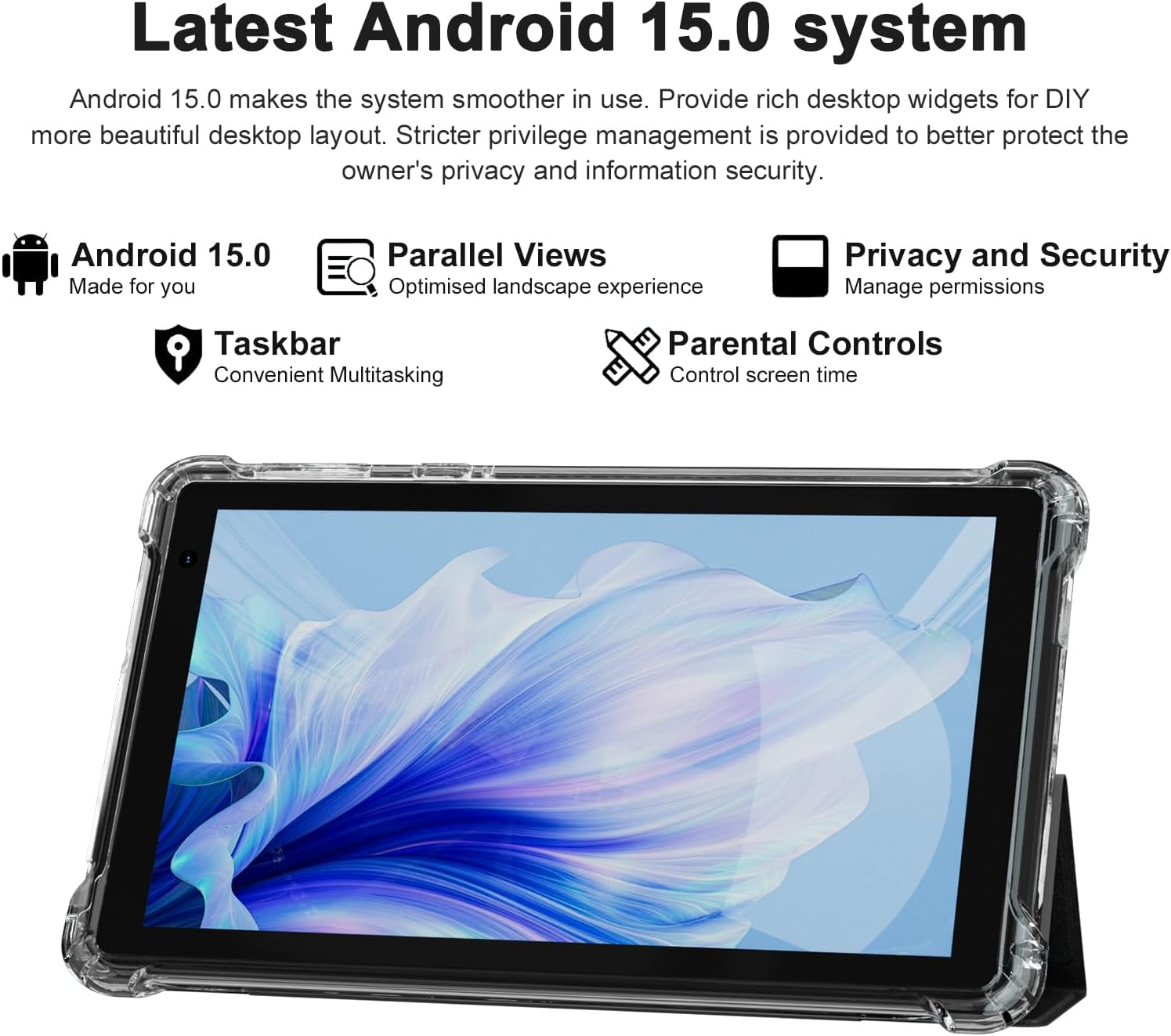
The PEICHENG Q2SPRO tablet screen displaying the Android 15.0 operating system interface, highlighting features like desktop widgets and privacy controls.
5. אַפּערייטינג ינסטרוקטיאָנס
5.1 יקערדיק נאַוויגאַציע
- טאָוטשסקרעען: צאַפּן, סווייפּן, קניפּ-צו-זומען פֿאַר אינטעראַקציע.
- היים פאַרשטעלן: Access apps, widgets, and notifications. Android 15.0 offers rich desktop widgets for customization.
- נאָטיפיקאַציעס פּאַנעל: לאַקכענען אַראָפּ פֿון די שפּיץ פון דעם עקראַן צו view נאָטיפיקאַציעס און שנעלע סעטטינגס.
- טאַסקבאַר: Android 15.0 includes a taskbar for convenient multitasking and optimized landscape mode.
5.2 ווי-פי קאַנעקשאַן
- גיין צו סעטטינגס > נעץ און אינטערנעט > אינטערנעט.
- קער אויף ווי-פי.
- אויסקלייבן אייער געוואונטשענע Wi-Fi נעץ פון דער ליסטע.
- אַרייַן די פּאַראָל אויב געבעטן, און דאַן צאַפּן פאַרבינדן.
5.3 בלועטאָאָטה פּערינג
- גיין צו סעטטינגס > קאָננעקטעד דעוויסעס > קאַנעקשאַן פּרעפֿערענצן > בלועטאָאָטה.
- קער אויף בלועטאָאָטה.
- Ensure the device you want to pair is in pairing mode.
- Select the device from the list of available devices and follow on-screen instructions to complete pairing.
5.4 קאַמעראַ באַניץ
די טאַבלעט פֿאַרמאָגט אַ 2.0MP פֿראָנט קאַמעראַ און אַ 5.0MP הינטערשטע קאַמעראַ.
- עפענען די אַפּאַראַט אַפּלאַקיישאַן.
- צאַפּן אויף די קאַמעראַ ייקאַן צו באַשטימען צווישן פראָנט און הינטערשטע קאַמעראַס.
- צאַפּן דעם שאַטער קנעפּל צו נעמען אַ פאָטאָ אָדער אָנהייבן/אָפּשטעלן ווידעאָ רעקאָרדינג.

This image illustrates the 5MP rear camera and 2MP front camera specifications of the PEICHENG Q2SPRO tablet, alongside exampבילדער גענומען מיטן אפאראט.
5.5 אַפּ ינסטאַלירונג
צוטריט מיליאָנען אַפּליקאַציעס דורך די גוגל פּליי סטאָר.
- עפענען די שפּיל סטאָר אַפּ.
- זוכן פֿאַר the desired app.
- צאַפּן ינסטאַלירן און נאָכגיין די פּראַמפּס אויף דעם עקראַן.
5.6 Protective Case and Stand
The included transparent, shock-absorbing protective case helps protect your tablet. It features a built-in foldable stand, allowing you to prop the tablet at a comfortable viewing angle for hands-free use.

The PEICHENG Q2SPRO tablet enclosed in its transparent protective case, demonstrating the integrated foldable stand propping the device at a comfortable viewינג ווינקל.
6. וישאַלט
6.1 רייניקן די טאַבלעט
- ניצט אַ ווייכן, לינט-פֿרייע שטאָף צו רייניקן דעם עקראַן און קערפּער.
- Do not use liquid cleaners or aerosols directly on the tablet.
- פֿאַר שווערע מאַרקן, אַ ביסל דampווישט דעם שטאָף מיט וואַסער אָדער אַ פאַרשטעלן-זיכערן רייניגער.
6.2 ווייכווארג דערהייַנטיקונגען
קאָנטראָלירט און אינסטאַלירט רעגולער ווייכווארג דערהייַנטיקונגען צו ענשור אָפּטימאַלע פאָרשטעלונג, זיכערהייט און צוטריט צו נייַע פֿעיִקייטן. גייט צו סעטטינגס > סיסטעם > סיסטעם דערהייַנטיקן.
6.3 באַטערי קער
- פֿאַרמײַדן עקסטרעמע טעמפּעראַטורן, וואָס קענען פֿאַרערגערן די לעבן פֿון דער באַטעריע.
- לאָזט נישט די באַטאַרייע גאָר אויסליידיקן אָפט.
- ניצט דעם צוגעשטעלטן טשאַרדזשער פֿאַר אָפּטימאַלער טשאַרדזשינג.
- The tablet emphasizes low power consumption for better battery efficiency.
7. טראָובלעשאָאָטינג
די סעקציע באהאנדלט אלגעמיינע פראבלעמען וואס איר קענט באגעגענען מיט אייער טאבלעט.
| פּראָבלעם | מעגלעך סיבה / לייזונג |
|---|---|
| טאַבלעט טוט זיך נישט אָן | זיכער מאַכן אַז די באַטאַרייע איז אויפגעלאָדן. פֿאַרבינדט זיך צום טשאַרדזשער און וואַרט אַ פּאָר מינוט איידער איר פּרוּווט ווידער אָנצוצינדן. |
| Tablet freezes or is unresponsive | Press and hold the Power button for about 10-15 seconds to force a restart. Close unnecessary background applications. |
| ווי-פי קשר ישוז | Ensure Wi-Fi is enabled. Restart your router and the tablet. Check if the Wi-Fi password is correct. Try connecting to a different network if available. |
| באַטאַרייע דריינז געשווינד | Reduce screen brightness. Close unused apps. Disable Wi-Fi/Bluetooth when not in use. Check for power-intensive apps in battery settings. |
| טאַבלעט אָוווערכיץ | Avoid using the tablet in direct sunlight or hot environments. Close demanding applications. Allow the tablet to cool down before continued use. |
| פּאַמעלעך פאָרשטעלונג | Clear cache and data of frequently used apps. Uninstall unused apps. Ensure sufficient free storage space. Restart the tablet regularly. |
8. ספּעסאַפאַקיישאַנז
Technical specifications for the PEICHENG Q2SPRO tablet.
| שטריך | דעטאַל |
|---|---|
| סאָרט | PEICHENG |
| מאָדעל נאָמען | Q2SPRO |
| אָפּערייטינג סיסטעם | אַנדרויד 15.0 |
| פאַרשטעלן גרייס | 7 אינטשעס |
| ווייַז טיפּ | IPS LED Touchscreen |
| ווייַז האַכלאָטע | 1024 X 600 בילדצעלן |
| באַראַן זכּרון | 8GB (3GB installed + 5GB expandable) |
| זכּרון סטאָרידזש קאַפּאַסיטי | 32 גיגאבייט (אויסברייטבאר ביז 1 טב דורך מיקראָסד) |
| פּראַסעסער סאָרט | ראָקקטשיפּ |
| דערציען אַפּאַראַט | 5.0MP |
| פראָנט אַפּאַראַט | 2.0MP |
| ווידעא קאַפּטורע רעסאָלוטיאָן | הד 720 פּ |
| ווירעלעסס טעכנאָלאָגיע | Wi-Fi (802.11ax, 802.11g, 2.4G+5G) |
| בלועטאָאָטה | בלועטאָאָטה 5.0 |
| קאַנעקטיוויטי טעכנאָלאָגיע | וסב 3.0 טיפּ C |
| באַטאַרייע צעל טיפּ | ליטהיום פּאָלימער |
| באַטעריע ענערגיע אינהאַלט | 3000 מיליampעטלעכע שעה (מאַה) |
| פּונקט וואָג | 0.49 קילאָגראַמס |
| נומער דימענשאַנז (L x W x גרעב) | 8"ל x 5"ברייט x 0.4"דיג |
9. וואָראַנטי אינפֿאָרמאַציע
The PEICHENG Q2SPRO tablet comes with a 1-יאָר לימיטעד וואָראַנטי from the date of purchase. This warranty covers manufacturing defects and malfunctions under normal use. It does not cover damage caused by misuse, accidents, unauthorized repairs, or normal wear and tear. Please retain your proof of purchase for warranty claims.
10. קונה שטיצן
For further assistance, technical support, or warranty inquiries, please refer to the contact information provided with your product packaging or visit the official PEICHENG website. When contacting support, please have your model number (Q2SPRO) and proof of purchase readily available.