
1. הקדמה
Thank you for choosing the COTOE G7 Bluetooth Headset. This manual provides detailed instructions for setting up, operating, and maintaining your headset. Please read this manual carefully before use to ensure optimal performance and longevity of your device.
The COTOE G7 is a wireless Bluetooth headset designed for clear communication and audio playback. It features an LED digital display for battery status, extended standby time, and Active Noise Cancellation (ANC) for an enhanced audio experience.
2. פּעקל אינהאַלט
ביטע טשעק די פּאַקעט פֿאַר די פאלגענדע זאכן:
- COTOE G7 Bluetooth Headset (Gray)
- טשאַרדזשינג קאַסע
- וסב טשאַרדזשינג קאַבלע
- אויער עצות (פאַרשיידענע סיזעס)
- באַניצער מאַנואַל
3. פּראָדוקט איבערview
Familiarize yourself with the components of your COTOE G7 Bluetooth Headset.
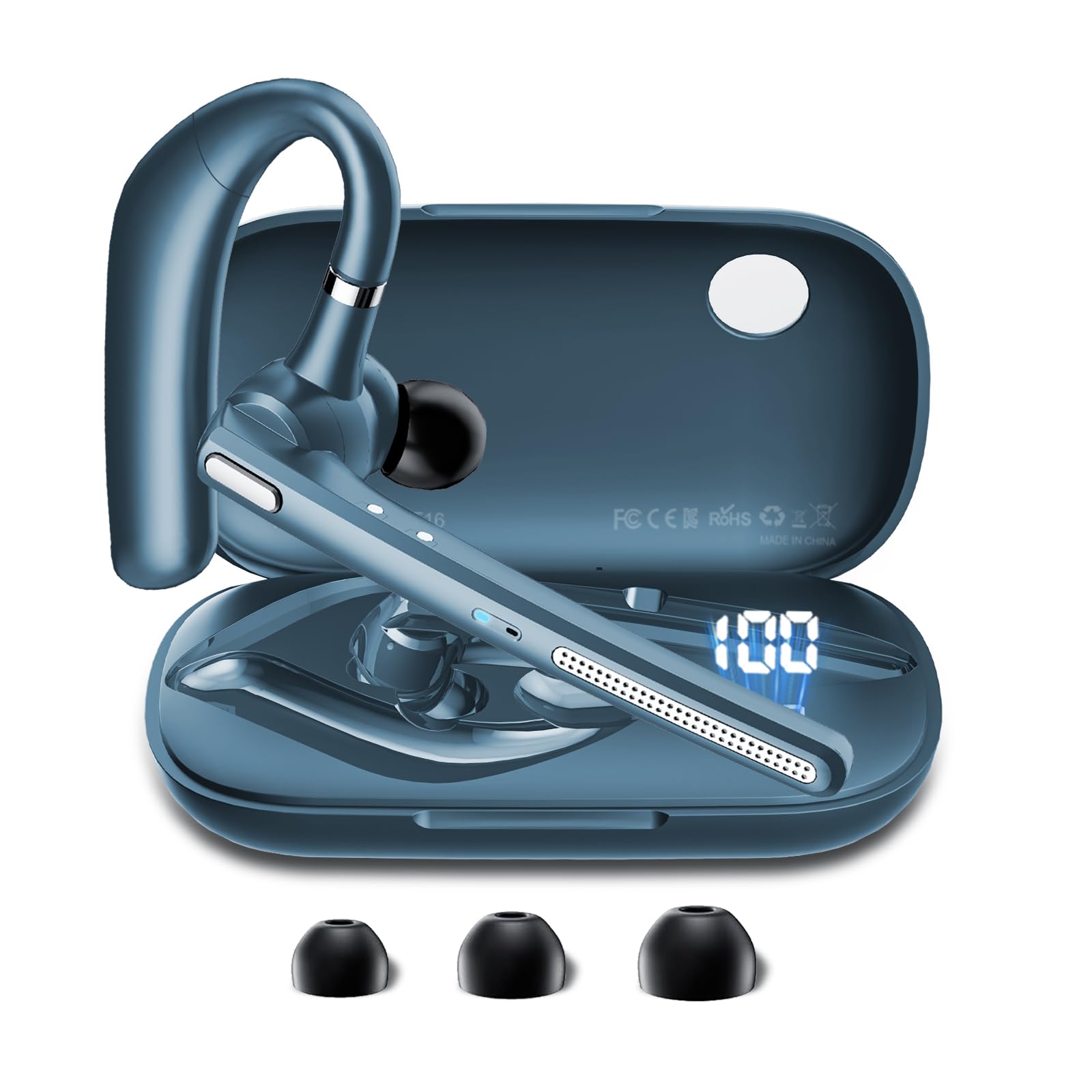
Image: The COTOE G7 Bluetooth Headset (gray) shown with its charging case. The headset features an ergonomic in-ear design, and the charging case is compact.
שליסל קאַמפּאָונאַנץ:
- עאַרפּיעסע: The main unit worn in the ear, containing the speaker, microphone, and control buttons.
- טשאַרדזשינג קאַסע: Used to store and charge the headset. Features an LED digital display.
- געפירט דיגיטאַל ווייַז: Located on the charging case, indicates the charging status of the headset and the power level of the case.
4. סעטאַפּ
4.1 אויפלאָדן דעם כעדסעט און קעסטל
- פֿאַרבינדט דעם USB טשאַרדזשינג קאַבל צום טשאַרדזשינג פּאָרט אויף דער קעיס און צו אַ מאַכט מקור (למשל, USB וואַנט אַדאַפּטער, קאָמפּיוטער USB פּאָרט).
- The LED digital display on the charging case will show the current battery level and charging status.
- Place the headset into the charging case. Ensure proper alignment for charging. The headset's indicator light will show charging status.
- A full charge typically takes approximately 1-2 hours for the headset and 2-3 hours for the charging case.
באַמערקונג: The headset offers up to 12 hours of music playback and the charging case provides 120 hours of standby time.
4.2 פּאָרן מיט אַ בלועטוט מיטל
- מאַכן זיכער אַז די כעדסעט איז טשאַרדזשינג.
- Take the headset out of the charging case. It will automatically enter pairing mode, indicated by a flashing LED light (usually blue and red).
- אויף אייער מאָביל טעלעפאָן אָדער אַנדער בלוטוט-ענייבאַלד מיטל, גייט צו די בלוטוט סעטטינגס.
- זוכן פֿאַר available devices. You should see "COTOE G7" in the list.
- Select "COTOE G7" to connect. Once connected, the headset's LED light will stop flashing and may turn solid blue or turn off.
- אויב געבעטן פֿאַר אַ פּאַראָל, אַרייַן "0000" (פיר נולן).
- The headset will automatically reconnect to the last paired device when powered on and within range.
5. אַפּערייטינג ינסטרוקטיאָנס
5.1 מאַכט אויף / אַוועק
- מאַכט אויף: Take the headset out of the charging case, or press and hold the Multi-function Button for approximately 3 seconds.
- מאַכט אַוועק: Place the headset back into the charging case, or press and hold the Multi-function Button for approximately 5 seconds.
5.2 רוף פאַרוואַלטונג
- ענטפער רופן: דריק איין מאל דעם מולטי-פונקציע קנעפל.
- סוף רופן: דריק דעם מולטי-פונקציע קנעפּל איין מאָל בעת אַ רוף.
- אָפּוואַרפן רופן: דריק און האַלט דעם מולטי-פונקציע קנעפּל פֿאַר אַרום 2 סעקונדעס.
- ריאַל די לעצטע נומער: דריקט צוויי מאָל דעם מולטי-פונקציע קנעפּל.
5.3 מוזיק פּלייבאַק
- שפּיל / פּויזע: דריק איין מאל דעם מולטי-פונקציע קנעפל.
- ווייַטער שפּור: דריק און האַלט די באַנד אַרויף קנעפּל.
- פֿריִערדיקע שפּור: דריקן און האַלטן די Volume Down קנעפּל.
5.4 באַנד קאָנטראָל
- פאַרגרעסערן באַנד: דריק דעם באַנד אַרויף קנעפּל.
- פאַרמינערן באנד: דריק דעם באַנד אַראָפּ קנעפּל.
5.5 אַקטיוו ראַש קאַנסאַליישאַן (ANC)
The COTOE G7 features Active Noise Cancellation to reduce ambient noise. To activate or deactivate ANC, locate the dedicated ANC button (if present) or refer to the specific button combination in your quick start guide. Typically, a long press on a designated button toggles ANC.
6. וישאַלט
- רייניקונג: Use a soft, dry, lint-free cloth to clean the headset and charging case. Do not use harsh chemicals or abrasive materials.
- סטאָרידזש: Store the headset in its charging case when not in use to protect it from dust and damage. Avoid extreme temperatures.
- באַטערי זאָרגן: To prolong battery life, avoid fully discharging the headset frequently. Charge it regularly, even if not used for extended periods.
- וואַסער קעגנשטעל: The headset is not waterproof. Avoid exposure to liquids and moisture.
7. טראָובלעשאָאָטינג
| פּראָבלעם | לייזונג |
|---|---|
| כעדסעט גייט נישט אן. | Ensure the headset is charged. Place it in the charging case to confirm charging. |
| קען נישט צופּאַסן מיטן דעווייס. | Make sure Bluetooth is enabled on your device. Ensure the headset is in pairing mode. Try restarting both the headset and your device. Clear previous Bluetooth connections on your device. |
| קיין קלאַנג אָדער נידעריקע וואָלומען. | Check the volume levels on both the headset and your connected device. Ensure the headset is properly connected. Try playing different audio sources. |
| אומגעריכטע פֿאַרבינדונג. | Ensure the headset is within the effective range of your Bluetooth device (typically 10 meters/33 feet). Avoid obstacles between the headset and device. |
8. ספּעסאַפאַקיישאַנז
- סאָרט: COTOE
- מאָדעל: G7
- קאָליר: גרוי
- אויער אָרט: אין אויער
- פאָרם פאַקטאָר: אין אויער
- ראַש קאָנטראָל: אַקטיוו ראַש קאַנסאַליישאַן
- סטאַנדביי צייט: אַרויף צו 120 שעה (מיט טשאַרדזשינג פאַל)
- מוזיק פּלייבאַק צייט: אַרויף צו 12 שעה (מיט טשאַרדזשינג פאַל)
9. וואָראַנטי און שטיצן
The COTOE G7 Bluetooth Headset comes with a standard manufacturer's warranty. Please refer to the warranty card included in your package for specific terms and conditions.
For technical support, troubleshooting assistance, or warranty claims, please contact COTOE customer service through the retailer where you purchased the product or visit the official COTOE webפּלאַץ פֿאַר קאָנטאַקט אינפֿאָרמאַציע.