
הקדמה
The VANPO 1/2-Inch Digital Torque Wrench provides precise torque control for various mechanical applications. This manual outlines the proper setup, operation, maintenance, and troubleshooting to ensure optimal performance and longevity of your tool.
שליסל פֿעיִקייטן:
- Precise Accuracy: Delivers reliable torque control with ±2% accuracy, reducing over-tightening and fastener damage.
- Clear Torque Feedback: Features a large backlit LCD display, audible alerts, LED indicators, and vibration feedback for clear confirmation when preset torque is reached.
- Durable & Bidirectional: Built for repeated use in automotive environments, supporting both clockwise and counterclockwise operation.
- Easy & Efficient Operation: Supports Peak and Track modes, with preset torque values, and a tool-free, quick-access battery compartment.
- ברייט אַפּלאַקיישאַן: Suitable for vehicle maintenance, home repair, workshop projects, and industrial machinery.
סעטאַפּ
1. באַטאַרייע ייַנמאָנטירונג
The torque wrench requires two AA batteries (included). To install:
- Unscrew the battery cap at the end of the handle.
- Insert two AA batteries, ensuring correct polarity (negative side down, positive side up).
- Replace the battery cap and tighten securely.
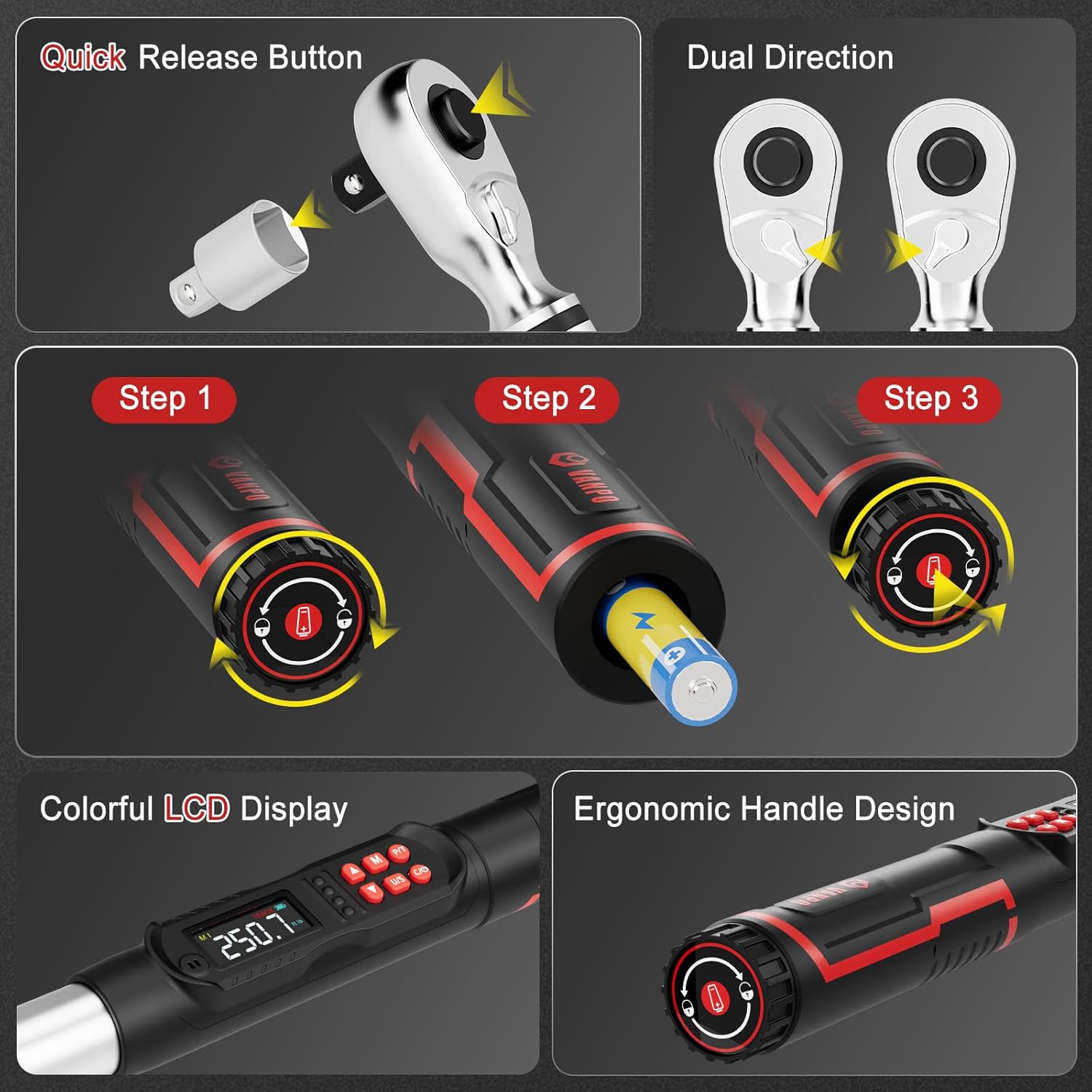
Figure 1: Battery installation and ergonomic handle design.
2. צוטשעפּען אַקסעסאָריעס
The wrench comes with a 125mm extension bar and a 1/2" to 3/8" adapter.
- To attach an extension or adapter, press the quick-release button on the ratchet head and insert the accessory.
- Ensure the accessory is securely locked in place before use.
Figure 2: Quick-release button for attaching sockets and accessories.
אַפּערייטינג ינסטראַקשאַנז
1. Power On/Off and Unit Selection
- דרוק די ON/OFF button to power on the wrench.
- דרוק די יו/ס button to cycle through measurement units: ft-lb, in-lb, Nm, kg-cm.

Figure 3: LCD display showing selectable measurement units.
2. Setting Target Torque Value
- ניצן די Up און אַראָפּ arrow buttons to adjust the target torque value.
- The LCD will display the current setting.
3. Operating Modes (Peak & Track)
דרוק די פּ/ט button to switch between Peak and Track modes.
- שפּור מאָדע: ווײַזט רעאַל-צייט טאָרק ווערטן ווען קראַפט ווערט געווענדט.
- שפּיץ מאָדע: Captures and displays the maximum torque value achieved during the tightening process.

Figure 4: Explanation of Track Mode and Peak Mode.
4. אָנווענדן דריימאָמענט
Apply force to the wrench. As you approach the preset torque value, the wrench will provide triple feedback:
- Audible Alert: A buzzer will sound.
- LED ינדיקאַטאָרס: Lights on the handle will illuminate (green for 85-90% of target, red for 100%).
- ווייבריישאַן באַמערקונגען: The handle will vibrate.

Figure 5: Triple feedback system for reaching target torque.
5. זכּרון פונקציע
The wrench can store multiple preset torque values. Use the M button to access and save memory settings.
6. Screen Lock Function
לאנג דריקן די M button for 3 seconds to lock the screen and buttons, preventing accidental changes during operation. Long press M ווידער צו עפענען.
וישאַלט
- רייניקונג: ווישט אָפּ דעם שליסל מיט אַ ריינעם, טרוקענעם שטאָף נאָך יעדן באַניץ. ניצט נישט קיין שרײַבנדיקע רייניגערס אדער סאָלווענטן.
- סטאָרידזש: Store the torque wrench in its protective case in a dry, cool place away from direct sunlight and extreme temperatures.
- באַטערי פאַרבייַט: טוישט די באַטעריעס ווען דער נידעריקע באַטעריע אינדיקאַטאָר דערשיינט אויפן LCD.
- קאליבראציע: For optimal accuracy, it is recommended to have the torque wrench calibrated periodically by a certified service center.
טראָובלעשאָאָטינג
| פּראָבלעם | מעגלעך סיבה | לייזונג |
|---|---|---|
| דער שליסל גייט נישט אן. | טויטע אדער נישט ריכטיק אינסטאלירטע באַטעריעס. | קאָנטראָלירט די פּאָלאַריטעט פון די באַטעריע אָדער פאַרבייטן מיט נייע AA באַטעריעס. |
| נישט פּינקטלעכע טאָרק לייענונגען. | דער שליסל דאַרף קאַליבראַציע אָדער נישט ריכטיק באַניץ. | Ensure proper technique. Consider professional recalibration. |
| No audible/vibration feedback. | Feedback settings disabled or malfunction. | Check user manual for enabling feedback. Contact support if issue persists. |
ספּעסאַפאַקיישאַנז
| שטריך | דעטאַל |
|---|---|
| מאָדעל נומער | VP18-340-01 |
| פאָר גרייס | 1/2-אינטש |
| טאָרק ראַנגע | 12.5–250.8 ft-lb / 17–340 Nm |
| אַקיעראַסי | ± 2% |
| מעזשערמאַנט וניץ | ft-lb, in-lb, Nm, kg-cm |
| באַמערקונגען | Audible, LED, Vibration |
| אָפּעראַציע מאָדעס | שפּיץ, שפּור |
| מאַכט מקור | 2 אַאַ באַטעריז (אַרייַנגערעכנט) |
| מאַטעריאַל | 40 CR, Chrome Molybdenum Steel, Chrome Vanadium Steel |
| פּונקט וואָג | 5.29 פונט |
| אַרייַנגערעכנט קאַמפּאָונאַנץ | 1* digital torque wrench, 1*1/2 to 3/8" Adapter, 1*1/2'' 125mm Extension Bar |
וואָראַנטי & שטיצן
This VANPO Digital Torque Wrench is backed by a 36-month manufacturer warranty. For warranty claims, technical support, or service inquiries, please refer to the contact information provided with your product packaging or visit the official VANPO webפּלאַץ.
A Certificate of Calibration Report is included with your product, detailing the device's accuracy at the time of manufacture.
פּראָדוקט ווידיאס
שליסל פֿעיִקייטן איבערview
ווידעא: אן איבערview of the key features and functionalities of the VANPO Digital Torque Wrench.
Detailed Features Demonstration
Video: A demonstration of the various features of the VANPO Digital Torque Wrench, including display and controls.