
1. הקדמה
This manual provides detailed instructions for the installation, operation, and maintenance of your CAMECHO 9-inch Android 15 Car Stereo. Please read this manual thoroughly before using the product to ensure proper function and safety. Keep this manual for future reference.
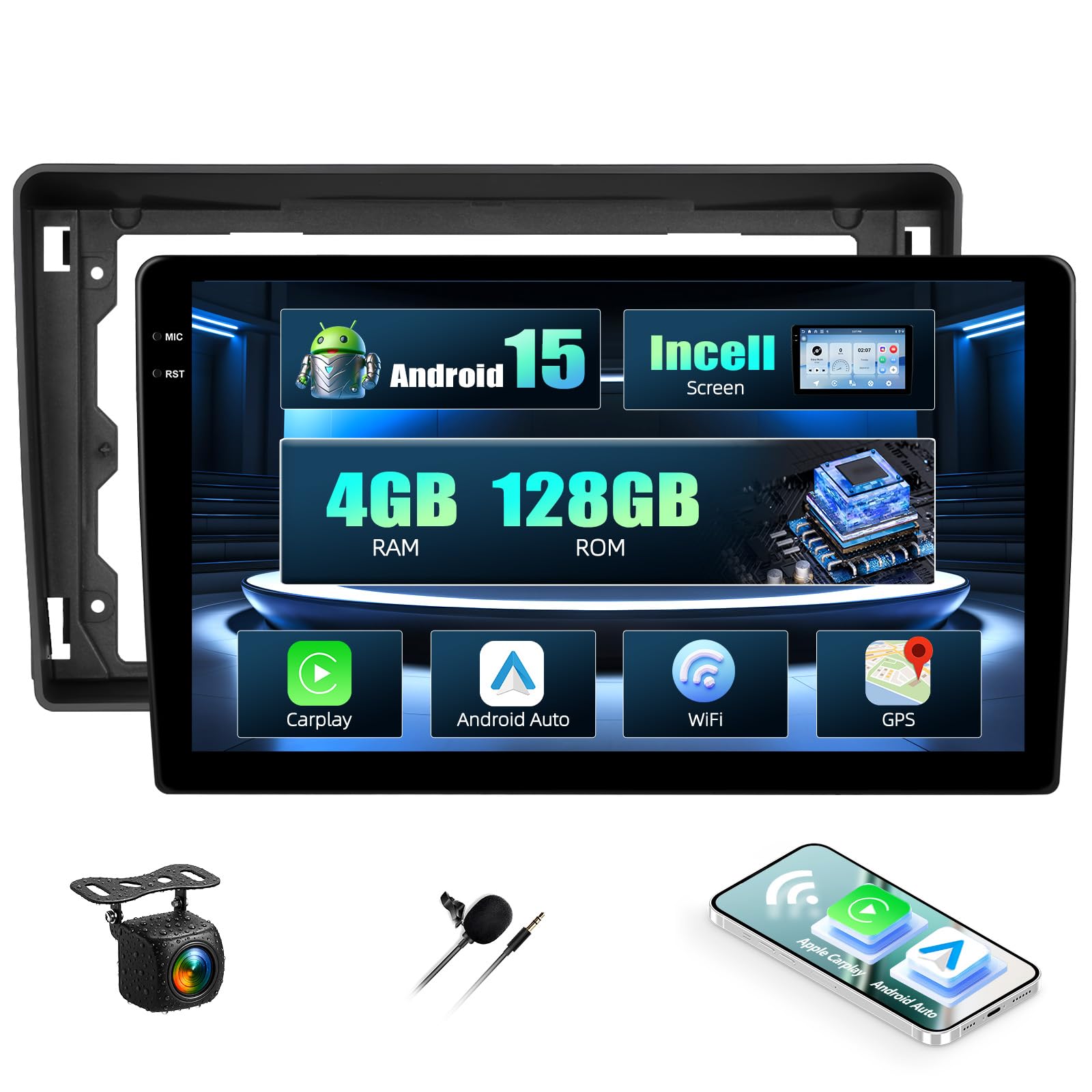
פראָנט view of the CAMECHO 9-inch Android 15 car stereo unit.
2. זיכערקייַט אינפֿאָרמאַציע
Always prioritize safety while operating your vehicle. Distracted driving can lead to accidents. Ensure the unit is securely installed to prevent it from becoming a projectile during sudden stops or collisions. For detailed safety guidelines, please refer to the provided safety information PDF document: זיכערקייַט אינפֿאָרמאַציע (PDF).
3. פּעקל אינהאַלט
באַשטעטיקן אַז אַלע זאכן זענען פאַראַן אין פּעקל איידער די אינסטאַלאַציע:
- CAMECHO 9-inch Android 15 Car Stereo Unit
- מאַכט קאַבלע
- רקאַ קאַבלע
- USB Cables (4-pin and 6-pin)
- אַפּאַראַט אַרייַנשרייַב קאַבלע
- ראַדיאָ אַנטענע
- גפּס אַנטענע
- AHD Rear Camera
- אַנטענע אַדאַפּטער
- ייַנמאָנטירונג טול
- מיקראָפאָן
- Canbus Decoder
- באַניצער מאַנואַל (דעם דאָקומענט)

Diagram showing the dimensions of the 9-inch car stereo unit and a list of included accessories such as cables, antennas, and the user manual.
4. פּראָדוקט איבערview
The CAMECHO 9-inch Android 15 Car Stereo is designed for select Ford models, offering advanced features for an enhanced in-car experience. It includes a powerful Android 15 system, ample memory, and various connectivity options.
שליסל פֿעיִקייטן:
- אַפּערייטינג סיסטעם: אַנדרויד 15
- זכּרון: 4 גיגאבייט באַראַן + 128 גיגאבייט ראַם
- ווייַז: 9-inch HD Incell Touchscreen (1280x720 resolution)
- קאַנעקטיוויטי: Wireless Carplay, Android Auto, Bluetooth 5.0, Wi-Fi
- נאַוויגאַציע: Built-in GPS with support for online and offline maps
- ראַדיאָ: FM/RDS Tuner
- אַודיאָ רעזולטאַט: Stereo, 4.0 Surround Sound, 4 Channels, 45W x 4 Output
- נאָך פֿעיִקייטן: Steering Wheel Control support, Split-Screen function, Rear Camera input (camera included), Microphone (included).

Visual representation of the car stereo's core features: Android 15 operating system, 4GB RAM + 128GB ROM storage, and a high-definition Incell touchscreen with 1280x720 resolution and 68% light transmittance.
5. אויפשטעלן און אינסטאַלירן
פראפעסיאנעלע אינסטאלאציע איז רעקאמענדירט. זיכערט זיך אז די אויטא'ס עלעקטריע איז אפגעטיילט איידער איר הייבט אן די אינסטאלאציע.
5.1 פאָרמיטל קאָמפּאַטאַביליטי
This unit is compatible with the following Ford models: Fiesta, Focus, Transit Connect, Kuga, Mondeo, Smax.

Image showing the CAMECHO car stereo integrated into a Ford vehicle dashboard, highlighting compatibility with Ford Fiesta, Focus, Transit Connect, Kuga, Mondeo, and Smax models.
5.2 וויירינג דיאַגראַמע
זעט די דראָט דיאַגראַמע וואָס איז צוגעשטעלט מיט אייער אַפּאַראַט פֿאַר ספּעציפֿישע פֿאַרבינדונגען. שליסל פֿאַרבינדונגען אַרייַננעמען:
- מאַכט קאַבלע: Connect to vehicle's power supply (ACC, B+, GND).
- RCA קייבלס: For audio output to external amplifiers or video input/output.
- וסב קאַבלעס: פֿאַר פֿאַרבינדן USB דעוויסעס אָדער טשאַרדזשינג.
- אַפּאַראַט אַרייַנשרייַב: Connect the included AHD rear camera.
- ראַדיאָ אַנטענע: פֿאַרבינדט די ראַדיאָ אַנטענע פֿונעם פֿאָרמיטל.
- גפּס אַנטענע: Mount in a location with a clear view פון הימל פֿאַר אָפּטימאַל סיגנאַל אָפּנאַם.
- Canbus Decoder: Connect as per vehicle-specific instructions for steering wheel controls and other vehicle data integration.
5.3 גשמיות ינסטאַלירונג
- Carefully remove the original car stereo and trim panels.
- Connect all necessary cables (power, speakers, antennas, camera, USB, Canbus).
- Secure the new CAMECHO unit into the dashboard opening.
- Reinstall trim panels.
- Reconnect the vehicle's power.
5.4 ערשט מאַכט-אויף
After installation, turn on the vehicle's ignition. The stereo should power on automatically. Follow any on-screen prompts for initial setup, such as language selection and time zone.
6. אַפּערייטינג ינסטרוקטיאָנס
6.1 יקערדיק אָפּעראַטיאָנס
- מאַכט אויף / אַוועק: The unit typically powers on with the vehicle's ignition. A long press on the power button (if available) may turn the screen off or put the unit into standby.
- באַנד קאָנטראָל: Adjust volume using the on-screen controls or steering wheel buttons.
6.2 Android 15 System Navigation
The unit runs on Android 15, providing a familiar smartphone-like interface. Swipe to navigate between home screens, tap icons to open applications, and use the back/home/recent apps buttons for system navigation.
6.3 וויירלעס קאַרפּליי און אַנדרויד אויטאָ
Connect your smartphone wirelessly to access Carplay or Android Auto. This allows for seamless integration of navigation, music, calls, and messaging directly on the car stereo display.
- Ensure Bluetooth and Wi-Fi are enabled on your smartphone and the car stereo.
- On the car stereo, open the Carplay or Android Auto application.
- Follow the on-screen instructions to pair your phone. Once paired, the connection will be automatic for future use.

Demonstrates the wireless Carplay, Android Auto, and Mirror Link functionalities, showing smartphone integration for navigation, music, and calls.
6.4 שפּיגל לינק
Mirror Link allows you to display your smartphone's screen directly on the car stereo. Android devices support two-way operation (control from stereo), while iOS devices typically support one-way display.
- Open the 'Mirror Link' application on the car stereo.
- Follow the specific instructions for connecting your iOS or Android device.
6.5 גפּס נאַוויגאַציע
The unit supports both online and offline navigation. For offline maps, download them via a Wi-Fi connection.
- אָנליין מאַפּעס: Requires an active internet connection (via Wi-Fi hotspot).
- אָפפליין מאַפּעס: Download map data to the unit's internal storage for navigation without an internet connection.

Illustrates the GPS navigation capabilities with online and offline maps, along with WiFi hotspot connection for app downloads and web בראַוזינג.
6.6 WiFi Hotspot Connection
Connect the car stereo to a Wi-Fi hotspot (e.g., from your smartphone) to access online features, download apps, and browse the internet.
- Go to 'Settings' on the car stereo and select 'Wi-Fi'.
- צינדט אן Wi-Fi און סעלעקטירט אייער געוואונטשענע נעץ.
- אַרייַן די פּאַראָל אויב פּראַמפּטיד.
6.7 FM/RDS ראַדיאָ
Access the FM/RDS radio application to listen to local radio stations. RDS (Radio Data System) provides additional information like station name and traffic updates.

Shows the FM/RDS radio interface and the graphic equalizer for sound customization.
6.8 בלועטוט קאָנעקטיוויטי
Pair your smartphone via Bluetooth 5.0 for hands-free calling and wireless audio streaming.
- On the car stereo, open the 'Bluetooth' application.
- געבן בלועטאָאָטה אויף דיין סמאַרטפאָנע און זוכן פֿאַר בנימצא דעוויסעס.
- Select the car stereo's Bluetooth name (e.g., "CAMECHO") and pair.

Highlights the upgraded Bluetooth 5.0 feature for stable, fast connections, hands-free calling, and wireless audio streaming.
6.9 Split-Screen Function
The split-screen feature allows you to run two applications simultaneously, such as navigation and music playback.
- עפֿנט די ערשטע אַפּליקאַציע וואָס איר ווילט נוצן.
- Press and hold the 'Recent Apps' button or swipe up from the bottom (depending on Android gesture settings) to enter split-screen mode.
- Select the second application from the recent apps list or app drawer.

Demonstrates the split-screen feature, allowing two applications (e.g., navigation and music) to run simultaneously for enhanced multitasking.
6.10 סטירינג ראָד קאָנטראָלס
The unit supports integration with your vehicle's original steering wheel controls via the Canbus decoder. This allows for safe operation of basic functions without diverting attention from the road.
- Access the 'Steering Wheel Control' settings in the unit's menu.
- Follow the on-screen instructions to program each button on your steering wheel to the desired function (e.g., volume up/down, track skip, mode).

Illustrates how the car stereo integrates with existing steering wheel controls for safe and convenient operation.
6.11 Rear Camera Function
When the vehicle is shifted into reverse gear, the unit will automatically display the feed from the connected rear camera.
7. וישאַלט
- רייניקונג: ניצט אַ ווייכע, טרוקענע שטאָף צו רייניקן דעם עקראַן און אַפּאַראַט. פֿאַרמייַדט אַברייסיוו רייניגער אָדער סאָלווענטן.
- ווייכווארג דערהייַנטיקונגען: Periodically check for software updates to ensure optimal performance and access to new features. Updates can usually be found on the manufacturer's website or through the unit's system settings if connected to Wi-Fi.
- טעמפּעראַטור: ויסמיידן יקספּאָוזינג די אַפּאַראַט צו עקסטרעם טעמפּעראַטורעס.
8. טראָובלעשאָאָטינג
| פּראָבלעם | מעגלעך סיבה | לייזונג |
|---|---|---|
| דער אַפּאַראַט טוט נישט מאַכט אויף. | לויזע עלעקטרישע פארבינדונג, צעבראכענע פיוז, אויטא איגנישאַן אויסגעלאָשן. | Check power cables, inspect vehicle fuses, ensure ignition is on. |
| קיין געזונט. | Volume too low, speaker wires disconnected, incorrect audio source. | Increase volume, check speaker connections, select correct audio source. |
| דזשי-פי-עס סיגנאַל פאַרלוירן אָדער נישט ריכטיק. | GPS antenna obstructed or improperly installed. | זיכער מאַכן אַז די GPS אַנטענע האָט אַ קלאָרע view of the sky, check connection. |
| בלועטאָאָטה קשר ישוז. | Bluetooth off, pairing failed, interference. | Ensure Bluetooth is on for both devices, re-pair, move away from interference sources. |
| טאָוטשסקרעען ניט ריספּאַנדאַבאַל. | System freeze, dirty screen. | Restart the unit (if possible), clean the screen, perform a factory reset if necessary (data will be lost). |
9. ספּעסאַפאַקיישאַנז
| שטריך | דעטאַל |
|---|---|
| סאָרט | CAMECHO |
| מאָדעל נומער | 4+128G Incell touchscreen |
| אָפּערייטינג סיסטעם | אַנדרויד 15 |
| באַראַן + ראַם | 4 גיגאבייט באַראַן + 128 גיגאבייט ראַם |
| פאַרשטעלן גרייס | 9 אינטשעס |
| פאַרשטעלן האַכלאָטע | 1280*720 HD Incell Touchscreen |
| קאַנעקטיוויטי טעכנאָלאָגיע | בלועטאָאָטה, ווי-פי |
| ספּעציעלע פֿעיִקייטן | 8 Core, Wireless Carplay, Android Auto, FM, RDS, Bluetooth, GPS, WIFI |
| קאַמפּאַטאַבאַל דעוויסעס | סמאַרטפאָנע |
| גאַנץ הדמי פּאָרץ | 2 |
| קאַנעקטער טיפּ | RCA, וסב |
| אַודיאָ רעזולטאַט מאָדע | סטערעאָ |
| סוראַונד סאַונד קאַנאַלן | 4.0 |
| ווידעא קאָדירונג | MKV, AVI, MP4 |
| רעזולטאַט מאַכט | 45 וואטס (פּער קאַנאַל) |
| נומער פון טשאַנאַלז | 4 |
| גאַנץ וואַטtage רעזולטאַט | 180 וואטס |
| Internet Applications | Carplay, Android Auto |
| קאָנטראָל מעטאָד | ריר |
| דיגיטאַלע מעדיע פֿאָרמאַט | AVI, Dolby, MP3 audio, MPEG, MPEG-2.5, WAV |
| לאַנד פון אָריגין | כינע |
10. וואָראַנטי אינפֿאָרמאַציע
CAMECHO products typically come with a standard manufacturer's warranty. Please refer to the warranty card included in your package or contact CAMECHO customer support for specific warranty terms and conditions.
11. שטיצע און קאָנטאַקט
For technical assistance, troubleshooting, or any questions regarding your CAMECHO car stereo, please contact our customer support team:
- בליצפּאָסט: bs_support21@126.com

Image displaying the customer support email address for professional online assistance and manual instructions.