
1. הקדמה
Thank you for choosing the THOMSON WS902DUO Cosy Bookshelf Speakers. These active stereo speakers deliver a powerful 150W audio experience with deep bass from two 10 cm woofers. They offer versatile connectivity options including Bluetooth 5.3, Optical, HDMI (ARC), RCA, and USB playback. The included remote control and side panel adjustments provide precise control over your audio. Please read this manual carefully before use to ensure proper operation and to maximize your listening experience.

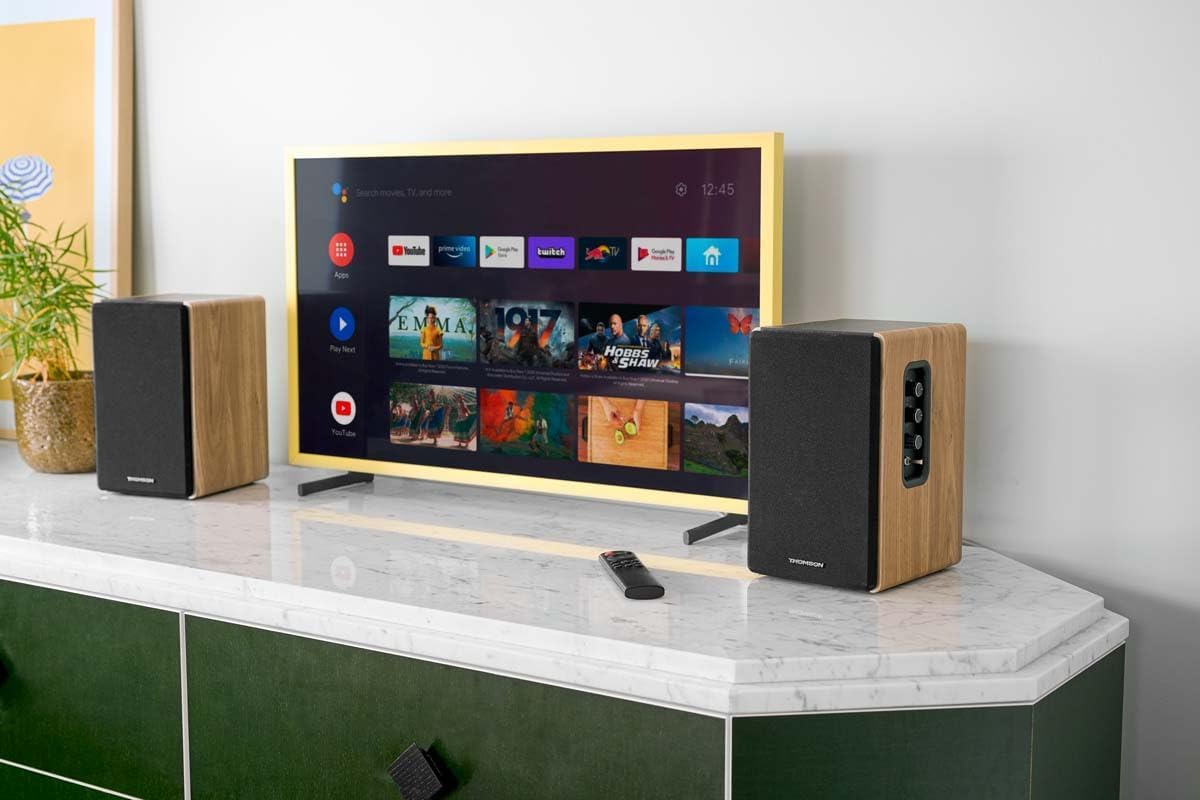
Image 1.1: THOMSON WS902DUO Bookshelf Speakers in a living space, showcasing their elegant wood finish.
2. וויכטיק סאַפעטי אינסטרוקציעס
- Read these instructions thoroughly before operating the product.
- האַלטן די ינסטראַקשאַנז פֿאַר צוקונפֿט רעפֿערענץ.
- היט אַלע וואָרנינגז אויף דעם פּראָדוקט און אין די אַפּערייטינג ינסטראַקשאַנז.
- גיי אַלע ינסטראַקשאַנז.
- דו זאלסט נישט נוצן דעם אַפּאַראַט לעבן וואַסער.
- ריין בלויז מיט אַ טרוקן שטאָף.
- בלאָקירט נישט קיין ווענטילאַציע עפענונגען. אינסטאַלירט לויט די אינסטרוקציעס פונעם פאַבריקאַנט.
- דו זאלסט נישט ינסטאַלירן לעבן קיין היץ קוואלן אַזאַ ווי ראַדיאַטאָרס, היץ רעדזשיסטערז, סטאָוווז אָדער אנדערע אַפּאַראַט (אַרייַנגערעכנט ampליפיערס) וואָס פּראָדוצירן היץ.
- דו זאלסט נישט באַזיגן די זיכערקייַט ציל פון די פּאָולערייזד אָדער גראַונדינג-טיפּ צאַפּן. א פּאָלאַריזעד צאַפּן האט צוויי בלאַדעס מיט איינער ברייט ווי די אנדערע. א גראַונדינג טיפּ צאַפּן האט צוויי בלאַדעס און אַ דריט גראַונדינג צאָן. די ברייט בלייד אָדער די דריט צאָן זענען צוגעשטעלט פֿאַר דיין זיכערקייַט. אויב די צוגעשטעלט צאַפּן טוט נישט פּאַסיק אין דיין ווענטיל, באַראַטנ אַ ילעקטרישאַן פֿאַר פאַרבייַט פון די פאַרעלטערט ווענטיל.
- באַשיצן די מאַכט שנור פון גיין אויף אָדער פּינטשט, ספּעציעל אין די פּלאַגז, קאַנוויניאַנס רעסאַפּיז און די פונט ווו זיי אַרויסגיין פון די אַפּאַראַט.
- נאָר נוצן אַטאַטשמאַנץ / אַקסעסעריז ספּעסיפיעד דורך דער פאַבריקאַנט.
- נוצן בלויז מיט די וואָגן, שטיין, דרייַפוס, קלאַמער אָדער טיש ספּעסיפיעד דורך דער פאַבריקאַנט, אָדער סאָלד מיט דעם אַפּאַראַט. ווען אַ וואָגן איז געניצט, נוצן וואָרענען ווען מאָווינג די וואָגן / אַפּאַראַט קאָמבינאַציע צו ויסמיידן שאָדן פון שפּיץ-איבער.
- אָפּשטויסן דעם אַפּאַראַט בעשאַס בליץ סטאָרמז אָדער ווען אַניוזד פֿאַר לאַנג פּיריאַדז.
- אָפּשיקן אַלע סערוויסעס צו קוואַלאַפייד סערוויס פּערסאַנעל. סערוויס איז פארלאנגט ווען דער אַפּאַראַט איז דאַמידזשד אין קיין וועג, אַזאַ ווי מאַכט צושטעלן שנור אָדער צאַפּן איז דאַמידזשד, פליסיק איז ספּילד אָדער אַבדזשעקץ זענען געפאלן אין די אַפּאַראַט, דער אַפּאַראַט איז יקספּאָוזד צו רעגן אָדער נעץ, אַרבעט נישט נאָרמאַלי , אָדער האט שוין דראַפּט.
3. פּעקל אינהאַלט
ביטע קאָנטראָלירט אַז אַלע זאכן וואָס זענען ליסטעד אונטן זענען אַרייַנגערעכנט אין דיין פּעקל:
- THOMSON WS902DUO Bookshelf Speakers (2 units)
- ווייַט קאָנטראָל
- מאַכט קאַבלע
- רעדנער קאַנעקשאַן קאַבלע
- 3.5mm Jack to RCA Adapter Cable
- באַניצער מאַנואַל (דעם דאָקומענט)

Image 3.1: Packaging of the THOMSON WS902DUO Bookshelf Speakers.
4. פּראָדוקט איבערview
4.1. Side Control Panel (Active Speaker)
The active speaker features a side control panel for easy access to essential functions.

Image 4.1: Side control panel.
- באַס קאָנטראָל: אַדזשאַסטירט די נידעריק-פרעקווענץ אַוטפּוט.
- טרעבל קאָנטראָל: אַדזשאַסטירט די הויך-פרעקווענץ אַרויסגאַנג.
- באַנד קאָנטראָל: אַדזשאַסטירט דעם אַלגעמיינעם קלאַנג־וואָלומען.
- מאַכט סוויטש: Turns the speakers on or off.
- LED ינדיקאַטאָר: Shows the current status or selected input.
4.2. Rear Panel (Active Speaker)
The rear panel of the active speaker provides all necessary input and output connections.
בילד 4.2: פֿאַרבינדונגען אויף דער הינטערשטער פּאַנעל.
- אָפּטיש אַרייַנשרייַב: For connecting digital audio sources like TVs, game consoles, or Blu-ray players.
- אוקס אריין (RCA): For connecting analog audio sources such as turntables, CD players, or PCs. A 3.5mm jack adapter is provided.
- TV Audio (HDMI ARC): For connecting to a TV's HDMI ARC port, allowing TV remote control of the speaker volume.
- USB שפּיל: פֿאַר שפּילן MP3 files גלייַך פֿון אַ וסב בליץ פאָר.
- Sub Out: For connecting an external active subwoofer for enhanced bass.
- רעדנער רעזולטאַט: פֿאַרבינדט זיך צום פּאַסיוון רעדנער.
- מאַכט אַרייַנשרייַב: Connects to the main power supply.
4.3. רימאָוט קאָנטראָל
די ווײַטקאָנטראָל גיט באַקוועמען צוטריט צו אַלע רעדנער פונקציעס פֿון אַ ווײַטן.

Image 4.3: Remote control.
- מאַכט קנעפּל: Turns the speakers on/off.
- שטיל קנעפּל: מוטשעט / ונמיוט דעם געזונט.
- באנד +/-: אַדזשאַסץ די באַנד מדרגה.
- Playback Controls (Play/Pause, Skip): For USB playback.
- Source Selection Buttons (OPT, BT, ARC, USB, LINE): אויסקלייבט די אַודיאָ אַרייַנגאַנג מקור.
- EQ Mode Buttons (MOVIE, MUSIC, DIALOG): Selects preset equalization modes.
5. סעטאַפּ
5.1. רעדנער פּלייסמאַנט
Place the speakers on a stable, flat surface such as a bookshelf, desk, or speaker stands. For optimal stereo imaging, position the speakers equidistant from your listening position and at ear level. Ensure there is adequate space around the speakers for ventilation.
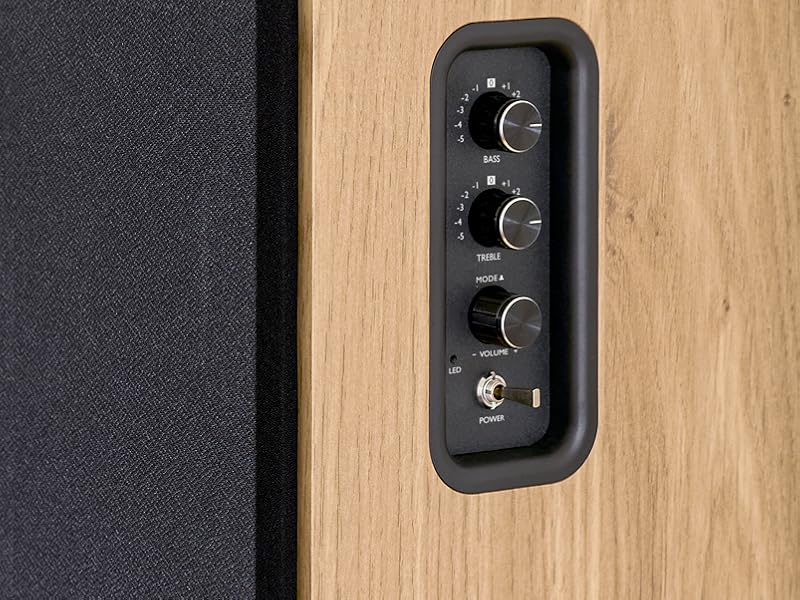
Image 5.1: Recommended speaker placement on a desk.
5.2. קאַנעקטינג די ספּיקערז
- Identify the active speaker (with controls and inputs) and the passive speaker.
- Connect the included speaker cable from the speaker output terminals on the active speaker to the input terminals on the passive speaker. Ensure correct polarity (+ to + and - to -).
5.3. קאַנעקטינג אַודיאָ קוואלן
Connect your desired audio sources to the active speaker using the appropriate cables.
- אָפּטיש אַרייַנשרייַב: Use an optical cable to connect your TV, game console, or Blu-ray player to the OPTICAL IN port.
- HDMI (ARC) אריינגאנג: Use an HDMI cable to connect your TV's HDMI ARC port to the TV AUDIO (HDMI) port on the speaker. This allows your TV remote to control the speaker volume.
- RCA (AUX) Input: Use an RCA cable (or the provided 3.5mm jack to RCA adapter) to connect devices like a turntable, CD player, or PC to the AUX IN (RCA) ports.
- וסב ינפּוט: אַרייַנלייגן אַ וסב בליץ פאָר מיט mp3 files into the USB PLAY port.

Image 5.2: Speakers connected to a television via HDMI ARC.
5.4. בלועטאָאָטה פּערינג
- זיכער מאַכן אַז די רעדנערס זענען אנגעצונדן.
- Press the 'BT' button on the remote control or the side panel to select Bluetooth input. The LED indicator will flash, indicating pairing mode.
- אויף אייער סמאַרטפאָון, טאַבלעט, אָדער קאָמפּיוטער, אַקטיווירט בלועטוט און זוכט פֿאַר פֿאַראַן דעוויסעס.
- Select "THOMSON WS902DUO" from the list of devices.
- Once paired, the LED indicator will stop flashing and remain solid. You can now stream audio wirelessly.
5.5. סאַבוואָאָפער פֿאַרבינדונג (אָפּציאָנעל)
If you wish to enhance bass further, connect an active subwoofer to the 'Sub Out' port on the rear panel of the active speaker using an RCA cable.
6. אַפּערייטינג ינסטרוקטיאָנס
6.1. מאַכט אויף / אויסגעלאשן
Use the power switch on the side control panel or the power button on the remote control to turn the speakers on or off.
6.2. מקור סעלעקציע
Press the corresponding source button on the remote control (OPT, BT, ARC, USB, LINE) to switch between connected audio inputs. The LED indicator will change to reflect the selected source.
6.3. באַנד קאָנטראָל
Adjust the volume using the 'Volume' knob on the side control panel or the 'VOL+/-' buttons on the remote control.
6.4. אַודיאָ אַדדזשוסטמענץ
Fine-tune the sound to your preference:
- באַס / טרעבל: Use the 'Bass' and 'Treble' knobs on the side control panel to adjust the low and high frequencies.
- עק מאָדעס: Press the 'MOVIE', 'MUSIC', or 'DIALOG' buttons on the remote control to select preset equalization settings optimized for different content types.
6.5. וסב פּלייַבאַקק
When a USB flash drive with MP3 files is inserted and USB source is selected, the speakers will automatically begin playing. Use the playback control buttons on the remote control (Play/Pause, Skip) to manage your music.
6.6. בלועטאָאָטה אָפּעראַציע
After successful pairing (see Section 5.4), you can stream audio from your Bluetooth device. Use your device's controls or the speaker's remote control for playback and volume adjustments.
7. וישאַלט
געהעריגע אויפהאלטונג גאראנטירט די לאנגעוויטי און פאָרשטעלונג פון אייערע רעדנערס.
- רייניקונג: ווישט די רעדנער-פלאַכן מיט אַ ווייכן, טרוקענעם שטאָף. ניצט נישט פליסיקע רייניקונגס-מיטלען אדער שרײַבנדיקע מאַטעריאַלן.
- ווענטילאַטיאָן: פאַרזיכערן אַז די ווענטאַליישאַן אָופּאַנינגז זענען נישט אפגעשטעלט צו פאַרמייַדן אָוווערכיטינג.
- סטאָרידזש: אויב איר לייגט די רעדנערס אויף פאר א לענגערע צייט, נעמט זיי ארויס פון דער עלעקטרישער ווענטיל און לייגט זיי אויף אין א קילן, טרוקענעם ארט.
- ויסמיידן נעץ: Keep the speakers away from water and high humidity.
8. טראָובלעשאָאָטינג
אויב איר טרעפן קיין ישוז, אָפּשיקן צו די פאלגענדע טראָובלעשאָאָטינג פירער:
| פּראָבלעם | מעגלעך סיבה | לייזונג |
|---|---|---|
| קיין מאַכט | Power cable not connected; Power switch off; Wall outlet not working. | Ensure power cable is securely connected. Turn on the power switch. Test the wall outlet with another device. |
| קיין געזונט | Incorrect input source selected; Volume too low; Mute function active; Audio cable not connected properly. | Select the correct input source. Increase volume. Press Mute button on remote. Check all audio cable connections. |
| בלועטאָאָטה פּערינג פיילז | Speakers not in pairing mode; Device too far; Bluetooth disabled on source device. | Ensure speakers are in Bluetooth pairing mode (flashing LED). Move device closer to speakers. Enable Bluetooth on your source device. |
| וסב פּלייבאַק טוט נישט אַרבעטן | USB drive not formatted correctly; Files not MP3; USB drive not inserted properly. | Ensure USB drive is FAT32 formatted. Verify files are in MP3 format. Re-insert USB drive firmly. |
| געזונט דיסטאָרשאַן | Volume too high; Source audio quality poor; Bass/Treble settings too extreme. | Lower the volume. Test with a different audio source. Adjust Bass and Treble controls. |
9. ספּעסאַפאַקיישאַנז
| שטריך | באַשרייַבונג |
|---|---|
| סאָרט | THOMSON |
| מאָדעל נומער | WS902DUO |
| מאַקסימום רעדנער אַרויסגאַנג מאַכט | 150 וואטס |
| אָפטקייַט ענטפער | 60 הז |
| קאַנעקטיוויטי טעכנאָלאָגיע | בלועטוט, HDMI (ARC), אָפּטיש, RCA, USB |
| בלועטאָאָטה ווערסיע | 5.3 |
| אַודיאָ רעזולטאַט מאָדע | סטערעאָ (2.0 קאַנאַלן) |
| אַרייַנשרייַב וואָלtage | 230 וואלטס (AC) |
| מאַונטינג טיפּ | פּאָליצע בארג |
| רעדנער טיפּ | Multimedia Bookshelf |
| ספּעציעלע פֿעיִקייטן | Stereo Pairing, USB Port, Sub-Out, Remote Control, EQ Modes |
| רעקאָממענדעד ניצט | Smartphone, Tablet, PC, TV, Game Console, DVD Player, Turntable |
| קאָליר | נאַטירלעך האָלץ ענדיקן |
| קאָנטראָל מעטאָד | Remote Control, Side Panel Knobs |
| וואָאָפער גרייס | 10 סענטימעטער |
| דימענשאַנז (H X W X D) | 28 cm x 24 cm x 47 cm (approximate, per speaker) |
| וואָג | 5048 Grams (total for pair) |
| נומער פון זאכן | 2 |
| לאַנד פון אָריגין | כינע |
10. וואָראַנטי אינפֿאָרמאַציע
This THOMSON WS902DUO product comes with a 1-יאָר לימיטעד וואָראַנטי פֿון דעם קויפֿדאַטום. די וואָראַנטי דעקט פֿאַבריקאַציע חסרונות און אַרבעט אונטער נאָרמאַל נוצן. עס דעקט נישט שעדיקן געפֿירט דורך אומרעכט נוצן, אַקסאַדענטן, נישט-אָטעריזירטע מאָדיפֿיקאַציעס, אָדער נאָרמאַל טראָגן און טרער. ביטע האַלטן דיין קויפֿבאַווייַז פֿאַר וואָראַנטי קליימז.
11. קונה שטיצן
For technical assistance, warranty claims, or any questions regarding your THOMSON WS902DUO speakers, please contact your retailer or visit the official THOMSON support website. Please have your model number (WS902DUO) and proof of purchase ready when contacting support.
אָנליין שטיצן: www.thomsonconsumer.com (Please check for regional support contacts)