
1. הקדמה
Thank you for choosing the MONODEAL CD401 Portable HiFi Stereo CD Player. This versatile device combines classic CD playback with modern connectivity options, including Bluetooth, FM radio, USB, and AUX input. Enjoy high-fidelity audio with built-in speakers, dynamic RGB lighting, and convenient remote control. This manual provides essential information for setup, operation, and maintenance to ensure optimal performance.
2. וואָס איז אין דער קעסטל
- 1x MONODEAL CD401 CD Player
- 1x באַניצער מאַנואַל
- 1x רימאָוט קאָנטראָל
- 1 קס 3.5 מם אַודיאָ קאַבלע
- 1x Charging Cable and Plug
3. פּראָדוקט איבערview
The MONODEAL CD401 is designed for both portability and desktop use, offering a blend of classic and contemporary audio features. Its compact design includes integrated speakers and a clear display for easy navigation.
פיגורע 1: פראָנט view of the MONODEAL CD401 Portable CD Player, showcasing its compact design and central display.
שליסל פֿעיִקייטן:
- מולטי-קאָליר RGB לייטינג: Dynamic lighting effects that change color to the beat of the music, enhancing visual and auditory experience.
- בלועטאָאָטה 5.3: Functions as both a Bluetooth transmitter (to headphones/speakers) and receiver (from phones/tablets).
- Integrated 4*HIFI Speakers: Provides surround sound for an immersive listening experience.
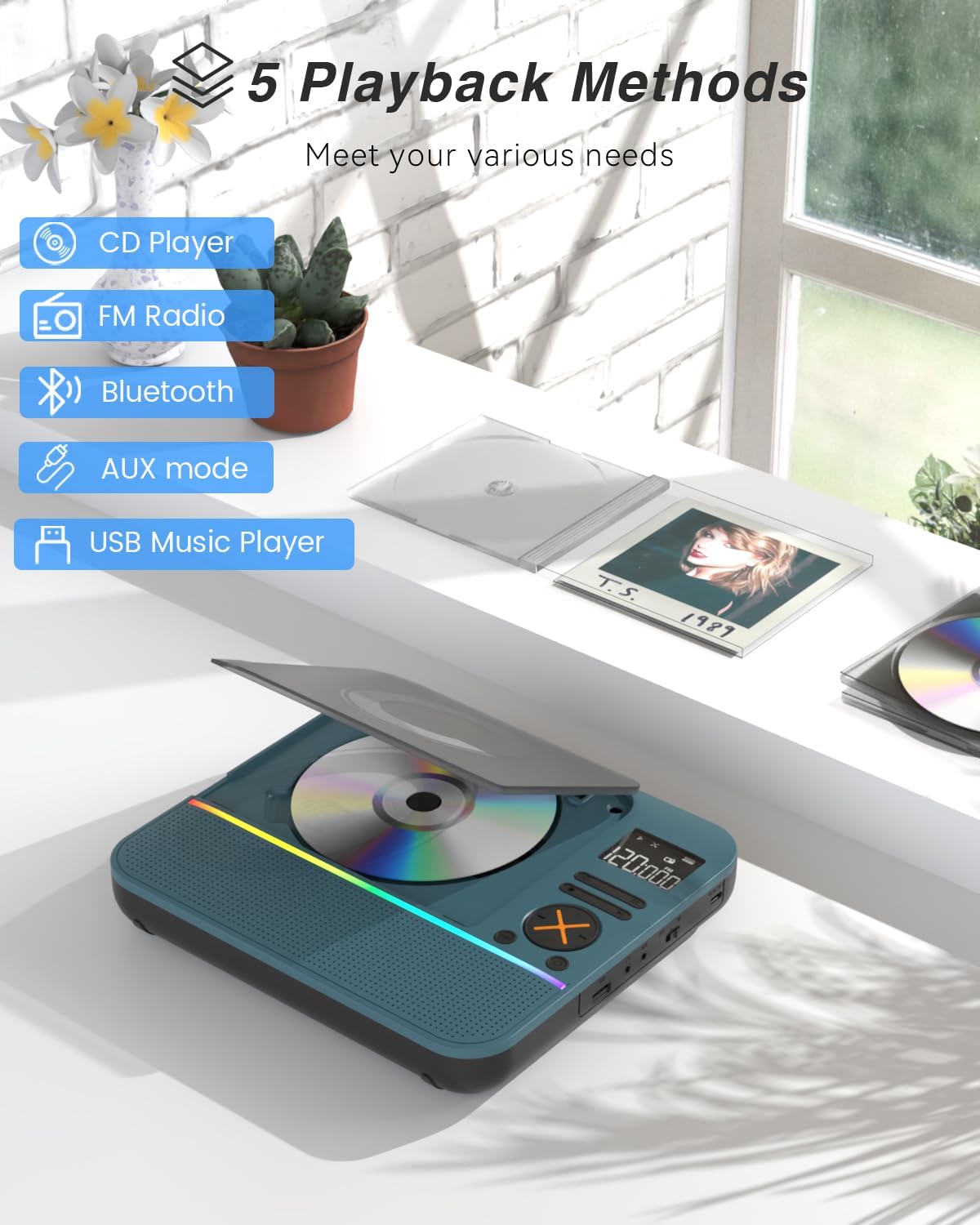
- קייפל פּלייַבאַקק מאָדעס: Easily switch between CD, Bluetooth, FM Radio, AUX, and USB modes via a large LCD screen.
- Wide CD Compatibility: Supports CD, CD-R, CD-RW, MP3, and WMA formats.
- סאָונד עפפעקץ: Choose from five equalizer presets: Flat, Rock, Pop, Jazz, and Classic.
- עפעם ראַדיאָ: Access FM frequencies from 76MHz to 108MHz.
- USB & AUX Connectivity: Play music from a USB flash drive or connect external devices via the 3.5mm AUX cable.
- קריקאָנלאָדלעך באַטערי: Built-in 3000mAh battery offers up to 8 hours of continuous playback.
- שלאָפן טימער: Customizable sleep timer from 10 to 90 minutes.

Figure 2: The MONODEAL CD401 displaying its multi-color RGB lighting effects, which synchronize with the music.
קאָנטראָלס און פּאָרץ:
The device features intuitive controls on its top panel and essential ports on the side for easy access.

Figure 3: Top panel of the CD player showing playback controls, mode selection, and display.

Figure 4: The side panel of the CD player, illustrating the AUX input, USB port, and charging port.
אפיציעלע פּראָדוקט ווידעא:
Video 1: Official product video from MonoDeals showcasing the Desktop CD Player with Bluetooth and RGB Light features.
Video 2: Official product video from MonoDeals demonstrating the Desktop Player's Bluetooth functionality and colorful lighting effects.
4. סעטאַפּ
4.1 טשאַרדזשינג די מיטל
- Connect the provided USB charging cable to the charging port on the side of the CD player.
- Plug the other end of the USB cable into a compatible USB power adapter (included) or a computer's USB port.
- The battery indicator on the LCD screen will show charging status. A full charge provides up to 8 hours of playback.
4.2 אריינלייגן א סי-די
- Gently open the CD compartment cover.
- Place the CD with the label side facing up onto the spindle. Ensure it clicks into place.
- Close the CD compartment cover firmly until it latches.
4.3 פּאַוערינג אויף / אַוועק
- To power on, slide the ON/OFF switch to the 'ON' position. The LCD screen will light up.
- צו אויסלאָשן, רוקט דעם אָן/אויס קנעפּל צו דער 'אויס' פּאָזיציע.
5. אַפּערייטינג ינסטרוקטיאָנס
5.1 מאָדע סעלעקציע
דרוק די מאָדע button on the device or remote control to cycle through the available modes: CD, Bluetooth, FM, AUX, and USB.

Figure 5: The CD player's display indicating the five available playback methods: CD, FM Radio, Bluetooth, AUX mode, and USB Music Player.
5.2 סי פּלייבאַק
- Insert a compatible CD (CD, CD-R, CD-RW, MP3, WMA).
- Select 'CD' mode. The player will automatically start reading the disc.
- ניצן די שפּיל / פּויזע, ווייַטער שפּור, און פֿריִערדיקע שפּירט קנעפּלעך צו קאָנטראָלירן פּלייבאַק.
- דרוק די איבערחזרן button to cycle through repeat options (e.g., repeat one, repeat all).
- דרוק די EQ button to select desired sound effects (Flat, Rock, Pop, Jazz, Classic).
5.3 בלועטאָאָטה מאָדע
The CD401 supports both Bluetooth transmission (BT TX) and reception (BT RX).
- Bluetooth Receiver (BT RX): Select 'Bluetooth' mode. The device will enter pairing mode. On your phone/tablet, search for 'CD401' and connect. Audio from your device will play through the CD player's speakers.
- Bluetooth Transmitter (BT TX): Select 'Bluetooth' mode. Press and hold the BT TX button. The CD player will search for nearby Bluetooth headphones or speakers. Once connected, CD audio will transmit to the external Bluetooth device.

Figure 6: Illustration of the CD player's dual Bluetooth functionality, allowing it to receive audio from a phone (RX) or transmit to headphones (TX).
5.4 עפעם ראַדיאָ
- אויסקלייבן 'FM' מאָדע.
- ניצן די ווייַטער שפּור און פֿריִערדיקע שפּירט קנעפּלעך צו סקענען ראַדיאָ סטאַנציעס.
- The FM frequency range is 76MHz to 108MHz.
5.5 AUX אַרייַנשרייַב
- Select 'AUX' mode.
- Connect an external audio device (e.g., smartphone, computer) to the AUX IN port using the provided 3.5mm audio cable.
- The CD player will now act as a wired speaker for the connected device.
- Note: Bluetooth connectivity is not supported in cars; use the 3.5mm AUX cable for car audio.
5.6 יו-עס-בי פּלייבּעק
- Select 'USB' mode.
- אַרייַנלייגן אַ וסב בליץ פאָר מיט mp3 אָדער וומאַ אַודיאָ fileס אין די וסב פּאָרט.
- The player will automatically detect and begin playing the audio files.
5.7 באַנד קאָנטראָל
Adjust the volume using the dedicated volume buttons on the device or the remote control.
5.8 שלאָפן טיימער
- דרוק די שלאָף קנעפּל אויף די ווייַט קאָנטראָל.
- Cycle through the available sleep timer durations (10, 20, 30, 40, 50, 60, 70, 80, 90 minutes).
- The device will automatically power off after the selected time.

Figure 7: The CD player featuring its sleep timer function, allowing users to set automatic shutdown after a specified duration.
6. וישאַלט
6.1 רייניקונג
- ווישט אָפּ דאָס אַפּאַראַט מיט אַ ווייכן, טרוקענעם שטאָף. ניצט נישט קיין פליסיקע רייניגער אָדער שרײַבנדיקע מאַטעריאַלן.
- Keep the CD compartment clean and free of dust.
6.2 סטאָרידזש
- Store the CD player in a cool, dry place away from direct sunlight and extreme temperatures.
- Remove any CDs or USB drives before storing for extended periods.
7. טראָובלעשאָאָטינג
| פּראָבלעם | מעגלעך סיבה | לייזונג |
|---|---|---|
| די מיטל טוט נישט מאַכט אויף | נידעריגע באַטעריע אדער די מאַכט סוויטש איז אויסגעלאָשן. | לאָדט דאָס אַפּאַראַט גאָר אויף. מאַכט זיכער אַז דער אָן/אויס קנעפּל איז אין דער 'אָן' פּאָזיציע. |
| קיין געזונט פון ספּיקערז | די באַנד איז צו נידעריק אָדער די אומרעכטע מאָדע איז אויסגעקליבן. | Increase volume. Verify correct playback mode (CD, Bluetooth, FM, AUX, USB). |
| סי-די שפּילט נישט | די סי-די איז שמוציק, קראַצט, אדער נישט ריכטיק אריינגעלייגט. | Clean the CD. Check for scratches. Reinsert the CD correctly with the label side up. |
| בלועטאָאָטה פּערינג ניט אַנדערש | Device is not in pairing mode or too far from the source. | Ensure the CD player is in Bluetooth pairing mode. Move devices closer. Disconnect from other Bluetooth devices. |
8. ספּעסאַפאַקיישאַנז
| שטריך | דעטאַל |
|---|---|
| מאָדעל נומער | CD401 |
| סאָרט | מאָנאָדעאַל |
| קאַנעקטיוויטי טעכנאָלאָגיע | בלועטאָאָטה 5.3 |
| רעדנער טיפּ | 4*HIFI Stereo |
| באַטאַרייע קאַפּאַציטעט | 3000mAh (איינגעבויט) |
| פּלייַבאַקק צייט | ביז 8 שעה (אויף פולער אָפּצאָל) |
| שטיצט דיסק פֿאָרמאַטירונגען | קאָמפּאַקטדיסק, קאָמפּאַקטדיסק-ר, קאָמפּאַקטדיסק-רוו |
| שטיצט אַודיאָ פֿאָרמאַטירונגען | mp3, וומאַ |
| עפעם פרעקווענסי קייט | 76MHz צו 108MHz |
| פּעקל דימענשאַנז | 10.83 X 9.13 X 1.93 אינטשעס |
| פּונקט וואָג | 2.48 פונט |
9. וואָראַנטי און שטיצן
For warranty information, technical support, or customer service inquiries, please refer to the contact details provided in your product packaging or visit the official MONODEAL webפּלאַץ. האַלטן דיין קויפן קאַבאָלע פֿאַר וואָראַנטי קליימז.