
הקדמה
Thank you for choosing the Greadio CD03P Portable Bluetooth CD Player. This manual provides essential information for the safe and efficient operation of your device. Please read it thoroughly before use and retain it for future reference.
The Greadio CD03P is a versatile audio device featuring CD playback, Bluetooth 5.3 connectivity, dual wireless karaoke microphones, dynamic LED lights, and multiple input options including USB, TF card, and AUX. It is powered by a 4000mAh rechargeable battery, offering portability for various environments.
פּראָדוקט איבערview
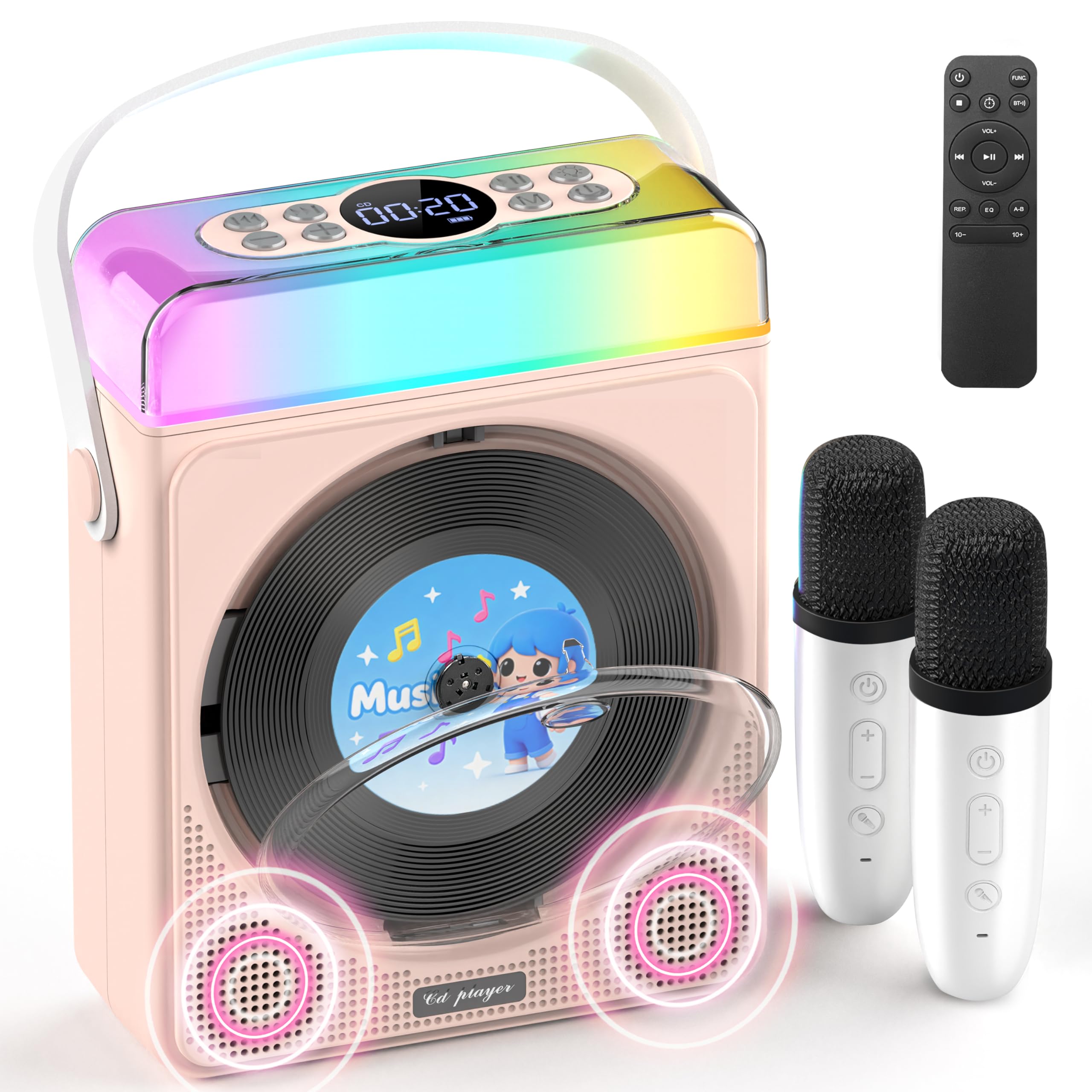
פיגורע 1: Greadio CD03P Portable Bluetooth CD Player with two microphones and LED lights.

פיגורע 2: Top view of the CD03P showing control buttons and LED light bar.
פּעקל אינהאַלט:
- Portable CD Player x 1
- קאַראַאָקע מיקראָפאָן X 2
- טיפּ-C טשאַרדזשינג קאַבלע X 1
- ווייַט קאָנטראָל רענטגענ 1
- AUX קאַבלע רענטגענ 1
סעטאַפּ
טשאַרדזשינג די מיטל:
Before first use, fully charge the CD player using the provided Type-C charging cable. Connect the cable to the Type-C port on the device and a compatible 5V/2A power adapter (not included). The battery indicator on the display will show charging status.
Charging the Microphones:
The two wireless microphones are rechargeable. Connect them to a power source using their respective charging cables (if provided, or compatible USB cables). Each microphone offers over 30 hours of playtime on a full charge.
אַפּערייטינג ינסטראַקשאַנז
1. מאַכט אויף / אַוועק:
לאַנג דריקן דעם פּאַוער קנעפּל (⏻) on the device or remote control to turn the unit on or off.
2. מאָדע סעלעקציע:
דרוק די M (Mode) button on the device or the FUNC. button on the remote control to cycle through available modes: CD, Bluetooth, USB, TF Card, and AUX.
3. סי פּלייבאַק:
- Press the release button to open the CD compartment cover.
- Carefully insert a CD (compatible with CD/CD-R/CD-RW/MP3/WMA formats) with the label side facing up.
- פֿאַרמאַכט דעם דעקל פֿון דעם סי-די אָפּטייל זיכער.
- Select "CD" mode using the Mode/FUNC. button. The device will begin loading and playing the CD.
- ניצן די |< און >| buttons for track navigation (short press) or fast forward/rewind (long press).
- דרוק די ▶|| קנעפּל צו שפּילן אָדער פּויזע.
ווידעא באַשרייַבונג: This video demonstrates how to play CDs, USB, and TF cards on the Greadio CD03P. It shows inserting a CD, selecting the CD mode, and using playback controls.
4. Bluetooth Connectivity (Receiving Mode):
- דרוק די M (Mode) button until "Bluetooth" mode is selected. The display will show "BLUE" and a blinking Bluetooth icon.
- On your mobile device, enable Bluetooth and search for "CD03P".
- Select "CD03P" to pair. A confirmation tone will sound upon successful connection.
- Play audio from your mobile device, and it will stream through the Greadio CD03P speakers.
ווידעא באַשרייַבונג: This video illustrates the Bluetooth receiving mode, showing how to connect a mobile phone to the Greadio CD03P for audio playback.
5. Bluetooth Connectivity (Transmitting Mode):
The CD03P can transmit audio to external Bluetooth speakers or headphones when in CD, USB, TF, or AUX mode (not in Bluetooth receiving mode).
- Ensure the CD03P is in CD, USB, TF, or AUX mode.
- קורץ דריקן די BT button on the remote control. The Bluetooth icon on the display will blink.
- Put your external Bluetooth speaker or headphones into pairing mode.
- Once connected, the Bluetooth icon on the CD03P will stop blinking. Audio will now play through the external Bluetooth device.
- To disconnect, short press the BT קנעפּל ווידער.
ווידעא באַשרייַבונג: This video demonstrates the Bluetooth transmitting mode, showing how to connect the Greadio CD03P to external Bluetooth speakers or headphones.
6. USB/TF Card Playback:
- Insert a USB flash drive into the USB port or a TF card into the TF card slot on the back of the device.
- דרוק די M (מאָדע) קנעפּל אָדער FUNC. button on the remote to select "USB" or "TF" mode.
- די דעווייס וועט אויטאָמאַטיש דעטעקטירן און שפּילן קאָמפּאַטיבלע אַודיאָ files (MP3/WMA/WAV/APE/FLAC).
- ניצן די |< און >| buttons for track navigation (short press) or fast forward/rewind (long press).
- דרוק די ▶|| קנעפּל צו שפּילן אָדער פּויזע.
Note: For best performance with USB/TF cards, use 64GB or less. Reformat 128GB cards to FAT32 if needed.
7. AUX אריינגאנג:
- Connect an external audio device (e.g., smartphone, MP3 player) to the AUX port on the back of the CD03P using the provided AUX cable.
- דרוק די M (מאָדע) קנעפּל אָדער FUNC. button on the remote to select "AUX" mode.
- Play audio from your external device. The sound will be output through the CD03P speakers.
8. Karaoke Microphones:
- Turn on the microphones by pressing their power buttons. They will automatically connect to the CD03P.
- ניצן די +/- buttons on the microphone to adjust microphone volume.
- דרוק די MIC button on the microphone to cycle through five voice effects: Female, Monster, Baby, Original, and KTV mode.
- דרוק די מאַכט button on the microphone to switch between microphone modes (e.g., adjust background music, microphone volume, reverb).
ווידעא באַשרייַבונג: This video demonstrates how to connect and use the wireless microphones with the Greadio CD03P, including switching voice effects and adjusting settings.
9. געפירט לייץ:
- The RGB light (LED1) turns on automatically when the device is powered on.
- קורץ דריקן די ליכט button on the device or remote to cycle through various light effects: breathing light (red, purple, blue, cyan, green, yellow, orange) and solid colors.
- לאנג דריקן די ליכט קנעפּל צו אויסלעשן די LED לייץ.
ווידעא באַשרייַבונג: This video showcases the dynamic LED light features of the Greadio CD03P, demonstrating how to cycle through different light modes and colors.
10. באַנד קאָנטראָל:
ניצן די VOL+ און וואָל- buttons on the device or remote control to adjust the main speaker volume.
11. EQ מאָדעס:
קורץ דריקן די EQ button on the remote control to switch between different equalizer modes (e.g., Pop, Jazz, Classic, Bass, Flat, Rock).
12. שלאָפן טיימער:
The CD03P can function as a night light with a sleep timer. Refer to the full user manual for detailed instructions on setting the sleep timer.
וישאַלט
- האַלטן די מיטל אַוועק פון וואַסער און נעץ.
- רייניקט דעם אַפּאַראַט מיט אַ ווייכן, טרוקענעם שטאָף. ניצט נישט קיין שרײַבנדיקע רייניגערס אדער סאָלווענטן.
- ויסמיידן יקספּאָוזינג די מיטל צו עקסטרעם טעמפּעראַטורעס אָדער דירעקט זונשייַן.
- Do not press the CD base directly.
- ווען נישט אין באַנוץ פֿאַר לענגערע פּעריאָדן, האַלט די מיטל אין אַ קיל, טרוקן אָרט.
טראָובלעשאָאָטינג
| פּראָבלעם | מעגלעך סיבה | לייזונג |
|---|---|---|
| די מיטל טוט נישט מאַכט אויף. | נידעריגע באַטעריע אָדער פּראָבלעם מיט מאַכט. | לאָדט דעם אַפּאַראַט גאָר אויף. מאַכט זיכער אַז דער טשאַרדזשינג קאַבל איז ריכטיק פֿאַרבונדן. |
| די סי-די שפּילט נישט אדער הערט זיך איבער. | די סי-די איז שמוציק, קראַצט, אדער נישט ריכטיק אריינגעלייגט. | Clean the CD with a soft cloth. Ensure the CD is inserted correctly with the label side up. Try a different CD. |
| בלועטאָאָטה פּערינג פיילז. | Device is not in Bluetooth mode or too far from the paired device. | Ensure the CD03P is in Bluetooth receiving mode. Move devices closer. Disconnect from other Bluetooth devices. |
| מיקראָפאָן טוט נישט אַרבעטן. | Microphone is off, uncharged, or out of range. | Turn on the microphone. Charge the microphone. Ensure it is within range of the CD03P. |
| קיין געזונט. | די קול איז צו נידעריג אדער שטיל. אומרעכטע מאָדע אויסגעקליבן. | Increase volume. Check if the device is muted. Ensure the correct input mode (CD, Bluetooth, USB, TF, AUX) is selected. |
| דיווייס רעאגירט נישט. | צייטווייליגע ווייכווארג פראבלעם. | Use a thin object to press the באַשטעטיק button on the back of the device. |
ספּעסאַפאַקיישאַנז
| שטריך | דעטאַל |
|---|---|
| מאָדעל נומער | CD03P |
| פּראָדוקט דימענשאַנז | 6.81 X 2.52 X 8.15 אינטשעס |
| פּונקט וואָג | 1.97 פונט |
| באַטאַרייע קאַפּאַציטעט | 4000 מאַה (ריטשאַרדזשאַבאַל) |
| קאַנעקטיוויטי | בלועטוט 5.3, USB, TF קארטל, AUX |
| קאָמפּאַטיביליטי פון קאָמפּאַקטדיסק | CD/CD-R/CD-RW/MP3/WMA |
| אַרייַנגערעכנט קאַמפּאָונאַנץ | Portable CD Player, 2 Karaoke Microphones, Type-C Charging Cable, Remote Control, AUX Cable |
וואָראַנטי און שטיצן
Greadio products come with a full year of coverage. For any issues or support needs, please contact Greadio customer service. Refer to the official Greadio webוועבזייטל אדער אייער קויפן דאקומענטאציע פאר קאנטאקט דעטאלן.
Note: This device is designed for personal and recreational use. Any unauthorized modifications or misuse may void the warranty.