
הקדמה
The XIKDS YK01 Adjustable Schumann Wave Resonance Generator is designed to produce a wide range of frequencies, including the natural 7.83Hz Schumann resonance. This device offers adjustable frequency output from 0.001Hz to 200KHz and various waveform options, making it suitable for diverse applications such as relaxation, meditation, and scientific experimentation.
וויכטיק סאַפעטי אינפֿאָרמאַציע
ווארענונג: This device is not intended to diagnose, treat, cure, or prevent any disease or health condition. Always consult a healthcare professional before starting any sound or frequency therapy program to ensure safety and effectiveness.
- האַלטן די מיטל אַוועק פון וואַסער און נעץ.
- פרובירט נישט צו עפענען אדער מאדיפיצירן דעם אפאראט. לאָזט איבער אלע סערוויסעס צו קוואַליפֿיצירטע פּערסאָנעל.
- Use only the provided or recommended USB-C power source.
- האַלטן אויס פון דערגרייכן פון קינדער.
פּעקל אינהאַלט
ביטע טשעק די פּאַקעט פֿאַר די פאלגענדע זאכן:
- XIKDS YK01 Schumann Wave Resonance Generator
- USB-C מאַכט קאַבלע
- Small plastic case with metal sphere (for output verification)
- Earbuds (for output verification)
- באַניצער מאַנואַל (דעם דאָקומענט)
פּראָדוקט איבערview
The XIKDS YK01 features a durable acrylic case and a clear display for frequency settings. It supports multiple waveform outputs and is powered via a convenient USB-C interface.
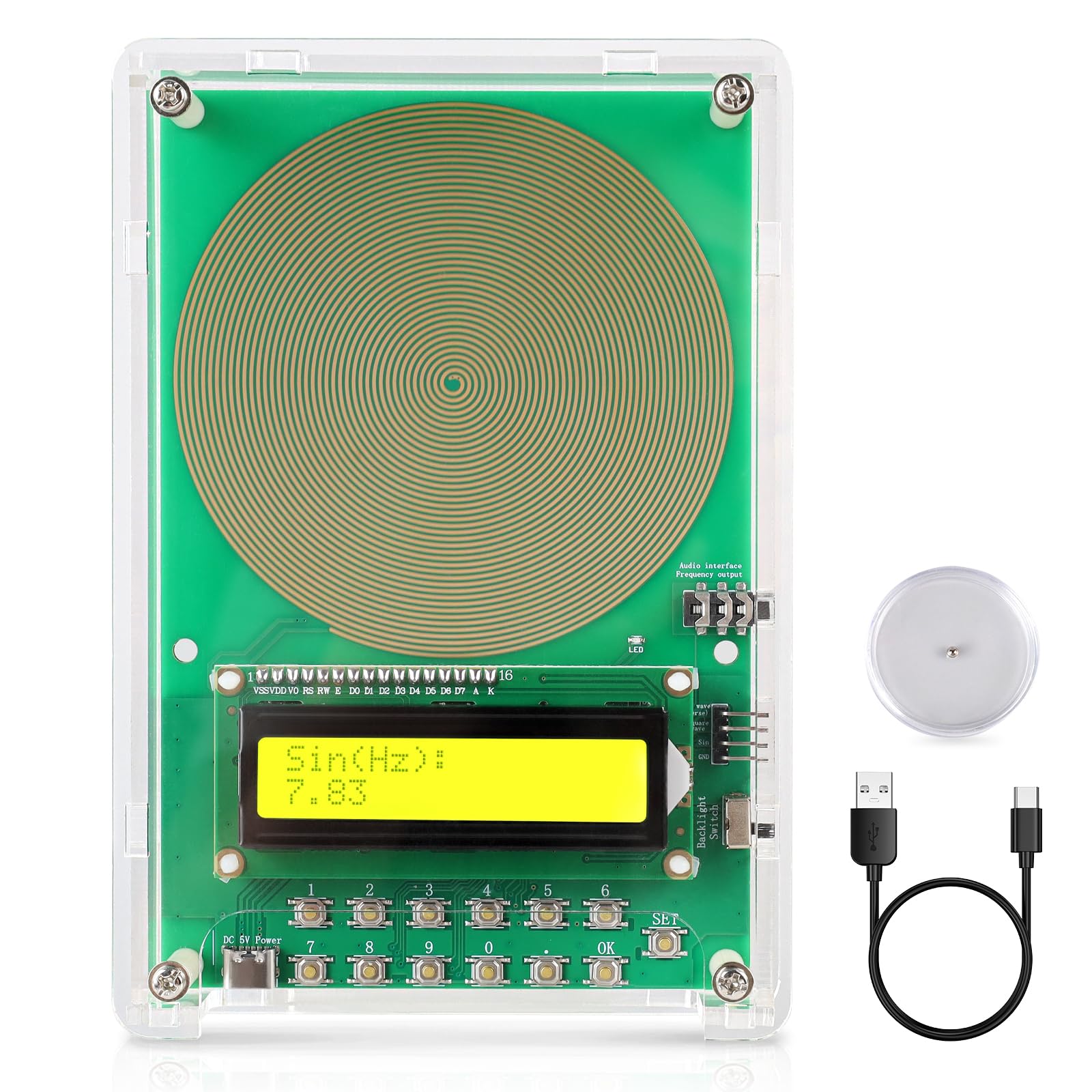
בילד: פראָנט view of the XIKDS YK01 Schumann Wave Resonance Generator, showing its clear acrylic casinג און אַרויסווייַז.
שליסל פֿעיִקייטן:
- אַדזשאַסטאַבאַל אָפטקייט: 0.001Hz צו 200KHz.
- Multiple Waveforms: Sine, Square, and Inverted Square.
- סאָליד פּלאַן: Portable size (6.50 x 4.37 inches) with a durable acrylic case.
- USB-C מאַכט: Easy and versatile power input.
- 7.83Hz Schumann Resonance: Pre-set option for specific applications.
סעטאַפּ
- אַנפּאַק: Carefully remove the Schumann Wave Resonance Generator and all accessories from its packaging.
- מאַכט קשר: Connect the provided USB-C cable to the USB-C port on the device. Plug the other end of the cable into a compatible USB power adapter (not included) or a computer USB port.
- מאַכט אויף: The device should power on automatically, and the display will illuminate, showing the current frequency setting.

Image: The XIKDS YK01 device connected via its USB Type-C interface to a laptop, illustrating power connection options.
אַפּערייטינג ינסטראַקשאַנז
1. Adjusting Frequency:
The device features buttons (typically labeled with numbers or arrows) to adjust the output frequency. Refer to the on-screen display to monitor the current frequency in Hertz (Hz).
- ניצן די אַרויף / אַראָפּ buttons to increase or decrease the frequency value.
- The frequency can be set from 0.001Hz up to 200KHz.
- A common setting for Schumann resonance is 7.83Hz.
2. Changing Waveforms:
The device supports Sine, Square, and Inverted Square waveforms. A dedicated button or menu option allows you to cycle through these waveform types.
- דרוק די וואַוועפאָרם button (or similar) to select the desired output waveform.
- The selected waveform will be indicated on the device's display.
3. Verifying Output Frequency:
You can verify the device's output using several methods:
- Using the Metal Sphere: Place the small plastic case containing the metal sphere directly on the device's main coil. The sphere will vibrate or move, indicating active frequency generation.
- ניצן אויערקנעפּלעך: Plug the provided earbuds into the audio jack on the device. While the frequencies are generally inaudible to the human ear, some users may perceive a subtle indication that the device is active.
- Professional Equipment: For precise verification, connect the device to professional frequency monitoring equipment, such as an oscilloscope.

Image: Illustration of three methods to check the output frequency: using a Schumann wave detector (metal sphere), 3.5mm earphones, and professional monitoring equipment.
4. באַקלייט קאָנטראָל:
Some models may include a switch to turn off the screen backlight, which can be useful for use in dark environments or during sleep.
וישאַלט
- רייניקונג: ווישט אָפּ דאָס אַפּאַראַט מיט אַ ווייכן, טרוקענעם שטאָף. ניצט נישט קיין שרײַבנדיקע רייניגערס אָדער סאָלווענטן.
- סטאָרידזש: האַלט דעם אַפּאַראַט אין אַ קיל, טרוקן אָרט אַוועק פון דירעקט זונשייַן און עקסטרעמע טעמפּעראַטורן.
- האַנדלינג: Handle the device with care to avoid dropping or physical damage to the acrylic casinג אדער אינערלעכע קאמפאנענטן.
טראָובלעשאָאָטינג
| פּראָבלעם | מעגלעך סיבה | לייזונג |
|---|---|---|
| די מיטל טוט נישט מאַכט אויף. | No power or faulty USB-C connection. | Ensure the USB-C cable is securely connected and the power source is functional. Try a different USB port or power adapter. |
| No visible or audible output. | Frequencies are often inaudible; device may be working correctly. | Verify output using the metal sphere or earbuds as described in the Operating Instructions. Ensure the frequency is set above 0.001Hz. |
| דער עקראַן איז ליידיק אָדער פֿאַרפֿרוירן. | צייטווייליגע ווייכווארג פראבלעם. | Disconnect and reconnect the power cable to restart the device. |
ספּעסאַפאַקיישאַנז
- מאָדעל נומער: YK01
- סאָרט: XIKDS
- אָפטקייַט קייט: 0.001Hz - 200KHz
- וואַוועפאָרמס: Sine, Square, Inverted Square
- מאַכט אַרייַנשרייַב: וסב-C
- דימענסיעס: Approximately 6.50 x 4.37 inches (device size); 7 x 5 x 2 inches (package)
- וואָג: Approximately 11.2 ounces (package)
וואָראַנטי און שטיצן
XIKDS provides 24/7 technical support for this product. For assistance, please refer to the contact information provided with your purchase or visit the official XIKDS webפּלאַץ.
Specific warranty details may vary. Please retain your proof of purchase for any warranty claims. Contact customer support for detailed warranty information.