
1. הקדמה
This manual provides essential information for using your Redmi 15 5G smartphone. Please read it carefully to ensure proper operation and to maximize the device's features. Keep this manual for future reference.

בילד: פאָרנט און הינטן view of the Redmi 15 5G smartphone.
2. וואָס איז אין דער קעסטל
באַשטעטיקט אַז אַלע זאכן זענען פאַראַן אין אייער פּראָדוקט פּאַקעט:
- Redmi 15 5G סמאַרטפאָנע
- טשאַרדזשער
- וסב קאַבלע
- סים אַרויסוואַרפן געצייַג
- וואָראַנטי קאַרד
- באַניצער גייד (דעם דאָקומענט)
- פּראַטעקטיוו קאַסע
3. דיווייס איבערview
Familiarize yourself with the physical components of your Redmi 15 5G.
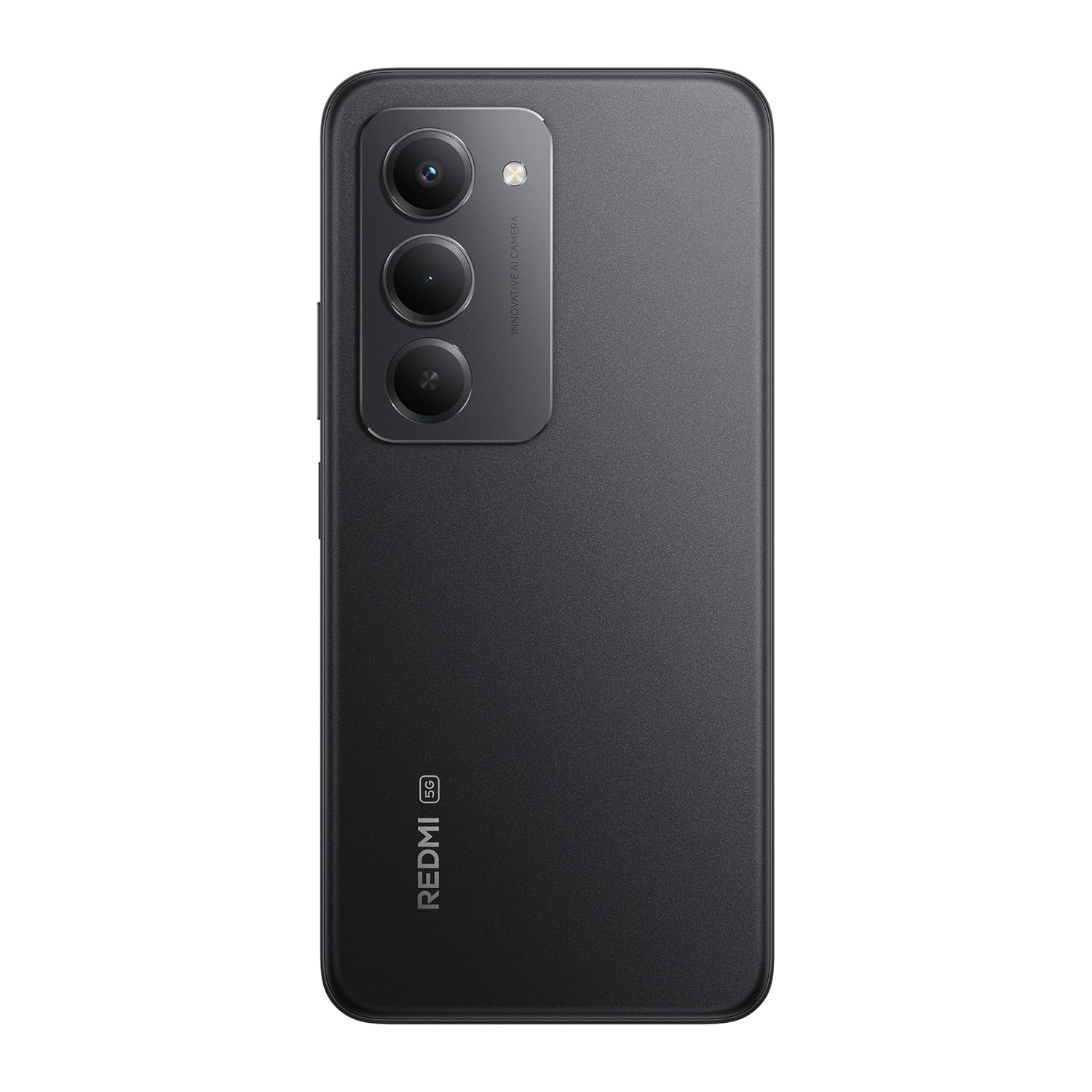
בילד: הינטערשטע view of the Redmi 15 5G, highlighting the camera array.

בילד: זייט view of the Redmi 15 5G, illustrating button placement.
שליסל פֿעיִקייטן:
- ווייַז: 17.53cm (6.9") FHD+ display with up to 144Hz refresh rate.
- פּראַסעסער: Qualcomm Snapdragon 6s Gen 3.
- אַפּאַראַט: 50MP AI Dual Camera system.
- באַטערי: Massive 7000mAh battery with 33W charging and 18W reverse charging.
- געווער: יפּ64 שטויב און וואַסער קעגנשטעל.
- אַפּערייטינג סיסטעם: אַנדרויד 15 מיט קסיאַאָמי היפּעראָס.
4. סעטאַפּ
4.1. Inserting SIM/SD Card
- געפינט די סים קארטל טאַץ אויף דער זייט פון אייער דעווייס.
- שטעקט אריין דעם סים קארטל ארויסווארף געצייג אין דעם קליינעם לאך לעבן דעם טרעי און דריקט פעסט ביז דער טרעי קומט ארויס.
- לייגט אריין אייער נאַנאָ-סים קאַרטל(ן) און/אָדער מיקראָSD קאַרטל אין די באַשטימטע סלאָץ אויף דער טאַץ. מאַכט זיכער אַז די גאָלדענע קאָנטאַקטן קוקן אַראָפּ.
- קערפאַלי שטופּן די טאַץ צוריק אין די מיטל ביז עס קליקס אין פּלאַץ.
4.2. ערשטע איינשאַלטונג און סעטאַפּ
- Press and hold the Power button (located on the side) until the Redmi logo appears.
- פֿאָלגט די אינסטרוקציעס אויף דעם עקראַן צו אויסקלײַבן אײַער שפּראַך, ראַיאָן, פֿאַרבינדן זיך צו Wi-Fi, און אויפֿשטעלן אײַער Google חשבון.
- You will be guided through setting up security features like fingerprint unlock or facial recognition.
4.3. טשאַרדזשינג די מיטל
פארן ערשטן באַנוץ, איז רעקאָמענדירט צו גאָר אָפּלאָדן אייער מיטל.
- פאַרבינדן די וסב קאַבלע צו די טשאַרדזשער.
- צאַפּן די טשאַרדזשער אין אַ מאַכט ווענטיל.
- Connect the USB cable to the Type-C port at the bottom of your phone.
- דער טשאַרדזשינג אינדיקאַטאָר וועט דערשייַנען אויף דעם עקראַן.

Image: Illustration of 18W reverse charging capability.
5. אַפּערייטינג דיין מיטל
5.1. יקערדיק נאַוויגאַציע
- ריר: צאַפּן אויף אַן איקאָן צו עפֿענען אַן אַפּ אָדער אויסקלײַבן אַן אייטעם.
- לאַקכענען: Slide your finger across the screen to scroll or navigate between screens.
- קניפּ: ניצט צוויי פינגער צו פארגרעסערן אדער פארקלענערן בילדער און web בלעטער.
- דזשעסטשערז: Configure navigation gestures in Settings for a full-screen experience.
5.2. מאַכן רופן און שיקן מעסעדזשעס
- עפענען די טעלעפאָן אַפּ צו רופן נומערן אָדער אויסקלייבן קאָנטאַקטן.
- עפענען די אַרטיקלען אַן אַפּ צו שרייבן און שיקן טעקסט מעסעדזשעס.
5.3. קאַמעראַ יוז
The Redmi 15 5G features a 50MP AI Dual Camera.
- עפענען די אַפּאַראַט אַפּ.
- אויסקלייבן אייער געוואונטשענעם מאָדע (פאָטאָ, פּאָרטרעט, ווידעאָ, אאז"וו).
- צאַפּן דעם שאַטער קנעפּל צו כאַפּן פאָטאָס אָדער אָנהייבן/אָפּשטעלן ווידעאָ רעקאָרדינג.
- Utilize AI features like AI Sky and AI Erase for enhanced photography.

Image: Close-up of the 50MP AI Dual Camera module.

Image: Demonstrating AI Sky and AI Erase camera capabilities.
5.4. באַטערי מאַנאַגעמענט
Your device is equipped with a 7000mAh battery.
- To check battery status, go to סעטטינגס> באַטערי.
- Enable Battery Saver mode to extend battery life.
- The device supports 33W fast charging and 18W reverse charging.

Image: Battery performance metrics for the 7000mAh battery.
5.5. קאַנעקטיוויטי
- ווי-פי: פאַרבינדן זיך צו וויירלעס נעטוואָרקס דורך סעטטינגס> Wi-Fi.
- בלועטאָאָטה: פארבינדט זיך מיט אנדערע בלועטוט דעווייסעס דורך סעטטינגס> בלועטאָאָטה.
- מאָביל דאַטן: Manage your cellular data connection via Settings > Mobile network.
5.6. Software (Android 15 with Xiaomi HyperOS)
Your Redmi 15 5G runs on Android 15 with Xiaomi HyperOS, offering a customized user experience and regular security updates.

Image: Software update policy for Xiaomi HyperOS.
6. וישאַלט
6.1. רייניקן דיין דעווייס
- ניצט אַ ווייכן, לינט-פֿרייע שטאָף צו רייניקן דעם עקראַן און קערפּער.
- ויסמיידן ניצן האַרב קעמיקאַלז אָדער אַברייסיוו מאַטעריאַלס.
- דיסקאַנעקט די מיטל פון מאַכט איידער רייניקונג.
6.2. ווייכווארג דערהייַנטיקונגען
קאָנטראָלירט רעגולער פֿאַר ווייכווארג דערהייַנטיקונגען צו ענשור אָפּטימאַל פאָרשטעלונג און זיכערהייט.
- גיין צו סעטטינגס > וועגן טעלעפאָן > MIUI ווערסיע.
- צאַפּן קוק פֿאַר דערהייַנטיקונגען.
- פֿאָלגט די אינסטרוקציעס אויף דעם עקראַן צו דאַונלאָודן און אינסטאַלירן אַלע בנימצא דערהייַנטיקונגען.
6.3. באַטערי קער
- ויסמיידן יקספּאָוזינג די מיטל צו עקסטרעם טעמפּעראַטורעס.
- לאָזט נישט די באַטאַרייע גאָר אויסליידיקן אָפט.
- Use only the official charger and cable provided.
6.4. שטויב און וואַסער קעגנשטעל (IP64)
The Redmi 15 5G is rated IP64 for dust and water resistance. This means it is protected against dust ingress and splashing water from any direction. However, it is not designed for submersion in water. Avoid exposing the device to high-pressure water or prolonged submersion.

Image: Durability features including IP64 dust and water resistance.
7. טראָובלעשאָאָטינג
אויב איר טרעפט פּראָבלעמען מיט אייער מיטל, פּרוּווט די פאלגענדע לייזונגען:
- מיטל נישט קער אויף: זיכער מאַכן אַז די באַטאַרייע איז אויפגעלאָדן. פֿאַרבינדט דעם טשאַרדזשער און וואַרט אַ פּאָר מינוט איידער איר פּרוּווט ווידער אָנצוצינדן.
- טשאַרדזשינג פּראָבלעמס: Check if the charger and cable are properly connected. Try a different power outlet.
- נעץ פראבלעמען: Ensure your SIM card is correctly inserted. Check network settings in Settings > Mobile network. Restart the device.
- אַפּ ענטפֿערט נישט: Force close the app from the recent apps screen or go to Settings > Apps > [App Name] > Force stop.
- לאַנגזאַמע פאָרשטעלונג: Clear cache, uninstall unused apps, or restart the device.
- פאַבריק באַשטעטיק: אלס א לעצטער מיטל, קענט איר דורכפירן א פאַבריק ריסעט (סעטטינגס> וועגן טעלעפאָן> פאַבריק באַשטעטיק). ווארענונג: דאָס וועט אויסמעקן אַלע דאַטן אויף דיין מיטל. מאַכט אַ באַקאַפּ פון וויכטיקע דאַטן איידער איר גייט ווייטער.
8. ספּעסאַפאַקיישאַנז
| שטריך | באַשרייַבונג |
|---|---|
| אָפּערייטינג סיסטעם | Android 15, Xiaomi HyperOS |
| באַראַן | 6 גיגאבייט |
| פּראָדוקט דימענשאַנז | 16.8 X 0.8 X 8 סענטימעטער |
| נומער מאָדעל נומער | 25057RN09I |
| קאַנעקטיוויטי טעכנאָלאָגיע | בלועטוט, יו-עס-בי, וויי-פיי |
| ספּעציעלע פֿעיִקייטן | Dust resistance, Water resistance (IP64) |
| ווייַז האַכלאָטע | 1080 X 2340 בילדצעלן |
| אַודיאָ דזשאַק | טיפּ C |
| קאָליר | האַלבנאַכט שווארצע |
| באַטערי פּאָווער שאַץ | 7000 מאַה |
| פּונקט וואָג | 217 ג |
| קפּו ספּיד | אַרויף צו 2.3 GHz |
9. וואָראַנטי און שטיצן
9.1. וואָראַנטי אינפֿאָרמאַציע
Your Redmi 15 5G comes with a limited manufacturer's warranty. Please refer to the וואָראַנטי קאַרד included in your product package for detailed terms and conditions, including coverage period and service procedures.
9.2. קונה שטיצן
For further assistance, technical support, or service inquiries, please visit the official Redmi support website or contact their customer service. Contact details can typically be found on the warranty card or the official Redmi webפּלאַץ.