
1. הקדמה
The NZXT H2 Flow (CI-H21FB-01) is a compact vertical Mini-ITX PC case designed to maximize airflow and save space while accommodating high-performance components. It features smart cable management, tool-less access, and includes dual top fans and a premium PCIe 5.0 riser cable for a streamlined building experience.
שליסל פֿעיִקייטן:
- Hybrid Glass-and-Mesh Side Panel: Showcases your build while supporting up to a 280 mm radiator for efficient cooling.
- סאָליד פּלאַן: A 20.7 L volume fits most GPUs up to 331 mm, offering high-end power in a small footprint.
- High Airflow Panels: Ultra-fine mesh panels on multiple sides maximize fresh air intake and filter dust, keeping components cooler and cleaner.
- Effortless Building: Tool-less panels, integrated cable routing Velcro straps, and intuitive wire management channels simplify installation.
- Pre-Installed Performance: Includes a premium PCIe 5.0 riser cable for vertical GPU mounting and dual F120Q CV fans for immediate exhaust cooling.
2. זיכערקייַט אינפֿאָרמאַציע
WARNING: Always disconnect power from your PC before performing any installation, maintenance, or troubleshooting. Failure to do so may result in personal injury or damage to components.
- לייענען אַלע ינסטראַקשאַנז קערפאַלי איידער ייַנמאָנטירונג.
- טראָגט אַן אַנטי-סטאַטישן האַנטגעלענק-רימען אָדער רירט אָפט אָן אַן געערדטן מעטאַלן אָביעקט צו פאַרמייַדן עלעקטראָסטאַטישן אָפּזאָגן (ESD) שאָדן צו קאָמפּאָנענטן.
- Handle components with care. Avoid touching pins or exposed circuitry.
- האַלט קליינע טיילן און פּאַקאַדזשינג מאַטעריאַלן אַוועק פון קינדער.
- זאָרגט פֿאַר געהעריקע ווענטילאַציע אַרום דעם פּיסי קעסטל כּדי צו פֿאַרמייַדן איבערהיצונג.
3. פּעקל אינהאַלט
Verify that all items are present in your NZXT H2 Flow package:
- NZXT H2 Flow Mini-ITX PC Case
- 2 x 120mm F120Q CV Top Fans (pre-installed)
- Premium PCIe 5.0 Riser Cable (pre-installed)
- אַקסעסאָרי קעסטל (מיט שרויפן, קאַבל טייז, און אַנדערע קליינע טיילן)
4. Component Compatibility
The NZXT H2 Flow case is designed to accommodate specific component sizes for optimal performance and fit:
- מאָטהערבאָאַרד: מיני יטקס
- גראַפיקס קאַרטל (GPU): Up to 331 mm in length
- ראַדיאַטאָר: Up to 280 mm (for liquid cooling solutions)
- מאַכט צושטעלן (פּסו): SFX/SFXL form factor is recommended for best compatibility and cable management.
- פאַנס: Includes 2 x 120mm top fans. Additional fan mounting options may be available depending on other component choices.
5. אויפשטעלן און אינסטאַלירן
Follow these steps to assemble your PC within the NZXT H2 Flow case. Refer to your individual component manuals for specific installation details.
5.1. Case Overview און דימענשאַנז
The NZXT H2 Flow is a compact vertical Mini-ITX case. Understanding its dimensions is crucial for planning your build.

5.2. Accessing the Case Interior
The H2 Flow features tool-less panels for easy access to the interior.

5.3. Motherboard and CPU Installation
Install your Mini-ITX motherboard and CPU (with cooler) before placing it into the chassis.
5.4. מאַכט צושטעלן אַפּאַראַט (PSU) ינסטאַלירונג
The case supports SFX/SFXL power supplies. Mount the PSU in its designated area, typically at the bottom of the case.

5.5. קאַבלע מאַנאַגעמענט
Utilize the integrated cable routing channels and Velcro straps for a clean and organized interior.
5.6. גראַפיקס קאַרטל (GPU) ינסטאַלירונג
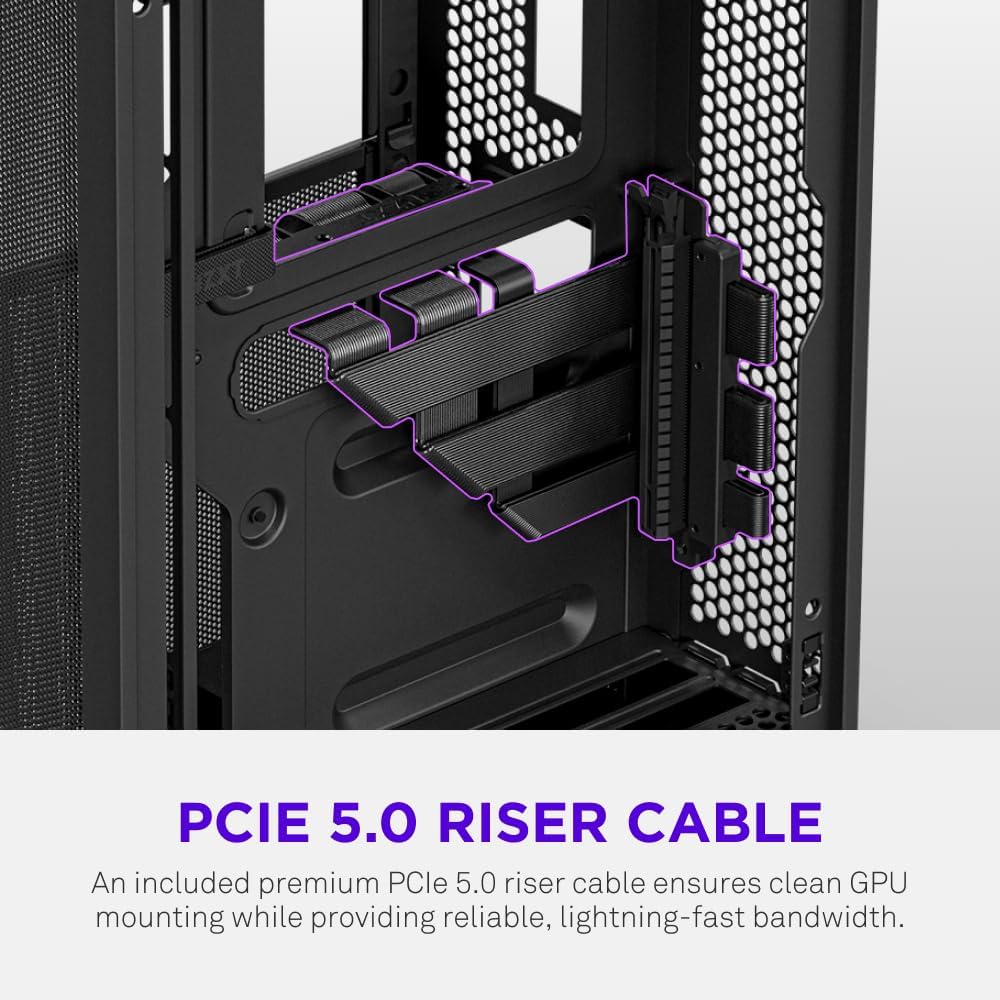
The H2 Flow supports GPUs up to 331 mm in length and includes a premium PCIe 5.0 riser cable for vertical mounting.

5.7. קאָאָלינג סיסטעם
The case comes with two pre-installed 120mm F120Q CV fans at the top for exhaust. It also supports up to a 280mm radiator for liquid cooling.


5.8. פּראָדוקט איבערview ווידעא
קוקט דעם אפיציעלן ווידעא פאר א וויזועלע איבערבליקview of the NZXT H2 Flow Mini-ITX PC Gaming Case.
6. אַפּערייטינג ינסטרוקטיאָנס
6.1. מאַכט אויף / אויסגעלאשן
Press the power button located on the front I/O panel to turn your PC on or off.
6.2. פראָנטאַלע I/O פּאָרטן
די פראָנט I/O פּאַנעל גיט באַקוועמען צוטריט צו:
- וסב 3.0 פּאָרץ
- וסב- C פּאָרט
- Audio Jack (if applicable)
Connect your peripherals such as keyboards, mice, and headsets to these ports.
7. וישאַלט
7.1. רייניקונג פון שטויב פילטערס
The NZXT H2 Flow features ultra-fine mesh panels that act as dust filters. Regularly clean these panels to maintain optimal airflow and prevent dust buildup inside your PC.
- Gently remove the mesh panels from the case.
- Use compressed air or a soft brush to remove accumulated dust.
- Reattach the panels securely.
7.2. אַלגעמיינע רייניקונג
ניצן אַ ווייך, דamp cloth to wipe down the exterior of the case. Avoid abrasive cleaners or solvents.
8. טראָובלעשאָאָטינג
אויב איר טרעפט פּראָבלעמען מיט אייער פּיסי בויען, באַטראַכט די פאלגענדע געוויינטלעכע טראָובלעשווטינג טריט:
- קיין מאַכט: זיכער מאַכן אַז אַלע מאַכט קייבאַלז (PSU צו וואַנט, PSU צו מוטערבאָרד, CPU, GPU) זענען זיכער פארבונדן. קאָנטראָלירט דעם מאַכט קנעפּל אויף די PSU.
- קיין ווייַז: Verify that your monitor is connected to the graphics card (not the motherboard I/O unless using integrated graphics) and that the GPU has proper power connections. Reseat the GPU and RAM.
- איבערהייצונג: Check fan connections and orientation. Ensure mesh panels are clean and not obstructed. Verify CPU cooler installation and thermal paste application.
- קאָמפּאָנענט נישט דעטעקטירט: Reseat the component (GPU, RAM, storage drives). Check power and data connections.
For more complex issues, consult your individual component manuals or NZXT customer support.
9. ספּעסאַפאַקיישאַנז
| שטריך | דעטאַל |
|---|---|
| סאָרט | NZXT |
| מאָדעל נאָמען | NZXT H2 Flow |
| טיפּ פון קאַסטן | מיני-טורעם |
| מאָטהערבאָאַרד קאַמפּאַטאַבילאַטי | מיני יטקס |
| GPU לענג שטיצע | אַרויף צו 331 מם |
| ראַדיאַטאָר שטיצן | אַרויף צו 280 מם |
| אַרייַנגערעכנט פאַנס | 2 x 120mm F120Q CV Top Fans |
| Included Riser Cable | Premium PCIe 5.0 |
| מאַכט צושטעלן מאַונטינג טיפּ | Bottom Mount (SFX/SFXL recommended) |
| קאָאָלינג אופֿן | Air, Liquid |
| קאָליר | שוואַרץ |
| מאַטעריאַל | גלאז, מעטאַל |
| פּונקט וואָג | 4.55 קילאָגראַמס |
| Total USB 3.0 Ports | 1 |
| Other Special Features | Tool-less Installation, Integrated Cable Management |
10. וואָראַנטי & שטיצן
10.1. וואָראַנטי אינפֿאָרמאַציע
The NZXT H2 Flow Mini-ITX PC Case comes with a 2-יאָר מאַנופאַקטורער וואָראַנטיביטע באַהאַלטן אייער קויפן באַווייַז פֿאַר וואָראַנטי קליימז.
10.2. קונה שטיצן
For technical assistance, troubleshooting, or warranty inquiries, please visit the official NZXT support webפּלאַץ אָדער קאָנטאַקט זייער קונה דינסט מאַנשאַפֿט.
NZXT Store: Visit the NZXT Store on Amazon