
1. הקדמה
Thank you for choosing the YPOO Room Runner Treadmill. This manual provides essential information for the safe and efficient use of your new fitness equipment. Please read it thoroughly before assembly and operation, and keep it for future reference.
The YPOO Room Runner is a compact, foldable treadmill designed for home use, offering speeds up to 8km/h and a 3-stage manual incline. It features quiet operation, app connectivity, and a convenient remote control for an enhanced workout experience.

Image: The YPOO Room Runner treadmill shown in both its unfolded, operational state and its compact, folded state, highlighting its versatility and space-saving design.
2. זיכערקייַט אינסטרוקציעס
To ensure your safety and prolong the life of your treadmill, please adhere to the following guidelines:
- לייענען אַלע ינסטראַקשאַנז: Familiarize yourself with the treadmill's operation before first use.
- אָרט: שטעלט דעם טרעדמיל אויף א גלאַטער, סטאַבילער ייבערפלאַך מיט גענוג פּלאַץ אַרום אים (מינדעסטנס 2 מעטער הינטן און 0.6 מעטער אויף יעדער זייט).
- עלעקטריקאַל זיכערקייַט: Ensure the power outlet is properly grounded. Do not use extension cords or adapters. Unplug the treadmill when not in use or before cleaning/maintenance.
- באַניצער וואָג לימיט: נישט איבערשטייגן דעם מאקסימום באַניצער וואָג פון 136 ק"ג (300 פונט).
- קינדער און פּעץ: האַלטן קינדער און פּעץ אַוועק פון די טרעדמיל בעשאַס אָפּעראַציע.
- מעדיצינישע באדינגונגען: באַראַט זיך מיט אַ דאָקטער איידער איר הייבט אָן קיין געניטונג פּראָגראַם, ספּעציעל אויב איר האָט שוין פאַר-עקסיסטירנדיקע מעדיצינישע צושטאנדן.
- Emergency Stop: Always know the location of the emergency stop button and how to use it.
- שוכוואַרג: טראָגט שטענדיק פּאַסיקע אַטלעטישע שיך בשעת איר ניצט די טרעדמיל.
- וישאַלט: Perform regular maintenance as described in this manual.
3. סעטאַפּ
3.1 אַנפּאַקינג
- פֿאָרזיכטיק אַרויסנעמען די טרעדמיל פֿון זײַן פּאַקאַדזשינג.
- Check all components against the packing list to ensure nothing is missing or damaged.
- Retain packaging materials for potential future transport or return.
3.2 פֿאַרזאַמלונג
The YPOO Room Runner is designed for easy assembly. Typically, this involves unfolding the unit and securing the handrails. Refer to the included quick start guide for specific steps.
3.3 פּלייסמאַנט
Choose a location with a stable, level floor. Ensure there is sufficient space around the treadmill for safe operation and access. The compact design allows for storage under furniture when folded.

Image: A woman demonstrating how to store the YPOO Room Runner treadmill compactly under a sofa, highlighting its slim 11cm thickness and built-in wheels for easy movement.
3.4 מאַכט קאַנעקשאַן
- פֿאַרבינדט דעם מאַכט שנור צום טרעדמיל'ס מאַכט אַרייַנגאַנג.
- צאַפּן די מאַכט שנור אין אַ גראָונדעד עלעקטריקאַל ווענטיל.
- Ensure the power switch on the treadmill is in the OFF position before plugging it in.

בילד: א נאָענטע בילד view of the power cord being connected to the treadmill's power input, showing the secure connection point.
4. אַפּערייטינג ינסטרוקטיאָנס
4.1 פּאַוערינג אויף / אַוועק
- To power on, flip the main power switch located near the power cord input to the ON position. The display will illuminate.
- צו אויסלאָשן, דרייט דעם הויפּט מאַכט קנעפל צו די "אויס" פּאָזיציע.
4.2 ניצן דעם קאָנטראָל פּאַנעל און ווײַטקאָנטראָל
The treadmill can be controlled via the integrated control panel on the handrail or the included remote control. Both offer similar functionalities for starting, stopping, and adjusting speed.
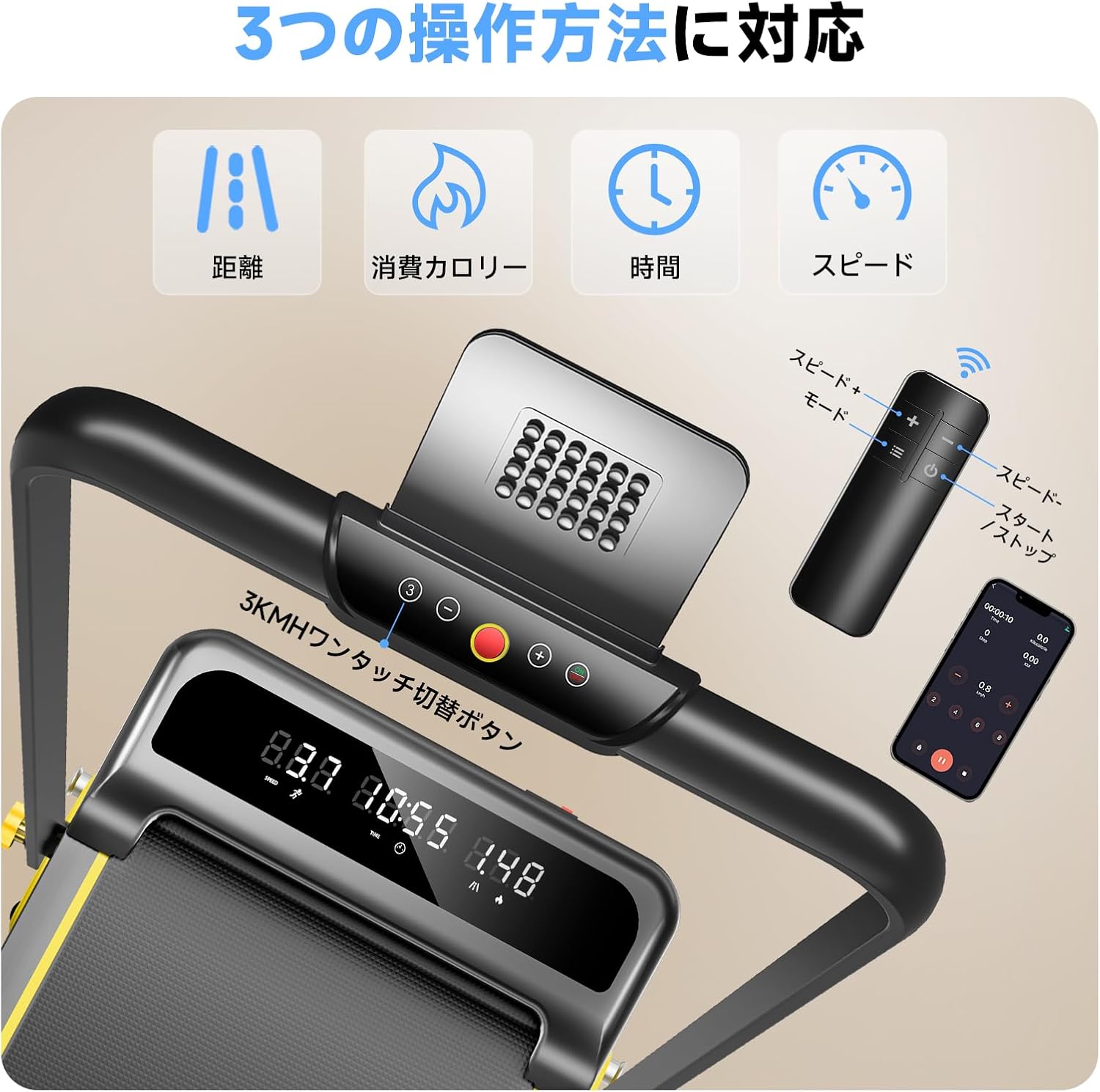
בילד: א דעטאַלירטע view of the treadmill's control panel, the handheld remote control, and a smartphone screen displaying the YPOO FIT app, illustrating the multiple control options.
- אָנהייב / האַלטן: Press the 'Start' or 'Stop' button on the control panel or remote to begin or end your workout.
- גיכקייט אַדזשאַסטמאַנט: Use the '+' and '-' buttons to increase or decrease the speed. The speed range is 0.8 km/h to 8 km/h.
- שנעלע גיכקייט קנעפּלעך: The control panel may feature quick-select buttons for common speeds (e.g., 3 km/h).
4.3 Adjusting Incline
The YPOO Room Runner features a 3-stage manual incline adjustment. To change the incline:
- Ensure the treadmill is stopped and unplugged for safety.
- Locate the incline adjustment pins at the rear of the treadmill.
- Adjust the pins to select your desired incline level: 1.5% (light exercise), 4.5% (fat burning), or 8% (intensive training).
- Ensure the pins are securely locked in place before resuming use.

Image: A woman exercising on the treadmill, accompanied by visual cues demonstrating the three manual incline settings (1.5%, 4.5%, 8%) and their corresponding benefits.
4.4 ווייַז אינפֿאָרמאַציע
The treadmill's display shows key workout metrics:
- דיסטאַנסע: Total distance covered during the current workout.
- קאַלאָריעס: עסטימאַטעד קאַלאָריעס פארברענט.
- צייט: Duration of the current workout.
- גיכקייַט: Current speed in km/h.
4.5 וואָרקאָוט מאָדעס
The YPOO Room Runner supports various workout modes to suit your fitness goals:
- Work Mode (0.8-2.5 km/h): אידעאל פֿאַר לייכטע טעטיקייט בשעתן ארבעטן אדער לייענען.
- Walking Mode (2.5-5 km/h): Suitable for brisk walking and general fitness.
- Running Mode (5-8 km/h): For more intense cardio and running workouts.
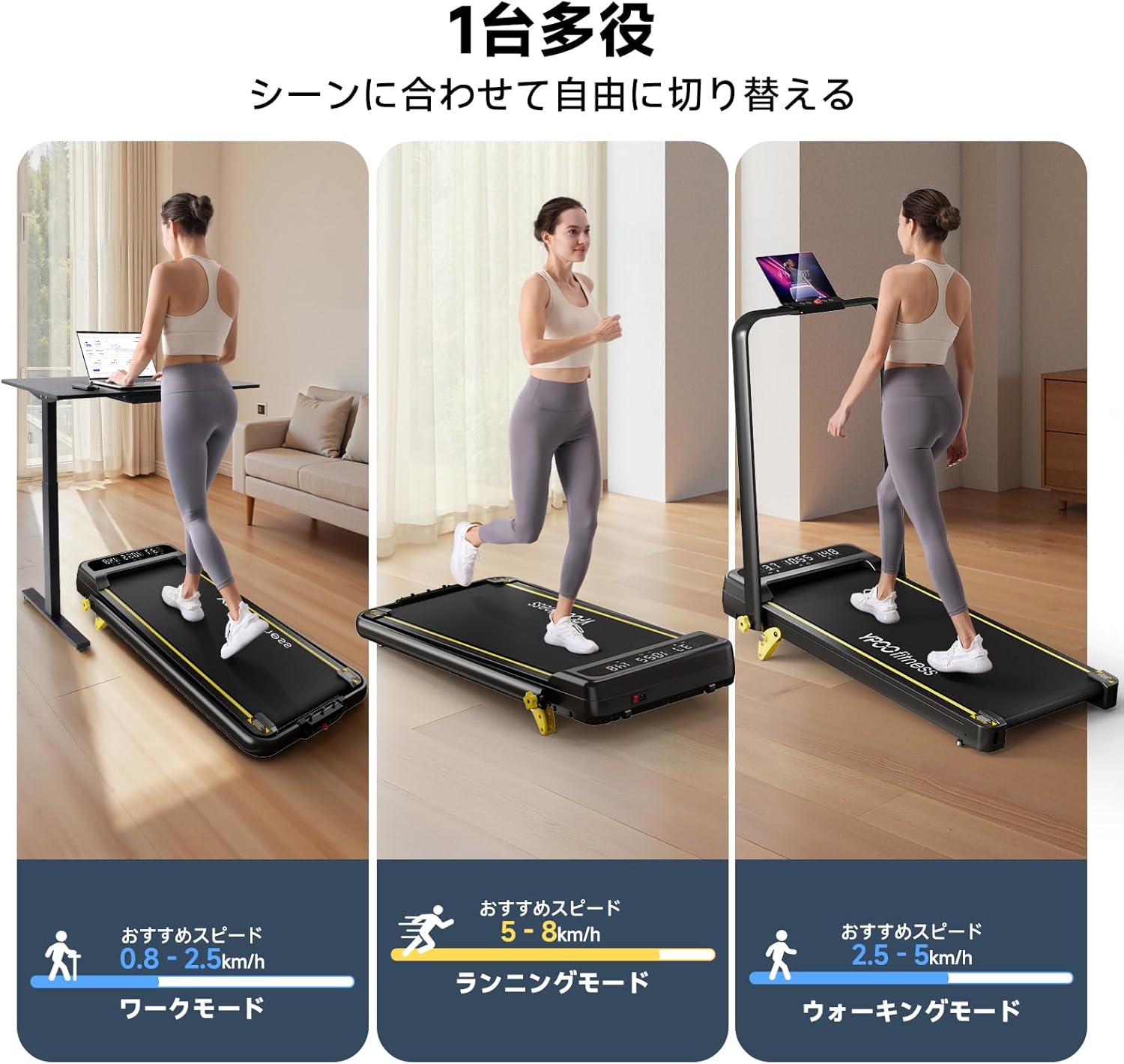
Image: Three panels illustrating the treadmill's versatility: a person walking slowly while using a laptop (Work Mode), a person running (Running Mode), and a person walking briskly (Walking Mode).
4.6 App Connectivity (YPOO FIT)
Enhance your workout experience by connecting your treadmill to the YPOO FIT app. The app allows you to track your progress, set goals, and access various training programs.
- Download the YPOO FIT app from your device's app store.
- Follow the in-app instructions to pair your treadmill via Bluetooth.
- Utilize the app for detailed workout data, personalized plans, and interactive training.

Image: A woman running on the YPOO Room Runner treadmill, with a large overlay showing the YPOO FIT application interface on a smartphone, emphasizing app integration.
5. וישאַלט
Regular maintenance ensures optimal performance and longevity of your YPOO Room Runner treadmill.
5.1 רייניקונג
- שטענדיק אויסשטעקן דעם טרעדמיל איידער איר רייניגט עס.
- ווישט אָפּ די קאַנסאָול און די אויסערלעכע ייבערפלאַכן מיט אַ ווייכן, דamp שטאָף. פֿאַרמײַדט אַברייסיוו רייניגער אָדער סאָלווענטן.
- פּיריאַדיש וואַקוום אונטער די טרעדמיל צו באַזייַטיקן שטויב און דעבריס.
5.2 פליסנדיק בעלט
- שמירן: The YPOO Room Runner features a running belt designed to be maintenance-free, requiring no lubrication.
- גאַרטל שפּאַנונג און אַליינמאַנט: Over time, the running belt may require adjustment. If the belt feels loose, slips, or drifts to one side, refer to the detailed instructions in the full user manual (if provided separately) or contact customer support for guidance on adjusting tension and alignment.
5.3 אַלגעמיינע קער
- Store the treadmill in a dry, temperate environment away from direct sunlight and moisture.
- Avoid placing heavy objects on the treadmill when not in use.
6. טראָובלעשאָאָטינג
If you encounter issues with your YPOO Room Runner, refer to the following common troubleshooting steps:
| פּראָבלעם | מעגלעך סיבה | לייזונג |
|---|---|---|
| טרעדמיל גייט נישט אן. | Power cord not connected; Power switch off; Circuit breaker tripped. | Ensure power cord is securely plugged in; Turn power switch ON; Check household circuit breaker. |
| דער לויף גאַרטל גליטשט אָדער האַלט זיך אָן. | Belt tension too low. | אַדזשאַסטירן די גאַרטל שפּאַנונג (זעט דעם גאַנצן מאַנואַל אָדער קאָנטאַקט שטיצע). |
| לויף גאַרטל דריפט צו איין זייט. | Belt alignment off. | Adjust belt alignment (refer to full manual or contact support). |
| ומגעוויינטלעך ראַש בעשאַס אָפּעראַציע. | Loose parts; Debris under belt; Motor issue. | Inspect for loose parts and tighten; Clean under the belt; If noise persists, contact support. |
| Error Code 007 (or similar). | ספּעציפישע אינערלעכע חסרון. | Turn off the treadmill, unplug it, wait 30 seconds, then plug it back in and restart. If the error persists, contact customer support with the specific error code. |
If you cannot resolve an issue using these steps, please contact YPOO customer support.
7. ספּעסאַפאַקיישאַנז
Key technical specifications for the YPOO Room Runner Treadmill:
- מאָדעל: Room Runner MAX8km/h
- גיכקייַט קייט: 0.8 - 8 קילאָמעטער פּער שעה
- גרייכן: 3-stage manual adjustment (1.5%, 4.5%, 8%)
- מאָטאָר: 2.5 הפּ (שפּיץ)
- מאַקסימום באַניצער וואָג: 136 קג (300 לבס)
- Running Belt Dimensions: 930 מם (לענג) x 380 מם (ברייט)
- פאָולדיד גרעב: בעערעך 11 סענטימעטער
- ראַש מדרגה: Approximately 45 dB (during typical operation)
- קאַנעקטיוויטי: Bluetooth for YPOO FIT App, Remote Control
- ווייַז: Multi-function LED display (Time, Distance, Calories, Speed)

Image: A visual representation of the treadmill's robust construction, featuring a 136 KG weight on the running deck, emphasizing its high weight capacity and the five-layer durable belt.
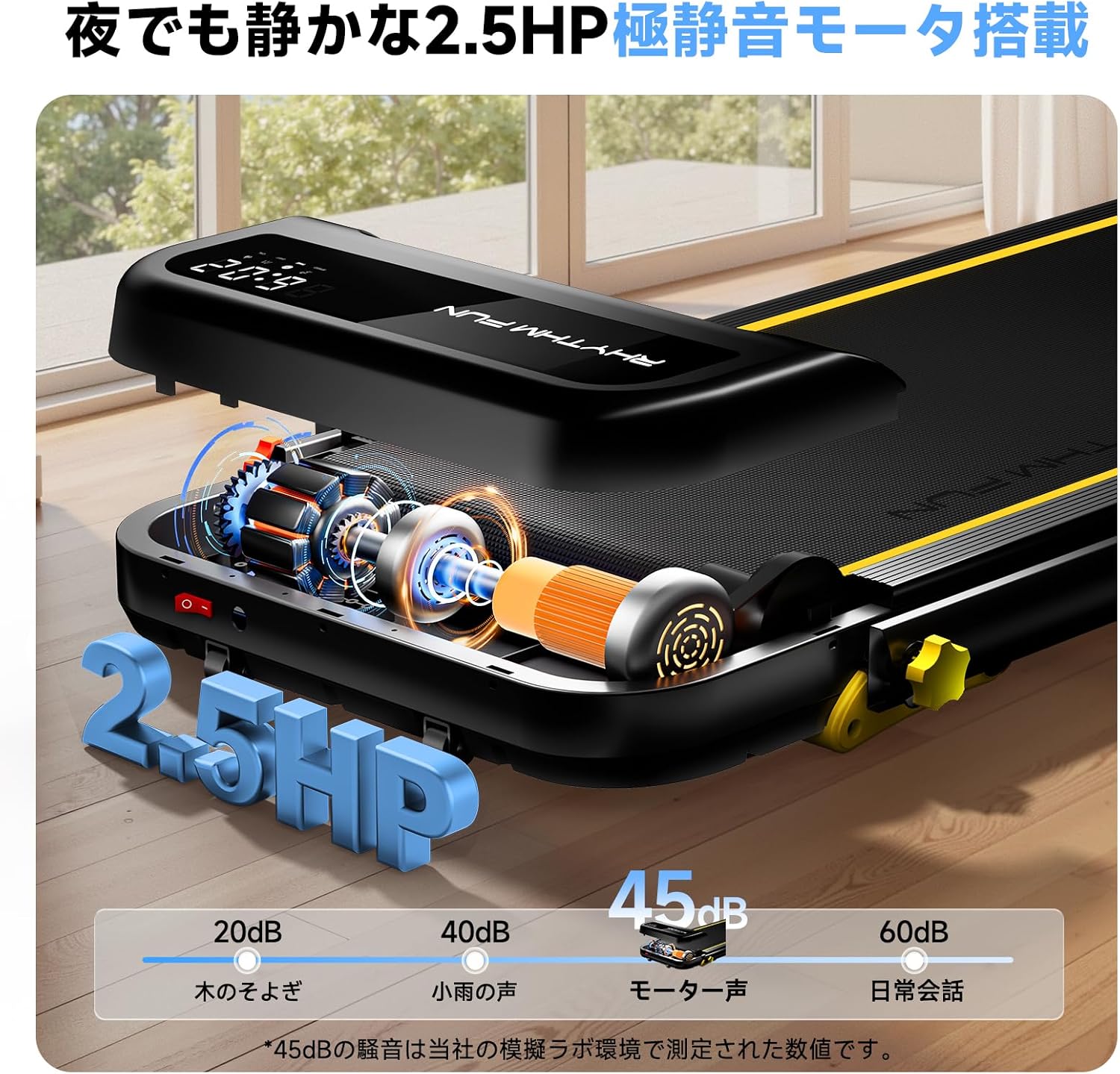
בילד: אן עקספלאדירטע view of the treadmill's internal motor and components, highlighting its 2.5HP quiet motor and a comparison of noise levels (e.g., 45dB for motor sound).
8. וואָראַנטי און שטיצן
YPOO provides a limited warranty for the Room Runner Treadmill:
- ראַם וואָראַנטי: 1-year limited warranty on the main frame.
- פּאַרץ וואָראַנטי: 90-day limited warranty on critical components and parts.
This warranty covers manufacturing defects under normal use. It does not cover damage resulting from misuse, accident, unauthorized modification, or improper maintenance.
קונה שטיצן
For technical assistance, warranty claims, or any questions regarding your YPOO Room Runner Treadmill, please contact YPOO customer support. Refer to your purchase documentation or the YPOO official webזייטל פֿאַר די מערסט אַקטועלע קאָנטאַקט אינפֿאָרמאַציע.