
1. הקדמה
Thank you for choosing the Schneider 43A1 4K UHD LED TV. This television combines advanced display technology with smart features to provide an immersive viewing experience. Featuring a 4K Ultra High Definition display, QLED-LCD technology with Direct LED backlighting, and the VIDAA Smart TV platform, your new TV offers vibrant colors, deep blacks, and access to a wide range of entertainment.
This manual provides essential information for the safe and efficient use of your television. Please read it thoroughly before operating the device and retain it for future reference.
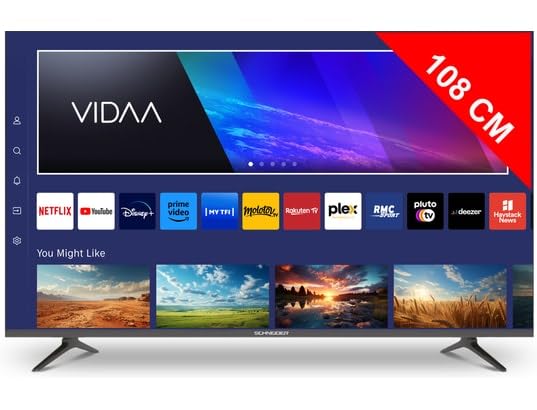
בילד 1.1: פראָנט view of the Schneider 43A1 TV with VIDAA interface.
2. זיכערקייַט אינפֿאָרמאַציע
כדי צו זיכער מאַכן זיכערע אָפּעראַציע און פאַרמייַדן שאָדן, ביטע אָבסערווירן די פאלגענדע זיכערהייט מיטלען:
- אָרט: Position the TV on a stable, level surface. Avoid placing it in direct sunlight, near heat sources, or in environments with high humidity or dust.
- ווענטילאַטיאָן: Ensure adequate ventilation around the TV. Do not block ventilation openings. Maintain a minimum distance of 10 cm from walls or other objects.
- מאַכט צושטעלן: ניצן בלויז די ספּעסיפיעד מאַכט צושטעלן וואָלtage. Ensure the power cord is not pinched or walked on. Disconnect the power plug during lightning storms or when unused for extended periods.
- רייניקונג: נעמט ארויס דעם טעלעוויזאר איידער איר רייניגט. ניצט א ווייכן, טרוקענעם טוך. ניצט נישט קיין פליסיגע אדער אייראזאל רייניגער.
- ליקווידס: שטעלט נישט אויס דעם טעלעוויזאר צו טראָפּנדיקע אָדער שפּריצנדיקע פליסיקייטן. שטעלט נישט קיין זאכן אָנגעפילט מיט פליסיקייטן, ווי וואַזעס, אויף דעם טעלעוויזאר.
- קינדער: Supervise children to ensure they do not climb on the TV or furniture.
- וואַנט מאָונטינג: If wall-mounting, use a VESA compatible bracket (200 x 200 mm) and ensure proper installation by qualified personnel to prevent injury.
3. פּעקל אינהאַלט
ביטע קאָנטראָלירט אַז אַלע זאכן זענען פאַראַן און אין גוטן צושטאַנד:
- Schneider 43A1 4K UHD LED TV
- ווייַט קאָנטראָל
- מאַכט קאַבלע
- טעלעוויזיע שטאַנד (2 שטיק)
- שרויפן פֿאַר טעלעוויזיע שטאַנד
- באַניצער מאַנואַל (דעם דאָקומענט)
4. סעטאַפּ
4.1 אַנפּאַקינג
Carefully remove the TV from its packaging. It is recommended to keep the original packaging for potential future transport or service needs.
4.2 שטיין ייַנמאָנטירונג
If you are not wall-mounting the TV, attach the included stand pieces to the bottom of the TV using the provided screws. Ensure the stand is securely fastened before placing the TV upright.
4.3 וואַנט מאָונטינג (אָפּציאָנאַל)
The Schneider 43A1 is compatible with VESA 200 x 200 mm wall mounts. For safe installation, it is highly recommended to use a professional installer. Refer to your wall mount's instructions for specific details.
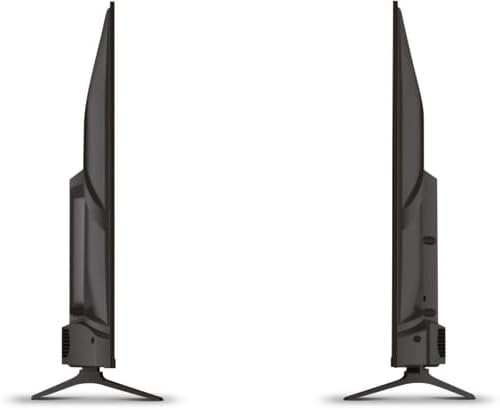
בילד 4.1: זייט view of the Schneider 43A1 TV, illustrating its profile for placement or wall mounting.
4.4 קאַנעקטינג פונדרויסנדיק דעוויסעס
אייער טעלעוויזיע אָפפערט פֿאַרשידענע קאָנעקטיוויטי אָפּציעס:
- הדמי: Connect up to three HDMI 2.0 devices (e.g., Blu-ray player, game console, set-top box) to the HDMI ports.
- וסב: Two USB ports are available for connecting USB storage devices to play media.
- AV/Audio Input: For older devices requiring composite video and stereo audio.
- קאָאַקסיאַל רעזולטאַט: פֿאַר פֿאַרבינדן צו אַן עקסטערנעם אַודיאָ סיסטעם.
- אַנטענע/קאַבל אַרייַנגאַנג: פֿאַרבינדט אייער אַנטענע אָדער קאַבל טעלעוויזיע סיגנאַל פֿאַר DVB-T/T2/C/S2 אָפּנאַם.
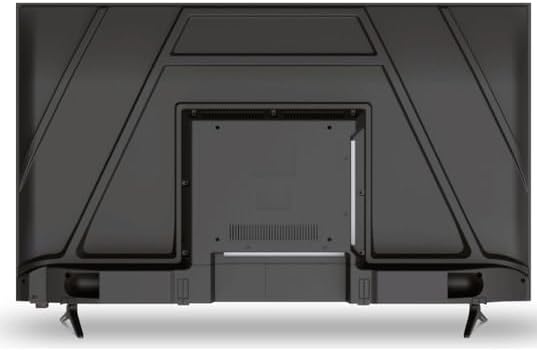
בילד 4.2: דערציען view of the Schneider 43A1 TV, highlighting connection ports.
4.5 קאַנעקטינג מאַכט
Plug the power cable into the TV's power input, then into a suitable wall outlet.
4.6 ערשטע סעטאַפּ וויזאַרד
Upon first power-on, the TV will guide you through an initial setup process. This includes selecting your language, connecting to a Wi-Fi network, and scanning for available channels (DVB-T/T2/C/S2).
5. אָפּערייטינג
5.1 רימאָוט קאָנטראָל פאַנגקשאַנז
די ווײַטקאָנטראָל לאָזט אײַך נאַוויגירן די פֿונקציעס פֿונעם טעלעוויזאָר:
- מאַכט קנעפּל: טורנס די טעלעוויזיע אויף אָדער אַוועק.
- באַנד אַרויף / אַראָפּ: אַדדזשוסץ די געזונט מדרגה.
- קאַנאַל אַרויף / אַראָפּ: טוישט טעלעוויזיע קאַנאַלן.
- אַרייַנשרייַב / מקור: Selects the input source (HDMI, USB, TV Tuner).
- נאַוויגאַציע קנעפּלעך: פֿאַר מעניו נאַוויגאַציע.
- סמאַרט טעלעוויזיע קנעפּלעך: Direct access to popular apps like Netflix, Prime Video, YouTube.
5.2 Smart TV (VIDAA)
The integrated VIDAA Smart TV platform provides access to a variety of applications and streaming services. Connect your TV to the internet via Wi-Fi to enjoy features like Netflix, Prime Video, and YouTube. Bluetooth connectivity allows for wireless connection to compatible audio devices.

בילד 5.1: געווינקלטע פראָנט view of the Schneider 43A1 TV, displaying the VIDAA Smart TV interface.
5.3 אַרייַנשרייַב סעלעקציע
Press the 'Input' or 'Source' button on your remote control to switch between connected devices (HDMI 1, HDMI 2, HDMI 3, USB, AV, TV Tuner).
5.4 בילד און קלאַנג סעטטינגס
Access the TV's menu to adjust picture and sound settings. The 4K UHD resolution, QLED-LCD technology, and Direct LED backlighting ensure a high-quality visual experience. The TV also features upscaling to enhance lower-resolution content. Audio is delivered via 2 x 8 W RMS stereo speakers with Dolby Audio support.
5.5 PC Monitor Mode
The TV can be used as a PC monitor by connecting your computer via an HDMI cable. This mode optimizes the display for computer use.
6. וישאַלט
6.1 רייניקן דעם טעלעוויזאר
Before cleaning, ensure the TV is unplugged from the power outlet.
- פאַרשטעלן: ווישט אָפּ דעם עקראַן מיט אַ ווייכן, לינט-פֿרײַעם שטאָף. פֿאַר שווערע פֿלעקן, ווישט לײַכט.ampווישט דעם שטאָף מיט וואַסער אָדער אַ ספּעציאַליזירטן עקראַן רייניגער (שפּריצט נישט גלייך אויפן עקראַן).
- עקסטעריע: ניצט אַ ווייכע, טרוקענע שטאָף צו ווישן דעם טעלעוויזאָרasinז. פֿאַרמײַדן אַברייסיוו רייניגער אָדער סאָלווענטן.
6.2 ווייכווארג דערהייַנטיקונגען
Your TV may receive software updates to improve performance and add new features. Ensure your TV is connected to the internet to receive these updates automatically or check for them manually through the settings menu.
7. טראָובלעשאָאָטינג
אויב איר טרעפט פּראָבלעמען מיט אייער טעלעוויזיע, זעט די פאלגענדע געוויינטלעכע פּראָבלעמען און לייזונגען:
- קיין מאַכט:
- Check if the power cable is securely plugged into the TV and the wall outlet.
- זיכער מאַכן אַז די וואַנט אַוטלעט אַרבעט (טעסט מיט אַן אַנדער דעווייס).
- דריק דעם מאַכט קנעפּל אויף דער ווײַטקאָנטראָל אָדער אויף דער טעלעוויזיע אַליין.
- קיין בילד/קלאַנג:
- באַשטעטיקן אַז די ריכטיקע אַרייַנגאַנג מקור איז אויסגעקליבן (למשל, HDMI 1, טעלעוויזיע).
- קאָנטראָלירט אַלע קאַבל פֿאַרבינדונגען צווישן דעם טעלעוויזיע און עקסטערנע דעוויסעס.
- זייט זיכער אז די קול איז נישט שטיל אדער געשטעלט אויף מינימום.
- אויב איר ניצט אַן אַנטענע, קאָנטראָלירט די אַנטענע פֿאַרבינדונג און דורכפֿירט אַ קאַנאַל סקען.
- רימאָוט קאָנטראָל נישט ארבעטן:
- פאַרבייַטן די באַטעריז אין די ווייַט קאָנטראָל.
- זיכער מאַכן אַז עס זענען נישטאָ קיין שטערונגען צווישן דעם ווײַטקאָנטראָל און דעם טעלעוויזיע'ס IR סענסאָר.
- Smart TV/Network Issues:
- קאָנטראָלירט אייער Wi-Fi ראַוטער און אינטערנעט פֿאַרבינדונג.
- Go to the TV's network settings to re-connect to your Wi-Fi network.
- ריסטאַרט די טעלעוויזיע און דיין ראַוטער.
אויב די פראבלעם בלייבט נאך פרובירן די לייזונגען, ביטע קאנטאקטירט קאסטומער סופארט.
8. ספּעסאַפאַקיישאַנז
| שטריך | באַשרייַבונג |
|---|---|
| מאָדעל | Schneider 43A1 |
| ווייַז גרייס | 109 סענטימעטער (43 אינטשעס) |
| האַכלאָטע | 4K Ultra HD (3840 X 2160 בילדצעלן) |
| ווייַז טעכנאָלאָגיע | QLED-LCD with Direct LED Backlight |
| קאַנטראַסט פאַרהעלטעניש | 1100:1 |
| ברייטנאַס | 200 סי / מ² |
| אַודיאָ רעזולטאַט | 2 x 8 W RMS Stereo |
| אַודיאָ טעכנאָלאָגיע | Dolby Audio |
| HDMI פּאָרץ | 3 (הדמי 2.0) |
| וסב פּאָרץ | 2 |
| אנדערע אינפֿאָרמאַציע | AV/Audio Input |
| אַוטפּוץ | קאָאַקסיאַל רעזולטאַט |
| טונער | DVB-T/T2/C/S2 |
| סמאַרט טעלעוויזיע פּלאַטפאָרם | VIDAA (Netflix, Prime Video, YouTube) |
| ווירעלעסס קאַנעקטיוויטי | ווי-פי, בלועטאָאָטה |
| VESA קאַמפּאַטאַבילאַטי | 200 רענטגענ 200 מם |
| וואָג | 7.5 קילאָגראַמס |