
1. פּראָדוקט איבערview
The DAREU AE7 Pro is a high-performance wireless gaming mouse designed for precision and comfort. It features a custom PAW3950 optical sensor, 8K polling rate, tri-mode connectivity, and an ergonomic right-handed design. The included charging dock provides convenient power and real-time status updates.
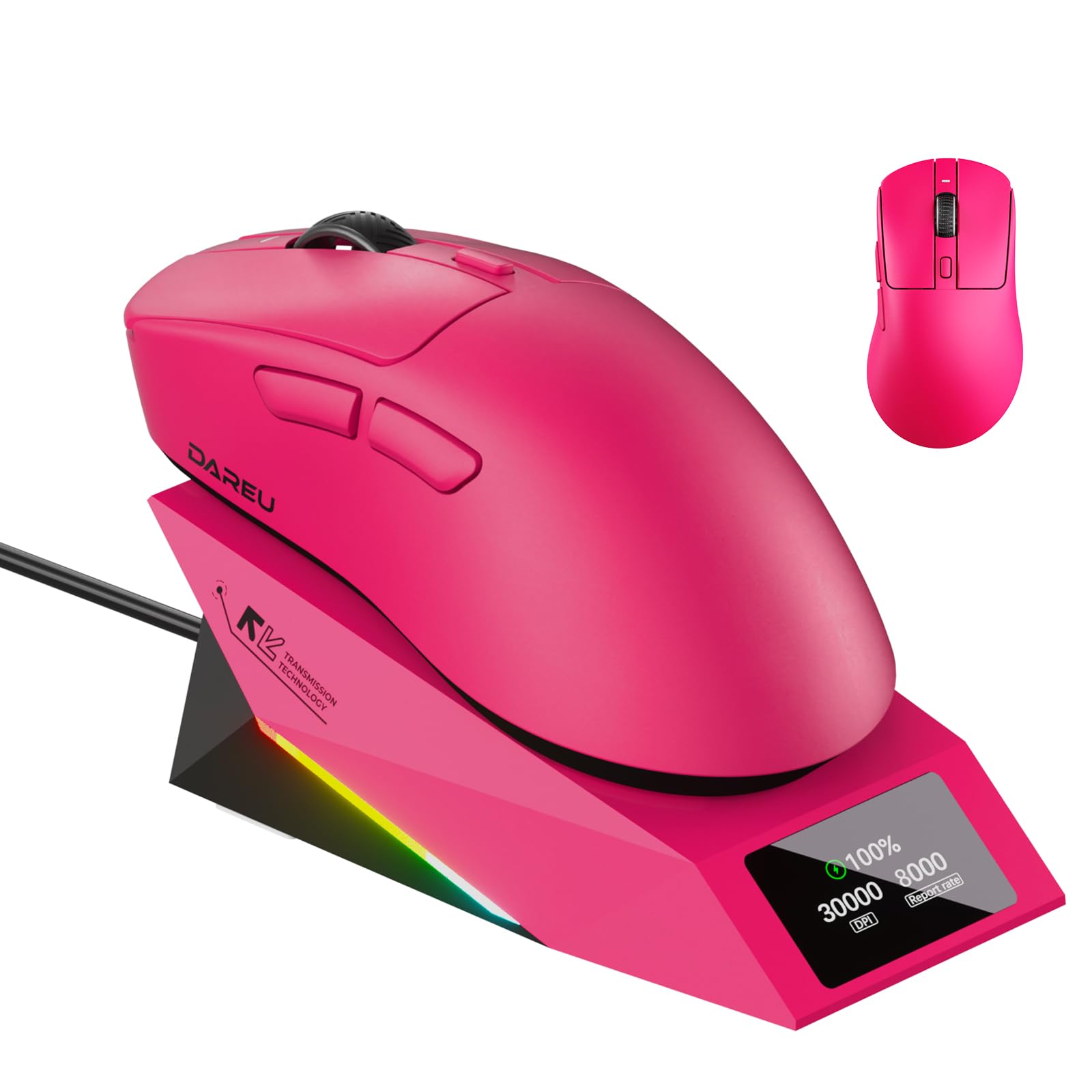
Image 1.1: DAREU AE7 Pro Wireless Gaming Mouse and Charging Dock.
2. פּעקל אינהאַלט
באַשטעטיקן אַז אַלע זאכן זענען פאַראַן אין דיין פּעקל:
- DAREU AE7 Pro Wireless Gaming Mouse
- טשאַרדזשינג דאָק
- וסב- C קאַבלע
- ענגליש מאַנואַל
3. סעטאַפּ גייד
3.1 אויפלאָדן די מויז
Before first use, fully charge the mouse. Place the mouse onto the charging dock. The magnetic connection will secure it. The TFT screen on the dock will display the battery level.

Image 3.1: The DAREU AE7 Pro mouse placed on its charging dock, displaying battery status.
3.2 פֿאַרבינדן זיך דורך 2.4GHz ווירעלעס
The charging dock also functions as the 2.4GHz wireless receiver. Connect the charging dock to your computer using the provided USB-C cable. Ensure the mouse is powered on and in 2.4GHz wireless mode (check the switch on the bottom of the mouse). The mouse should automatically connect.
3.3 קאַנעקטינג דורך בלועטאָאָטה
To connect via Bluetooth, switch the mode selector on the bottom of the mouse to Bluetooth mode. On your computer or device, search for Bluetooth devices and select "DAREU AE7 Pro" to pair.
3.4 Connecting via Wired USB
You can use the mouse in wired mode by connecting the USB-C cable directly from the mouse to your computer. This also charges the mouse.

בילד 3.2: פראָנט view of the DAREU AE7 Pro mouse, showing the USB-C port for wired connection and charging.
3.5 Web דרייווער אַקסעס
For advanced customization of buttons, DPI stages, polling rate, and macros, access the DAREU web driver. This driver is compatible with both Windows and macOS systems and can be accessed via an internet connection for instant setup.

Image 3.3: Screenshot of the DAREU web driver interface for mouse customization.
4. אָפּעראַציע
4.1 קנעפּל פאַנגקשאַנז
The DAREU AE7 Pro features 6 programmable buttons: Left Click, Right Click, Scroll Wheel Click, DPI Cycle, Forward, and Backward. These can be customized using the web שאָפער.
בילד 4.1: אויבן view of the DAREU AE7 Pro mouse, highlighting the placement of its programmable buttons.
4.2 דפּי אַדזשאַסטמאַנט
The mouse supports up to 30,000 DPI. Use the dedicated DPI button on the mouse or the web driver to cycle through preset DPI stages or set custom values.
4.3 וואל-ראטע
The AE7 Pro features an 8,000Hz polling rate in both wired and 2.4GHz wireless modes, providing ultra-low latency. The polling rate can be adjusted via the web שאָפער.

Image 4.2: The DAREU AE7 Pro mouse and its charging dock, emphasizing the 8K polling rate capability.
4.4 TFT Display on Charging Dock
The charging dock's TFT screen displays real-time information including battery level, current DPI setting, and polling rate.

Image 4.3: Close-up of the DAREU charging dock's TFT screen, showing real-time battery, DPI, and polling rate information.
4.5 Keel Structure and KBS Light Button Technology
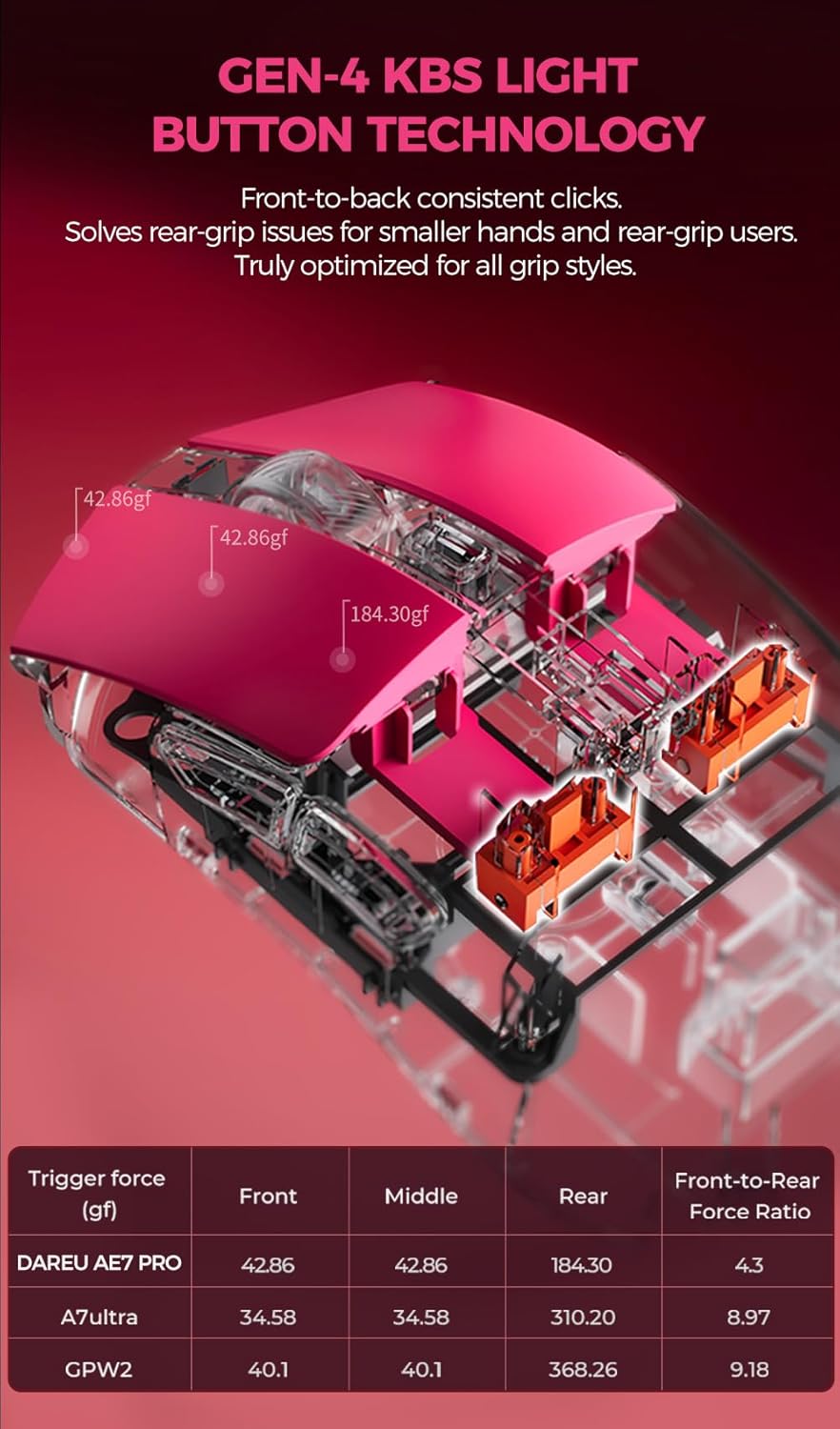
The mouse incorporates an innovative Keel structure for enhanced durability and KBS Light Button Technology for consistent tactile feedback across the entire button surface, accommodating various grip styles.

Image 4.4: Diagram illustrating the internal Keel structure of the DAREU AE7 Pro mouse, designed for increased strength.

Image 4.5: Diagram detailing the KBS Light Button Technology, ensuring consistent click feel across the button surface.
4.6 Ergonomic Design and Excimer Coating
The mouse features an ergonomic right-handed design for comfortable use. The excimer coating provides enhanced sweat resistance, anti-slip properties, and scratch resistance.

בילד 4.6: זייט פּראָfile of the DAREU AE7 Pro mouse, showcasing its ergonomic design for right-handed users.

בילד 4.7: נאָענט־אַרויף view of the mouse surface, highlighting the UV excimer skin-like coating for improved grip and durability.
5. וישאַלט
5.1 רייניקונג
צו רייניקן די מויז, ניצט א ווייכע, טרוקענע שטאָף. פֿאַר שווערע שמוץ, ניצט אַ ביסל טרוקענעם שטאָף.amp מען קען ניצן אַ שטאָף מיט מילדער זייף, און זיכער מאַכן אַז קיין פליסיקייט גייט נישט אַרײַן אין דער מויז. פֿאַרמײַדט שטרענגע כעמיקאַלן אָדער אַברייסיוו מאַטעריאַלן.
5.2 סטאָרידזש
When not in use, store the mouse on its charging dock or in a clean, dry environment away from extreme temperatures.
6. טראָובלעשאָאָטינג
- מויז ענטפערט נישט: Ensure the mouse is charged and powered on. Check the connectivity mode (2.4GHz, Bluetooth, or Wired) and ensure it matches your computer's connection. For 2.4GHz, ensure the charging dock/receiver is properly connected to the computer.
- פֿאַרהאַלטונג אָדער אָפּשטעל: Move the charging dock closer to the mouse for 2.4GHz wireless. Ensure no strong interference sources (e.g., other wireless devices) are nearby. Update mouse firmware via the web driver if available.
- טשאַרדזשינג ישוז: Ensure the mouse is correctly seated on the charging dock and the dock is powered. Check the USB-C cable connection.
- קנעפּלעך אַרבעטן נישט ווי געריכט: אַקסעס די web driver to verify button assignments and macros. Reset settings to default if necessary.
7. ספּעסאַפאַקיישאַנז
| שטריך | דעטאַל |
|---|---|
| סאָרט | DAREU |
| מאָדעל נאָמען | AE7 PRO |
| קאַנעקטיוויטי טעכנאָלאָגיע | יו-עס-בי, בלועטוט, 2.4 גי-הרץ ווירעלעס |
| באַוועגונג דעטעקשאַן טעכנאָלאָגיע | Optical (Custom PAW3950 Sensor) |
| Mouse Maximum Sensitivity | 30000 דפּי |
| פּאָללינג קורס | 8000Hz (Wired/Wireless) |
| קנעפּל קוואַנטיטעט | 6 פּראָגראַממאַבלע קנעפּלעך |
| האַנט אָריענטירונג | רעכט |
| באַטערי דורכשניטלעך לעבן | 166 שעה |
| פּונקט וואָג | 62 גראַמז |
| אַפּערייטינג סיסטעם קאַמפּאַטאַבילאַטי | Win 7/8/10/11, macOS, Android |
| ספּעציעלע פֿעיִקייטן | 8K polling, Charging dock, Excimer Coating, Keel structure, Right-hand Design |
8. אפיציעלע פּראָדוקט ווידעאָ
Video 8.1: An official DAREU video showcasing the AE7 Pro Dual 8K Wireless Gaming Mouse with its charging dock, demonstrating its features and design.
9. וואָראַנטי און שטיצן
For warranty information and technical support, please refer to the DAREU official website or contact DAREU customer service. Keep your purchase receipt for warranty claims.