
1. הקדמה
Thank you for choosing the MyKaFort Remote Control City Express Train Set. This battery-powered electric train toy is designed for toddlers and is compatible with most wooden railway tracks. It features dual control modes, lights, and sounds for an engaging play experience. Please read this manual carefully before use to ensure proper setup and operation.
2. זיכערקייַט אינפֿאָרמאַציע
ווארענונג: דערשטיקונגס-געפאר - קליינע טיילן. Not for children under 3 years. Adult supervision is recommended during play. Keep packaging for important information.
3. פּעקל אינהאַלט
זיכער מאַכן אַז אַלע זאכן זענען פאַראַן אין פּעקל:
- 1x Train Locomotive
- 1x Passenger Carriage
- 1x רימאָוט קאָנטראָל
- 1x Posable Figure
4. פּראָדוקט איבערview און פֿעיִקייטן
The MyKaFort City Express Train Set offers a rich play experience with the following features:
- צווייענדיק קאָנטראָל מאָדעס: Operate the train using the included remote control or the buttons located on top of the engine.
- Light & Sound Effects: Functional headlights and authentic train sounds enhance the play experience.
- Magnetic Carriage: The detachable passenger carriage connects securely to the locomotive using strong magnetic connectors.
- פּאָזאַבאַל פיגור: An action figure is included and can be placed inside the carriage for imaginative journeys.
- וניווערסאַל קאַמפּאַטאַבילאַטי: Designed to fit major wooden railway brands such as Brio, Thomas, KidKraft, and Chuggington.
- דוראַבאַל קאַנסטראַקשאַן: Crafted from high-quality ABS plastic with smooth edges, suitable for children aged 3 and up.

Image 1: Dimensions of the train locomotive (7.67in long, 2in high) and remote control (3.93in wide, 3.54in high, 2.36in lever height).
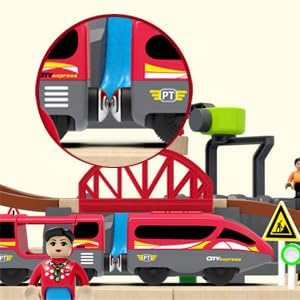
Image 2: Detail showing the magnetic connectors that link the train locomotive and passenger carriage.
5. סעטאַפּ
5.1 Battery Installation (Train Locomotive)
- Locate the battery compartment on the underside of the train locomotive.
- Using a small screwdriver, unscrew the battery compartment cover.
- Insert 2 AA batteries (not included) into the compartment, ensuring correct polarity (+/-).
- פאַרבייַטן די דעקל און באַוואָרענען עס מיט די שרויף.
5.2 באַטעריע אינסטאַלאַציע (ווייט קאָנטראָל)
- Locate the battery compartment on the underside of the remote control.
- Using a small screwdriver, unscrew the battery compartment cover.
- Insert 2 AAA batteries (not included) into the compartment, ensuring correct polarity (+/-).
- פאַרבייַטן די דעקל און באַוואָרענען עס מיט די שרויף.

Image 3: The bottom of the train and remote control, indicating battery compartments and the A/B channel switch for pairing.
5.3 רימאָוט פּערינג
To pair the remote control with the train:
- Ensure both the train and the remote control are turned off. The switch on the train's underside should be in the middle position.
- Set both the train's channel switch (on the underside) and the remote's channel switch (on the bottom) to the same channel (A or B).
- For first-time pairing, turn the train on FIRST, then turn the remote on.
6. אָפּעראַציע
6.1 Train Controls (On-board Buttons)
The train locomotive features buttons on its top for direct control:
- דרוק דעם פאָרויס קנעפּל צו מאַך די באַן פאָרויס.
- Press the reverse button to move the train backward.
- Press the stop button to halt the train.
- These buttons also activate lights and train sounds.
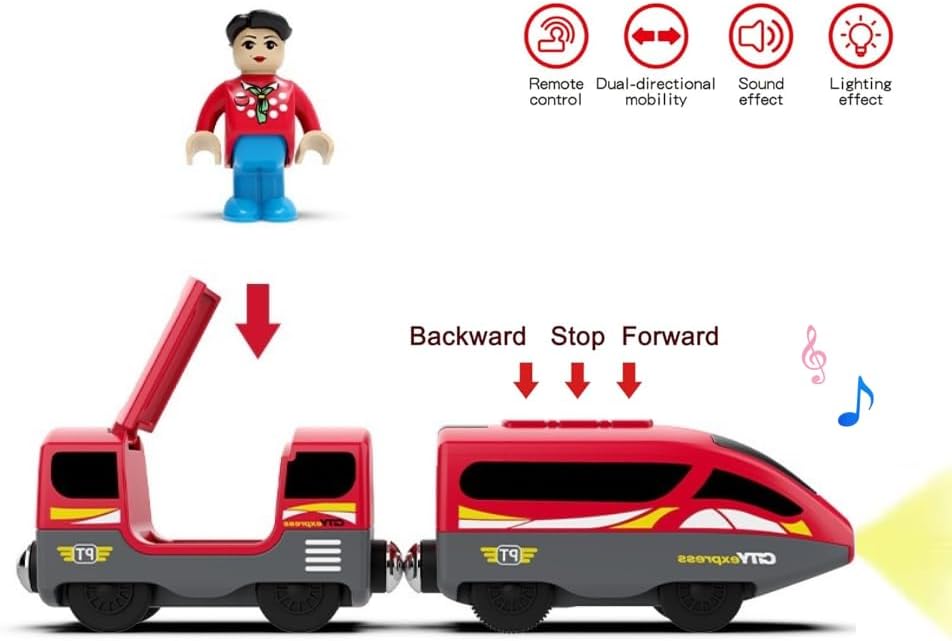
Image 4: The train locomotive highlighting the on-board buttons for controlling movement, lights, and sounds.
6.2 רימאָוט קאָנטראָל פאַנגקשאַנז
Once paired, use the remote control to operate the train:
- פֿאָרווערטס: שטופּן די הייבער פאָרויס.
- צוריק: Pull the lever backward.
- אָפּשטעל: Push the lever then quickly release it.
- געזונט: Press the speaker button to activate train sounds.
- ליכט: Press the light bulb button to activate the headlights.
6.3 מאַגנעטישע קאַפּלינג
The locomotive and carriage connect via magnetic couplers. Simply bring the ends together, and they will snap into place. To detach, gently pull them apart.

Image 5: The MyKaFort City Express Train Set running on a wooden track, demonstrating its compatibility.
6.4 Track Compatibility
This train set is designed to be compatible with most standard wooden railway tracks, allowing for integration with existing train sets and expansion possibilities.
7. וישאַלט
- Wipe the train and remote control with a dry cloth to remove dust and dirt. Do not immerse in water.
- If the toy will not be used for an extended period, remove the batteries from both the train and the remote control to prevent leakage.
- Store the train set in a cool, dry place away from direct sunlight.
8. טראָובלעשאָאָטינג
| פּראָבלעם | מעגלעך סיבה | לייזונג |
|---|---|---|
| Train does not move or respond to remote. | 1. Batteries are low or incorrectly installed. 2. Remote and train are not paired. 3. Channel switches (A/B) are mismatched. | 1. Replace batteries in both train and remote. Check polarity. 2. Follow remote pairing instructions (Section 5.3). 3. Ensure both train and remote are set to the same A or B channel. |
| Lights or sounds are not working. | 1. באַטעריז זענען נידעריק. 2. Feature not activated. | 1. פאַרבייַטן באַטעריז. 2. Press the dedicated light/sound buttons on the remote or train. |
| Train moves slowly or struggles on inclines. | באַטעריז זענען נידעריק. | Replace batteries in the train locomotive. |
9. ספּעסאַפאַקיישאַנז
| שטריך | דעטאַל |
|---|---|
| סאָרט | MyKaFort |
| מאָדעל נומער | 90098 |
| מאַטעריאַל | אַבס פּלאַסטיק |
| מאַכט מקור | באַטאַרייע פּאַוערד |
| Train Batteries | 2x AA (ניט אַרייַנגערעכנט) |
| ווייַט באַטעריז | 2 קס אַאַאַ (נישט אַרייַנגערעכנט) |
| עלטער רעקאָמענדאַציע | 36 months (3 years) and up |
| קאָנטראָל מעטאָד | ווייַט, ריר |
| נומער דימענשאַנז | 4.33 x 4.33 x 2.83 inches (packaging dimensions, actual product dimensions are shown in Image 1) |
10. וואָראַנטי און שטיצן
Specific warranty information and detailed support contacts are not provided in the available product data. For assistance, please refer to the retailer where the product was purchased or visit the official MyKaFort brand store online.
11. פּראָדוקט ווידעאָס
No official seller videos are available for embedding in this manual. Please refer to the product page for any available customer-uploaded videos.