
1. הקדמה
Thank you for choosing the STRICH 37-Key Kids Mini Digital Piano Keyboard. This manual provides essential information for the safe and effective use of your new musical instrument. Please read it thoroughly before operation and retain it for future reference.

Figure 1.1: STRICH 37-Key Kids Mini Digital Piano Keyboard (Pink)
2. זיכערקייַט אינפֿאָרמאַציע
- שטענדיק קאָנטראָלירן קינדער בעשאַס נוצן.
- Keep the piano away from water and moisture.
- דו זאלסט נישט ויסשטעלן צו עקסטרעם טעמפּעראַטורעס אָדער דירעקט זונשייַן.
- Use only the provided power adapter or recommended batteries.
- פֿאַרמײַדט צו לאָזן דאָס אינסטרומענט פֿאַלן אָדער עס אויסשטעלן צו שטאַרקע קלאַפּן.
- פאַרזיכערן געהעריק ווענטאַליישאַן אַרום די אַפּאַראַט.
3. פּעקל אינהאַלט
באַשטעטיקן אַז אַלע זאכן זענען פאַראַן אין פּעקל:
- STRICH 37-Key Mini Digital Piano Keyboard
- מאַכט אַדאַפּטער (DC 6V)
- Kid's Piano Course Music Book
- Key Stickers for learning
- ינסטראַקשאַנז מאַנואַל

Figure 3.1: Included accessories with the STRICH piano.
4. סעטאַפּ
4.1 Powering the Piano
The piano can be powered by either the included DC 6V power adapter or 4 AA batteries (not included).
4.1.1 באַטאַרייע ייַנמאָנטירונג
- Locate the battery compartment on the underside of the piano.
- ניצן אַ שרויפנ - ציער צו עפענען די באַטאַרייע אָפּטייל דעקן.
- אַרייַנלייגן 4 אַאַ באַטעריז, ינשורינג די ריכטיק פּאָולעראַטי (+/-).
- פאַרבייַטן די דעקל און באַוואָרענען עס מיט די שרויף.
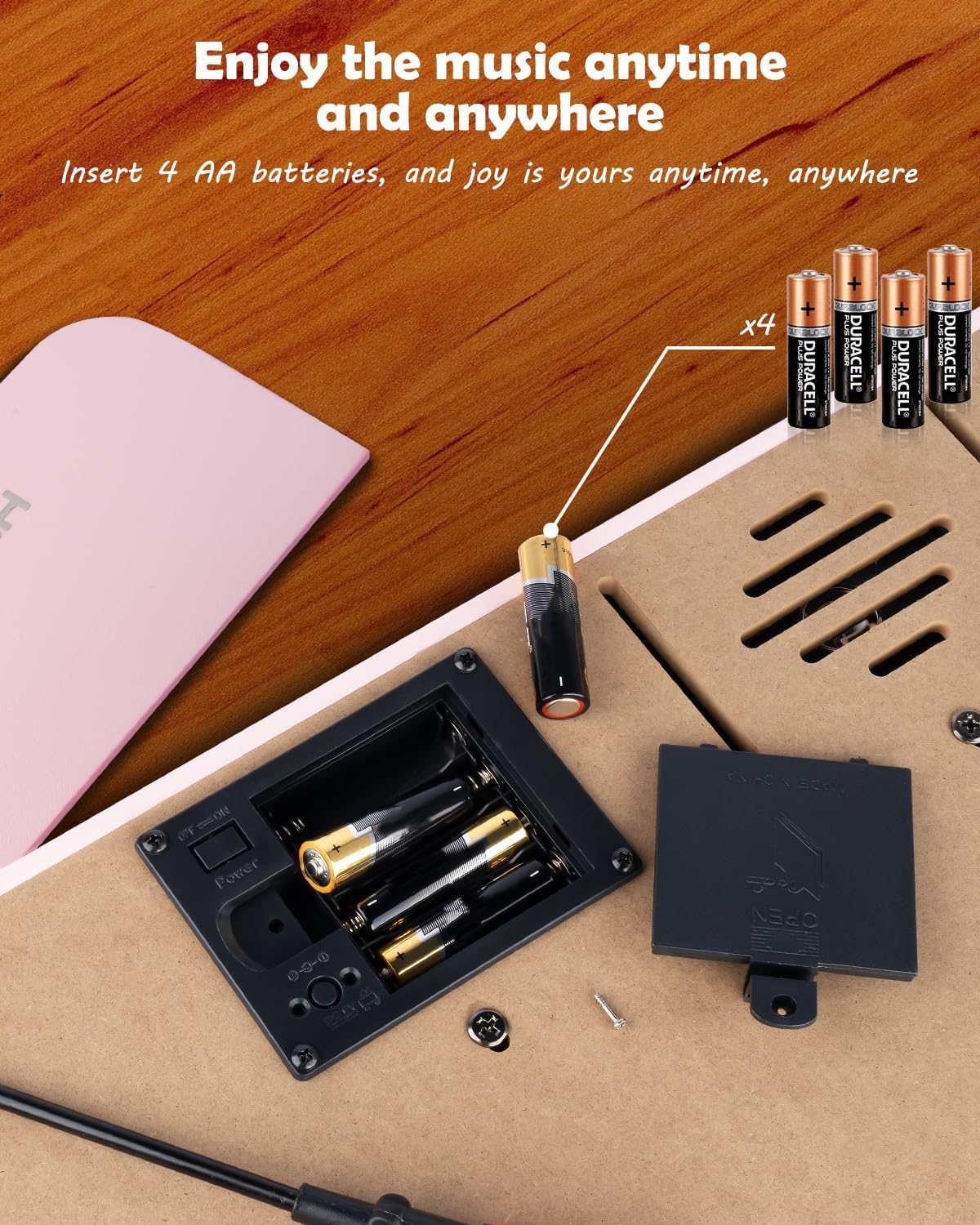
פיגור 4.1: באַטעריע אָפּטייל פֿאַר 4 AA באַטעריעס.
4.1.2 Power Adapter Connection
Insert the DC 6V power adapter into the 'DC: 6V' port on the rear panel of the piano, then plug the adapter into a standard wall outlet.
4.2 Applying Key Stickers
The included key stickers are designed to assist with learning. Refer to the 'Kid's Piano Course' music book for guidance on proper placement.

Figure 4.2: Key stickers applied to the piano keys.
4.3 Music Stand Placement
The detachable music stand can be inserted into the slot on the top panel of the piano to hold your music book or tablet.
5. אַפּערייטינג ינסטרוקטיאָנס
5.1 מאַכט אויף/אויס און באַנד קאָנטראָל
Locate the 'VOL' knob on the rear panel. Turn the knob clockwise to power on the piano and increase the volume. Turn it counter-clockwise to decrease the volume and power off the piano.

Figure 5.1: Volume and power control knob.
5.2 קאַנעקטינג פונדרויסנדיק דעוויסעס
The rear panel features various ports for enhanced functionality:
- MIDI Port: Connect to MIDI-compatible devices for advanced musical applications.
- וסב פּאָרט: Connect to a computer or other USB devices.
- טעלעפאָן פּאָרט: Plug in headphones for private practice.
- אַרייַנגאַנג פּאָרט: Connect external audio sources (e.g., MP3 player) to play along.
- SUSTAIN PEDAL Port: Connect an optional sustain pedal for extended note duration.

פיגור 5.2: הינטערשטע פּאַנעל קאַנעקשאַנז.
5.3 ווירעלעסס קאַנעקטיוויטי
The piano supports wireless connection, allowing playback of songs and music from compatible mobile phones and tablets. Refer to your device's instructions for pairing with a Bluetooth audio device.
5.4 Learning with the Music Book and Stickers
The included 'Kid's Piano Course' music book provides simple tutorials and songs that correspond to the key stickers. Follow the color and shape codes to play basic melodies.
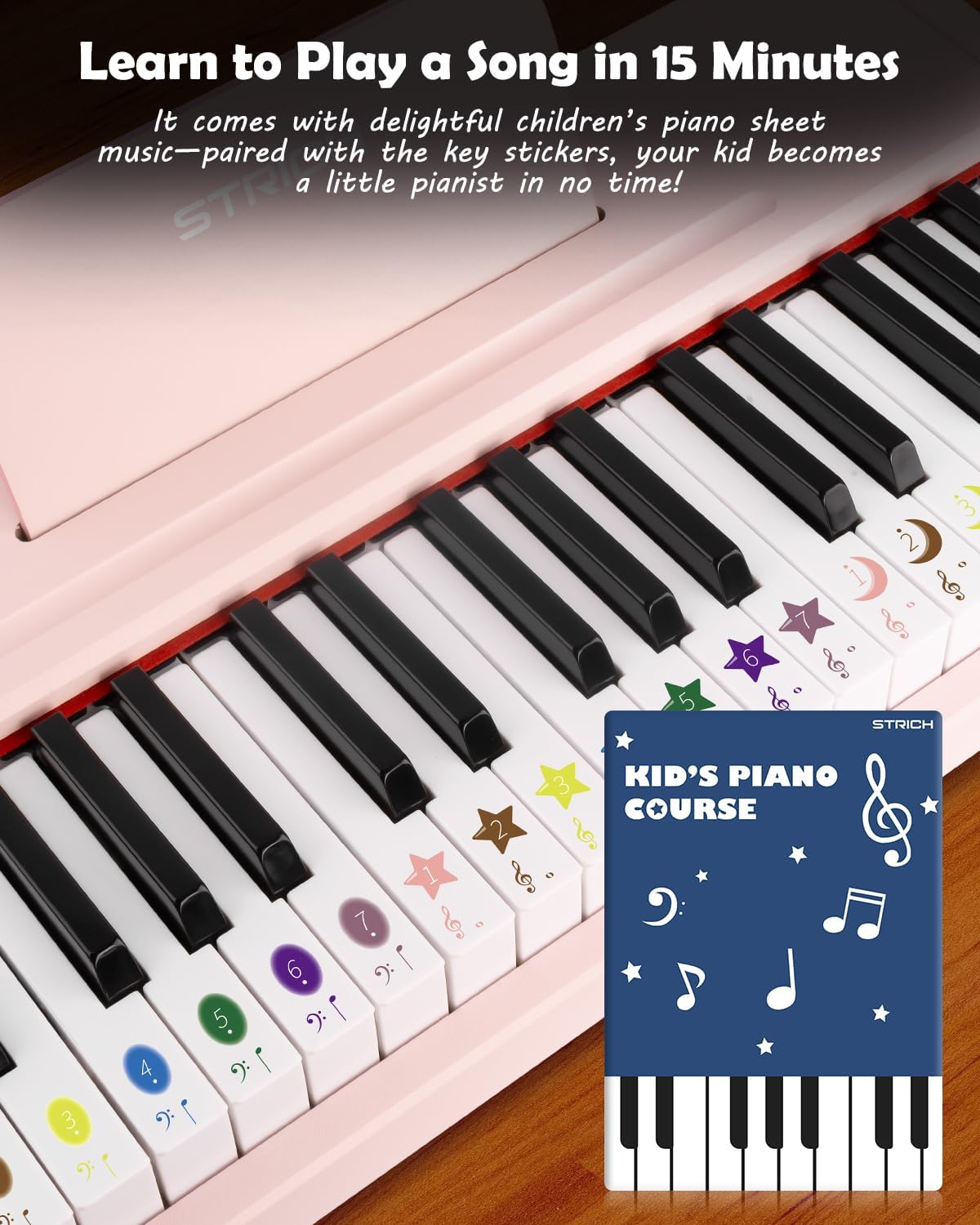
Figure 5.3: Learning to play using the music book and key stickers.
6. וישאַלט
- Clean the piano surface with a soft, dry cloth. Avoid abrasive cleaners or solvents.
- אויב נישט אין באַנוץ פֿאַר אַ לענגערע צייט, אַרויסנעמען די באַטעריעס צו פאַרמייַדן ליקאַדזש.
- Store the piano in a cool, dry place, away from direct sunlight and extreme temperatures.
7. טראָובלעשאָאָטינג
- קיין קול: Ensure the piano is powered on and the volume is turned up. Check battery installation or power adapter connection. Verify external devices (headphones, speakers) are correctly connected and powered.
- קנעפּלעך רעאַגירן נישט: Ensure the piano is powered on. If using batteries, check battery level.
- פראבלעמען מיט דראטלאזע קאנעקשאן: Ensure the piano's wireless function is active and your external device's Bluetooth is enabled. Try re-pairing the devices.
8. ספּעסאַפאַקיישאַנז
| שטריך | באַשרייַבונג |
|---|---|
| מאָדעל נומער | SEK-37 |
| פּראָדוקט דימענשאַנז | 21.65 X 11.02 X 3.54 אינטשעס |
| פּונקט וואָג | 9.9 פונט |
| שליסלען | 37 |
| מאַכט מקור | DC 6V Adapter or 4 AA Batteries |
| רעקאַמענדיד עלטער | 36 חדשים - 8 יאָר |
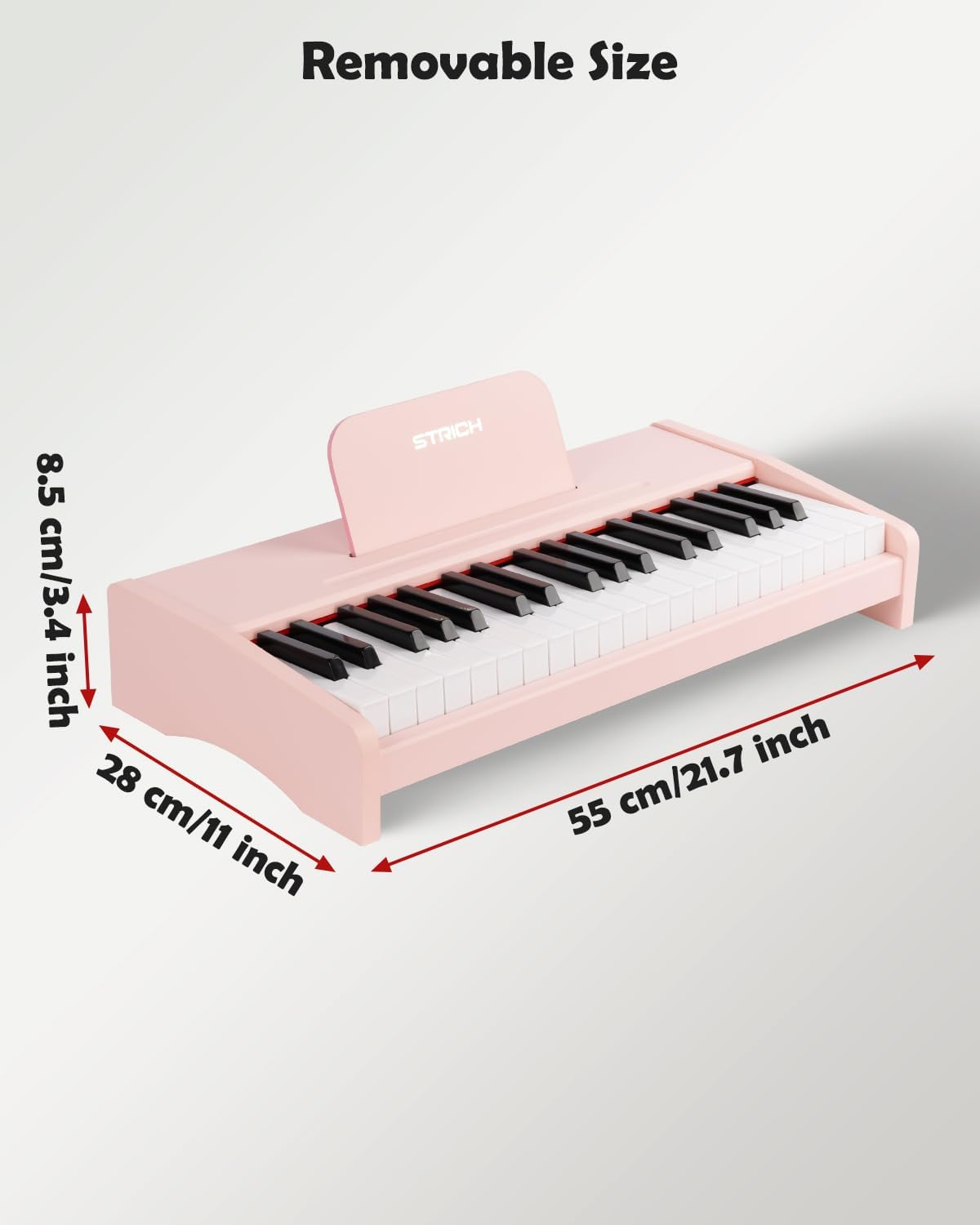
פיגור 8.1: פּראָדוקט דימענסיעס.
9. וואָראַנטי און שטיצן
For warranty information or technical support, please refer to the contact details provided with your purchase or visit the official STRICH webזייטל. האַלט דיין קויפן באַווייַז פֿאַר וואָראַנטי קליימז.