
וויכטיק סאַפעטי אינסטרוקציעס
ביטע ליינט אלע אינסטרוקציעס קערפול איידער איר ניצט דעם שרעדער. האלט דעם מאנואל פאר שפעטערדיגע רעפערענץ.
- האַלטן קינדער און פּעץ אַוועק פון די שרעדער.
- האַלט לויזע קליידער, צירונג, האָר און הענט אַוועק פון די פּאַפּיר אַרייַנגאַנג שפּאַלט.
- Do not spray any flammable products onto the shredder.
- Do not shred metal objects, wet paper, or adhesive labels.
- נעמט ארויס דעם שרעדער ווען ער איז נישט אין באנוץ אדער פארן רייניגן.
- ניצט נישט דעם שרעדער אויב דער עלעקטרישער שנור איז געשעדיגט.
פּראָדוקט איבערview
The Staples 12-Sheet Micro-Cut Personal Shredder (ST62153) is designed for secure disposal of personal and office documents. It features micro-cut shredding for enhanced security (P-4 rating), reducing documents to 4mm x 12mm pieces.
שליסל פֿעיִקייטן אַרייַננעמען:
- שרעדינג קאַפּאַציטעט: Up to 12 sheets of paper per pass.
- מאַטעריאַל קאַמפּאַטאַבילאַטי: Shreds paper, credit cards, standard staples, small paper clips, and CDs/DVDs.
- זיכערהייט מדרגה: P-4 micro-cut for high security.
- לויפן צייט: 20 minutes continuous operation, followed by a 40-minute cool-down period.
- מיסט בין: 5-gallon (18.9L) pull-out bin for easy emptying.
- זיכערקייַט פֿעיִקייטן: Auto Start/Stop, Auto Reverse, Overload Protection, blue ready LED indicator, red flash for bin full indicator.
- מאָביליטי: Equipped with casters for easy movement.

Image: The shredder in operation, feeding a document into the micro-cut slot.
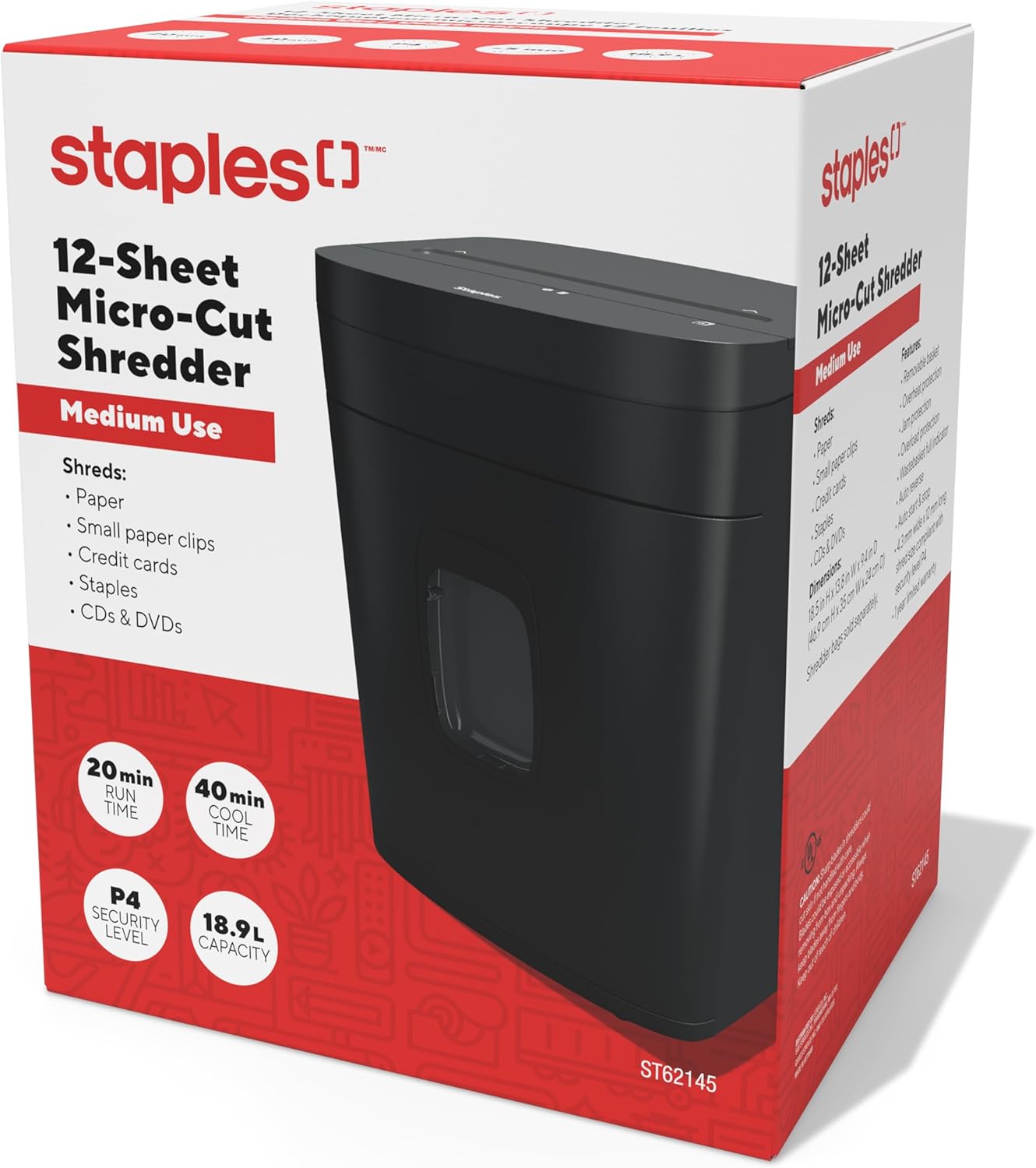
Image: The retail packaging for the Staples 12-Sheet Micro-Cut Personal Shredder.
פּעקל אינהאַלט
באַשטעטיקן אַז אַלע זאכן זענען פאַראַן אין פּעקל:
- Staples 12-Sheet Micro-Cut Personal Shredder Unit
- ינסטרוקטיאָן מאַנואַל (דעם דאָקומענט)
סעטאַפּ
- אויספּאַקן: Carefully remove the shredder from its packaging. Remove any protective materials or plastic bags.
- אָרט: Position the shredder on a flat, stable surface. Ensure there is adequate space around the unit for ventilation and to access the waste bin. The shredder is equipped with casters for easy mobility.
- מאַכט קשר: צאַפּן די מאַכט שנור אין אַ נאָרמאַל עלעקטריקאַל ווענטיל.

Image: The shredder positioned in an office setting, demonstrating its compact size.

בילד: א דעטאַלירטע view of the shredder's base, highlighting the integrated casters for easy movement.
אָפּעראַציע
- מאַכט אויף: Ensure the shredder is plugged in. The blue LED indicator should illuminate, indicating the shredder is ready for operation.
- צעשניידן פּאַפּיר: Insert up to 12 sheets of paper into the paper entry slot. The shredder will automatically start when paper is detected and stop once shredding is complete.
- Shredding Other Materials: The shredder can also process credit cards, CDs/DVDs, standard staples, and small paper clips. Insert these items one at a time into the designated entry slot (if separate) or the main paper entry slot.
- קעסיידערדיק אָפּעראַציע: The shredder is designed for 20 minutes of continuous use. After this period, allow the unit to cool down for 40 minutes to prevent overheating and ensure longevity.
- אויטאָ ריווערס: If too much paper is inserted, the Auto Reverse feature will attempt to clear the jam by reversing the shredding action.

בילד: א נאָענטע בילד view of the paper entry slot on the shredder's top panel.
וישאַלט
- ליידיק די וויסט באַן: When the waste bin is full, a red indicator light will flash. Pull out the 5-gallon capacity bin from the front of the shredder and empty the shredded material. Reinsert the bin securely.
- רייניקונג: Unplug the shredder before cleaning. Use a soft, dry cloth to wipe the exterior. Do not use abrasive cleaners or solvents. For optimal performance, periodically oil the shredder blades with shredder oil (sold separately).
- Cool-Down Periods: Adhere to the 40-minute cool-down period after 20 minutes of continuous use to prevent motor strain and extend the life of the shredder.
טראָובלעשאָאָטינג
| פּראָבלעם | מעגלעך סיבה | לייזונג |
|---|---|---|
| שרעדער הייבט זיך נישט אן | Not plugged in; waste bin not fully inserted; power switch off. | Ensure power cord is securely plugged in. Push waste bin completely into place. Check power switch position. |
| פּאַפּיר קלעם | Too much paper inserted; paper folded or crumpled. | Utilize the Auto Reverse function. If jam persists, unplug, carefully remove paper from the entry slot. Reduce paper quantity for future shredding. |
| Shredder stops during operation (overheating) | Exceeded continuous run time (20 minutes); motor overload. | Allow the shredder to cool down for 40 minutes. The Overload Protection feature will reset automatically. |
| Red bin full indicator flashing | דער מיסט קאַסטן איז פול. | Empty the waste bin and reinsert it securely. |
ספּעסאַפאַקיישאַנז
| שטריך | דעטאַל |
|---|---|
| מאָדעל נומער | ST62153 |
| דרוק טיפּ | מיקראָ קאַט |
| זיכערהייַט מדרגה | פּ-4 |
| שרעד גרייס | 4 מם X 12 מם |
| בלאַט קאַפּאַסיטי | 12 שיץ |
| באַן קאַפּאַציטעט | 5 גאלאנען (18.9 ליטער) |
| קעסיידערדיק לויפן צייט | קסנומקס מינוט |
| קיל אַראָפּ צייט | קסנומקס מינוט |
| ראַש מדרגה | 65 דעסאַבאַלז |
| דימענסיעס (L X W X H) | 38.4D x 30W x 47H סענטימעטער (13.8"L x 9.4"W x 18.5"H) |
| פּונקט וואָג | 10.16 ק״ג (22.4 פונט) |
| פאַבריקאַנט | סטייפּאַלז |
| UPC | 718103440509 |
וואָראַנטי אינפֿאָרמאַציע
This Staples 12-Sheet Micro-Cut Personal Shredder (ST62153) is covered by a 1-יאָר לימיטעד פאַבריקאַנט וואָראַנטי from the date of purchase. This warranty covers defects in materials and workmanship under normal use. For warranty claims or further details, please contact customer support.
קונה שטיצן
For technical assistance, troubleshooting, or warranty inquiries, please contact Staples customer support.
פאַבריקאַנט קאָנטאַקט אינפֿאָרמאַציע:
500 STAPLES DR
FRAMINGHAM MA 01702-4474
פֿאַראייניקטע שטאַטן פון אַמעריקע
Please visit the official Staples website or your local Staples store for additional support resources.