
הקדמה
The RAPOO E9050L is a versatile wireless keyboard designed for seamless connectivity across multiple devices and operating systems. Its ultra-slim profile, quiet keys, and long-lasting rechargeable battery make it ideal for various environments, from office to travel. This manual provides detailed instructions for setup, operation, maintenance, and troubleshooting to ensure optimal use of your keyboard.
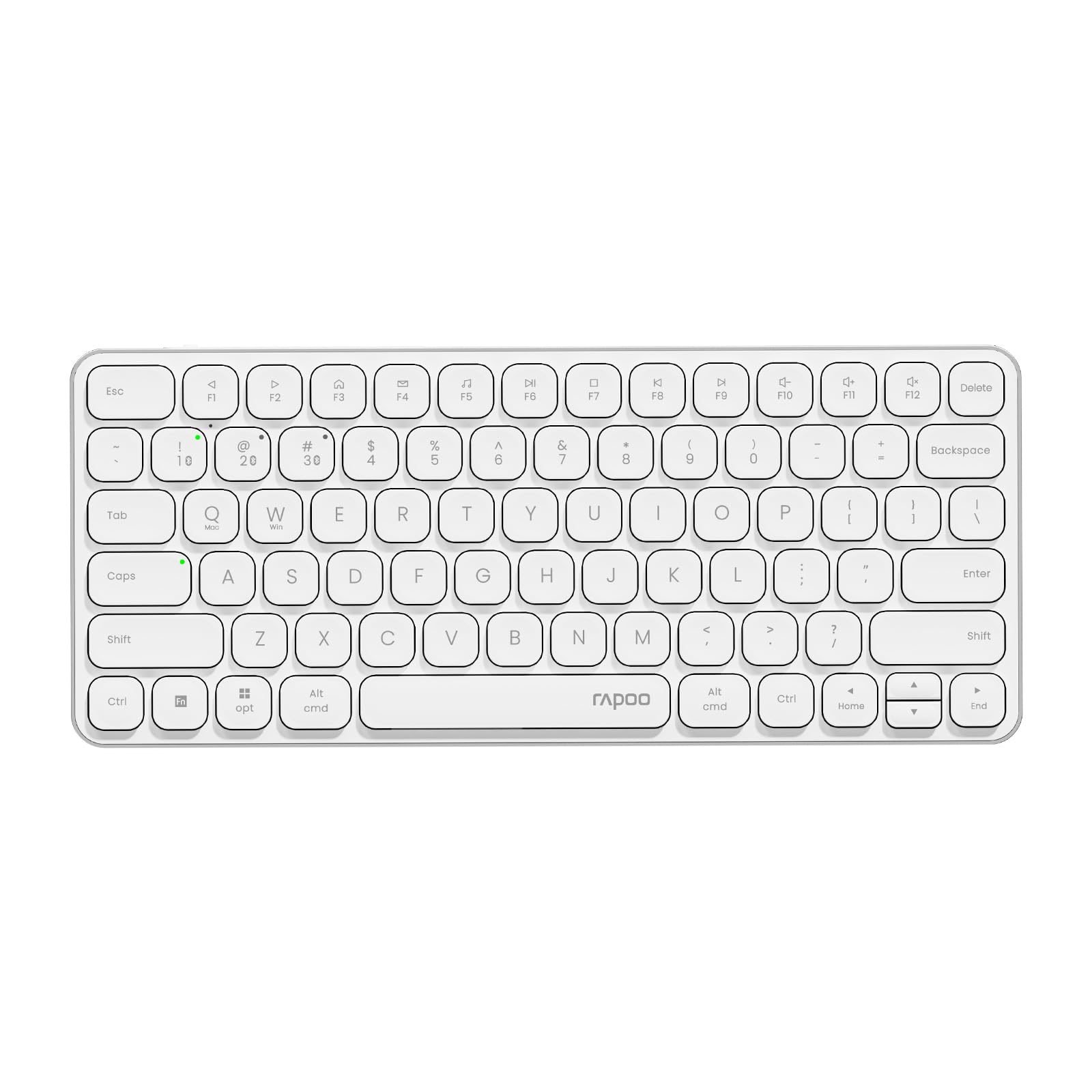
Image: The RAPOO E9050L Wireless Keyboard, showcasinג זײַן גלאַטן דיזײַן.
סעטאַפּ
פּעקל אינהאַלט
- RAPOO E9050L Wireless Keyboard
- וסב-C טשאַרדזשינג קאַבלע
- באַניצער מאַנואַל
טשאַרדזשינג די קלאַוויאַטור
The E9050L features a built-in rechargeable battery. Before first use, fully charge the keyboard using the provided USB-C cable. A full charge can provide up to 90 days of continuous use. A quick 10-minute charge can provide enough power for one day of use.

Image: Diagram illustrating the rechargeable battery and charging indicators.
Connecting to Devices (Multi-Device & Multi-OS)
The keyboard supports wireless connection via 2.4GHz USB receiver or Bluetooth 5.0/4.0, allowing connection to up to 4 devices simultaneously. You can seamlessly switch between a notebook PC, desktop PC, tablet, or smartphone.

Image: Visual representation of multi-device and multi-OS connectivity options.
- 2.4GHz ווירעלעסס קאַנעקשאַן:
שטעקט אריין דעם USB ריסיווער אין א פאראן USB פארט אויף אייער קאמפיוטער. די קלאַוויאַטור זאָל זיך אויטאָמאַטיש פארבינדן. - בלועטאָאָטה קאַנעקשאַן:
Press and hold the Bluetooth pairing key (usually indicated by a Bluetooth icon or a specific Fn key combination) until the indicator light flashes. On your device (PC, tablet, smartphone), enable Bluetooth and search for "RAPOO E9050L". Select it to pair. - באַשטימען צווישן דיווייסאַז:
Use the dedicated device switching keys (e.g., Fn + 1, Fn + 2, Fn + 3, Fn + 4) to switch between your paired devices. The corresponding indicator light will show which device is currently active.

Image: Icons representing compatibility with various operating systems including Windows, Mac OS, Linux, iOS, Android, and Chrome OS.
אַפּערייטינג ינסטראַקשאַנז
Key Functions and Multimedia Hotkeys
The E9050L features a compact 78-key layout with 12 multimedia hotkeys for quick access to common functions like play/pause, volume control, and email. These functions are accessed by pressing the Fn key in combination with the corresponding F-keys (F1-F12).

Image: Diagram showing the multimedia hotkeys and their functions when used with the Fn key.
OS סוויטשינג
The keyboard supports dual system compatibility. To switch between Windows and Mac OS layouts, use the following key combinations:
- פֿאַר ווינדאָוז: דריקן פן + וו
- For Mac OS: Press Fn + Q
ינדיקאַטאָר ליגהץ
The keyboard includes indicator lights for device connection, Caps Lock status, and battery level. These lights provide clear visual feedback on the keyboard's current state, addressing user feedback for improved clarity.

בילד: נאָענט-אַרויף view of the device indicator lights and Caps Lock indicator.
טייפּינג דערפאַרונג
The E9050L utilizes thin chiclet keycaps and a scissor-switch mechanism, providing a quiet and comfortable typing experience. The ultra-thin design (0.2 inches / 0.53 cm) reduces wrist strain, eliminating the need for a separate palm rest.

בילד: דעטאַלירט view of the thin chiclet keycaps and scissor-switch mechanism.
וישאַלט
To ensure the longevity and optimal performance of your RAPOO E9050L keyboard, follow these maintenance guidelines:
- רייניקונג: ניצן אַ ווייך, לינט-פֿרייַ שטאָף אַ ביסל דampened with water or a mild cleaning solution to wipe the keycaps and surface. Avoid harsh chemicals or abrasive materials.
- באַזייַטיקונג פון שטויב: ניצט קאמפרעסט לופט צו באזייטיגן שטויב און שמוץ פון צווישן די קנעפלעך.
- ויסמיידן ליקווידס: Do not expose the keyboard to excessive moisture or submerge it in liquids. In case of spills, immediately disconnect the keyboard and allow it to dry completely before reuse.
- סטאָרידזש: האַלט די קלאַוויאַטור אין אַ קיל, טרוקן אָרט אַוועק פון דירעקט זונשייַן און עקסטרעמע טעמפּעראַטורן.
טראָובלעשאָאָטינג
If you encounter issues with your RAPOO E9050L keyboard, refer to the following common solutions:
- קלאַוויאַטור פֿאַרבינדט זיך נישט:
- זייט זיכער אַז די קלאַוויאַטור איז אויפגעלאָדן.
- Verify that the 2.4GHz USB receiver is properly inserted or that Bluetooth is enabled and paired on your device.
- Try re-pairing the Bluetooth connection or re-inserting the USB receiver.
- Ensure you are on the correct device channel (Fn + 1/2/3/4).
- Keys Not Responding or Delayed Response:
- קאָנטראָלירט די באַטאַרייע מדרגה; אַ נידעריקע באַטאַרייע קען אַפעקטירן די פאָרשטעלונג.
- Ensure the keyboard is within range of your device (for Bluetooth/2.4GHz).
- Interference from other wireless devices can cause issues; try moving closer to your device or away from other wireless sources.
- ריסטאַרט דיין קאָמפּיוטער אָדער מיטל.
- Incorrect Key Output (e.g., @ key types "):
- This often indicates an incorrect keyboard layout setting on your operating system. Ensure your device's keyboard settings match the US layout of the E9050L.
- Verify the correct OS mode is selected on the keyboard (Fn + W for Windows, Fn + Q for Mac).
- Caps Lock / Device Indicator Not Working:
- זייט זיכער אז די קלאַוויאַטור איז אנגעצונדן און פארבונדן.
- If the issue persists, try restarting the keyboard and your device.
ספּעסאַפאַקיישאַנז
| שטריך | דעטאַל |
|---|---|
| סאָרט | RAPOO |
| מאָדעל נומער | E9050L |
| קאַמפּאַטאַבאַל דעוויסעס | Smartphones, Tablets, Notebook PCs, Desktop PCs |
| קאַנעקטיוויטי טעכנאָלאָגיע | Bluetooth, USB (2.4GHz) |
| קלאַוויאַטור באַשרייַבונג | ינטעגראַטעד |
| רעקאָממענדעד ניצט | Personal, Business, Student, Everyday Use |
| ספּעציעלע פֿעיִקייטן | Ergonomic, Silent |
| קאָליר | ווייַס |
| פּראָדוקט דימענשאַנז (L x W x H) | 28.4 סענטימעטער X 11.9 סענטימעטער X 1.3 סענטימעטער (11.18 אין X 4.69 אין X 0.51 אין) |
| מאַטעריאַל | Plastic (with aluminum frame) |
| מאַכט מקור | באַטאַרייע פּאַוערד (קריקאָנלאָדלעך) |
| באַשטימען טיפּ | Mechanical (Scissor-switch) |
| קלאַוויאַטור אויסלייג | QWERTY (אמעריקאנער אויסלייג) |
| שטיצט אַפּערייטינג סיסטעמס | Linux, Windows, Mac OS, iOS, Android, Chrome OS |
| נומער פון קיז | 78 |

Image: Diagram showing the precise dimensions of the RAPOO E9050L keyboard.
וואָראַנטי און שטיצן
וואָראַנטי אינפֿאָרמאַציע
The RAPOO E9050L Wireless Keyboard comes with a 1-יאָר פאַבריקאַנט ס וואָראַנטי פֿון דעם קויפֿדאַטום. די וואָראַנטי דעקט חסרונות אין מאַטעריאַלן און אַרבעט אונטער נאָרמאַלן באַנוץ. ביטע באַהאַלטן אייער קויפֿבאַווייַז פֿאַר וואָראַנטי קלאַגעס.
קונה שטיצן
For technical assistance, troubleshooting, or warranty inquiries, please contact RAPOO customer support through the official website or your retailer. Detailed contact information can typically be found on the product packaging or the RAPOO official support page.