
1. הקדמה
This manual provides essential information for the safe operation, setup, and maintenance of your FINOTI S-X1 MAX Drone. Please read this manual thoroughly before operating the drone to ensure proper function and to avoid damage or injury. The S-X1 MAX is an advanced quadcopter featuring an 8K HD camera, 3-axis anti-shake gimbal, 5G GPS, and a remote control with a 4.5-inch LCD screen for real-time FPV.

Image 1.1: The FINOTI S-X1 MAX Drone and its remote control unit, ready for flight in a grassy field.
2. פּעקל אינהאַלט
באַשטעטיקט אַז אַלע זאכן וואָס זענען אויסגערעכנט אונטן זענען פאַראַן אין אייער פּעקל. אויב עפּעס פעלן אָדער זענען געשעדיגט, ביטע קאָנטאַקטירט קונה שטיצע.
- FINOTI S-X1 MAX Drone x 1
- ווײַטקאָנטראָל מיט 4.5-אינטש LCD עקראַן x 1
- Intelligent Flight Battery x 1 (Triple Battery versions include 3 batteries)
- רעזערוו ווענטילאַטאָר בליידז x 8
- 5 USB טשאַרדזשינג קייבאַלז
- שרויפנ - ציער רענטגענ 1
- באַניצער מאַנואַל x 1
- קאָרט לייענער x 1
- Memory Card x 1
3. סעטאַפּ
3.1. באַטעריע טשאַרדזשינג און ינסטאַלירונג
The intelligent flight battery and remote control battery (if applicable) must be fully charged before first use. Use the provided USB charging cables.
- Drone Battery: Insert the intelligent flight battery into the drone until it clicks securely into place. To charge, connect the battery to a USB power source using the provided USB cable. The indicator lights will show charging status.
- רימאָוט קאָנטראָל באַטערי: The remote control has an internal rechargeable battery. Connect the remote control to a USB power source using a USB cable.
3.2. פּראָפּעלער ינסטאַלירונג
Ensure propellers are installed correctly according to their rotation direction. Each propeller is marked (A or B) and corresponds to specific motor arms.
- Match the propeller type (A or B) with the corresponding motor arm.
- Place the propeller onto the motor shaft and secure it firmly.
3.3. Gimbal Protection Removal
Before flight, carefully remove the gimbal protector. Failure to do so may damage the gimbal during operation.

בילד 3.1: נאָענט־אַרויף view of the drone's 3-axis gimbal, highlighting GPS return and optical flow hover capabilities.
4. אַפּערייטינג ינסטרוקטיאָנס
4.1. פאַר-פלי טשעקליסט
- זיכער מאַכן אַז די דראָון און ווײַט קאָנטראָל באַטעריעס זענען פֿולשטענדיק אויפֿגעלאָדן.
- Propellers are correctly installed and secure.
- גימבאַל פּראָטעקטאָר איז אַוועקגענומען.
- Fly in an open area, away from obstacles, people, and restricted airspace.
- Check weather conditions; avoid flying in strong winds or rain.
4.2. פּאָווערינג אויף / אויסגעלאשן
- מאַכט אויף: Press and hold the power button on the drone until indicator lights illuminate. Then, press and hold the power button on the remote control.
- מאַכט אַוועק: Press and hold the power button on both the drone and remote control until they power down.
4.3. רימאָוט קאָנטראָל גייד
The remote control features a 4.5-inch LCD screen for real-time FPV and various control buttons and joysticks.
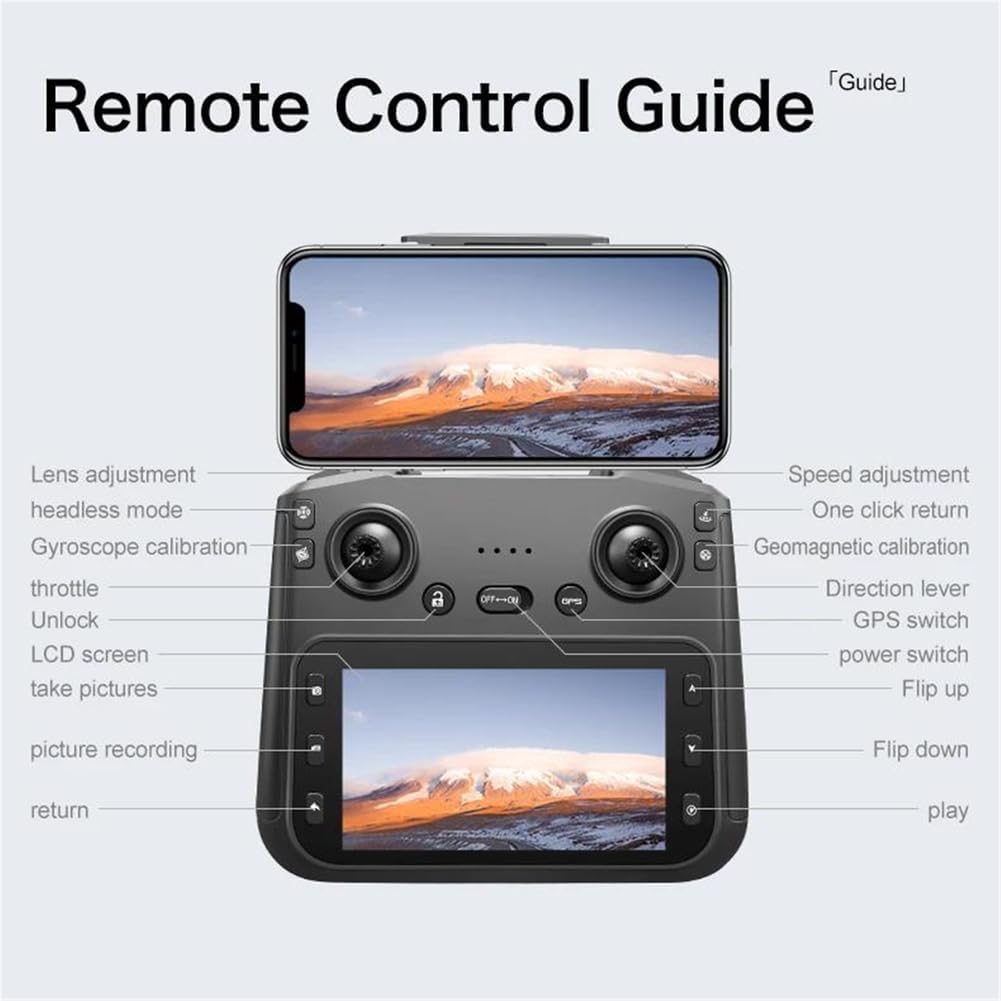
Image 4.1: Detailed diagram of the remote control, indicating the function of each button, joystick, and screen area.
- לינקער דזשויסטיק (גאז/גיי): קאָנטראָלירט הייך (אַרויף/אַראָפּ) און ראָטאַציע (לינקס/רעכטס).
- רעכטער דזשויסטיק (ריכטונג): קאָנטראָלירט באַוועגונג פאָרויס, צוריק, לינקס און רעכטס.
- מאַכט סוויטש: טוט אן/אויסדרייען די ווײַטקאָנטראָל.
- גפּס סוויטש: Activates/deactivates GPS mode.
- איין-קליק צוריקקער: הייבט אן אויטאמאטישע צוריקקער אהיים.
- גיכקייט אַדזשאַסטמאַנט: טוישט צווישן פארשידענע פלי-גיכקייטן.
- Lens Adjustment: Controls the camera's vertical angle.
- Headless Mode: פאַרפּשוטערט פלי אָריענטירונג.
- גיראָסקאָפּע קאַלאַבריישאַן: קאליברירט דעם דראָון'ס גיראָסקאָפּ.
- Geomagnetic Calibration: Calibrates the drone's compass.
- נעם בילדער: כאַפּט אַ סטיל בילד.
- Picture Recording: הייבט אָן/שטעלט אָפּ ווידעאָ רעקאָרדינג.
- ופשליסן: Unlocks the motors for flight.
4.4. אויפשטייג און לאַנדונג
- אויטאָמאַטישע אָפּפֿליִען: After calibration and GPS lock (if in GPS mode), press the one-key takeoff button or push both joysticks to the bottom-outer corners to unlock motors, then push the left joystick up.
- אויטאָמאַטיש לאַנדינג: דריק דעם איין-קנעפל לאַנדינג קנעפּל. די דראָון וועט אַראָפּגיין און לאַנדן אויטאָמאַטיש.
- מאַנואַל לאַנדינג: Slowly pull the left joystick down to descend. Once on the ground, hold the left joystick down for a few seconds to stop the motors.
4.5. GPS Functions
The S-X1 MAX features advanced GPS capabilities for enhanced flight stability and intelligent functions.
- גפּס פּאַזישאַנינג: Provides precise hovering and stable flight. Ensure a strong GPS signal before takeoff.
- GPS Return (Return-to-Home): The drone will automatically return to its takeoff point under conditions such as low battery, loss of signal, or manual activation.
- GPS Follow Me: The drone will automatically follow the remote control's GPS signal.
- בילד טראַקינג: Identify a subject on the screen, and the drone will automatically track its movement.

Image 4.2: Visual representation of the drone's GPS capabilities, including low power return, over distance return, out of control return, and one-click return.
4.6. Camera Operation and Gimbal
The drone is equipped with an 8K HD dual-camera system and a 3-axis mechanical gimbal with EIS anti-shake for stable and clear aerial photography.

בילד 4.3: דעטאַלירט view of the drone's HD camera and 3-axis self-stabilizing gimbal, showing adjustable angles for roll, heading, and pitch.
- פראָנט אַפּאַראַט: Wide-angle 1080P HD lens with EIS.
- אונטערשטע קאַמעראַ: Optical flow positioning lens.
- פאָטאָ / ווידעא: Use the dedicated buttons on the remote control to capture photos or start/stop video recording.
- גימבאַל קאָנטראָל: Adjust the camera's pitch angle using the lens adjustment button on the remote control.
5. וישאַלט
5.1. רייניקונג
- Use a soft, dry cloth to clean the drone body and remote control.
- Gently clean camera lenses with a microfiber cloth designed for optics.
- פֿאַרמײַדן ניצן סאָלווענטן אָדער שאַרפֿע כעמיקאַלן.
5.2. סטאָרידזש
- Store the drone and remote control in a cool, dry place, away from direct sunlight.
- אַרויסנעמען באַטעריעס אויב איר לאָזט עס אָפּהאַלטן פֿאַר לענגערע צייטן.
- Fold the drone arms for compact storage.
5.3. באַטערי קער
- דו זאלסט נישט אָוווערטשאַרדזש אָדער איבער-אָפּזאָגן באַטעריז.
- Charge batteries at least once every three months to maintain health.
- פֿאַרמײַדן אויסצושטעלן באַטעריעס צו עקסטרעמע טעמפּעראַטורן.
6. טראָובלעשאָאָטינג
| פּראָבלעם | מעגלעך סיבה | לייזונג |
|---|---|---|
| דראָון טוט זיך נישט אָן | נידעריגע באַטעריע; אומרעכטע באַטעריע אינסטאַלאַציע | לאָד די באַטאַרייע; ריינסטאַל די באַטאַרייע ריכטיק |
| דראָון דריפֿט בעתן פֿלוג | Improper calibration; Strong wind interference | Perform gyroscope and geomagnetic calibration; Fly in calm conditions |
| No image on remote screen | Poor connection; Drone too far | Ensure drone and remote are paired; Fly within transmission range |
| GPS פונקציעס ארבעטן נישט | Weak GPS signal; Flying indoors | Fly in an open outdoor area with clear sky; Wait for sufficient GPS satellites to connect |
| Motors do not unlock | Drone not calibrated; Safety lock engaged | Perform all necessary calibrations; Ensure one-key unlock or joystick combination is used correctly |
7. ספּעסאַפאַקיישאַנז
- סאָרט: FINOTI
- מאָדעל: S-X1 MAX
- אַפּאַראַט: 8K HD Dual Camera (Front 1080P Wide-angle with EIS, Bottom Optical Flow)
- גימבאַל: 3-Axis Mechanical Stabilization + EIS Anti-Shake
- מאָטאָר טיפּ: ברושלעסס
- בילד טראַנסמיסיע: 5G Digital Image Transmission (up to 5KM range)
- ווייַט קאָנטראָל: 4.5-inch LCD Color Screen for Real-time FPV
- גפּס: Yes, with Intelligent Tracking, GPS Follow Me, Return-to-Home functions
- באַטערי: 7.4V 1600mAh Intelligent Battery
- פאָולדיד דימענשאַנז: בעערעך 8.2 X 14.8 X 6.4 סענטימעטער
- קאָליר: שוואַרץ
8. זיכערקייַט גיידליינז
האַלט זיך צו די פאלגענדע זיכערהייט גיידליינז צו ענשור אַ זיכער און ענדזשויאַבאַל פלי דערפאַרונג:
- Always fly in open areas, away from buildings, trees, power lines, and crowds.
- Maintain a safe distance from people and animals.
- Do not fly in adverse weather conditions (strong winds, rain, snow).
- Respect local regulations and airspace restrictions.
- Keep the drone within your line of sight.
- Perform pre-flight checks before every flight.
- אַפּערירט נישט דעם דראָון אונטערן איינפלוס פון אַלקאָהאָל אָדער דרוגס.
- קינדער זאָלן נאָר אָפּערירן דעם דראָון אונטער דער השגחה פֿון אַן ערוואַקסענעם.
9. וואָראַנטי און שטיצן
FINOTI products are designed for reliability and performance. For warranty information, technical support, or service inquiries, please refer to the warranty card included in your package or contact FINOTI customer service through the retailer where the product was purchased. Please have your model number (S-X1 MAX) and purchase date available when contacting support.