
1. הקדמה
א דאנק פארן קויפןasing the SODLK T21 40W Portable Bluetooth Speaker. This manual provides essential information for setting up, operating, and maintaining your speaker. Please read it carefully before use to ensure optimal performance and longevity of the product.
2. פּראָדוקט פֿעיִקייטן
- 6D stereo surround sound for an immersive audio experience.
- Strengthened deep bass with 2pcs vibrating diaphragm.
- 4pcs built-in driver unit (2pcs bass driver unit + 2pcs Mids & Tweets) for balanced sound.
- 5Play model: Supports TF card slot, U disk, AUX input, Bluetooth, and TWS connection.
- 2pcs power amplifier for robust audio output.
- Integrated LED light for visual ambiance.
- Inbuilt 3600mAh battery for extended playtime.
- TWS (True Wireless Stereo) function to connect two speakers for amplified stereo sound.
3. פּעקל אינהאַלט
ביים אויספּאַקן, ביטע זיכער מאַכן אַז אַלע זאכן וואָס זענען ליסטעד אונטן זענען פאַראַן און אין גוטן צושטאַנד:
- SODLK T21 Portable Bluetooth Speaker
- וסב טיפּע- C טשאַרדזשינג קאַבלע
- באַניצער מאַנואַל

Image: The SODLK T21 Portable Bluetooth Speaker, highlighting its ultra-portable design and key features like IPX7 waterproof rating, BT 5.3, punchy bass, voice assistant, Type-C port, 18 hours playtime, stereo pairing, and hands-free calls.
4. קאָנטראָלס און ינדיקאַטאָרס
Familiarize yourself with the speaker's control panel for easy operation:
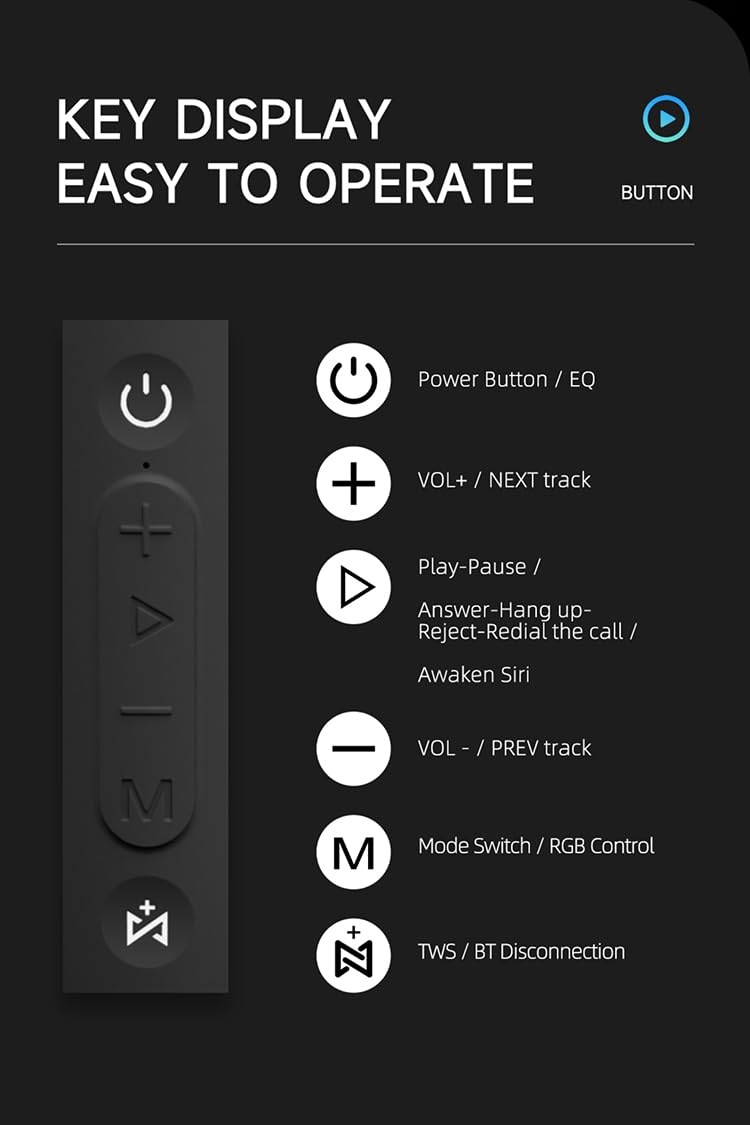
בילד: א דעטאַלירטע view of the SODLK T21 speaker's control panel, showing buttons for Power/EQ, Volume Up/Next Track, Play/Pause/Answer/Hang Up/Reject/Redial/Awaken Siri, Volume Down/Previous Track, Mode Switch/RGB Control, and TWS/BT Disconnection.
- Power Button / EQ: Press and hold to power on/off. Short press to cycle through EQ modes.
- VOL+ / NEXT track: קורץ דריקן צו פֿאַרגרעסערן די קול. לאַנג דריקן צו גיין צום נעקסטן ליד.
- Play-Pause / Answer-Hang up-Reject-Redial the call / Awaken Siri: Short press for play/pause. Short press to answer/hang up calls. Long press to reject calls. Double press to redial. Triple press to awaken Siri (or other voice assistant).
- VOL- / PREV track: קורץ דריקן צו פֿאַרמינערן די קול. לאַנג דריקן צו גיין צום פֿריִערדיקן ליד.
- Mode Switch / RGB Control: Short press to switch between input modes (Bluetooth, TF card, U disk, AUX). Long press to control RGB lighting effects.
- TWS / BT Disconnection: Short press to initiate TWS pairing. Long press to disconnect Bluetooth.
5. סעטאַפּ און אָפּעראַציע
5.1 אויפלאָדן דעם רעדנער
Before first use, fully charge the speaker. Connect the provided USB Type-C cable to the speaker's charging port and the other end to a compatible USB power adapter (5V/1A recommended). The charging time is approximately 3-4 hours.
5.2 מאַכט אויף / אַוועק
דריקן און האַלטן די מאַכט קנעפּל for 2-3 seconds to turn the speaker on or off. An audible prompt will indicate the power status.
5.3 בלועטאָאָטה פּערינג
- צינדט אן דעם רעדנער. עס וועט אויטאמאטיש אריינגיין אין בלוטוט פארבינדונג מאָדוס, אנגעצייכנט דורך א בלינקנדיקע LED ליכט.
- אַקטיווירן בלועטוט אויף אייער מיטל (סמאַרטפאָון, טאַבלעט, אאז"וו).
- זוכן פֿאַר "SODLK T21" in the list of available Bluetooth devices and select it to connect.
- Once connected, the LED light will become solid, and you will hear a confirmation tone.
5.4 TWS (אמת'ע ווירעלעס סטערעאָ) פּאָרינג
To achieve stereo sound, you can connect two SODLK T21 speakers together:

Image: Two SODLK T21 speakers shown side-by-side with a TWS icon and dashed lines indicating a wireless connection, illustrating the stereo pairing feature.
- Ensure both SODLK T21 speakers are powered on and not connected to any other Bluetooth device.
- On one speaker (this will be the primary speaker), short press the TWS קנעפּל. The speaker will enter TWS pairing mode.
- The two speakers will automatically connect to each other. A confirmation tone will sound once TWS pairing is successful.
- איצט, פֿאַרבינדט אייער דעווייס צום הויפּט רעדנער דורך בלועטוט ווי באַשריבן אין סעקציע 5.3. ביידע רעדנער וועלן שפּילן אַודיאָ אין סטערעאָ.
5.5 מאָדע סוויטשינג
קורץ דריקן די Mode Switch Button (M) to cycle through available input modes: Bluetooth, TF Card, U Disk, and AUX. The speaker will announce the current mode.
5.6 RGB ליכט קאָנטראָל
לאנג דריקן די Mode Switch Button (M) to change or turn off the RGB lighting effects.

Image: The SODLK T21 speaker displaying a vibrant rainbow light show, illustrating its 16.8 million color RGB light effect feature.
6. וישאַלט
- רייניקט דעם רעדנער מיט אַ ווייכן, טרוקענעם שטאָף. ניצט נישט קיין שרײַבנדיקע רייניגערס אדער סאָלווענטן.
- האַלט דעם רעדנער אַוועק פון עקסטרעמע טעמפּעראַטורן, דירעקט זונשייַן און פייכטקייט.
- פרובירט נישט צו צענעמען אדער פאררעכטן דעם רעדנער אליין. דאס וועט בטל מאכן די גאראנטיע.
- האַלט דעם רעדנער אין אַ קיל, טרוקן אָרט ווען עס איז נישט אין באַנוץ פֿאַר לענגערע פּעריאָדן.
7. טראָובלעשאָאָטינג
| פּראָבלעם | מעגלעך סיבה | לייזונג |
|---|---|---|
| דער רעדנער לאָזט זיך נישט אָנ. | נידעריק באַטאַרייע. | לאָדט דעם רעדנער גאָר אויף. |
| קען נישט פארבינדן דורך בלוטוט. | דער רעדנער איז נישט אין פּערינג מאָדע אדער שוין פארבונדן צו אן אנדער דעווייס. | Ensure the speaker is in pairing mode (flashing LED). Disconnect from other devices. Restart both speaker and device. |
| קיין געזונט. | Volume too low, incorrect input mode, or device not playing. | Increase volume on both speaker and device. Check input mode. Ensure audio is playing on the connected device. |
| TWS פּאָרינג פיילז. | רעדנערס זענען צו ווייט איינער פון צווייטן אדער שוין פארבונדן צו אנדערע דעווייסעס. | Ensure speakers are within close proximity. Disconnect both speakers from any other Bluetooth devices before initiating TWS pairing. |
8. ספּעסאַפאַקיישאַנז

Image: The SODLK T21 speaker with its dimensions (232mm height, 100mm width) and a table of specifications including model number, color, BT version, output, waterproof rating, play time, charging time, working distance, input, speaker size, and speaker weight.
| שטריך | דעטאַל |
|---|---|
| מאָדעל נומ. | T21 |
| קאָליר | שוואַרץ |
| BT ווערסיע | BT5.3 |
| רעזולטאַט | 40 וו |
| וואָטערפּרוף | IPX7 |
| שפּיל צייט | אַרויף צו 18 שעה |
| טשאַרדזשינג צייט | 3-4 שעה |
| ארבעטן דיסטאַנסע | אַרויף צו 18 מיליאָן |
| אַרייַנשרייַב | 5V/1A |
| רעדנער גרייס | 232מם * 100מם |
| רעדנער וואָג | 1.12 קג |
9. וואָראַנטי און שטיצן
The SODLK T21 Portable Bluetooth Speaker comes with a standard manufacturer's warranty. Please refer to the warranty card included in your package for specific terms and conditions. For technical support or service inquiries, please contact your retailer or the SODLK customer service team.