
vine B0FFBC4MV4
וויין קלוגער טערמאָסטאַט (מאָדעל B0FFBC4MV4) באַניצער מאַנואַל
קאָמפּרעהענסיווע אינסטרוקציעס פֿאַר ינסטאַלירונג, אָפּעראַציע און וישאַלט.
1. הקדמה
This manual provides detailed instructions for the installation, setup, and operation of your vine Smart Thermostat, Model B0FFBC4MV4. This device is designed to offer efficient temperature control for your home, featuring Wi-Fi connectivity, 7-day programmable scheduling, and compatibility with smart home assistants like Alexa and Google Assistant. Please read this manual thoroughly before installation and use to ensure proper function and safety.
2. זיכערקייַט אינפֿאָרמאַציע
- מאַכט דיסקאַנעקשאַן: Always turn off power to your heating and cooling system at the circuit breaker before installing or servicing the thermostat.
- C-Wire Requirement: A common wire (C-wire) is required for the operation of this thermostat. Ensure your system has a C-wire or install a C-wire power adapter if necessary.
- Voltage קאַמפּאַטאַבילאַטי: This thermostat is designed for 24V AC systems. It is not compatible with 110V-240V AC electric baseboard heat, millivolt systems, or systems that use S terminals for indoor/outdoor sensors. Attempting to install with incompatible systems can cause damage or injury.
- פאַכמאַן ינסטאַלירונג: אויב איר זענט נישט זיכער וועגן קיין טייל פון די אינסטאַלאַציע פּראָצעס, קאָנסולטירט אַ קוואַליפֿיצירטן HVAC טעכניקער אָדער עלעקטריקער.
- סיסטעם טשעק: After installation, verify that your heating and cooling system operates correctly.
3. פּעקל אינהאַלט
באַשטעטיקט אַז אַלע זאכן וואָס זענען אויסגערעכנט אונטן זענען אַרייַנגערעכנט אין אייער פּעקל:
- vine Smart Thermostat (Model B0FFBC4MV4) x1
- וואנט פּלאַטע x1
- Large Trim Plate x1 (for covering marks from previous thermostat)
- Screws Sets x2
- Wiring Labels x1
- באַניצער מאַנואַל x1

פיגורע 3.1: Package contents for the vine Smart Thermostat. Includes the thermostat unit, wall plate, trim plate, screws, wiring labels, and user manual.
4. קאָמפּאַטאַביליטי קאָנטראָל
Before installation, it is crucial to confirm your HVAC system's compatibility with the vine Smart Thermostat. This thermostat requires a C-wire (common wire) for operation and is designed for 24V AC systems.
4.1. סיסטעם טייפּס
The vine Smart Thermostat is compatible with approximately 90% of 24V AC systems, including:
- Conventional (2 Heat/2 Cool) - Gas, Oil, Electric, Boiler
- Heat Pump (2 stages Heat/Cool + 2 stages Auxiliary/Emergency)
- Heat-only or Cool-only Systems
4.2. Incompatible Systems
דער טערמאַסטאַט איז ניט קאַמפּאַטאַבאַל מיט:
- Electric baseboard heat (110VAC-240VAC)
- מיליוואָלט סיסטעמען
- Systems that do not support S terminals for indoor and outdoor sensors
4.3. Online Compatibility Tool
For a detailed compatibility check, visit the official vine support page: vineconnected.com/support/thermostat. This tool will guide you through identifying your current wiring and system type.

פיגורע 4.1: Visual guide to HVAC system compatibility, including wiring details and warnings for incompatible systems.
ווידעא 4.1: This video demonstrates how to check the compatibility of your HVAC system with the vine Smart Thermostat, guiding you through identifying your current wiring and system type.
5. ינסטאַלירונג
Follow these steps carefully to install your vine Smart Thermostat. Ensure you have performed the compatibility check before proceeding.
5.1. מכשירים פארלאנגט
- פיליפּס שרויפנ-ציער
- לעוועל (אפציאנאל, פאר עסטעטישע אויסריכטונג)
- בלייַער (פֿאַר מאַרקינג)
5.2. שריט-ביי-שריט אינסטאַלאַציע
- קער אַוועק מאַכט: Locate your circuit breaker for your HVAC system and turn off the power. Verify the system is off by checking if your old thermostat screen is blank or unresponsive.
- אַראָפּנעמען אַלט טערמאַסטאַט: Carefully remove the cover of your old thermostat. Take a picture of the wiring for reference before disconnecting any wires. This will help ensure correct re-connection.
- לייבל דראָטן: Use the provided wiring labels to mark each wire according to its terminal on your old thermostat. If you see any jumper wires, remove them; your new thermostat has internal jumpers.
- אַראָפּנעמען אַלטע וואַנט פּלאַטע: שרויפט אַראָפּ און נעמט אַראָפּ די אַלטע וואַנט פּלאַטע.
- Install New Wall Plate: Position the new vine wall plate on the wall. If needed, use the large trim plate to cover any marks or holes from the previous thermostat. Secure the new wall plate using the provided screws.
- פאַרבינדן ווירעס: Insert each labeled wire into its corresponding terminal on the new vine wall plate. Ensure each wire is securely connected. If your system has two power wires (R/RC and RH), adjust the internal switch on the thermostat unit to the connection position.
- מאָנטירן טערמאָסטאַט: Align the four clips on the thermostat unit with the wall plate. Gently push the thermostat onto the wall plate until it clicks into place.
- ומקערן מאַכט: Turn the power back on at your circuit breaker. The thermostat screen should light up.

פיגורע 5.1: Visual steps for thermostat installation, including power off, wire labeling, and mounting.
ווידעא 5.1: This video provides a detailed guide on how to assemble and install the vine Smart Thermostat (Model TJ550), covering wiring and mounting procedures.
6. App and Wi-Fi Setup
After physical installation, connect your vine Smart Thermostat to your home Wi-Fi network and the vine mobile application for remote control and smart features.
6.1. אראפקאפיע די אַפּ
Download the "Vine Thermostat" or "Smart Life" app from the Apple App Store (iOS) or Google Play Store (Android). You can also scan the QR codes provided in the app setup guide.
6.2. Create an Account and Connect
- Open the app and sign in or create a new account. Note: You must create your own vine account to use third-party services and products. Guest accounts are not supported for full functionality.
- On the thermostat, after initial power-up, you will be prompted to make some basic settings (e.g., heat type, heating/cooling stages). Complete these settings.
- On the thermostat, touch the "Wi-Fi Setup" button.
- In the app, touch the "+" button in the upper right corner to add a device. Select your thermostat model (TJ-550).
- פֿאָלגט די אינסטרוקציעס אין דער אַפּ צו פֿאַרבינדן דעם טערמאָסטאַט צו אייער 2.4GHz Wi-Fi נעץ. Important: The vine thermostat DOES NOT support 5GHz Wi-Fi. Ensure your phone is connected to a 2.4GHz network during setup.
- Once connected, you can modify the thermostat's name within the app.
ווידעא 6.1: This video demonstrates the step-by-step process of setting up the vine Smart Thermostat app (Model TJ550), including account creation, Wi-Fi connection, and initial device configuration.
7. אַפּערייטינג ינסטרוקטיאָנס
Your vine Smart Thermostat offers various features for comfortable and efficient home climate control.
7.1. Basic Temperature Control
On the main screen of the thermostat, use the "+" and "-" buttons to adjust the desired temperature. Tap the "O" button to switch between "Heating" or "Cooling" modes.
ווידעא 7.1: This video illustrates how to change the thermostat system mode (Heat, Cool, Off) and fan mode directly on the vine Smart Thermostat device.
7.2. Programmable Schedules (7-day, 8-period)
Utilize the 7-day programmable schedules with up to 8 periods per day to automatically adjust your home's temperature. This feature helps maintain comfort while optimizing energy consumption. Access and configure schedules through the Vine Thermostat App or Smart Life App.

פיגורע 7.1: The app interface for setting 7-day programmable schedules to optimize energy usage.
7.3. ווײַטקאָנטראָל דורך אַפּ
Control and monitor your thermostat from anywhere using the Vine Thermostat App or Smart Life App. Adjust settings, view current temperatures, and manage schedules remotely.
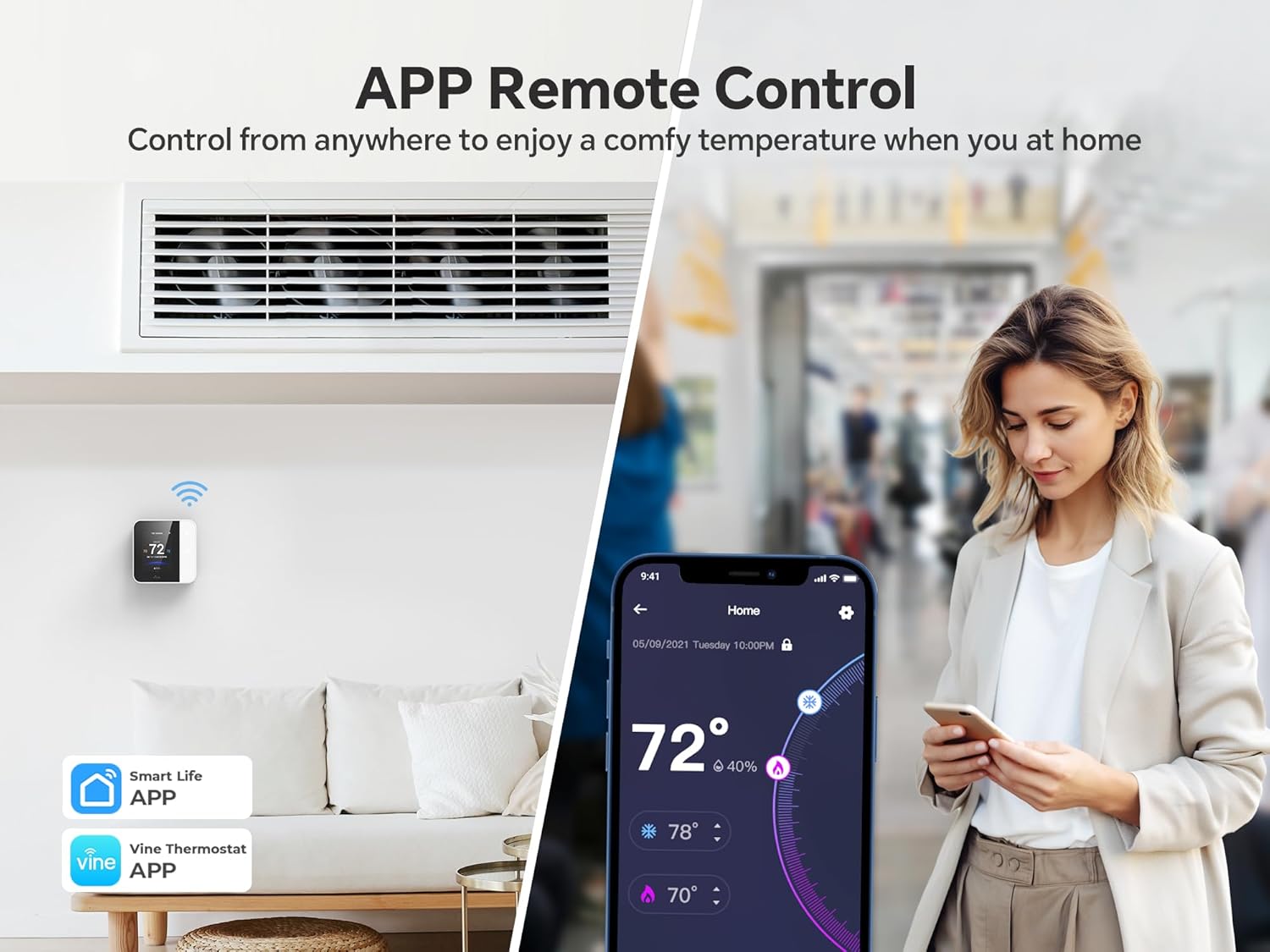
פיגורע 7.2: Remote control functionality via the Vine Thermostat App, allowing temperature adjustments from any location.
7.4. קול קאָנטראָל
The thermostat is compatible with Amazon Alexa and Google Assistant, enabling hands-free voice control. Simply use voice commands to adjust the temperature or change modes.
- "Alexa, set the room temperature to 72 degrees."
- "היי גוגל, מאַך אויף די היץ."

פיגורע 7.3: Voice control integration with Amazon Alexa and Google Assistant for convenient temperature management.
7.5. Auto Home/Away with Geofencing
Leverage geofencing technology to automatically adjust the temperature based on your proximity to home. The thermostat can switch to an energy-saving "Away" mode when you leave and return to a comfortable "Home" setting before you arrive.

פיגורע 7.4: Geofencing feature automatically adjusts thermostat settings as you enter or leave a predefined area.
7.6. Child Lock Functionality
Prevent unintended adjustments by children or others by activating the child lock feature through the mobile application. This locks the thermostat screen, requiring app access for changes.

פיגורע 7.5: The child lock feature, activated via the app, prevents unauthorized changes directly on the thermostat screen.
8. וישאַלט
Regular maintenance ensures optimal performance and longevity of your vine Smart Thermostat.
- רייניקונג: Gently wipe the thermostat screen and body with a soft, damp שטאָף. ויסמיידן ניצן אַברייסיוו קלינערז אָדער סאָלוואַנץ.
- פילטער טוישן רימיינדערז: The thermostat app can provide reminders for HVAC filter changes. Follow your HVAC system manufacturer's recommendations for filter replacement.
- ווייכווארג דערהייַנטיקונגען: Ensure your Vine Thermostat App is updated to the latest version for new features and performance improvements. Firmware updates for the thermostat may also be available through the app.
9. טראָובלעשאָאָטינג
If you encounter issues with your vine Smart Thermostat, refer to the following common problems and solutions:
| פּראָבלעם | מעגלעך סיבה | לייזונג |
|---|---|---|
| טערמאָסטאַט עקראַן איז ליידיק. | קיין שטראָם צום טערמאָסטאַט. | Check the circuit breaker for your HVAC system and ensure it is ON. Verify C-wire connection. |
| קענען ניט פאַרבינדן צו ווי-פי. | Incorrect Wi-Fi password, 5GHz network selected, or weak signal. | Ensure you are connecting to a 2.4GHz Wi-Fi network. Double-check the password. Move the router closer or use a Wi-Fi extender. |
| טעמפּעראַטור מעסטונג מיינט נישט ריכטיק. | Thermostat location, drafts, or calibration needed. | Ensure the thermostat is not in direct sunlight or near heat sources/drafts. Check app settings for temperature calibration options. |
| די HVAC סיסטעם רעאַגירט נישט אויף די טערמאָסטאַט. | Incorrect wiring, power off, or system incompatibility. | Verify all wiring connections are secure and correct. Check power to the HVAC system. Re-confirm system compatibility. |
| שטימע קאנטראל ארבעט נישט. | Incorrect linking with Alexa/Google Assistant, or network issues. | Ensure the vine thermostat is correctly linked in your Alexa or Google Home app. Check Wi-Fi connectivity for both the thermostat and smart speaker. |
10. ספּעסאַפאַקיישאַנז
| שטריך | דעטאַל |
|---|---|
| סאָרט | ווייַנשטאָק |
| מאָדעל נומער | B0FFBC4MV4 |
| פּראָדוקט דימענשאַנז | 0.98"ד רענטגענ 3.54"וו רענטגענ 3.54"ה |
| פּונקט וואָג | 10.5 אונסעס |
| קאָנטראָללער טיפּ | אַמאַזאָן אַלעקסאַ, אַנדרויד, גוגל אַסיסטאַנט, יאָס |
| ספּעציעלע פֿעיִקייטן | Auto-Away Mode, Geofence Technology, Lockable, Programmable, Vacation Mode |
| ספּעציפיש ניצט | לופטקילונג, בוילער, אויוון, היץ פּאָמפּע |
| טעמפּעראַטור קאָנטראָל טיפּ | קילן, הייצן |
| קאַנעקטיוויטי טעכנאָלאָגיע | Wi-Fi (נאָר 2.4GHz) |
| מאַכט מקור | Corded Electric (C-wire required) |
| ווייַז טיפּ | לקד |
| קאָנטראָל מעטאָד | אַפּ, ריר, קול |
| מאַונטינג טיפּ | וואנט בארג |
11. וואָראַנטי און שטיצן
For warranty information, technical support, or any questions regarding your vine Smart Thermostat, please contact vine customer service.
- פאַבריקאַנט: ווייַנשטאָק
- פארקויפער : vine_sszn
- אָנליין שטיצן: Refer to the vineconnected.com webוועבזייטל פֿאַר אָפֿט געשטעלטע פֿראַגעס און נאָך רעסורסן.
- קאָנטאַקט: If you have any questions, please feel free to contact us at any time. (Specific contact details like email/phone are not provided in the product data, so a general statement is used).
Ask a question about this manual
Ask about setup, troubleshooting, compatibility, parts, safety, or missing instructions. Manuals+ will review the question and use this page’s manual context to help answer it.