
DATOUBOSS 3000W Hybrid Inverter 24V User Manual
Model: SP-24V-3000W
1. הקדמה
This manual provides comprehensive instructions for the installation, operation, and maintenance of the DATOUBOSS 3000W Hybrid Inverter, model SP-24V-3000W. This device integrates a 3000W pure sine wave inverter, a 100A MPPT solar charge controller, and a battery charger into a single unit. It is designed to provide reliable power for various applications, supporting both 24V lead-acid and lithium battery systems.
2. זיכערקייַט אינסטרוקציעס
Please read all instructions and warnings carefully before installation and operation. Failure to follow these instructions may result in electric shock, fire, or serious injury.
- קוואַלאַפייד פּערסאַנעל: ייַנמאָנטירונג און וישאַלט מוזן זיין דורכגעקאָכט דורך קוואַלאַפייד פּערסאַנעל.
- באַטערי זיכערקייַט: Always connect batteries with correct polarity. Ensure proper ventilation when working with lead-acid batteries.
- גראָונדינג: The inverter must be properly grounded to prevent electric shock.
- ווענטילאַטיאָן: Ensure adequate airflow around the inverter to prevent overheating. Do not block ventilation openings.
- סוויווע: Install the inverter in a dry, cool, and well-ventilated area, away from flammable materials, corrosive gases, and excessive dust.
- דיסקאַנעקט מאַכט: Before performing any wiring or maintenance, ensure all power sources (AC, DC, PV) are disconnected.
- אָווערלאָאַד שוץ: Do not exceed the inverter's rated power output to avoid damage.
3. פּראָדוקט איבערview
3.1 אויסזען באַשרייַבונג

The image above illustrates the various components and interfaces of the DATOUBOSS 3000W Hybrid Inverter. Key features include the LCD display for real-time system data, status indicators (AC/INV, CHG, FAULT), control buttons (ESC, UP, DOWN, ENTER), communication ports (RS232, BMS/RS485), a power ON/OFF switch, AC input/output terminals, PV input, and battery input terminals. Cooling fans are located on the rear for thermal management.
3.2 שליסל פֿעיִקייטן
- 3000 וואט ריין סינוס כוואַליע רעזולטאַט: Provides stable and high-quality AC power (230V AC) from a 24V DC source.
- אינטעגרירטע MPPT זונ - אָפּצאָל קאָנטראָללער: Features a 100A MPPT controller with a maximum PV open-circuit voltage of 450Vdc and a maximum PV power of 3000W.
- LCD ווייַז: Real-time monitoring of system data and operational status for intuitive use.
- פולשטענדיק שוץ: Includes short-circuit, overcurrent, overvoltage, ונדעראָלtagע, איבערהיצונג, און איבערלאסטונג שוץ.
- ברייט אַפּלאַקיישאַן קייט: Suitable for RVs, camping boats, home backup power, and various electrical loads.
3.3 דיטיילד פּאַראַמעטערס

The image displays the product label with detailed technical specifications. For example, the model is DT2430, capacity is 3000VA/3000W, operating temperature range is -10 to 50°C, and protection degree is IP21. The serial number for this unit is 20240909 0120.
4. ינסטאַלירונג
4.1 וויירינג דיאַגראַמע
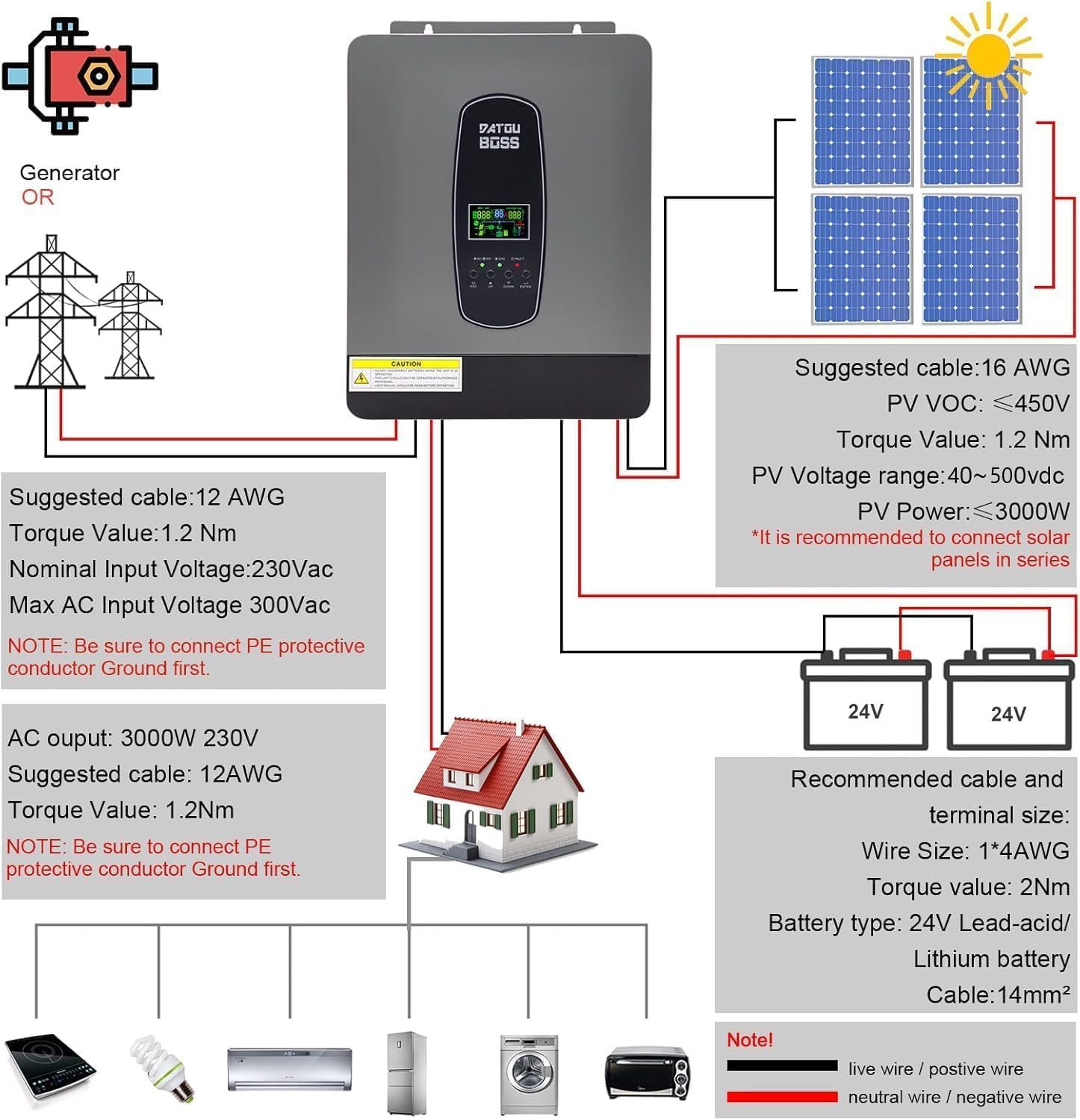
This diagram illustrates the recommended wiring connections for the hybrid inverter, including connections to a generator or utility grid, solar panels, battery bank, and AC loads. Always ensure proper cable sizing and torque values for secure and safe connections.
- פּוו אַרייַנשרייַב: Suggested cable 16 AWG, PV VOC ≤ 450V, PV Voltage range 40~500Vdc, PV Power ≤ 3000W. It is recommended to connect solar panels in series.
- באַטערי קשר: Recommended cable and terminal size: Wire Size 1*4AWG, Torque value 2Nm. Battery type: 24V Lead-acid/Lithium battery, Cable: 14mm².
- אַק רעזולטאַט: 3000W 230V. Suggested cable 12AWG, Torque value 1.2Nm.
- AC Input (Generator/Grid): Suggested cable 12 AWG, Torque value 1.2Nm. Nominal Input Voltage: 230Vac, מאַקס AC אַרייַנגאַנג וואָלומעןtagE 300Vac.
- גראָונדינג: נאטיץ: Be sure to connect the PE protective conductor Ground first for both AC input and AC output.
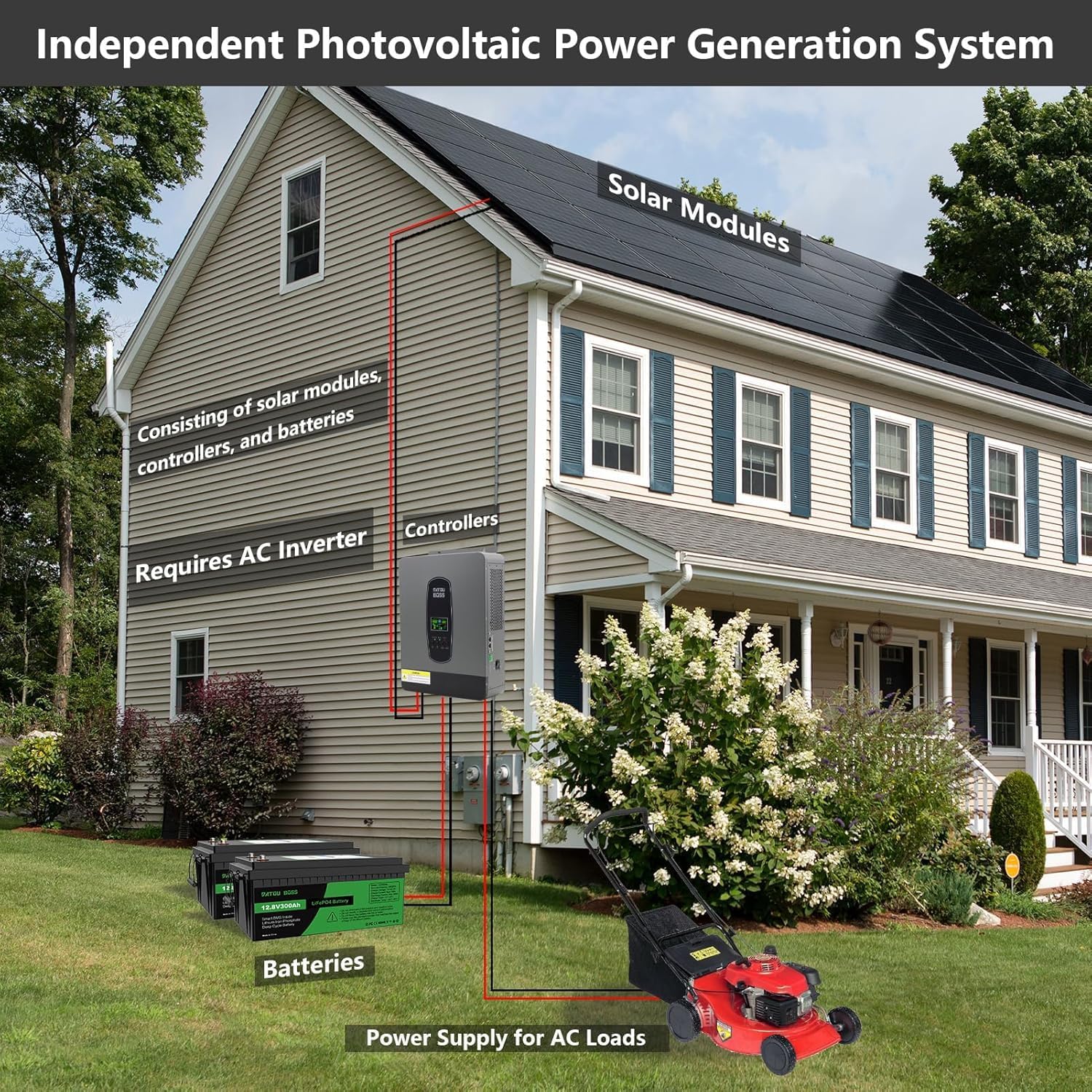
4.2 Independent Photovoltaic Power Generation System Overview

This diagram illustrates how the DATOUBOSS hybrid inverter integrates into an independent photovoltaic power generation system for a household. It shows solar modules connected to the inverter, which then charges batteries and supplies power to AC loads within the home.
4.3 קאַנעקשאַן סטעפּס
- מאָונטינג: Securely mount the inverter in a suitable location as per safety guidelines.
- גראָונדינג: Connect the protective earth (PE) ground wire to the inverter's ground terminal and to a reliable ground point.
- באַטערי קשר: Connect the battery cables to the inverter's DC input terminals, ensuring correct polarity (+ to + and - to -).
- PV קשר: Connect the solar panel array to the PV input terminals, observing correct polarity and voltagE לימאַץ.
- AC אינפוט קאנעקשאן (אפציאנאל): If connecting to a generator or utility grid, connect the AC input cable to the designated AC input terminals.
- AC אַרויסגאַנג קאַנעקשאַן: Connect your AC loads or distribution panel to the AC output terminals.
- מאַכט אויף: After verifying all connections are secure and correct, switch on the battery breaker, then the PV breaker, and finally the inverter's power switch.
5. אָפּעראַציע
5.1 LCD אַרויסווייַז און קאָנטראָל קנעפּלעך
The inverter features an LCD display that provides real-time information about the system's status, including input/output voltagE, באַטאַרייע אָפּצאָל מדרגה, מאַסע פּראָצענטtage, and operational modes. The control buttons (ESC, UP, DOWN, ENTER) allow navigation through menus and adjustment of settings.
5.2 Charging and Load Output Modes
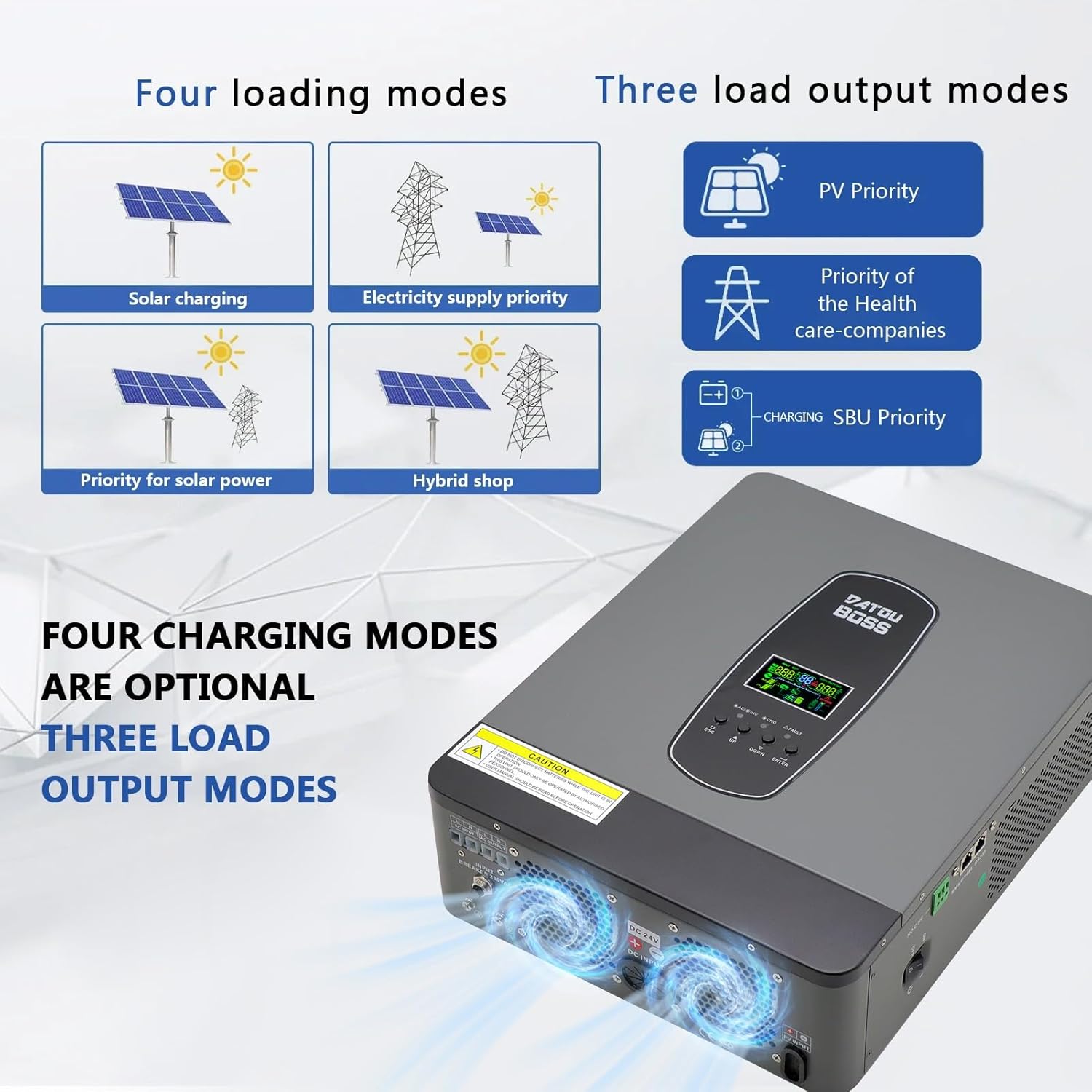
The inverter offers flexible operational modes to suit various energy management needs:
Four Charging Modes (Optional):
- זונ טשאַרדזשינג: גיט פריאריטעט צו זונ - ענערגיע פאר באטעריע טשאַרדזשינג.
- Electricity Supply Priority: גיט פּריאָריטעט צו גריד מאַכט פֿאַר טשאַרדזשינג.
- Priority for Solar Power: Solar power is the primary source for charging.
- Hybrid Shop: A combination mode utilizing both solar and grid power for charging.
דריי לאָוד אַוטפּוט מאָדעס:
- PV פּריאָריטעט: Solar power is the primary source for loads.
- SBU פּריאָריטעט: Solar → Battery → Utility (Grid) priority for loads.
- נוצלעכקייט פּריאָריטעט: Grid power is the primary source for loads.
5.3 ריין סינוס כוואַליע רעזולטאַט

The DATOUBOSS hybrid inverter produces a pure sine wave AC output, which is identical to utility grid power. This ensures compatibility with all types of electrical appliances, including sensitive electronics, providing stable and clean power without risk of damage. This feature makes it suitable for a wide range of family uses.
5.4 Supported Loads
This solar inverter can power a variety of electrical devices in your home or office. Examples include kettles, televisions, refrigerators, air conditioners, stoves, rice cookers, lamps, fans, and other common household appliances.
6. קאָמוניקאַציע צובינד
6.1 RS232 and RS485 Ports

The inverter is equipped with RS232 and BMS/RS485 communication ports for monitoring and data exchange.
- RS232 פּאָרט: Can be connected to a WiFi module to enable wireless communication and remote monitoring of inverter data. Note: A WiFi module provides remote viewing of inverter data but does not support remote modification of inverter parameters or remote control.
- RS485 צובינד: Facilitates communication with compatible batteries. The RS485 pins correspond to: 1 for 485B, 2 for 485A. Ensure to connect the communication pins of the battery (485A and 485B) to the corresponding pins on the hybrid inverter for successful communication. Pins 3/4/5/6/7/8 are typically not connected (NC).
7. וישאַלט
רעגולערע אויפהאלטונג גאראנטירט אפטימאלע פאָרשטעלונג און לאַנגלעבעדיקייט פון אייער ינווערטער.
- רייניקונג: Periodically clean the inverter's exterior and ventilation openings to prevent dust accumulation. Use a dry, soft cloth.
- קאָנעקשאַנז קאָנטראָל: רעגולער קאָנטראָלירן אַלע עלעקטרישע פֿאַרבינדונגען (PV, באַטאַרייע, AC אַרייַנגאַנג/אַרויסגאַנג) פֿאַר שטרענגקייט און וואונדער פון קעראָוזשאַן.
- באַטערי דורכקוק: קאָנטראָלירט די באַטעריע טערמינאַלן פֿאַר קעראָוזשאַן און זיכערט זיך אַז זיי זענען ריין און פעסט. מאָניטאָרירט די באַטעריע וואָלומען.tage and health as per battery manufacturer guidelines.
- סוויווע: זיכער מאַכן אַז די אינסטאַלאַציע סביבה בלייבט אין די ספּעציפֿישע טעמפּעראַטור און הומידיטי ריינדזשאַז.
- Firmware דערהייַנטיקונגען: קוק די פאַבריקאַנט ס webזייטל פֿאַר אַלע בנימצא פירמווער דערהייַנטיקונגען.
8. טראָובלעשאָאָטינג
If the inverter is not functioning as expected, refer to the following general troubleshooting steps. For specific error codes displayed on the LCD, consult the full product manual or contact technical support.
- קיין מאַכט: Check all power connections (battery, PV, AC input). Ensure the inverter's power switch is ON. Verify battery voltage איז אין די אַפּערייטינג קייט.
- קיין AC אַרויסגאַנג: Check AC output connections and ensure loads are not exceeding the inverter's capacity. Check for overload or short-circuit protection activation.
- טשאַרדזשינג ישוז: Verify PV panel connections and voltage. Check if the MPPT controller is active. Ensure battery parameters are correctly set.
- שולד ינדיקאַטאָר: If the FAULT indicator is lit, note any error codes on the LCD and refer to the detailed troubleshooting guide in the comprehensive manual.
- איבערהייצונג: Ensure adequate ventilation around the inverter. Clear any obstructions from the cooling fans. Reduce load if operating in high ambient temperatures.
9. ספּעסאַפאַקיישאַנז
| שטריך | באַשרייַבונג |
|---|---|
| סאָרט | DATOUBOSS |
| נומער מאָדעל נומער | SP-24V-3000W |
| מאָדעל נאָמען | SP |
| רעקאָממענדעד ניצט פֿאַר פּראָדוקט | היים |
| מאַכט מקור | סאָלאַר פּאַוערד און באַטאַרייע פּאַוערד |
| מאַכט | 3000 וואט-שעה |
| אַרייַנשרייַב וואָלtage | 24 וואלטס (דק) |
| רעזולטאַט מאַכט | 3000 וואטס |
| פּונקט וואָג | 6.5 קילאָגראַמס |
| עפעקטיווקייַט | A+ |
| רעזולטאַט חלקtage | 230 וואלטס (AC) |
| פאַבריקאַנט | DATOUBOSS |
| דאַטע ערשטער בנימצא אויף Amazon.com.be | יולי 13, 2023 |
| ספּער פּאַרץ אַוואַילאַביליטי | אינפֿאָרמאַציע ניט בנימצא |
| געראַנטיד ווייכווארג דערהייַנטיקונגען ביז | אינפֿאָרמאַציע ניט בנימצא |
10. וואָראַנטי און שטיצן
Official warranty information for the DATOUBOSS 3000W Hybrid Inverter is not explicitly provided in the product specifications. For detailed warranty terms, technical support, or service inquiries, please contact DATOUBOSS customer service directly or refer to the documentation included with your purchase.