
1. הקדמה
Thank you for choosing the Generic X5 Mini WiFi Camera. This compact and versatile camera is designed for various monitoring needs, including home security and outdoor surveillance. It features HD1080P video recording, a wide-angle lens, night vision, and remote access via Wi-Fi. Please read this manual carefully to ensure proper setup and operation of your device.
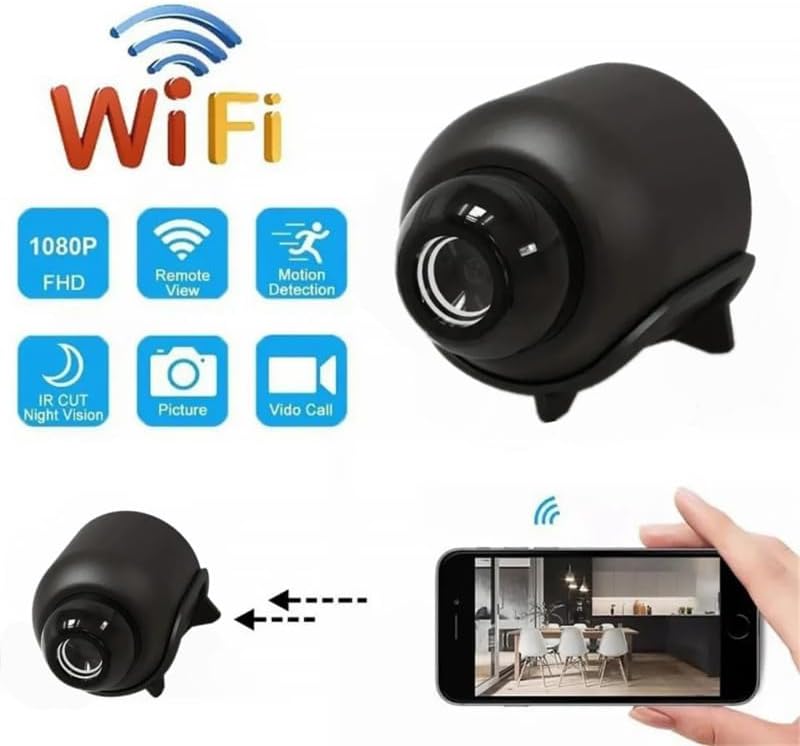
Image 1.1: The X5 Mini WiFi Camera highlighting its key features such as 1080P FHD, Remote View, Motion Detection, IR Cut Night Vision, Picture, and Video Call capabilities.
2. פּעקל אינהאַלט
ביטע טשעק די פּאַקעט פֿאַר די פאלגענדע זאכן:
- 1 x X5 Mini WiFi Camera
- 1 x באַניצער מאַנואַל
- קסנומקס רענטגענ סופּפּאָרט בראַקעט
- 1 רענטגענ טיפּ-C קאַבלע
3. פּראָדוקט איבערview
Familiarize yourself with the camera's components and dimensions.

Image 3.1: Labeled components of the X5 Mini Camera, including the TF Card slot, Infrared Lamp, Button, and Charging Jack.

בילד 3.2: פראָנט view of the X5 Mini Camera, indicating the photosensitive sensor, HD lens, and built-in microphone.

Image 3.3: Dimensions of the X5 Mini Camera, showing approximate measurements of 4cm (1.57inch) length, 3.5cm (1.38inch) height, and 3cm (1.18inch) width.
4. ספּעסאַפאַקיישאַנז
| שטריך | באַשרייַבונג |
|---|---|
| האַכלאָטע | 1080 פּ |
| ווידעא פֿאָרמאַט | AVI |
| בילד פֿאָרמאַט | JPG |
| בילד סקאַלע | 16:9 |
| ווידעא פריים קורס | 30 פפּס |
| ברייט ווינקל לענס | 140° |
| נאַכט וויזשאַן ראַנגע | Up to 10 meters (with four infrared lights) |
| קאַנעקטיוויטי | WiFi (2.4GHz band only) |
| אַפּ | יסקסלייט |
| טשאַרדזשינג פּאָרט | טיפּ-C |
| מאַטעריאַל | ABS |
| דימענשאַנז | 4.3 x 3.3 x 3.3 ס״מ (אומגעפער) |
| ספּעציעלע פֿעיִקייטן | WiFi Remote, Circular Recording, Mobile Detection, Built-in Microphone, Cloud Storage (subscription required) |

Image 4.1: Visual comparison demonstrating the superior clarity and detail of 1080P resolution compared to 720P, ensuring clear footagביז 10 מעטער.
5. סעטאַפּ גייד
Follow these steps to set up your X5 Mini WiFi Camera:
- מאַכט צושטעלן: Plug the camera into a 5V/1A power supply using the provided Type-C cable.
- אַפּ אראפקאפיע Download the 'YsxLite' application on your mobile phone. You can find it in your device's app store or by scanning a QR code if provided in the physical manual.
- ראַוטער קאַנפיגיעריישאַן: Ensure your Wi-Fi router is configured to operate on the 2.4GHz band. The camera only supports 2.4GHz Wi-Fi. If your router uses both 2.4GHz and 5GHz, you may need to adjust settings to ensure the camera connects to the 2.4GHz network.
- אַרייַנלייגן זכּרון קאָרט: Insert an extra purchased memory card (TF card) into the designated slot on the camera. This is required for local recording.
- פאַרבינדן צו אַפּ:
- First, connect your mobile phone to the camera's intranet (hotspot) if prompted by the app.
- Then, connect the camera to your router's 2.4GHz Wi-Fi network through the app. Follow the on-screen instructions in the YsxLite app for successful connection.
- באַשטעטיק אויב נייטיק: If the connection process is unsuccessful, please reset the camera and repeat the above steps.

Image 5.1: Illustration of connecting the camera to a WiFi hotspot for real-time viewing and remote access via the YsxLite app on Apple/Android smartphones.
6. אַפּערייטינג ינסטרוקטיאָנס
6.1 גרונטלעכע רעקאָרדירונג
The camera supports circular recording. Once a memory card is inserted and the camera is powered on, it will begin recording. Older footage will be overwritten when the memory card is full.
6.2 ווייטער מאָניטאָרינג (WiFi)
After successfully connecting the camera to your home Wi-Fi network via the YsxLite app, you can view לעבן פאָאָtage and control camera functions remotely from your smartphone.
6.3 באַוועגונג דעטעקשאַן
The camera features mobile detection. When motion is detected, the camera can send alerts to your smartphone via the YsxLite app. You can configure motion detection sensitivity and alert settings within the app.

Image 6.1: Demonstration of the AI Human Detection feature, which detects humans or animals in motion and sends activity alerts to your phone.
6.4 נאַכט זעאונג
Equipped with four infrared lights, the camera provides night vision up to 10 meters, allowing for clear footage in low-light and nighttime conditions. You can control the infrared lights (on/off) from your phone via the app.
6.5 וואָלקן סטאָרידזש
Cloud storage is supported for your recordings (subscription required). Refer to the YsxLite app for details on cloud storage plans and activation.
6.6 User Sharing
The camera supports multi-user real-time sharing. The main account can add multiple sub-accounts to view videos, allowing family members to monitor simultaneously.

Image 6.2: Illustration of the user sharing feature, allowing multiple family members to view די קאַמעראַ פיד סיימאַלטייניאַסלי.
7. וישאַלט
- רייניקונג: ניצט אַ ווייכע, טרוקענע שטאָף צו רייניקן די קאַמעראַ לענס און קערפּער. פֿאַרמייַדט ניצן שטרענגע כעמיקאַלן אָדער אַברייסיוו מאַטעריאַלן.
- סטאָרידזש: Store the camera in a cool, dry place away from direct sunlight and extreme temperatures when not in use.
- באַטערי זאָרגן: To prolong battery life, avoid fully discharging the camera frequently. Charge it regularly, especially if storing for extended periods.
8. טראָובלעשאָאָטינג
If you encounter issues with your X5 Mini WiFi Camera, refer to the following common problems and solutions:
- די אַפּאַראַט מאַכט נישט אויף:
- Ensure the camera is properly connected to a 5V/1A power source.
- Check the Type-C cable for damage.
- דריקן און האַלטן די מאַכט קנעפּל פֿאַר אַ ביסל סעקונדעס.
- נישט געקענט זיך פארבינדן צו Wi-Fi:
- Confirm your router is broadcasting a 2.4GHz Wi-Fi signal. The camera does not support 5GHz Wi-Fi.
- זיכער מאַכן אַז די קאַמעראַ איז אין דער ראַנגע פון דיין Wi-Fi ראַוטער.
- Reset the camera and attempt the connection process again.
- באַשטעטיקן אַז די Wi-Fi פּאַראָל וואָס איז אַרייַנגעגעבן געוואָרן אין דער אַפּ איז ריכטיק.
- נעבעך ווידעא קוואַליטעט:
- זיכער מאַכן אַז די קאַמעראַ לענס איז ריין און פריי פון שטויב אָדער שמוץ.
- קאָנטראָלירט די שטאַרקייט פון אייער Wi-Fi סיגנאַל; אַ שוואַכער סיגנאַל קען אַפעקטירן די סטרימינג קוואַליטעט.
- Ensure adequate lighting for optimal image capture, especially during the day.
- באַוועגונג דעטעקציע אַרבעט נישט:
- Verify that motion detection is enabled in the YsxLite app settings.
- אַדזשאַסטירן די סענסיטיוויטי סעטטינגס פֿאַר באַוועגונג דעטעקשאַן.
- זיכער מאַכן אַז די קאַמעראַ view איז נישט פארמאכט.
- No recording to memory card:
- Ensure a compatible TF card is inserted correctly.
- Check if the memory card is full; the camera supports circular recording, but initial setup might require formatting.
- Format the memory card through the app if issues persist.
9. וואָראַנטי און שטיצן
This product comes with a standard manufacturer's warranty. For specific warranty details, please refer to the product packaging or contact your retailer. For technical support or further assistance, please reach out to the seller or manufacturer through the platform where the product was purchased.