
הקדמה
This manual provides detailed instructions for the installation, operation, and maintenance of your UNITOPSCI Single Din Car Stereo, Model 6886C. This unit features a 6.86-inch HD touchscreen, Apple CarPlay, Android Auto, Bluetooth 5.0, FM radio, USB connectivity, and support for a backup camera. Please read this manual thoroughly before use to ensure proper functionality and safety.
פּעקל אינהאַלט
באַשטעטיקט אַז אַלע זאכן וואָס זענען אויסגערעכנט אונטן זענען אַרייַנגערעכנט אין אייער פּעקל:
- 1 x Car Stereo
- 1 x באַקקופּ אַפּאַראַט
- 1 x מאַכט קאַבלע
- 1 x רעדנער קאַבלע
- 1 x Remote Control (Battery Not included)
- 1 x באַניצער מאַנואַל
- 1 x מיקראָפאָן

Image: All components included in the UNITOPSCI car stereo package.
פּראָדוקט איבערview
The UNITOPSCI 6886C is a single DIN car stereo featuring a 6.86-inch HD touchscreen. Its compact design allows for installation in standard single DIN openings.
דימענשאַנז און קאַנעקשאַנז
The unit measures approximately 187mm (7.3 inches) in length and 52mm (2.0 inches) in height. The screen itself is 6.86 inches. The rear panel includes various ports for power, speakers, microphone, video output, camera input, and GPS antenna.

בילד: פאָרנט און הינטן view with dimensions and connection ports labeled.
סעטאַפּ & ייַנמאָנטירונג
פראפעסיאנעלע אינסטאלאציע איז רעקאמענדירט. זיכערט זיך אז די אויטא'ס עלעקטריע איז אפגעטיילט איידער איר הייבט אן די אינסטאלאציע.
ינסטאַלירונג סטעפּס:
- Prepare Dash Opening: Confirm your vehicle's dash opening is suitable for a single DIN unit (187mm x 52mm). A suitable dash kit may be required if the opening is not standard.
- וויירינג קאַנעקשאַנז: Connect the power cable and speaker cable to the corresponding ports on the car stereo and your vehicle's wiring harness. Refer to the wiring diagram in the included user manual for specific connections.
- באַקקופּ אַפּאַראַט: Connect the backup camera cable to the 'CAMIN' port on the rear of the stereo. Ensure the camera's power is correctly wired to the vehicle's reverse light circuit for automatic activation.
- מיקראָפאָן: Connect the external microphone to the 'MIC' port for improved hands-free calling audio quality.
- גפּס אַנטענע: If applicable, connect the GPS antenna to the 'GPS' port.
- זיכערע איינהייט: Mount the car stereo securely into the dash opening.
- רעקאָננעקט מאַכט: Reconnect the vehicle's battery and test all functions.
אַפּערייטינג ינסטראַקשאַנז
This section details the primary functions and features of your car stereo.
1. Apple CarPlay & Android Auto (Wired Connection)
Connect your iPhone or Android smartphone via a USB cable to access Apple CarPlay or Android Auto. This allows you to use navigation, make calls, send messages, and listen to music directly from your phone's interface displayed on the stereo screen. Voice control (Siri for CarPlay, Google Assistant for Android Auto) is supported for hands-free operation.

Image: Apple CarPlay, Android Auto, and Mirror Link functionality via wired USB connection.
2. בלועטאָאָטה 5.0
Pair your mobile device with the stereo via Bluetooth 5.0 for hands-free calling and wireless audio streaming. Access your phonebook and dial directly from the stereo's touchscreen. The Bluetooth name for pairing is 'CAR BT'.
3. עפעם ראַדיאָ
Tune into FM radio stations (frequency range 87.5-108MHz). The unit supports 18 preset stations, allowing quick access to your favorite channels for news, music, and traffic updates.
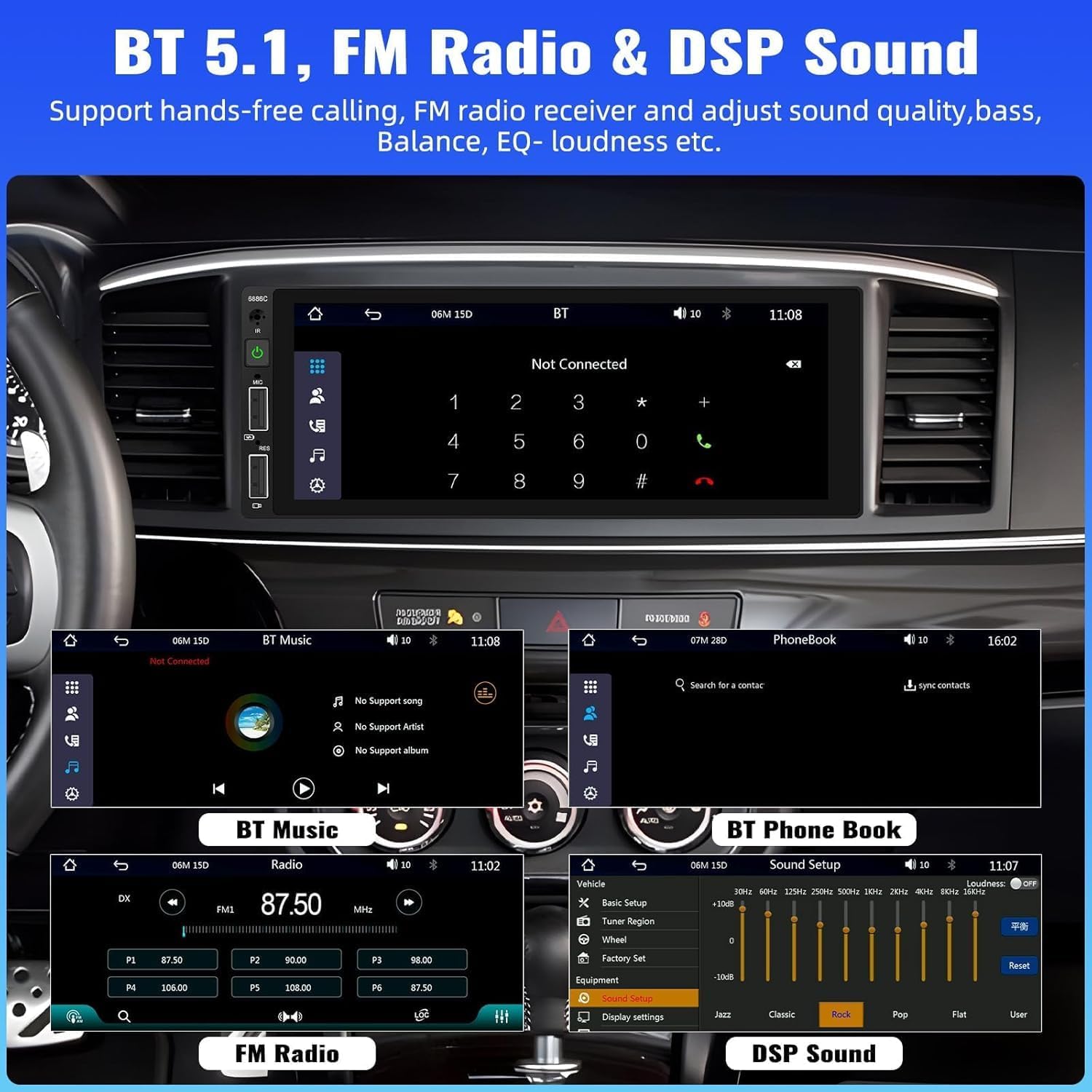
Image: Bluetooth, FM Radio, and Digital Sound Processing (DSP) settings interface.
4. שפּיגל לינק
Utilize the Mirror Link function to display your smartphone's screen directly on the car stereo. Connect your device using its original USB cable. This feature is useful for viewing maps or playing videos from your phone.
5. USB Playback & Charging
The stereo features dual USB slots. Use these ports for media playback from USB drives or for fast charging your mobile devices. The unit also supports DVR connection via USB (DVR not included).

Image: Multiple playback options including USB charging and DVR support.
6. EQ Sound Feature
Adjust the audio output to your preference using the built-in EQ sound feature. Customize settings for bass, balance, and loudness to optimize your listening experience.
7. שטיר-ראד קאנטראל (SWC)
If your vehicle supports it, connect the steering wheel control wires to easily manage radio functions, adjust volume, and handle calls without taking your hands off the wheel. This enhances driving safety.
8. באַקקופּ קאַמעראַ אַרייַנשרייַב
When the vehicle is shifted into reverse gear, the stereo automatically displays the video feed from the connected backup camera. The included camera features 4 LED lights for clear night vision and parking lines to assist with safer parking maneuvers.

Image: Backup camera input and steering wheel control interface.
9. Seven Color Backlight
Customize the button backlight color to match your vehicle's interior or your personal preference. Choose from seven available colors.
10. אויסלעשן זכּרון
The unit retains the last playing state (e.g., radio station, music track) when powered off and resumes from that point upon restart.
וישאַלט
כדי צו זיכער מאַכן די לאַנגלעבעדיקייט און אָפּטימאַלע פאָרשטעלונג פון דיין מאַשין סטערעאָ, נאָכפאָלגן די וישאַלט גיידליינז:
- רייניקונג: ניצט אַ ווייכע, טרוקענע שטאָף צו רייניקן דעם עקראַן און דעם אויסערן. פֿאַרמייַדט אַברייסיוו רייניגער אָדער סאָלווענטן.
- טעמפּעראַטור: ויסמיידן יקספּאָוזינג די אַפּאַראַט צו עקסטרעם טעמפּעראַטורעס.
- נעץ: האַלט די אַפּאַראַט טרוקן און אַוועק פון נעץ.
- Firmware דערהייַנטיקונגען: קוק די פאַבריקאַנט ס webזוכט דעם וועבזייטל פון צייט צו צייט פאר אלע פארהאן פירמווער דערהייַנטיקונגען צו פארבעסערן די פאָרשטעלונג און צולייגן פֿעיִקייטן.
טראָובלעשאָאָטינג
אויב איר טרעפט פּראָבלעמען מיט אייער אויטאָ סטערעאָ, זעט די פאלגענדע געוויינטלעכע פּראָבלעמען און לייזונגען:
| פּראָבלעם | מעגלעך סיבה | לייזונג |
|---|---|---|
| קיין מאַכט | נישט ריכטיגע דראָטן; דורכגעבלאָזן פיוז; נידעריקע באַטעריע פון אויטאָ. | Check power connections; Replace fuse; Check vehicle battery. |
| קיין געזונט | רעדנער דראָטן אפגעטיילט; וואָלומען צו נידעריק; שטום פונקציע אַקטיוו. | Verify speaker connections; Increase volume; Deactivate mute. |
| בלועטאָאָטה ניט קאַנעקטינג | Bluetooth not enabled on device; Incorrect pairing process. | Ensure Bluetooth is on; Re-attempt pairing (Bluetooth name: CAR BT). |
| CarPlay/Android Auto Not Working | Faulty USB cable; Phone not compatible; Software issue. | Use original USB cable; Check phone compatibility; Restart phone and stereo. |
| Backup Camera No Display | Camera not powered; Video cable disconnected; Incorrect trigger wire. | Check camera power supply; Verify video cable connection; Ensure reverse trigger wire is connected. |
ספּעסאַפאַקיישאַנז
Detailed technical specifications for the UNITOPSCI 6886C car stereo:
- מאָדעל: 6886C
- Voltage: DC12V
- סיסטעם: ווינק
- CPU chip: פ133
- פאַרשטעלן גרייס: 6.86 אינטשעס
- פאַרשטעלן האַכלאָטע: 1280*480
- שפּיגל לינק: געשטיצט
- ראַדיאָ באַנד: FM
- ראַדיאָ טשיפּ: QN8035
- מאַכט רעזולטאַט: 45W*4 (180 Watts total)
- אַרבעט טעמפּעראַטור: -10~60℃
- בלועטאָאָטה ווערסיע: 5.0
- בלועטאָאָטה נאָמען: CAR BT
- קאָלירפול באַקלייט: געשטיצט
- Reversing Input: CVBS
- מאַכט Ampליפיער שפּאָן: TDA7388
- ראַדיאָ אָפטקייַט: 87.5-108 מהז
- אַודיאָ פֿאָרמאַט שטיצן: מפּקסנומקס / וומאַ / וואַוו / אַפּע / פלאַק
- ווידעא פֿאָרמאַטירונג שטיצן: RM/RMVB/AVI/MP4/MKV/3GP
- Picture Format Support: דזשפּג במפּ פּנג
- געשטיצט שפראכן: English, Chinese, Spanish, Portuguese, Russian, Italian, German, French, Turkish, Czech, Arabic, Polish, Hebrew
וואָראַנטי און שטיצן
Your UNITOPSCI car stereo comes with a 2 יאָר וואָראַנטי from the date of purchase, covering manufacturing defects. For technical assistance, troubleshooting, or warranty claims, please contact our support team.
אָנליין שטיצן: UNITOPSCI@126.com