
הקדמה
This manual provides detailed instructions for the setup, operation, and maintenance of your FoMaKo K820S 12G-SDI 4K 60FPS NDI PTZ Camera. Designed for professional video production and live streaming, this camera features advanced AI tracking, 20X optical zoom, and multiple high-quality video output interfaces. Please read this manual thoroughly before using the product to ensure optimal performance and longevity.
פיגורע 1: פראָנט view of the FoMaKo K820S PTZ Camera.
וואָס איז אין די קעסטל
באַשטעטיקט אַז אַלע זאכן וואָס זענען אויסגערעכנט אונטן זענען אַרייַנגערעכנט אין אייער פּעקל:
- FoMaKo 12G-SDI 4K 60FPS AI Tracking NDI PTZ Camera (20x optical zoom)
- ווייַט קאָנטראָללער
- וואנט בארג
- סופיט קלאַמער
- וסב קאַבלע
- מאַכט אַדאַפּטער 12V 2A
- באַניצער מאַנואַל
פּראָדוקט איבערview
The FoMaKo K820S is a high-performance PTZ camera designed for versatile professional applications. Key features include:
- 4K 60FPS ווידעא: Utilizes a low-power, high-performance Ambarella 4KP60 AI vision chip and a 1/1.8-inch UHD CMOS sensor for uncompressed 4K (3840x2160) at 60fps.
- Advanced AI Auto-Tracking (Gen 3): Offers customized tracking features including adjustable tracking modes, sensitivity, figure size, AI-Track Speed, horizontal tracking, character position, and lost target action. Activate by pressing F3 on the remote.
- NDI | HX3 & NDI | HX2 Support: NDI License Included (Officially Approved by Newtek Inc.) for low-latency, high-quality video transmission over network, even with low bandwidth.
- FreeD Protocol: Delivers real-time, high-precision 3D spatial tracking (camera position, angle, lens data) for seamless virtual/augmented reality integration in live productions.
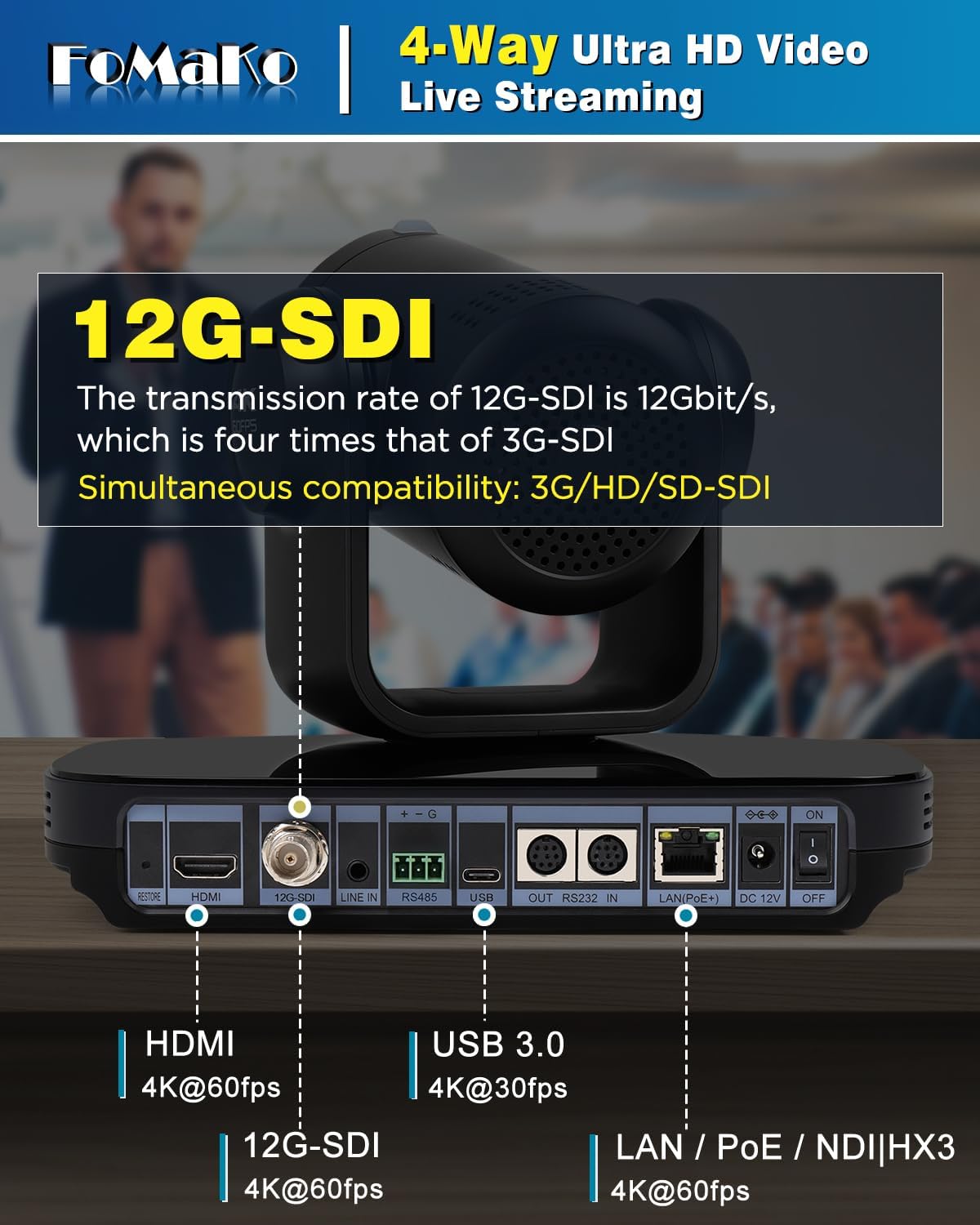
- קייפל ווידעא רעזולטאַט אינטערפייסיז: Simultaneous 12G-SDI, NDI/LAN, USB3.0 Type-C, and HDMI 2.0 outputs.
- 20X Optical Zoom with 16x Digital Zoom: Provides a maximum field angle of 60 degrees (FOV) for detailed capture.
- PoE (מאַכט איבער עטהערנעט): Allows power, control, and video/audio streaming via a single network cable.
- Leading Auto-Focus (AF) Technology: Fast, accurate, and stable AF with adjustable Pan/Tilt/Zoom speeds and preset speeds. Supports Auto/Manual/One Push Focus modes.

פיגורע 2: דערציען view of the camera showing various input/output ports.
סעטאַפּ
Follow these steps to set up your FoMaKo K820S PTZ Camera:
- מאַכט קשר: Connect the provided 12V 2A power adapter to the DC 12V port on the camera. Alternatively, if using PoE, connect an Ethernet cable from a PoE-enabled switch to the LAN port.
- ווידעא רעזולטאַט: Connect your preferred video output cable (12G-SDI, HDMI, USB3.0, or Ethernet for NDI/LAN) to your display, capture card, or streaming device.
- נעץ קאַנעקשאַן: For NDI/LAN control and streaming, connect an Ethernet cable to the LAN port. Ensure your network is properly configured for IP communication.
- אַודיאָ אַרייַנשרייַב: If external audio is required, connect an audio source to the LINE IN port.
- קאָנטראָל קשר: For external control, connect an RS232 or RS485 cable to the respective ports, or use the network connection for IP-based control.
- מאַכט אויף: Flip the ON/OFF switch to the 'ON' position. The camera will perform a self-test and the LCD screen will display its IP address and resolution.
Video 1: Unboxing and initial setup of the K820S 4K NDI PTZ Camera. This video demonstrates the physical components and basic connections.
אַפּערייטינג
AI Auto-Tracking
The K820S features advanced AI auto-tracking to keep your subject in frame automatically. To activate:
- דרוק די F3 button on the remote control to enable AI Auto-Tracking.
- Use the left and right buttons on the remote control to switch between tracking targets if multiple subjects are present.
- Customize tracking modes, sensitivity, figure size, and speed via the camera's web צובינד.

Figure 3: AI Auto-Tracking in action, keeping the presenter centered.
פּאַן, טילט, און פארגרעסער קאָנטראָל
Use the included remote control or an external PTZ controller (e.g., joystick controller) to adjust the camera's pan, tilt, and zoom. Preset positions can be saved and recalled for quick scene changes.
- ווייַט קאָנטראָל: The remote allows for direct control of pan, tilt, zoom, focus, and preset recall. Supports ultra-long distance control up to 50 meters.
- פונדרויסנדיק קאָנטראָללער: Compatible with FoMaKo PTZ Camera controllers and third-party software like vMix/OBS for multi-camera production.
Video 2: Demonstrates the integration and preset configuration with a FoMaKo controller.
אַוטאָ-פאָקוס
The camera features industry-leading auto-focus technology. You can switch between Auto, Manual, or One Push Focus modes as needed.
קאַנעקטיוויטי
The K820S offers a wide range of connectivity options for various production environments:
- 12G-SDI: Professional broadcast-grade interface supporting 4KP60, 4KP59.94, 4KP50, 4KP30, 1080P60, 1080I60, 1080I50, etc.
- הדמי 2.0: Supports 4KP60, 4KP59.94, 4KP50, 4KP30, 1080P60, 1080I60, 1080I50, etc.
- USB3.0 Type-C: Supports 4KP30, 1080P60, etc. for direct connection to computers.
- LAN/NDI: Supports 4KP60, 1080P60, etc. for network-based video transmission and control, including NDI | HX3 and NDI | HX2.
- RS232/RS485: For serial control from external PTZ controllers.
Video 3: Explains NDI advantages, tools, and usage guidelines for FoMaKo PTZ cameras.
ייַנמאָנטירונג
The FoMaKo K820S offers flexible installation options:
- וואנט בארג: Use the provided wall mount bracket to secure the camera to a wall.
- Ceiling Mount: Utilize the ceiling bracket for inverted mounting. The built-in gravity sensor supports automatic image flip.
- Tripod Mount: The camera can be mounted on a standard tripod for portable setups.

פיגורע 4: עקסample of wall mount installation for the PTZ Camera.
ספּעסאַפאַקיישאַנז
| שטריך | דעטאַל |
|---|---|
| סאָרט | FoMaKo |
| מאָדעל נומער | K820S |
| פּונקט וואָג | 9 פונט |
| פּעקל דימענשאַנז | 11.65 X 10.16 X 9.76 אינטשעס |
| פאָטאָ סענסאָר טעכנאָלאָגיע | קמאָס |
| ווידעא קאַפּטורע רעסאָלוטיאָן | 4K |
| מאַקסימום פאָקאַל לענג | 92 מילאַמיטערז |
| מאַקסימום עפענונג | 2.9 f |
| ווידעא קאַפּטורע פֿאָרמאַט | mp4 |
| שטיצט אַודיאָ פֿאָרמאַט | AAC, MP3, PCM |
| פאַרשטעלן גרייס | 2 Inches (LCD screen for IP address and resolution) |
| קאַנעקטיוויטי טעכנאָלאָגיע | 12G-SDI, NDI, LAN, HDMI, USB3.0 |
| ספּעציעלע פֿעיִקייטן | AI tracking PTZ Camera, PoE support, FreeD Protocol |
טראָובלעשאָאָטינג
If you encounter issues with your camera, consider the following:
- קיין מאַכט: Ensure the power adapter is securely connected and plugged into a working outlet, or that the PoE connection is active and providing power.
- קיין ווידעא רעזולטאַט: Check all video cable connections (HDMI, SDI, USB, Ethernet). Verify the display or receiving device is set to the correct input. Ensure the camera's resolution and frame rate settings are compatible with the receiving device.
- Network/NDI Issues: Confirm the Ethernet cable is properly connected. Check the camera's IP address on the LCD screen and ensure it's on the same subnet as your control device. Verify NDI tools/software are correctly configured.
- AI Tracking Malfunction: Ensure AI tracking is enabled (F3 on remote). Check for any obstructions in the camera's view or extreme lighting conditions that might interfere with tracking.
- קאָנטראָל ישוז: Verify the remote control has fresh batteries and a clear line of sight. For serial control, check cable connections and baud rate settings. For IP control, confirm network connectivity and correct IP address.
וואָראַנטי & שטיצן
Your FoMaKo K820S PTZ Camera comes with comprehensive support:
- 3-יאָר לימיטעד וואָראַנטי: Shop with confidence.
- 30-טאָג געלט-צוריק גאַראַנטירן: Risk-free purchase.
- Free Online Training: Get started easily with available training resources.
- 24/7 Expert Assistance: Responses within 24 hours (please include your Order ID for prompt service). Remote assistance for setup is available if necessary.
- Lifetime Customer Technical Support: דיין צופֿרידנקייט איז אונדזער בילכערקייַט.

Figure 5: FoMaKo offers 24/7 expert assistance and lifetime technical support.