
אַודיאָ לאַב 9000 אַ
אַודיאָלאַב 9000A פלאַגשיפּ אינטעגרירט Ampליפיער/דאַק/פאָנאָ פּרעamp
באַניצער מאַנואַל
1. הקדמה
The Audiolab 9000A is a high-performance integrated amplifier designed to be the central component of any advanced audio system. It combines a powerful amplifier, a high-resolution Digital-to-Analog Converter (DAC), and a dedicated phono preamplifier, offering extensive connectivity and advanced features for audiophiles.
This manual provides essential information for setting up, operating, and maintaining your Audiolab 9000A to ensure optimal performance and longevity.
2. זיכערקייַט אינפֿאָרמאַציע
ביטע ליינט אלע זיכערהייט אינסטרוקציעס קערפול איידער איר ניצט דעם אַפּאַראַט. האַלט דעם מאַנואַל פֿאַר צוקונפֿטיקע רעפֿערענץ.
- מאַכט צושטעלן: Connect the unit only to a power supply of the type marked on the rear panel.
- ווענטילאַטיאָן: זיכער מאַכן אַז עס איז דאָ גענוג ווענטילאַציע. נישט פֿאַרשטאָפּן די ווענטילאַציע עפענונגען.
- וואַסער און נעץ: שטעלט נישט אויס דעם אַפּאַראַט צו רעגן אָדער פייכטקייט. שטעלט נישט קיין זאכן אָנגעפילט מיט פליסיקייטן אויף דעם אַפּאַראַט.
- היץ: שטעלט נישט דעם אַפּאַראַט לעבן היץ־קוואַלן ווי ראַדיאַטאָרן, היץ־רעגיסטערס, אויוון אָדער אַנדערע אַפּאַראַטן וואָס פּראָדוצירן היץ.
- רייניקונג: ריין בלויז מיט אַ טרוקן שטאָף. דו זאלסט נישט נוצן פליסיק קלינערז אָדער אַעראָסאָל קלינערז.
- סערוויס: פרובירט נישט צו סערוויסן דעם אַפּאַראַט אליין. לאָזט איבער אַלע סערוויסינג צו קוואַליפֿיצירטע סערוויס פּערסאָנעל.
3. וואָס איז אין דער קעסטל
Carefully unpack the contents of the box. You should find the following items:
- אַודיאָלאַב 9000A אינטעגרירט Ampליפער
- מאַכט שנור
- ווייַט קאָנטראָל
- באַניצער מאַנואַל (דעם דאָקומענט)
- Antennas (for Bluetooth connectivity)
4. פּראָדוקט איבערview
פראָנט פּאַנעל
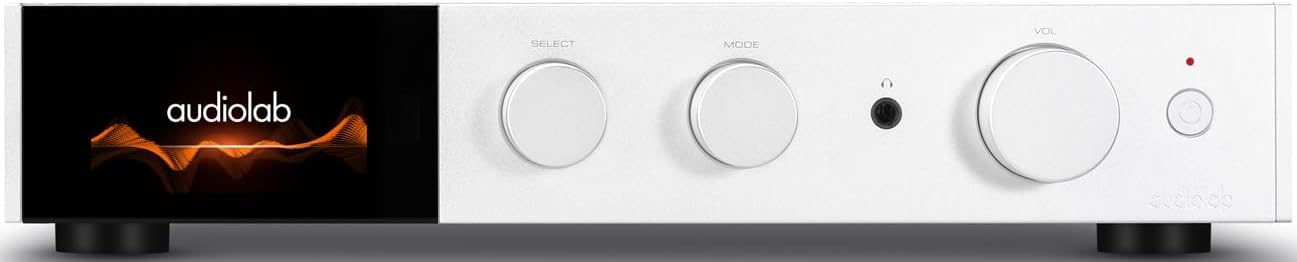
פיגורע 4.1: פראָנט view of the Audiolab 9000A, displaying the Audiolab logo on its full-color IPS LCD screen. The front panel features three rotary controls for Select, Mode, and Volume, along with a headphone jack and power button.

פיגורע 4.2: פראָנט view of the Audiolab 9000A, showcasing the full-color IPS LCD screen displaying VU meters. This visual option provides real-time audio level feedback.
The 9000A features a 4.3-inch (800 x 480mm) full-color IPS LCD screen, providing clear and informative playback, source, and file information. It also offers various display options, including two VU meter styles, allowing for visual feedback or a discreet appearance.
דערציען פּאַנעל קאַנעקשאַנז

Figure 4.3: Rear panel of the Audiolab 9000A, showing a comprehensive array of input and output connections. These include analog, XLR, phono (MM), power amplifier input, SPDIF (coaxial and optical), PC USB, Bluetooth antenna, pre-amplifier output, stereo speaker terminals, and 12V trigger connections.
The rear panel provides a wide range of connectivity options, including multiple analog and digital inputs, a dedicated phono input, balanced XLR input, and various outputs for speakers and external components. Bluetooth antennas are also located here for wireless streaming.
שליסל פֿעיִקייטן
- Ampליפיקאַטיאָן: Discrete Class AB power amplifier delivering 100W per channel into 8 ohms (160W into 4 ohms). Features Audiolab's CFB (Complementary Feedback) topology for superior linearity.
- דיגיטאַל-צו-אַנאַלאָג קאָנווערטער (DAC): Equipped with the ESS 9038PRO flagship 32-bit DAC chip, supporting PCM up to 32-bit/768kHz and DSD up to DSD512.
- MQA דיקאָודינג: Full MQA decoding capability for high-resolution streaming.
- פאָנאָ זtage: Dedicated high-performance, low-noise Moving Magnet (MM) phono stage with JFET-based circuitry and precise RIAA equalization.
- כעדפאָון Ampלייבער: דעדאַקייטאַד כעדפאָונז מיט קראַנט באַמערקונגען amplifier with wide bandwidth and high slew rate.
- קאַנעקטיוויטי: Multiple analog inputs (3 x AUX, 1 x XLR), digital inputs (2 x Coaxial, 2 x Optical, 1 x PC USB), Bluetooth 5.1 with aptX HD/AAC/LDAC support.
- אַפּערייטינג מאָדעס: Integrated, Pre-Power, and Pre Only modes for versatile system integration.
5. סעטאַפּ
5.1 פּלייסמאַנט
Place the Audiolab 9000A on a stable, level surface away from direct sunlight, heat sources, and excessive moisture. Ensure there is adequate space around the unit for ventilation.
5.2 קאַנעקטינג ספּיקערז
- Ensure the 9000A is powered off and unplugged from the mains.
- Connect your loudspeakers to the speaker terminals on the rear panel (refer to Figure 4.3). Ensure correct polarity: red (+) to red (+) and black (-) to black (-).
- Tighten the binding posts securely, but do not overtighten.
5.3 פֿאַרבינדן אַודיאָ קוועלער
די 9000A אָפפערט אַ פאַרשיידנקייט פון אַרייַנשרייַב אָפּציעס:
- אנאלאגע איינגאבעס (AUX1, AUX2, AUX3): Use RCA cables to connect analog sources like CD players, tuners, or tape decks.
- באַלאַנסט קסלר ינפּוט: For high-quality analog sources with XLR outputs.
- פאָנאָ (מם) אַרייַנשרייַב: Connect your turntable directly to this input. Ensure your turntable has a Moving Magnet (MM) cartridge.
- Digital Inputs (COAX1, COAX2, OPT1, OPT2): Connect digital sources such as CD transports, media streamers, or TVs using coaxial or optical cables.
- PC USB (USB B): Connect your computer for high-resolution audio playback.
- בלועטאָאָטה: Attach the supplied antennas to the rear panel for optimal Bluetooth signal reception.
5.4 מאַכט קאַנעקשאַן
Once all audio connections are made, connect the supplied power cord to the IEC inlet on the rear panel and then to a suitable mains power outlet.
6. אַפּערייטינג ינסטרוקטיאָנס
6.1 פּאַוערינג אויף / אַוועק
Press the power button on the front panel or the remote control to switch the unit on or off. The display will illuminate upon power-on.
6.2 מקור סעלעקציע
Use the "SELECT" rotary control on the front panel or the source buttons on the remote control to cycle through the available input sources (AUX1, AUX2, AUX3, XLR, Phono, COAX1, COAX2, OPT1, OPT2, PC USB, Bluetooth).
6.3 באַנד קאָנטראָל
Adjust the listening volume using the "VOL" rotary control on the front panel or the Volume Up/Down buttons on the remote control.
6.4 אַפּערייטינג מאָדעס
The 9000A offers three distinct operating modes, selectable via the menu:
- אינטעגרירטע מאָדע: This is the default mode, where the pre-ampליפיער און מאַכט ampליפער סtages are combined. Use this for connecting digital and analog sources directly to the 9000A and driving a pair of speakers.
- פאַר-מאַכט מאָדע: This mode disconnects the pre-ampליפיער און מאַכט ampליפער סtages. The 9000A can then be used solely as a power amplifier (e.g., connected to an AV processor) or to insert external signal processing between the pre-out and power-in connections.
- Pre Only Mode: In this mode, the 9000A functions solely as a pre-amplifier, outputting the processed signal via its pre-amplifier outputs to an external power ampליפער.
6.5 דיגיטאַל פילטערס
For digital inputs, the 9000A provides user-selectable digital filters to optimize the response to suit the source file and partnering equipment. Access these options through the unit's menu system.
6.6 בלועטוט קאָנעקטיוויטי
- Ensure the Bluetooth antennas are connected to the rear panel.
- Select "Bluetooth" as the input source on the 9000A.
- אויף אייער מאָבילער מיטל (סמאַרטפאָן, טאַבלעט, לאַפּטאָפּ), אַקטיווירט בלועטוט און זוכט פֿאַר פֿאַראַן דעוויסעס.
- Select "Audiolab 9000A" from the list to pair. Once paired, audio from your device will stream wirelessly to the ampליפער.
- The 9000A supports aptX HD, AAC, and LDAC protocols for high-quality wireless audio.
6.7 כעדפאָון רעזולטאַט
Connect your headphones to the 6.35mm (1/4 inch) headphone jack on the front panel. Connecting headphones will automatically mute the main speaker outputs.
7. וישאַלט
- רייניקונג: Use a soft, dry, lint-free cloth to clean the unit. Do not use abrasive cleaners, waxes, or solvents.
- ווענטילאַטיאָן: קאָנטראָלירט פּעריִאָדיש אַז די ווענטילאַציע עפענונגען זענען ריין פון שטויב און שמוץ.
- פֿאַרבינדונגען: Ensure all cables are securely connected. Loose connections can affect sound quality.
- סטאָרידזש: אויב איר לייגט דאָס אַפּאַראַט אַוועק פֿאַר אַ לענגערע צייט, זאָלט איר עס אָפּשטעקן פֿון דער עלעקטרישער צושטעל און עס אַוועקלייגן אין אַ קילן, טרוקענעם אָרט.
8. טראָובלעשאָאָטינג
| פּראָבלעם | מעגלעך סיבה | לייזונג |
|---|---|---|
| קיין מאַכט | שטראָם־קאַבל נישט פֿאַרבונדן; אַ דעפֿעקטיווער עלעקטרישער אַוטלעט; אַפּאַראַט אין וואַרט־מאָדוס. | Check power cord connection; Try a different outlet; Press power button on unit or remote. |
| קיין געזונט פון ספּיקערז | Incorrect input selected; Speaker cables loose or incorrectly connected; Volume too low; Mute function active; Headphone connected. | Select correct input; Check speaker connections and polarity; Increase volume; Deactivate mute; Disconnect headphones. |
| קיין געזונט פון איין קאַנאַל | Speaker cable loose or faulty; Source cable faulty; Speaker faulty. | Check speaker and source cable connections; Test with another speaker or source. |
| כאַמינג אָדער באַזינג ראַש | גראונד שלייף; עלעקטרישע אריינמישונג אין דער געגנט; דעפעקטיווער קאבל. | Ensure all components are properly grounded; Move unit away from other electronics; Try different cables. |
| בלועטאָאָטה פּערינג ישוז | Antennas not connected; Device too far; Device already paired with another unit. | Connect Bluetooth antennas; Move device closer; Disconnect from other devices and try pairing again. |
9. ספּעסאַפאַקיישאַנז
| קאַטעגאָריע | דעטאַל |
|---|---|
| אַלגעמיינע באַשרייַבונג | ינטעגראַטעד Ampליפער |
| רייטאַד מאַכט רעזולטאַט | 2 x 100W (8 ohms, THD<1%); 2 x 160W (4 ohms, THD<1%) Class AB |
| DAC שפּאָן | ES9038Pro 32-bit DAC |
| ווייַז | 4.3" (800 x 480mm) Full View IPS LCD |
| MQA דיקאָודינג | Built-in Certified MQA Full Decoder (PC USB, Coax/Optical) |
| בלועטאָאָטה | Bluetooth 5.1 (aptX/aptX HD/AAC/LDAC) Support |
| פאָנאָ זtage | Dedicated High-performance, Low-noise MM Phono Stage |
| כעדפאָון AMP | דעדאַקייטאַד כעדפאָונז מיט קראַנט באַמערקונגען AMP |
| אַפּערייטינג מאָדעס | Integrated / PRE-POWER / PRE Only Modes |
| USB Upgrade Support | יא |
| ינפּוץ | 3 x Analogue, 1 x XLR, 1 x Phono (MM), 1 x Power Amplifier, 2 x SPDIF (Coax), 2 x SPDIF (Optical), 1 x PC USB (USB B), 1 x Bluetooth, 1 x 12V Trigger |
| אַוטפּוץ | 1 X PRE Ampליפיער, 1 x סטערעאָ רעדנער, 1 x כעדפאָון, 1 x 12 וו צינגל |
| Sampling Frequency (Optical/Coaxial) | 44.1 כז-192 כז |
| Sampling Frequency (PC USB) | 44.1kHz-768kHz (PCM) / DSD64, DSD128, DSD256, DSD512 |
| Preamplifier Gain (max.) | +6dB (Line), +53dB (Phono MM) |
| Preampליפיער THD | <0.0004% (1kHz @ 2V, Volume = 0dB) |
| DAC THD | <0.001% (1kHz @ 0dBFS) |
| מאַכט Ampליפיער THD | <0.002% (1 כז @ 50 וו / 8 אָום) |
| כעדפאָון Ampליפיער THD | <0.01% (1kHz, 50mW) |
| נעץ וואָג | 9.4 קג |
| דימענשאַנז (ב x ה x ד) | 444 X 342 X 89 מם |
| ענדיקן אָפּציעס | שוואַרץ / זילבער |
| מאַכט רעקווירעמענץ | 100-120 וו ~ 50/60 הז |
10. וואָראַנטי און שטיצן
Audiolab products are manufactured to the highest standards and undergo rigorous quality control. This product is covered by a manufacturer's warranty, the terms of which may vary by region. Please refer to the warranty card included with your product or visit the official Audiolab webפּלאַץ פֿאַר דיטיילד וואָראַנטי אינפֿאָרמאַציע.
For technical support, service, or inquiries regarding your Audiolab 9000A, please contact your authorized Audiolab dealer or distributor. You can also find support resources, FAQs, and contact information on the official Audiolab webפּלאַץ: www.audiolab.co.uk
Ask a question about this manual
Ask about setup, troubleshooting, compatibility, parts, safety, or missing instructions. Manuals+ will review the question and use this page’s manual context to help answer it.