
1. הקדמה
Welcome to the user manual for your Doro Leva E22 4G flip phone. This guide provides essential information on how to set up, operate, and maintain your new phone. Designed with ease of use in mind, the Doro Leva E22 features a large screen, contrasting keys, and loud, clear sound, making it ideal for seniors. Please read this manual carefully to ensure optimal performance and longevity of your device.
2. פּעקל אינהאַלט
ביטע אָפּהאַקן דאָס קעסטל פֿאַר די פֿאָלגנדיקע זאַכן:
- Doro Leva E22 4G Flip Phone
- טשאַרדזשינג סטאַנציע
- וסב טיפּע- C קאַבלע
- באַטערי
- שנעל אָנהייב גייד
3. טעלעפאָנירן איבערview
Familiarize yourself with the physical components of your Doro Leva E22 phone.
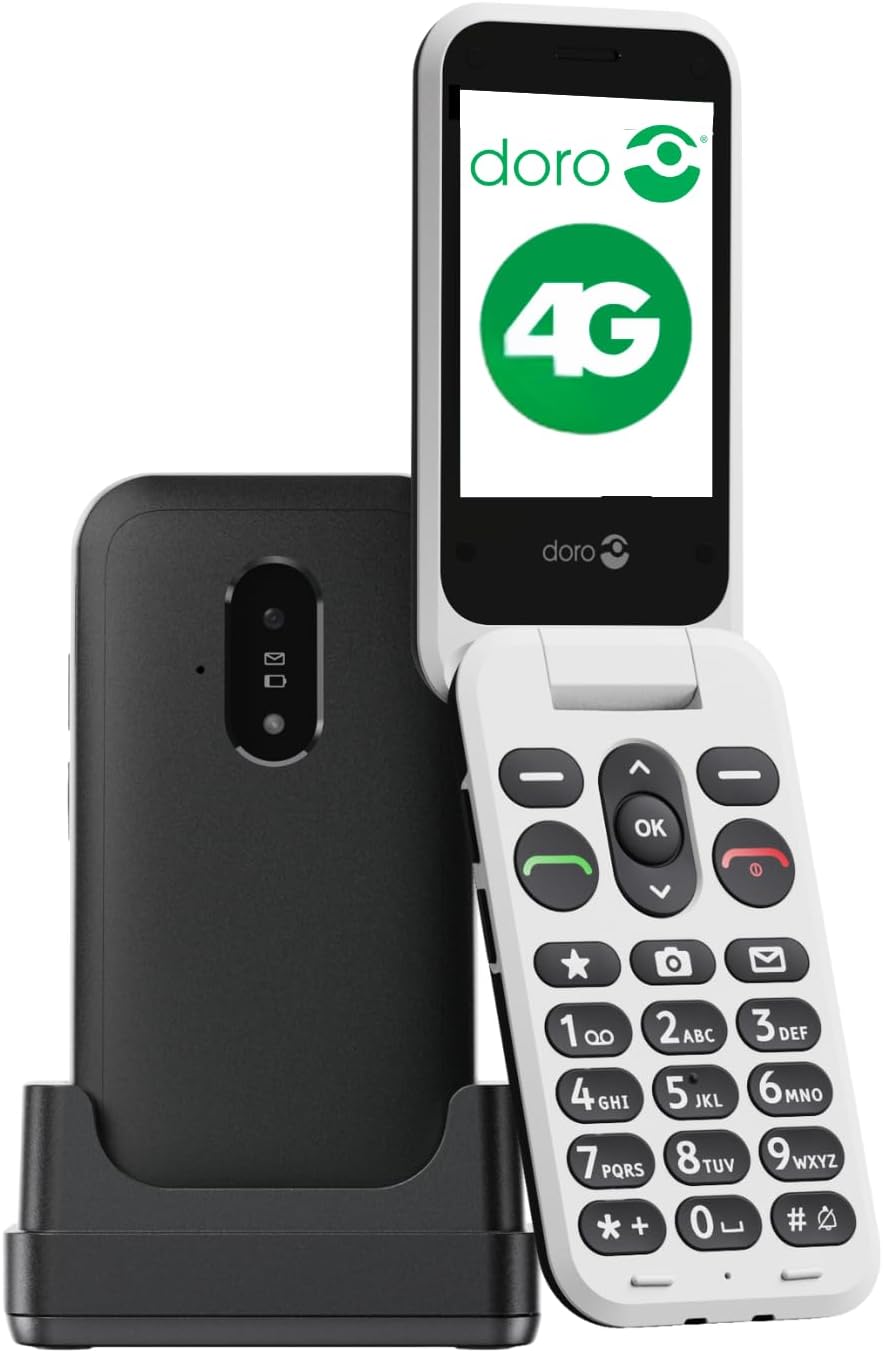
Image 3.1: Doro Leva E22 phone with charging station.
The Doro Leva E22 is a simple and user-friendly 4G flip phone. It features a Doro Secure Button for emergencies, allows answering and hanging up calls with a simple flip, and is compatible with hearing aids. Enjoy clear and powerful sound, along with large keys that offer voice feedback for easier dialing.

Image 3.2: Key features of the Doro Leva E22.
The phone offers a simple menu interface, a built-in camera, a flashlight, and is splash-resistant (IP54 rated).

Image 3.3: User interface and additional features.
The ergonomic design ensures comfortable handling. Make calls, send SMS, and take photos easily thanks to the well-spaced and high-contrast keys, and the large screen. The included charging station ensures your phone is always in a known location and charged.

Image 3.4: Ergonomic design and Doro Secure Button.
The phone also supports speed dial for favorite contacts, quick access to the camera, and messages.

Image 3.5: Speed dial functionality.

Image 3.6: Ergonomic design of the closed phone.
4. סעטאַפּ
4.1. ינסערטינג די סים קאַרד
- פֿאָרזיכטיק אַראָפּנעמען די הינטערשטע דעקל פֿון טעלעפֿאָן.
- Locate the SIM card slot. The Doro Leva E22 supports a single SIM card.
- אַרײַנשטעלן די סים קאַרטל מיט די גאָלדענע קאָנטאַקטן אַראָפּגעקערט און די אָפּגעשניטענע ווינקל אויסגעשטעלט מיטן שפּאַלט.
- זיכער מאַכן אַז די סים קאַרטל איז זיכער אין פּלאַץ.
4.2. ינסערטינג די באַטערי
- After inserting the SIM card, place the battery into the battery compartment, aligning the gold contacts on the battery with the contacts in the phone.
- Gently press down until the battery is seated securely.
- לייג צוריק דעם הינטערשטן דעקל, זיכער מאכנדיג אז עס קליקט אריין אין פלאץ.
4.3. טשאַרדזשינג די טעלעפאָן
- Connect the USB Type-C cable to the charging station.
- Plug the other end of the USB cable into a power adapter (not always included) and then into a wall outlet.
- Place your Doro Leva E22 phone into the charging station. Ensure it is properly seated and the charging indicator appears on the screen.
- For initial use, charge the phone for at least 2-3 hours.
5. יקערדיק אָפּעראַציע
5.1. פּאָווערינג אויף / אויסגעלאשן
- צו מאַכט אויף: Press and hold the red End Call/Power button (usually marked with a red phone icon) until the Doro logo appears.
- צו מאַכט אַוועק: Press and hold the red End Call/Power button until the power-off options appear on the screen. Select 'Power off' and confirm.
5.2. מאכן און ריסיווינג קאַללס
- מאַכן אַ רוף: Enter the phone number using the keypad and press the green Call button (usually marked with a green phone icon).
- ענטפֿערן אַ רוף: When the phone rings, open the flip or press the green Call button.
- ענדיקן אַ רוף: Close the flip or press the red End Call button.
5.3. Sending and Receiving Messages (SMS)
- Navigate to the 'Messages' menu using the navigation keys.
- אויסקלייבן 'נײַע מעסעדזש' אדער 'שאַפֿן מעסעדזש'.
- אַרייַן די נומער פון דעם באַקומער אָדער סעלעקטירן פון דיין קאָנטאַקטן.
- טיפּ דיין אָנזאָג ניצן די קיפּאַד.
- דריק 'שיקן'.
5.4. אָנפירונג קאָנטאַקטן
- Go to the 'Contacts' or 'Phonebook' menu.
- You can add new contacts, edit existing ones, or delete entries.
- Use the speed dial feature to assign frequently called numbers to specific keys (e.g., 2-9).
5.5. אַדזשאַסטינג באַנד
Use the dedicated volume buttons on the side of the phone to adjust call volume, ringtone volume, and media volume.
6. אַוואַנסירטע פֿעיִקייטן
6.1. ניצן די קאַמעראַ
Your Doro Leva E22 is equipped with a 0.3-megapixel camera.
- Access the camera from the main menu or via a dedicated shortcut key if available.
- ראַמען דיין שאָס ניצנדיק דעם עקראַן.
- Press the 'OK' button or the designated camera button to take a picture.
- פאָטאָס ווערן געראַטעוועט אין דער טעלעפאָן גאַלעריע.
6.2. Doro Secure Button (SOS Function)
The Doro Secure Button is located on the back of the phone and is designed for emergencies.
- סעטאַפּ: Before using, configure emergency contacts in the phone's settings.
- אַקטאַוויישאַן: In an emergency, press and hold the Doro Secure Button for a few seconds. The phone will automatically call and send an SMS to your pre-set emergency contacts.
6.3. פלאַשליגהט
The phone includes a built-in flashlight for convenience.
- Access the flashlight function from the main menu or by pressing a dedicated shortcut key (refer to your Quick Start Guide for specific key assignments).
6.4. העאַרינג אַיד קאַמפּאַטאַבילאַטי
The Doro Leva E22 is designed to be compatible with hearing aids, providing a clearer audio experience for users with hearing impairments.
7. וישאַלט
7.1. רייניקן דיין טעלעפאָן
- ניצט אַ ווייכן, לינט-פֿרייע שטאָף צו רייניקן דעם עקראַן און קערפּער פֿון טעלעפֿאָן.
- פֿאַרמײַדן ניצן שטרענגע כעמיקאַלן, אַברייסיוו רייניגער, אָדער אַעראָסאָל ספּרײַס.
- Ensure the phone is powered off and disconnected from the charger before cleaning.
7.2. באַטערי קער
- ויסמיידן יקספּאָוזינג די באַטאַרייע צו עקסטרעם טעמפּעראַטורעס.
- נישט דורכשטעכן, צענעמען אדער מאדיפיצירן די באטעריע.
- If the battery appears damaged or swollen, discontinue use and replace it with an authorized Doro battery.
8. טראָובלעשאָאָטינג
If you encounter issues with your Doro Leva E22, try the following solutions:
| פּראָבלעם | מעגלעך לייזונג |
|---|---|
| דער טעלעפאָן טוט נישט קער אויף | Ensure the battery is charged. Connect to the charging station and wait a few minutes before attempting to power on. Check if the battery is correctly inserted. |
| קען נישט מאַכן/באַקומען רופן | Check if the SIM card is correctly inserted and activated. Ensure you have network coverage. Restart the phone. |
| נעבעך געזונט קוואַליטעט | Adjust the volume using the side buttons. Ensure the speaker/microphone is not blocked. If using a hearing aid, ensure compatibility settings are correct. |
| באַטאַרייע דריינז געשווינד | Reduce screen brightness. Close unused applications. Limit background data usage. Ensure the phone is not in an area with very weak signal, which can increase battery consumption. |
If the problem persists, please refer to the Doro support webפּלאַץ אָדער קאָנטאַקט קונה דינסט.
9. ספּעסאַפאַקיישאַנז
- מאָדעל נאָמען: Leva E22
- מאָדעל נומער: 8991
- סאָרט: דאָראָ
- קאָליר: שוואַרץ / ווייַס
- אַפּערייטינג סיסטעם: MOCOR OS
- פאַרשטעלן גרייס: 2.8 אינטשעס
- קאַנעקטיוויטי: 4G, LTE
- טשאַרדזשינג פּאָרט: וסב טיפּ C
- אַפּאַראַט האַכלאָטע: 0.3 Megapixels (Effective Fixed Resolution)
- סים קאַרד סלאָץ: איין סים
- ווירעלעסס טרעגער: VoiceStream Wireless Service Provider (Note: Compatibility may vary by region/carrier)
- ספּעציעלע פֿעיִקייטן: Doro Secure Button, Large Contrasting Keys, Loud & Clear Sound, HD Voice, Hearing Aid Compatible, Flashlight, Splash-resistant (IP54)
10. וואָראַנטי און שטיצן
Your Doro Leva E22 4G flip phone comes with a standard manufacturer's warranty. Please refer to the warranty card included in your package for specific terms and conditions, including warranty duration and coverage details.
For technical support, troubleshooting assistance, or to inquire about spare parts, please visit the official Doro website or contact Doro customer service directly. Contact information can typically be found on the Doro webזייטל אדער אין אייער פּראָדוקט פּאַקאַדזשינג.
אָנליין שטיצן: www.doro.com/support (עקסample link, please verify official Doro support page)