
1. הקדמה
This manual provides comprehensive instructions for the safe and effective use of the AMPBANK H128 Handheld Thermal Camera. The H128 is designed for precise temperature measurement and thermal imaging, suitable for various applications including electrical inspections, HVAC diagnostics, building energy audits, and automotive maintenance. Please read this manual thoroughly before operating the device and retain it for future reference.

פיגור 1.1: די AMPBANK H128 Handheld Thermal Camera, showcasing its ergonomic design and integrated display.
2. זיכערקייַט אינפֿאָרמאַציע
Always observe the following safety precautions to prevent injury and damage to the device.
- Do not point the camera directly at extremely high-intensity energy sources, such as the sun or lasers, as this may damage the infrared detector.
- Avoid dropping the device or subjecting it to severe impact, despite its robust design.
- Do not immerse the device in water or other liquids. While it has an IP65 rating for dust and water jet protection, it is not designed for submersion.
- Use only the specified charging cable (USB-C) and power adapter to charge the device.
- פרובירט נישט צו צענעמען אדער מאדיפיצירן די קאמערא. רעפארן זאלן נאר דורכגעפירט ווערן דורך בארעכטיגטע סערוויס פערסאנעל.
- Keep the lens clean and free from dust and debris. Use a soft, lint-free cloth for cleaning.
- Operate the device within the specified environmental conditions (temperature and humidity).
3. פּראָדוקט איבערview
3.1. קאַמפּאָונאַנץ
די AMPBANK H128 thermal camera includes the following main components:
- ינפרערעד לענס: Captures thermal radiation.
- ווייַז פאַרשטעלן: ווײַזט טערמישע בילדער, טעמפּעראַטור לייענונגען און מעניו אָפּציעס.
- קאָנטראָל קנעפּלעך: For navigation and selection (OK, Up, Down, Return/Power).
- טריגער קנעפּל: To capture images.
- וסב- C פּאָרט: פֿאַר טשאַרדזשינג און דאַטן אַריבערפירן.
- Tripod Mount: Standard 1/4-inch thread for stable positioning.
3.2. שליסל פֿעיִקייטן
The H128 thermal camera offers a range of advanced features for efficient and accurate thermal inspections:
- Enhanced Clarity with TISR Resolution: The camera utilizes TISR (Thermal Image Super Resolution) technology to achieve an effective display resolution of 240x240 pixels from a 128x128 infrared sensor, providing clearer thermal images.
- עקסטענדעד 24-שעה באַטאַרייע לעבן: Equipped with a built-in 2900mAh rechargeable battery, the H128 provides up to 24 hours of continuous operation, minimizing downtime during extended inspections.
- פּינקטלעכע טעמפּעראַטור מעסטונג: The device offers high accuracy with a temperature resolution of 0.1°C and readings within ±3%, covering a wide temperature range from -4°F to 842°F (-20°C to 450°C). Users can adjust emissivity for various materials to improve accuracy.
- Temperature Alarm for Anomaly Detection: A built-in alarm system quickly identifies abnormal heat sources, automatically tracking and displaying maximum, minimum, and center temperatures on the screen.
- Durable and Robust Design: The H128 is built to withstand demanding environments, featuring a 6.56-foot (2-meter) drop protection and an IP65 ingress protection rating against dust and water jets.
- הויך ראַם קורס: A 25Hz frame rate ensures smooth, real-time thermal imagery, crucial for dynamic inspections.
- Multiple Thermal Palettes: Choose from 5 different color palettes (Iron Red, Black Hot, Rainbow, White Hot, Red Hot) to best visualize temperature differences for specific applications.

Figure 3.1: Comparison of thermal image clarity with and without TISR technology, demonstrating the enhanced 240x240 resolution.

Figure 3.2: Illustration of the H128's long-lasting 24-hour battery life and Type-C charging port.

Figure 3.3: The H128 in use, demonstrating its capability for accurate temperature measurement in an electrical panel.

Figure 3.4: The H128 display highlighting hot, center, and cold spots with an integrated high/low temperature alarm.
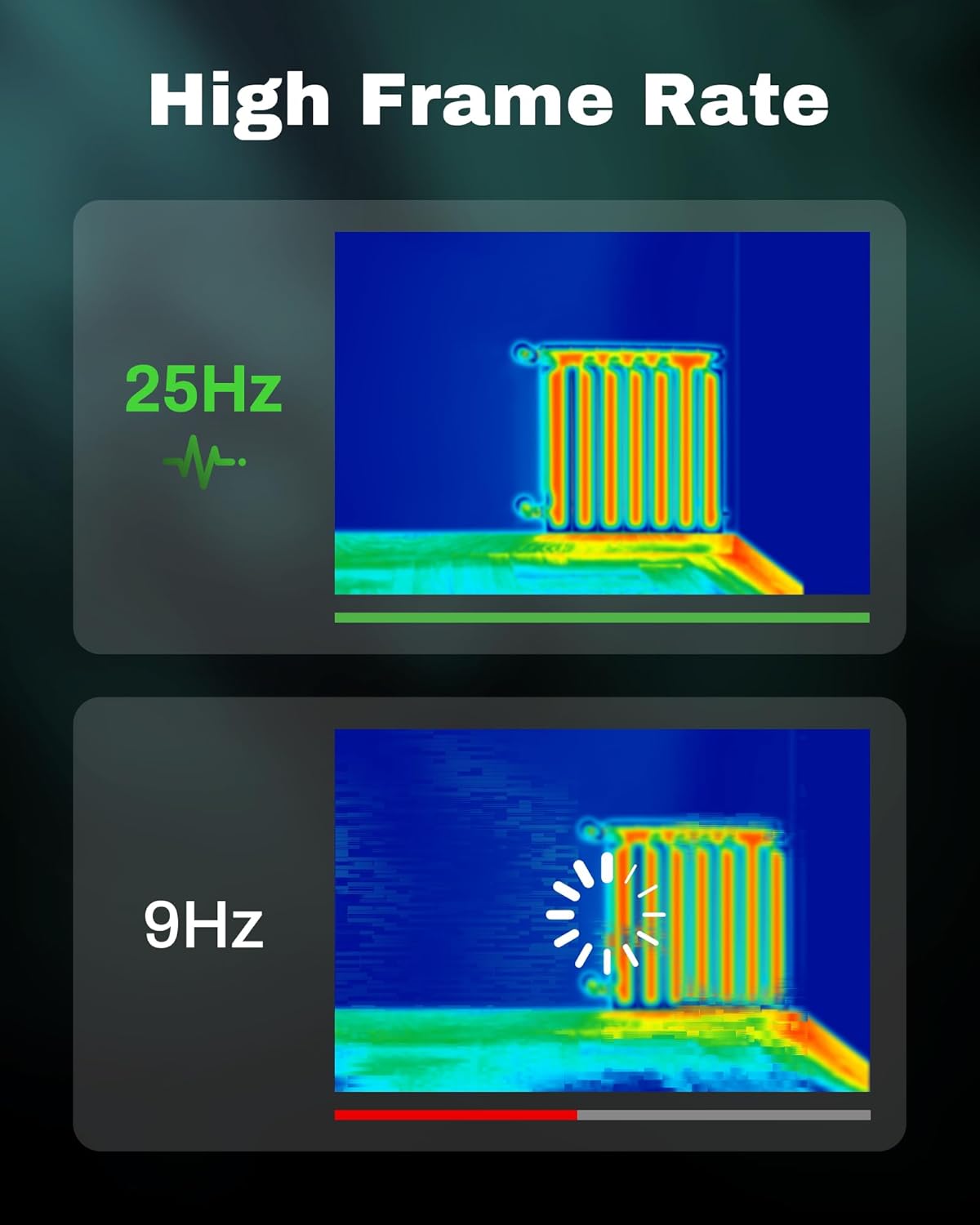
Figure 3.5: Visual comparison of thermal image fluidity at 25Hz versus 9Hz frame rates.

Figure 3.6: Display of the five available thermal color palettes for varied visualization of heat signatures.
4. סעטאַפּ
4.1. ונפּאַקקינג
Carefully remove all items from the packaging. The box should contain:
- AMPBANK H128 Thermal Imaging Camera
- וסב- C קאַבלע
Inspect the camera for any signs of damage. If any components are missing or damaged, contact customer support immediately.
4.2. טשאַרדזשינג די באַטערי
Before first use, fully charge the camera's built-in battery.
- Connect the supplied USB-C cable to the USB-C port on the top of the camera.
- פֿאַרבינדט דעם אַנדערן עק פֿונעם USB-C קאַבל צו אַ קאָמפּאַטיבלע USB מאַכט אַדאַפּטער (נישט אַרייַנגערעכנט) אָדער אַ קאָמפּיוטער'ס USB פּאָרט.
- The charging indicator on the screen will show the charging status. A full charge typically takes several hours.
- אַמאָל גאָר באפוילן, דיסקאַנעקט די קאַבלע.
4.3. ערשטע איינשטראָם און גרונטלעכע סעטטינגס
- מאַכט אויף: Press and hold the power button (often integrated with the Return button) for approximately 8 seconds until the screen illuminates.
- שפּראַך סעלעקציע: Upon first power-on, you may be prompted to select your preferred language. Use the Up/Down buttons to navigate and the OK button to confirm.
- טאָג און צייט: שטעלן די ריכטיק דאַטע און צייט פֿאַר פּינטלעך צייטamping of captured images. Navigate to the settings menu using the OK button, then find the Date/Time option.
5. אָפּעראַציע
5.1. יקערדיק אָפּעראַציע
- מאַכט אויף / אַוועק: Press and hold the power button for 8 seconds to turn on. Press and release the power button to turn off or enter sleep mode.
- נאַוויגאַציע מעניוז: ניצן די OK קנעפּל צו אַרייַן אין די מעניו. ניצט דעם Up און אַראָפּ arrow buttons to scroll through options. Press OK to select an option. Press the צוריקקומען button to exit a menu or go back.
- כאַפּן בילדער: Aim the camera at the target. Press the trigger button (located on the handle) to capture a thermal image. Images are saved internally.
5.2. Measurement Modes and Settings
- Temperature Spot Measurement: The H128 automatically displays the maximum, minimum, and center temperatures on the screen.
- עמיסיוויטי אַדזשאַסטמאַנט: For accurate temperature readings, adjust the emissivity setting based on the material being inspected. Access this setting through the menu. Common emissivity values can be found in reference tables.
- דיסטאַנסע באַשטעטיקן: Inputting the approximate distance to the target can further refine temperature accuracy.
- טערמישע פּאַלעטן: Change the color scheme of the thermal image to highlight temperature differences more effectively. Navigate to the palette settings in the menu and choose from Iron Red, Black Hot, Rainbow, White Hot, or Red Hot.
5.3. דאַטאַ מאַנאַגעמענט
The H128 can store over 8000 images internally. To transfer images to a computer:
- Connect the camera to your computer using the supplied USB-C cable.
- The camera will appear as a removable storage device.
- Browse to the image folder and copy the desired fileס צו דיין קאָמפּיוטער.

Figure 5.1: Connecting the H128 thermal camera to a laptop via USB-C for image transfer.
6. וישאַלט
6.1. רייניקונג
- אַפּאַראַט גוף: ווישט אָפּ דעם קאַמעראַ קערפּער מיט אַ ווייכן, דamp שטאָף. דו זאלסט נישט נוצן אַברייסיוו קלינערז אָדער סאָלוואַנץ.
- ינפרערעד לענס: The infrared lens is a delicate optical component. Use a lens cleaning cloth or a soft, lint-free cloth specifically designed for optics. Gently wipe the lens to remove dust or smudges. Do not apply excessive pressure or use harsh chemicals.
6.2. סטאָרידזש
When not in use, store the H128 in a cool, dry place, away from direct sunlight and extreme temperatures. Ensure the battery is partially charged (around 50%) before long-term storage to preserve battery health.
6.3. באַטערי קער
צו מאַקסאַמיזירן באַטאַרייע לעבן:
- פֿאַרמײַדט אָפֿט פֿולשטענדיק אויסצולאָדן די באַטעריע.
- ויסמיידן לאָזן די באַטאַרייע גאָר באפוילן פֿאַר עקסטענדעד פּיריאַדז.
- באַשולדיקן די באַטאַרייע אין צימער טעמפּעראַטור.
7. טראָובלעשאָאָטינג
| פּראָבלעם | מעגלעך סיבה | לייזונג |
|---|---|---|
| די קאַמעראַ גייט נישט אָן. | באַטערי איז דיפּליטיד. | לאָדט אויף די באַטאַרייע מיטן USB-C קאַבל. |
| דאָס בילד איז פֿאַרשוואָמען אָדער נישט קלאָר. | Lens is dirty. / Incorrect focus (if applicable). | Clean the infrared lens with a soft, lint-free cloth. The H128 has fixed focus, ensure you are within the optimal measurement distance. |
| טעמפּעראַטור מעסטונגען ויסקומען אומרעכט. | Incorrect emissivity setting. / Distance to target is too far. | Adjust the emissivity setting in the menu to match the material being measured. Ensure you are within the recommended measurement distance. |
| קען נישט איבערפירן בילדער צום קאמפיוטער. | Loose USB-C connection. / Driver issue. | Ensure the USB-C cable is securely connected to both the camera and the computer. Try a different USB port or cable. Restart both devices. |
| באַטערי לעבן איז קירצער ווי דערוואַרט. | Frequent use of high-brightness settings. / Battery degradation over time. | Reduce screen brightness if possible. Ensure proper charging and storage practices. If battery life significantly degrades, contact support. |
If the problem persists after attempting these solutions, please contact AMPBANK customer support.
8. ספּעסאַפאַקיישאַנז
| פּאַראַמעטער | ווערט |
|---|---|
| מאָדעל | H128 |
| ינפרערעד האַכלאָטע | 128x128 פּיקסעלס |
| TISR Display Resolution | 240x240 פּיקסעלס |
| טעמפּעראַטור ראַנגע | -4°F צו 842°F (-20°C צו 450°C) |
| אַקיעראַסי | ±3% or ±3°C (whichever is greater) |
| טערמאַל סענסיטיוויטי (NETD) | 40mk |
| ראַם קורס | 25 הז |
| באַטערי טיפּ | Built-in Rechargeable Lithium Ion (2900mAh) |
| באַטערי לעבן | ביז 24 שעה קאנטינעווער באניץ |
| טשאַרדזשינג פּאָרט | וסב-C |
| קאַפּ פּראַטעקשאַן | 6.56 פֿיס (2 מעטער) |
| IP שאַץ | IP65 |
| סטאָרידזש קאַפּאַסיטי | 8000+ images |
| דימענשאַנז | 9.33 X 4.76 X 3.86 אינטשעס (בעערעך) |
| וואָג | 1.06 פונט (אומגעפער) |
9. וואָראַנטי & שטיצן
For detailed warranty information, please refer to the warranty card included with your product or visit the official AMPBANK webזייטל. גאַראַנטיע טערמינען און באדינגונגען קענען זיין אַנדערש לויט געגנט און פּראָדוקט.
If you require technical assistance, have questions about your product, or need to initiate a warranty claim, please contact AMPBANK customer support through their official channels:
- פאַבריקאַנט: AMPBANK
- אָנליין קראָם: באַזוכן די AMPBANK Store on Amazon
- ביטע אָפּשיקן צו דער באַאַמטער AMPBANK website or product packaging for the most current contact information (email, phone, service centers).