
1. הקדמה
This manual provides detailed instructions for the safe and efficient assembly, operation, and maintenance of your SpeaKa Professional SP-TVS-600 TV Floor Stand. Please read this manual thoroughly before installation and retain it for future reference.
The SP-TVS-600 is designed to support televisions and monitors ranging from 37 to 86 inches, with a maximum load capacity of 45 kg. It features tool-free tilt adjustment, adjustable height for the screen (900 to 1100 mm), and an integrated cable management system. An additional height-adjustable storage shelf (200 to 910 mm) is included for media devices.
2. זיכערקייַט אינפֿאָרמאַציע
ווארענונג: Failure to read, understand, and follow all instructions can result in serious personal injury, property damage, or voiding of your warranty.
- Ensure the floor stand is placed on a stable, level surface.
- דו זאלסט נישט יקסיד די מאַקסימום מאַסע קאַפּאַציטעט פון 45 קג (99 לבס).
- Verify that your TV's VESA mounting pattern is compatible with the stand (100x100 to 600x400 mm).
- Always use two people for lifting and positioning the TV onto the stand.
- האַלט קינדער און חיות אַוועק פון דעם שטאַנד בעת פֿאַרזאַמלונג און אָפּעראַציע.
- Do not hang on the stand or TV.
- Regularly check all screws and connections to ensure they remain secure.
- פּאָטער פון פּאַקקאַגינג מאַטעריאַלס ריספּאַנסאַבלי.
3. פּעקל אינהאַלט
Please check that all components are present and undamaged before beginning assembly. If any parts are missing or damaged, contact your retailer.
- TV Floor Stand (disassembled components)
- ינסטרוקטיאָן מאַנואַל (דעם דאָקומענט)
- זיכערקייַט דאַטאַ בלאַט
- Hardware Kit (screws, washers, spacers, tools for assembly)

פיגורע 1: פראָנט view of the SpeaKa Professional SP-TVS-600 TV Floor Stand.
4. סעטאַפּ און אַסעמבלי
Follow these steps carefully to assemble your TV floor stand. It is recommended to have a second person assist with assembly, especially when mounting the television.
- אָפּלייגן קאַמפּאָונאַנץ: פֿאָרזיכטיק אַרויסנעמען אַלע טיילן פֿון דער פֿאַרפּאַקונג און לייגן זיי אויס אויף אַ ווייכער, ריינער ייבערפֿלאַך כּדי צו פֿאַרמייַדן קראַצן.
- אַסעמבאַל די באַזע: Attach the main support column to the base plate using the provided screws and tools. Ensure all connections are tight and secure.
- Install TV Brackets: Attach the VESA mounting brackets to the back of your television using the appropriate screws, washers, and spacers from the hardware kit. Refer to your TV's manual for specific screw requirements. Ensure the brackets are level and securely fastened.
- מאָנטירן דעם טעלעוויזאָר: With assistance, carefully lift the television and hook the TV brackets onto the main support column's mounting plate. Secure the TV in place using the safety screws or locking mechanisms provided.
- צוטשעפּען די פּאָליצע: Install the media shelf onto the main support column at your desired height. Secure it with the designated fasteners.
- קאַבלע פאַרוואַלטונג: Route all TV and device cables through the integrated cable management system within the stand's column for a tidy appearance.
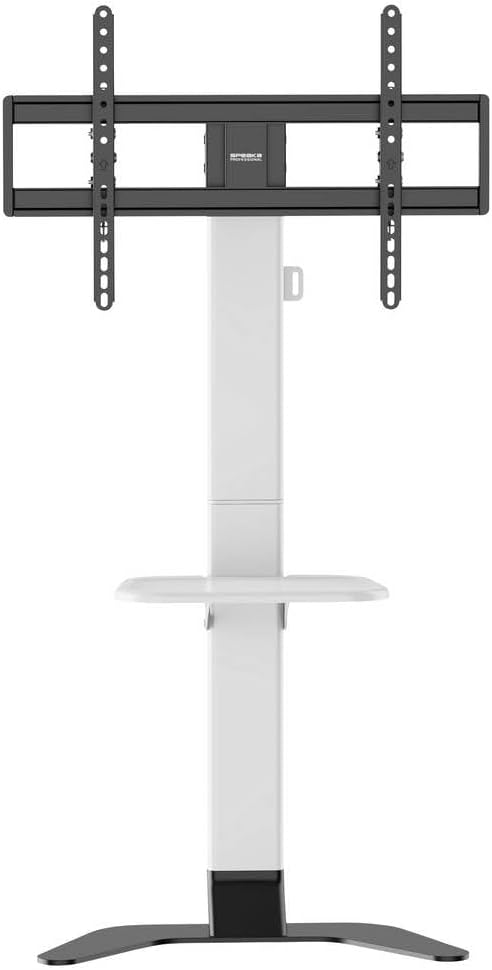
פיגורע 2: פראָנט view of the stand showing the adjustable shelf.

פיגורע 3: זייַט view of the stand, illustrating the profile און פעסטקייַט.
5. אַפּערייטינג ינסטרוקטיאָנס
5.1 אַדזשאַסטירן טעלעוויזיע הייך
The TV mounting plate can be adjusted in height from 900 mm to 1100 mm. To adjust, loosen the height adjustment screws on the main column, carefully slide the TV to the desired height (with assistance), and then securely tighten the screws.
5.2 אַדזשאַסטירן טעלעוויזיע טילט
The stand features tool-free tilt adjustment. Gently push or pull the top or bottom of the TV to achieve your desired viewing angle. The mechanism will hold the TV in place.
5.3 אַדזשאַסטירן פּאָליצע הייך
The media shelf can be adjusted in height from 200 mm to 910 mm. Loosen the shelf adjustment screws, move the shelf to the preferred height, and then re-tighten the screws firmly.
6. וישאַלט
- רייניקונג: Use a soft, dry cloth to clean the stand. For stubborn marks, a slightly damp מען קען ניצן אַ שטאָף מיט אַ מילדן וואַשפּולווער, און דערנאָך טריקענען עס אויס. פֿאַרמייַדן אַברייסיוו רייניגער אָדער סאָלווענטן.
- פּעריאָדיש טשעקס: Regularly inspect all screws, bolts, and connections to ensure they are tight and secure. Re-tighten if necessary.
- שעדיקן: If any part of the stand becomes damaged, discontinue use immediately and contact customer support for replacement parts or advice.
7. טראָובלעשאָאָטינג
| פּראָבלעם | מעגלעך סיבה | לייזונג |
|---|---|---|
| דער שטאַנד איז וואָקלדיק אָדער נישט סטאַביל. | Screws are loose; stand is on an uneven surface; weight capacity exceeded. | Ensure all assembly screws are tightened. Move stand to a level surface. Verify TV weight is within 45 kg limit. |
| TV does not tilt smoothly or stays in position. | Tilt mechanism needs adjustment or is obstructed. | Check for any obstructions. Ensure the tilt mechanism is clean. |
| קייבלס זענען נישט אָרדנטלעך געראטן. | Cables not routed through the designated channels. | Re-route cables through the integrated cable management system in the main column. |
8. ספּעסאַפאַקיישאַנז
- מאָדעל: SP-TVS-600
- טייל נומער: SP-13382656
- סאָרט: SPEAKA PROFESSIONAL
- מאַונטינג טיפּ: שטאָק שטיין
- באַוועגונג טיפּ: טילטאַבלע
- מאַטעריאַל: אַללוי סטיל
- קאָליר: ווייַס / שוואַרץ
- קאַמפּאַטאַבאַל טעלעוויזיע סיזעס: 37 - 86 inches (94.0 cm - 218.4 cm)
- VESA קאַמפּאַטאַבילאַטי: 100x100, 200x100, 200x200, 300x200, 400x200, 300x300, 400x300, 400x400, 600x400 מ״מ
- מאַקסימום מאַסע קאַפּאַציטעט: 45 קג (99 לבס)
- TV Height Adjustment: 900 - 1100 מ״מ
- Shelf Height Adjustment: 200 - 910 מ״מ
- קאַמפּאַטאַבאַל דעוויסעס: טעלעוויזיע, מאָניטאָר
- נומער וואָג: 12.505 ק״ג (12505 גראַם)
- לאַנד פון אָריגין: כינע
9. וואָראַנטי און שטיצן
9.1 וואָראַנטי אינפֿאָרמאַציע
This SpeaKa Professional product comes with a 2-year manufacturer's warranty. Please refer to the terms and conditions provided with your purchase or visit the official SpeaKa Professional website for full details. Keep your proof of purchase for warranty claims.
9.2 קונה שטיצן
For technical assistance, missing parts, or warranty inquiries, please contact your retailer or SpeaKa Professional customer support. Contact information can typically be found on the product packaging or the official brand webפּלאַץ.