
1. הקדמה
This manual provides instructions for the proper use and care of your Zoop Digital Watch, Model 16051PP04. This watch features a digital display, chronograph, stopwatch, and alarm functions, designed for durability and everyday use.

פיגורע 1: פראָנט view of the Zoop Digital Watch 16051PP04.
שליסל פֿעיִקייטן:
- דיגיטאַל ווייַז: Clear and easy-to-read time display.
- טשראָנאָגראַף: פֿאַר צייט-פֿאַרבינדונגען צווישן געשעענישן.
- סטאַפּוואַטש: Precise time measurement.
- שרעק פֿונקציע: Daily alarm setting.
- קוואַרץ באַוועגונג: ינשורז פּינטלעך טימעקיפּינג.
- Acrylic Glass: Durable and impact-resistant watch face.
- וואַסער קעגנשטעל: Up to 50 meters (suitable for splashes, not swimming).
- דוראַבאַל קאַנסטראַקשאַן: ABS case and PU strap with military camouflage print.
2. ערשט סעטאַפּ
Before using your watch, please familiarize yourself with the buttons and their basic functions.

פיגורע 2: זייַט view ווײַזנדיק זייגער קנעפּלעך.
קנעפּל פאַנגקשאַנז:
- ליכט (אויבן לינקס): באַלויכטן דעם עקראַן.
- MODE / ADJ (Bottom Left): Cycles through modes (Time, Alarm, Stopwatch) and enters adjustment mode.
- ST/STOP (Top Right): Starts/stops stopwatch or chronograph.
- RESET / SET/STOP (Bottom Right): Resets stopwatch/chronograph or confirms settings in adjustment mode.
באַשטעטיקן צייט און דאַטע:
- פֿון דער נאָרמאַלער צײַט־אַרויסווייַזונג, דריק די MODE / ADJ קנעפּל איבער און איבער ביז דער צייט איינשטעלונג מאָדע איז אַקטיוויזירט (געוויינטלעך אנגעצייכנט דורך בלינקנדיקע ציפערן).
- ניצן די ST/STOP קנעפּל צו סטרויערן די בלינקנדיקע ציפער (שעה, מינוט, יאָר, חודש, טאָג).
- דרוק די MODE / ADJ button to move to the next setting item.
- אַמאָל אַלע סעטטינגס זענען פֿאַרטיק, דריקן די RESET / SET/STOP קנעפּל צו אַרויסגאַנג די באַשטעטיקן מאָדע.
3. אַפּערייטינג ינסטרוקטיאָנס
ניצן די סטאַפּוואַטש:
- דרוק די MODE / ADJ button until the stopwatch display appears (usually '00:00:00').
- דרוק ST/STOP צו אָנהייבן טיימינג.
- דרוק ST/STOP ווידער צו אפשטעלן די צייט.
- דרוק RESET / SET/STOP צו באַשטעטיק די סטאַפּוואַטש צו נול.
באַשטעטיקן די שרעק:
- דרוק די MODE / ADJ קנעפּל ביז די אַלאַרם סעטטינג דיספּלעי דערשיינט.
- ניצן די ST/STOP button to adjust the flashing hour digit.
- דרוק די MODE / ADJ קנעפּל צו גיין צו די מינוט איינשטעלונג.
- ניצן די ST/STOP button to adjust the flashing minute digit.
- דרוק RESET / SET/STOP to confirm the alarm time and activate/deactivate the alarm.
ניצן די ליכט:
דרוק די ליכט button (top left) to illuminate the display for a few seconds, allowing for visibility in low-light conditions.
4. וישאַלט און קער
וואַסער קעגנשטעל:
Your watch is water resistant up to 50 meters. This means it is suitable for everyday use, splashes, rain, and brief immersion in water. It is not suitable for swimming, diving, or showering with hot water. ניצט נישט די קנעפלעך בשעת די זייגער איז נאַס אדער אונטערגעטובלט.
רייניקונג:
Wipe the watch case and strap with a soft, dry cloth. For stubborn dirt, a slightly damp cloth can be used, followed by drying thoroughly. Avoid using chemical cleaners or solvents, as these can damage the watch materials.
באַטערי פאַרבייַט:
The watch is powered by a long-lasting quartz battery. When the display becomes dim or the watch stops functioning, the battery may need replacement. It is recommended to have the battery replaced by a qualified watch technician to ensure proper sealing and water resistance.
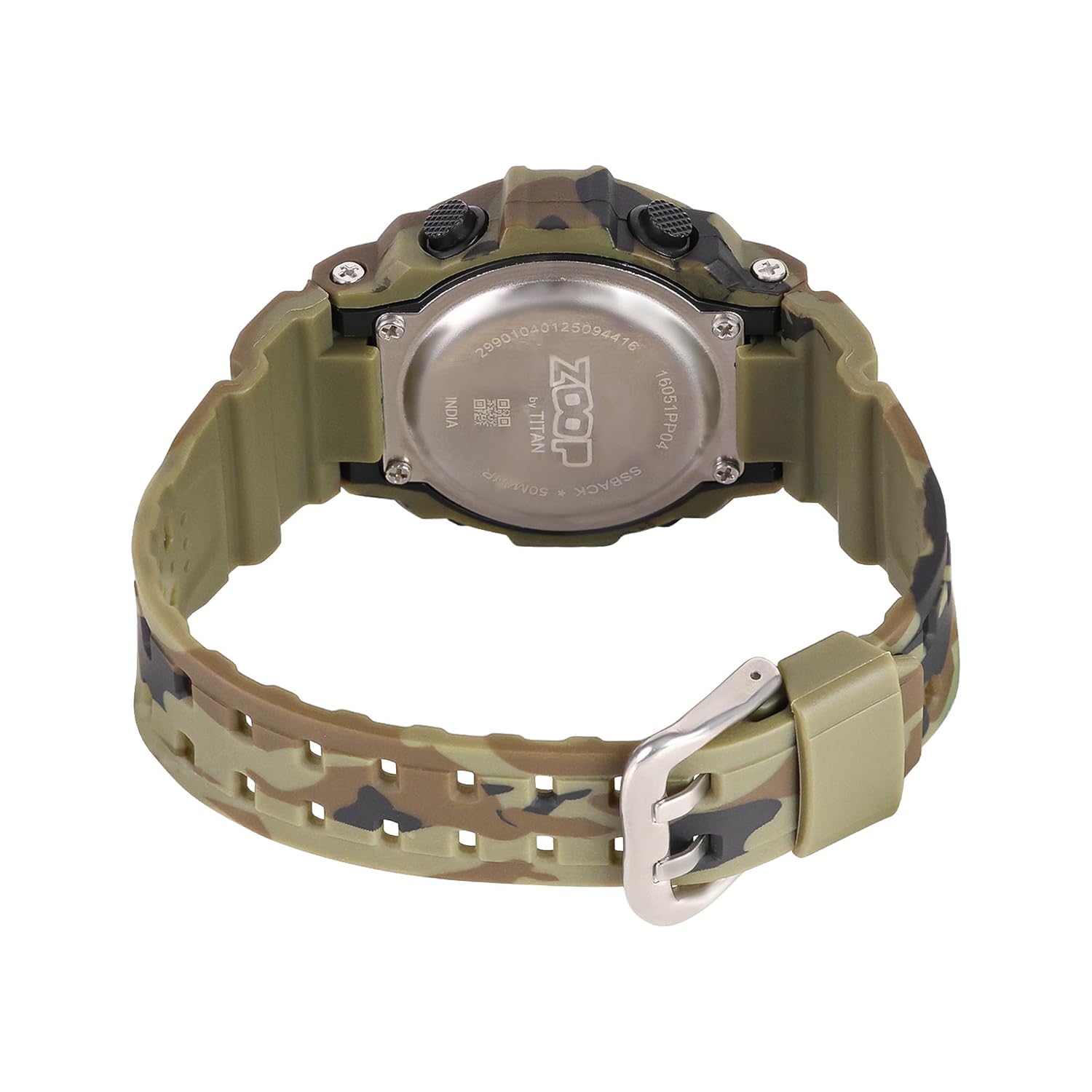
Figure 3: Watch case back, showing water resistance and model details.
5. טראָובלעשאָאָטינג
| פּראָבלעם | מעגלעך סיבה | לייזונג |
|---|---|---|
| דער עקראַן איז ליידיק אָדער טונקל. | נידעריק באַטאַרייע. | פאַרבייַטן באַטאַרייע. |
| צייט איז ומפּינקטלעך. | אומרעכטע צייט איינשטעלונג אדער נידריגע באַטעריע. | Reset time; if problem persists, replace battery. |
| די קנעפּלעך זענען נישט ריספּאַנדינג. | די זייגער איז אפשר אין א פארשפארטן מאָד אדער האט אן אינערליכע פראבלעם. | Try pressing all buttons to reset. If unresponsive, consult service. |
| וואַסער אינעווייניק פון דער זייגער. | Water resistance compromised (e.g., buttons pressed underwater, extreme temperature changes). | Immediately take to a service center. Do not attempt to dry it yourself. |
6. ספּעסאַפאַקיישאַנז

Figure 4: Watch dimensions, showing case size.
- מאָדעל נומער: 16051PP04
- ווייַז טיפּ: דיגיטאַל
- באַוועגונג טיפּ: קוואַרץ
- קאַסטן מאַטעריאַל: אַבס פּלאַסטיק
- רימען מאַטעריאַל: פּו (פּאַליוראַטיין)
- קריסטאַל מאַטעריאַל: אַקריליק
- קאַסע דיאַמעטער: 34 מילאַמיטערז
- קאַסטן גרעב: 10.3 מילאַמיטערז
- באַנד ברייט: 2.1 סענטימעטער
- וואַסער קעגנשטעל טיפקייַט: 50 מעטער
- קלעפּיק טיפּ: בלעכע
- נומער וואָג: 150 גראַמז
- לאַנד פון אָריגין: אינדיע
7. וואָראַנטי און שטיצן
Two Year Guarantee:
This Zoop Digital Watch comes with a two-year limited guarantee from the date of purchase, covering manufacturing defects. This warranty does not cover damage resulting from improper use, accidents, unauthorized repairs, or normal wear and tear.
פאַבריקאַנט קאָנטאַקט אינפֿאָרמאַציע:
For warranty claims, service, or support, please contact:
טיטאַן פֿירמע לימיטעד
#3, SIPCOT Industrial Complex
Hosur - 635126, Tamil Nadu, India