
1. זיכערקייַט אינפֿאָרמאַציע
Please read all instructions carefully before using this monitor. Keep this manual for future reference.
- שטעלט נישט אויס דעם מאָניטאָר צו רעגן אָדער פייכטקייט כּדי צו פאַרמייַדן פייער אָדער עלעקטרישע קלאַפּן.
- עפֿנט נישט דעם מאָניטאָר casinז. עס זענען נישטאָ קיין טיילן וואָס דער באַניצער קען סערוויסן אינעווייניק. לאָזט איבער אַלע סערוויסינג צו קוואַליפֿיצירטע פּערסאָנעל.
- שטעלט דעם מאָניטאָר אויף אַ סטאַבילער, גלאַטער ייבערפלאַך כּדי צו פאַרהיטן אַז ער זאָל נישט פאַלן.
- זיכער מאַכן אַז די ווענטילאַציע אַרום דעם מאָניטאָר איז ריכטיק. בלאָקירט נישט די ווענטילאַציע עפענונגען.
- ניצט נאָר דעם מאַכט אַדאַפּטער וואָס ווערט צוגעשטעלט מיטן מאָניטאָר.
- נעמט ארויס דעם מאָניטאָר פֿון דער עלעקטרישער אַוטלעט בעת בליץ-שטורעמס אָדער ווען ער ווערט נישט גענוצט פֿאַר לאַנגע פּעריאָדן.
2. פּעקל אינהאַלט
באַשטעטיקן אַז אַלע זאכן זענען פאַראַן אין דיין פּעקל:
- Amzfast AMZG25F6F 24.5 Inch Gaming Monitor
- מאָניטאָר שטאַנד (באַזע און האַלדז)
- מאַכט אַדאַפּטער
- דיספּלייפּאָרט (DP) קאַבל
- HDMI קאַבלע
- באַניצער מאַנואַל

Image: Amzfast Gaming Monitor with key features and included accessories.
3. פּראָדוקט איבערview
3.1 מאָניטאָר פֿעיִקייטן
- ווייַז: 24.5-inch Fast IPS Panel, Full HD (1920x1080) Resolution
- דערפרישן קורס: 320Hz for ultra-smooth visuals
- ענטפער צייט: 1ms MPRT (Moving Picture Response Time)
- קאָליר גאַמע: 120% sRGB coverage, 8-bit (16.7 Million Colors)
- הויך דינאַמיש קייט: HDR support for enhanced contrast and color
- אַדאַפּטיוו סינק: Eliminates screen tearing and stuttering
- אויג קער טעכנאָלאָגיע: Anti-flicker, Anti-glare, Blue Light Filter to reduce eye strain
- גיימינג מאָדעס: Optimized presets for FPS, RTS, and RPG games
- Special Gaming Functions: AI Crosshair, Night Vision, Screen Size Adjustment (4:3/16:9)
- VESA קאַמפּאַטאַבילאַטי: 100x100mm for wall mounting or alternative stands
3.2 פּאָרטן און קאָנטראָלן

בילד: הינטערשטע view of the monitor highlighting input ports and the 5-way joystick control.
The monitor features a 5-way joystick for easy navigation of the On-Screen Display (OSD) menu. The rear panel includes the following ports:
- DC מאַכט אַרייַנשרייַב: פאַרבינדן די מאַכט אַדאַפּטער דאָ.
- HDMI 2.0 פּאָרץ (x2): Supports up to 240Hz refresh rate.
- DisplayPort 1.4 פּאָרטן (x2): Supports up to 320Hz refresh rate.
- אַודיאָ רעזולטאַט: פֿאַר פֿאַרבינדן כעדפֿאָונז אָדער עקסטערנע רעדנערס.
4. סעטאַפּ
4.1 צוזאַמענשטעלן דעם שטאַנד
- נעמט פֿאָרזיכטיק אַרויס דעם מאָניטאָר און שטאַנד קאָמפּאָנענטן פֿון דער פּאַקאַדזשינג.
- באַפעסטיקט דעם שטאַנד האַלדז צום מאָניטאָר פּאַנעל. מאַכט זיכער אַז עס קליקט זיכער אין פּלאַץ אָדער איז באַפעסטיקט מיט שרויפן אויב עס איז צוגעשטעלט.
- באַפעסטיקט דעם שטאַנד באַזע צום שטאַנד האַלדז. פֿעסט צו דעם גראָבן שרויף אָדער די שרויפן ביים דנאָ פֿון דער באַזע.
- שטעלט דעם צוזאַמענגעשטעלטן מאָניטאָר אויף אַ סטאַבילער, גלאַטער ייבערפלאַך.
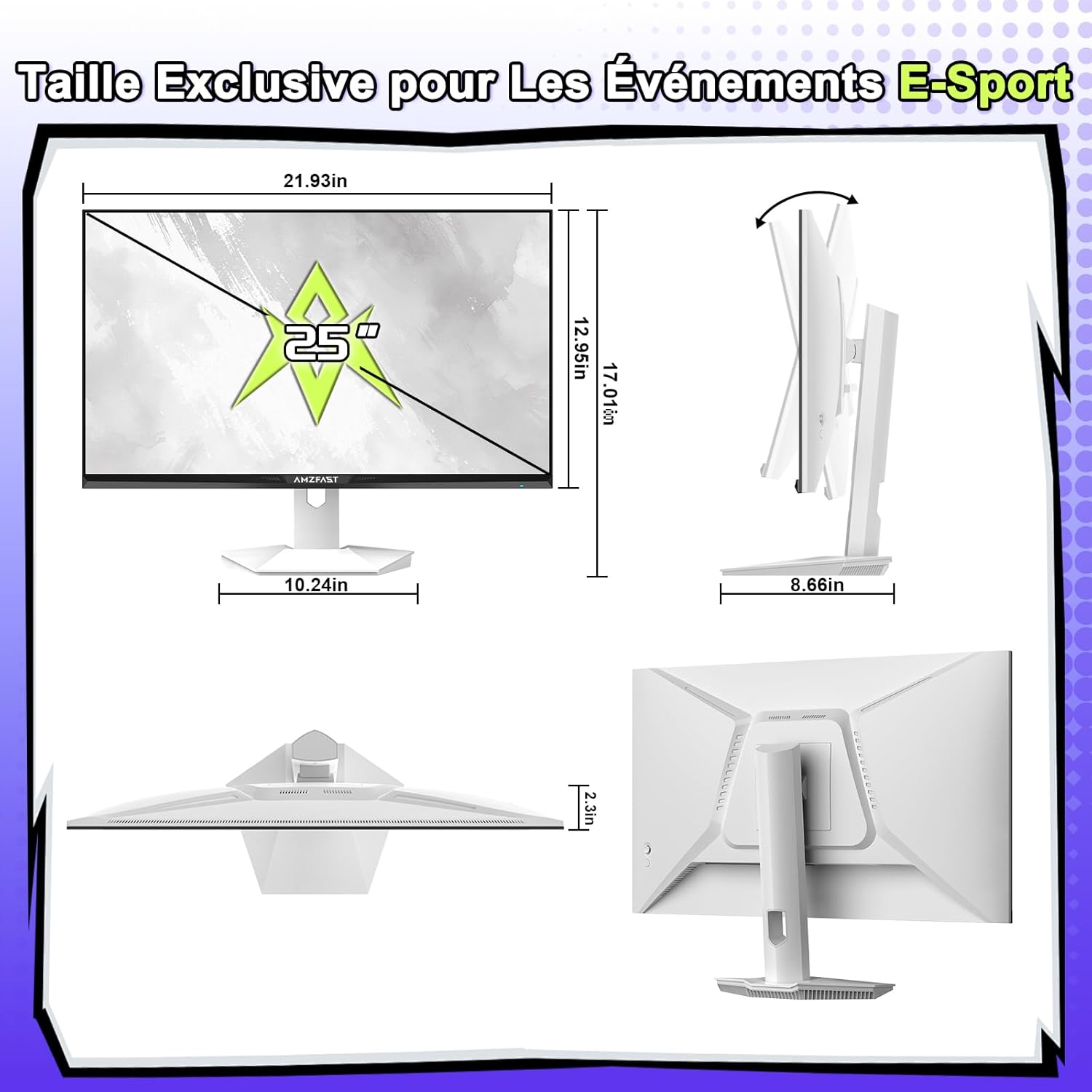
Image: Monitor dimensions and stand assembly diagram.
4.2 קאַנעקטינג צו אַ מיטל
- Connect one end of the provided DisplayPort or HDMI cable to the corresponding port on your computer, console, or laptop.
- Connect the other end of the cable to an available DisplayPort 1.4 or HDMI 2.0 port on the monitor. For optimal performance (320Hz), use a DisplayPort 1.4 cable.
- פֿאַרבינדט דעם מאַכט אַדאַפּטער צום גלייכשטראָם מאַכט אַרייַנגאַנג אויף דעם מאָניטאָר, און דערנאָך שטעק דעם אַדאַפּטער אין אַ מאַכט ווענטיל.
4.3 ערשט מאַכט אויף
Press the power button (often integrated into the joystick) to turn on the monitor. The monitor will automatically detect the input signal. If no signal is detected, ensure your device is powered on and the cables are securely connected.
5. אַפּערייטינג ינסטרוקטיאָנס
5.1 OSD מעניו נאַוויגאַציע
Use the 5-way joystick located on the back of the monitor to navigate the On-Screen Display (OSD) menu:
- דריק דעם דזשויסטיק: גייט אריין אין דעם OSD מעניו אדער באשטעטיקט אן אויסוואל.
- Move joystick Up/Down: נאַוויגירט דורך מעניו אָפּציעס.
- Move joystick Left/Right: Adjusts values or moves to sub-menus.
- Move joystick Left (from main screen): Quick access to input selection.
- Move joystick Right (from main screen): Quick access to exit.
- Move joystick Up (from main screen): Quick access to Game Mode.
- Move joystick Down (from main screen): Quick access to AI Crosshair.
5.2 ווייַז סעטטינגס
אינעם OSD מעניו, קענט איר אַדזשאַסטירן פֿאַרשידענע דיספּליי סעטטינגס:
- ברייטנאַס / קאַנטראַסט: Adjust image luminance and distinction.
- קאָליר סעטטינגס: Fine-tune color temperature, gamma, and saturation.
- בילד מאָדע: Select from various presets (Standard, Movie, Office, Gaming) or customize your own.
- HDR: Enable or disable High Dynamic Range for compatible content.
- אויג-זאָרג: Activate Blue Light Filter and Flicker-Free modes to reduce eye strain during prolonged use.
5.3 גיימינג פֿעיִטשערס
Enhance your gaming experience with these dedicated features:
- Game Modes (FPS/RTS/RPG): Select pre-calibrated settings for specific game genres to optimize visuals and response.
- קינסטלעכע אינטעליגענץ קראָסכער: An on-screen crosshair that changes color based on the scene, aiding target acquisition.
- נאַכט זעאונג: Enhances visibility in dark in-game areas, allowing you to spot enemies more clearly.
- סקרין גרייס אַדזשאַסטמענט: Switch between 4:3 and 16:9 aspect ratios to suit different games or preferences.
- אַדאַפּטיוו סינק: Ensure this feature is enabled in both the monitor OSD and your graphics card settings to synchronize the monitor's refresh rate with your GPU's frame rate, eliminating screen tearing and stuttering.

Image: Different game modes (FPS, RTS, RPG) for optimized gameplay.

Image: Demonstrating screen size adjustment (4:3 vs 16:9) and Adaptive Sync functionality.
6. וישאַלט
געהעריגע אויפהאלטונג גאראנטירט די לאנגעוויטי און אפטימאלע פערפארמאנס פון אייער מאניטאר.
- רייניקונג די פאַרשטעלן: ווישט אָפּ דעם עקראַן מיט אַ ווייכן, לינט-פֿרײַעם שטאָף. פֿאַר שווערע פֿלעקן, ווישט לײַכט.ampווישט דעם שטאָף מיט וואַסער אָדער אַ ספּעציאַליזירטן עקראַן רייניגער. שפּריצט קיינמאָל נישט פליסיקייט גלייך אויפן עקראַן.
- רייניקונג פון די Casing: ניצט אַ ווייכע, טרוקענע שטאָף צו ווישן דעם מאָניטאָרasinז. פֿאַרמײַדן אַברייסיוו רייניגער אָדער סאָלווענטן.
- ווענטילאַטיאָן: Ensure the ventilation holes on the back of the monitor are clear of dust and obstructions.
- סטאָרידזש: When storing the monitor for an extended period, unplug it and cover it to protect it from dust.
7. טראָובלעשאָאָטינג
אויב איר טרעפט פּראָבלעמען מיט אייער מאָניטאָר, זעט די פאלגענדע געוויינטלעכע פּראָבלעמען און לייזונגען:
- קיין מאַכט:
- זיכער מאַכן אַז דער מאַכט אַדאַפּטער איז זיכער פארבונדן צו ביידע דעם מאָניטאָר און אַ אַרבעטנדיקן מאַכט ווענטיל.
- Check if the power button is pressed.
- קיין סיגנאַל:
- Verify that the video cable (DP or HDMI) is securely connected to both the monitor and your source device (PC, console).
- Ensure your source device is powered on.
- ניצט דעם OSD מעניו צו מאַנועל אויסקלײַבן די ריכטיקע אינפוט מקור.
- פליקערנדיק אדער פארדרייט בילד:
- קאָנטראָלירט דעם ווידעא קאַבל פֿאַר שאָדן אָדער לויזע פֿאַרבינדונגען. פּרוּווט אַן אַנדער קאַבל אויב מעגלעך.
- זייט זיכער אז אייערע גראַפיקס קאַרטל דרייווערס זענען אַרויף צו דאַטע.
- Disable Adaptive Sync in the OSD and graphics card settings to see if the issue persists.
- Adjust the refresh rate in your operating system display settings.
- דעד פּיקסעלס:
- A small number of bright or dark pixels are common in LCD/LED technology and do not typically indicate a defect. Refer to the warranty policy for specific pixel defect criteria.
8. ספּעסאַפאַקיישאַנז
| שטריך | באַשרייַבונג |
|---|---|
| סאָרט | Amzfast |
| מאָדעל נומער | AMZG25F6F |
| פאַרשטעלן גרייס | 24.5 אינטשעס |
| האַכלאָטע | FHD 1080p (1920 x 1080 פּיקסעלס) |
| אַספּעקט פאַרהעלטעניש | 16:9 |
| טאַפליע טיפּ | שנעל IPS |
| פאַרשטעלן ייבערפלאַך | Matte, Anti-glare |
| דערפרישן קורס | 320 הז |
| ענטפער צייט | 1ms MPRT |
| קאַנטראַסט פאַרהעלטעניש | 1000:1 |
| ברייטנאַס | 320 סי / מ² |
| קאָליר גאַמע | 120% sRGB |
| קאָליר דעפּט | 8-ביט (16.7 מיליאָן קאָלירן) |
| Viewינג אַנגלע | 178 דיגריז |
| קאַנעקטיוויטי | 2x HDMI 2.0, 2x DisplayPort 1.4, Audio Out |
| אַדאַפּטיוו סינק | Yes (G-Sync Compatible) |
| ספּעציעלע פֿעיִקייטן | Blue Light Filter, Tilt Adjustment, Flicker-Free, HDR, AI Crosshair, Night Vision |
| וועסאַ בארג | 100x100מם |
| דימענשאַנז (די רענטגענ וו x ה) | 22D x 55.7W x 43.2H cm |
| פּונקט וואָג | 3.7 קילאָגראַמס |
| מאַכט אַרייַנשרייַב | 240 וואלטס |
9. וואָראַנטי און שטיצן
This Amzfast monitor comes with a 3-יאָר פאַבריקאַנט ס וואָראַנטי פֿון דעם קויפֿדאַטום. די וואָראַנטי דעקט פֿאַבריקאַציע חסרונות און אַרבעט אונטער נאָרמאַל נוצן.
די וואָראַנטי טוט נישט דעקן:
- שעדיקן געפֿירט דורך צופאַל, זידלען, מיסיוז, מבול, פייַער, ערדציטערניש אָדער אנדערע פונדרויסנדיק סיבות.
- Damage caused by operating the product outside the permitted or intended uses described by Amzfast.
- Damage caused by service performed by anyone who is not an authorized representative of Amzfast.
- Products or parts that have been modified to alter functionality or capability without the written permission of Amzfast.
For warranty claims or technical support, please contact Amzfast customer service through the retailer where the product was purchased or visit the official Amzfast webפּלאַץ פֿאַר קאָנטאַקט אינפֿאָרמאַציע.