
Insignia NS-24F201CA26
Insignia NS-24F201CA26 24-inch 720p HD HDR LED Fire TV Smart TV User Manual
Model: NS-24F201CA26
הקדמה
א דאנק פארן קויפןasing the Insignia NS-24F201CA26 24-inch 720p HD HDR LED Fire TV Smart TV. This manual provides essential information for the safe and efficient use of your television. Please read these instructions thoroughly before operating your new TV and retain them for future reference.
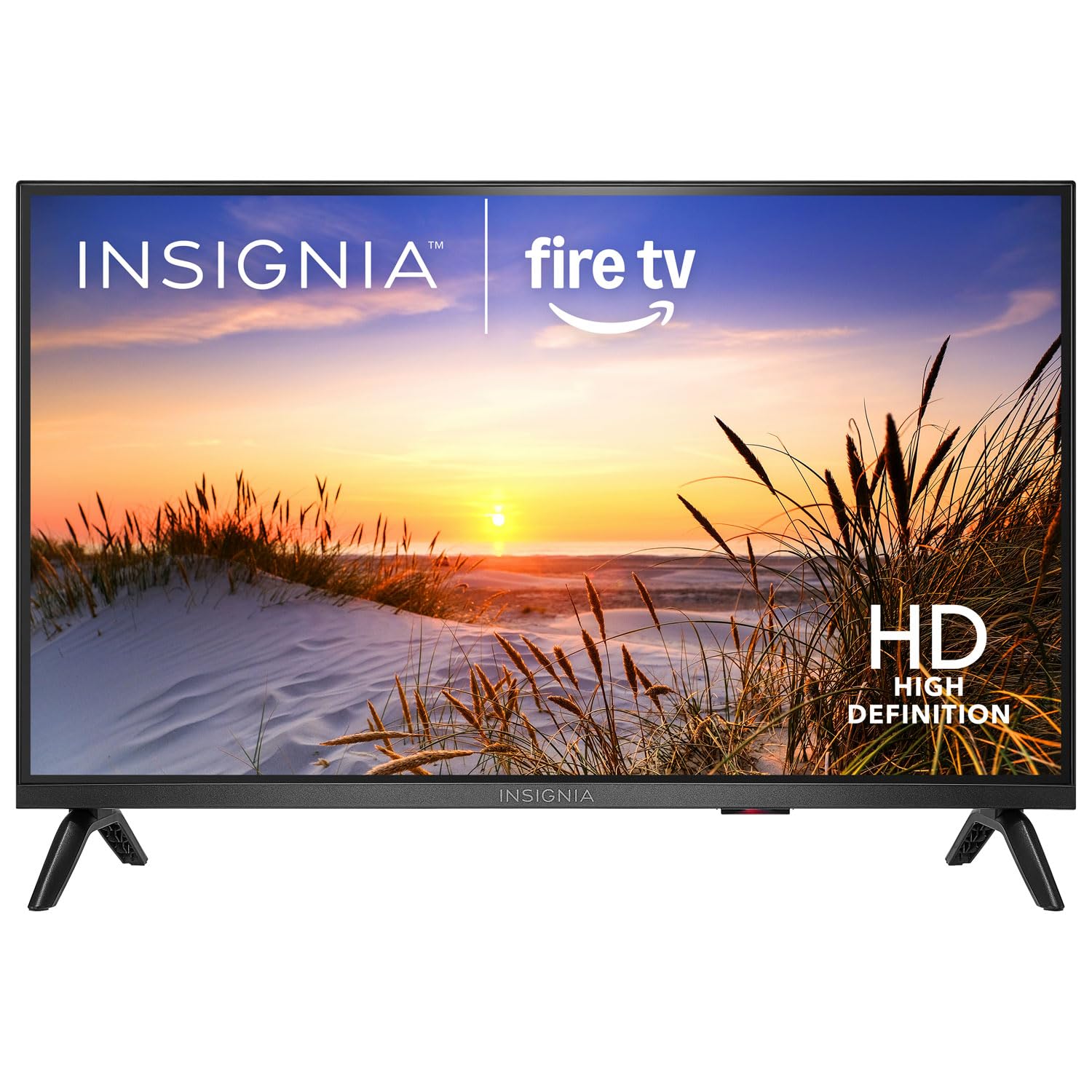
בילד: פראָנט view of the Insignia NS-24F201CA26 24-inch Fire TV Smart TV, showcasing its slim bezel and screen.
וויכטיק סאַפעטי אינפֿאָרמאַציע
שטענדיק פֿאָלגן די גרונטלעכע זיכערהייט מיטלען ווען איר ניצט אייער טעלעוויזיע צו רעדוצירן דעם ריזיקע פֿון פֿײַער, עלעקטרישן קלאַפּ און שאָדן:
- דו זאלסט נישט ויסשטעלן די טעלעוויזיע צו רעגן אָדער נעץ.
- Do not open the TV cabinet. Refer all servicing to qualified service personnel.
- זיכער מאַכן אַז די ווענטילאַציע איז ריכטיק. נישט פאַרשפּאַרן די ווענטילאַציע עפענונגען.
- באַשיצן די מאַכט שנור פון גיין אויף אָדער פּינטשעד.
- נעמט ארויס דעם טעלעוויזאר בעת בליץ-שטורעמס אדער ווען מען ניצט עס נישט פאר לאנגע צייטן.
- האַלט דעם טעלעוויזאָר אַוועק פון היץ קוועלער ווי ראַדיאַטאָרן, היץ רעגיסטערס, אויוון, אָדער אַנדערע אַפּאַראַטן וואָס פּראָדוצירן היץ.
- ניצן בלויז אַטאַטשמאַנץ / אַקסעסעריז ספּעסיפיעד דורך דער פאַבריקאַנט.
וואָס איז אין די קעסטל
Carefully unpack your new product and ensure all items are present:
- Insignia NS-24F201CA26 24-inch Fire TV Smart TV
- קול רימאָוט מיט Alexa
- AAA באַטעריז (2)
- מאַכט שנור
- טעלעוויזיע שטאַנד (2 שטיק)
- שרויפן פֿאַר טעלעוויזיע שטאַנד
- שנעל סעטאַפּ גייד
- Important Safety Information Sheet
סעטאַפּ
1. באַפעסטיקן דעם שטאַנד אָדער וואַנט מאַונטינג
You can either attach the included stand or mount the TV to a wall. If wall mounting, refer to the instructions provided with your wall mount kit. For stand attachment:
- Place the TV face-down on a clean, cushioned surface to prevent screen damage.
- Align the stand pieces with the screw holes on the bottom of the TV.
- באַפעסטיקט יעדן שטאַנד שטיק מיט די צוגעשטעלטע שרויפן. מאַכט זיכער אַז זיי זענען פעסט אָנגעצויגן.
Image Description: An illustration showing the process of attaching the two stand feet to the bottom of the television using screws. (Specific image not available in provided data)
2. קאַנעקטינג דעוויסעס
Connect your external devices (e.g., cable box, Blu-ray player, gaming console) to the TV's HDMI ports. The TV has 2 HDMI ports.
- הדמי: פֿאַר הויך-דעפֿיניציע ווידעא און אַודיאָ.
- וסב: פֿאַר פֿאַרבינדן USB סטאָרידזש דעוויסעס.
- אַנטענע / קאַבלע: פֿאַר פֿאַרבינדן אַן אַנטענע אָדער קאַבל טעלעוויזיע פֿיד.
- אָפּטיש דיגיטאַל אַודיאָ אַרויס: פֿאַר פֿאַרבינדן צו אַ סאַונדבאַר אָדער אַודיאָ ריסיווער.
- מאַכט: פֿאַרבינדט דעם עלעקטרישן שנור צום טעלעוויזיע און דערנאָך צו אַ וואַנט אַוטלעט.
Image Description: A diagram illustrating the various input/output ports on the back of the television, including HDMI, USB, and power connections. (Specific image not available in provided data)
3. ערשטע איינשטראָם און ערשטע אויפשטעל
- צאַפּן די מאַכט שנור אין אַן עלעקטריקאַל ווענטיל.
- דרוק די מאַכט קנעפּל אויף די ווייַט קאָנטראָל.
- Follow the on-screen instructions to complete the initial setup, which includes selecting your language, connecting to a Wi-Fi network, and signing in to your Amazon account for Fire TV features.
אפערירן דיין טעלעוויזיע
ווייַט קאָנטראָל איבערview
The included Voice Remote with Alexa allows you to navigate the Fire TV interface, control playback, and use voice commands.
Image Description: A detailed diagram of the Voice Remote with Alexa, highlighting each button and its function. (Specific image not available in provided data)
- מאַכט קנעפּל: טורנס די טעלעוויזיע אויף אָדער אַוועק.
- Voice Button (Alexa): דריק און האלט צו אַקטיווירן אַלעקסאַ שטימע קאָמאַנדעס.
- נאַוויגאַציע רינג: ניצט צו גיין דורך מעניוז און אויסקלייבן זאכן.
- היים קנעפּל: קערט צוריק צום פייער טיווי היים עקראַן.
- צוריק קנעפּל: קערט צו די פריערדיקע פאַרשטעלן.
- באַנד אַרויף / אַראָפּ: אַדזשאַסץ די טעלעוויזיע באַנד.
- שטיל קנעפּל: מיוטעס אָדער אַנמיוט די געזונט.
- אַפּ קנעפּלעך: שנעלער צוטריט צו פּאָפּולערע סטרימינג אַפּפּס.
יקערדיק פאַנגקשאַנז
- מאַכט אויף / אַוועק: דרוק די מאַכט קנעפּל אויף די ווייַט.
- באַנד קאָנטראָל: ניצן די VOL+ or באַנד - קנעפּלעך.
- אַרייַנשרייַב סעלעקציע: From the Fire TV home screen, navigate to the "Inputs" section to switch between HDMI inputs, live TV, or other sources.
Smart TV Features (Fire TV)
Your Insignia Fire TV provides access to a vast library of streaming content, apps, and live TV options.
- היים פאַרשטעלן: Displays recommended content, recently used apps, and input options.
- אַפּפּס: Download and manage streaming applications from the Amazon Appstore.
- Alexa Voice Control: Press and hold the Voice button on your remote and speak commands to search for content, launch apps, control smart home devices, and more.
פּאַרענטאַל קאָנטראָלס
To manage content access for children, you can set up parental controls:
- From the Fire TV home screen, navigate to סעטטינגס.
- אויסקלייַבן פּרעפֿערענצן, דעמאלט פּאַרענטאַל קאָנטראָלס.
- Follow the on-screen prompts to enable parental controls and set a PIN. You can restrict purchases, app launches, and content based on ratings.
וישאַלט
רייניקונג די פאַרשטעלן
- שטענדיק אויסשטעקן דעם טעלעוויזאר איידער איר רייניגט.
- ניצן אַ ווייך, לינט-פֿרייַ שטאָף לייטלי דampאָפּגעווישט מיט וואַסער אָדער אַ ספּעציעלן עקראַן רייניגער.
- Wipe the screen gently. Do not apply excessive pressure.
- Never use abrasive cleaners, waxes, or solvents.
אַלגעמיינע קער
- Keep the TV in a well-ventilated area.
- פֿאַרמײַדט צו שטעלן זאַכן אויף דער טעלעוויזיע.
- שטעלט נישט אויס דעם טעלעוויזאר צו דירעקטער זון אדער עקסטרעמע טעמפעראטורן.
טראָובלעשאָאָטינג
Before contacting support, try these common solutions:
| פּראָבלעם | מעגלעך לייזונג |
|---|---|
| קיין מאַכט | זיכער מאַכן אַז די מאַכט שנור איז זיכער אַרייַנגעשטעקט אין די טעלעוויזיע און אַ אַרבעטנדיק עלעקטריש ווענטיל. פּרוּווט אַן אַנדער ווענטיל. |
| קיין בילד נישט, אבער סאונד איז דא | קאָנטראָלירט די אינפוט מקור. מאַכט זיכער אַז די פֿאַרבונדענע מיטל איז אנגעצינדן און אַרבעט ריכטיק. |
| קיין קלאַנג, אָבער בילד איז דאָ | Check the volume level and ensure the TV is not muted. Verify audio cables are connected correctly. |
| ווייַט קאָנטראָל נישט ארבעטן | Replace the batteries (2 AAA batteries). Ensure there are no obstructions between the remote and the TV. |
| קענען ניט פאַרבינדן צו ווי-פי | זיכער מאַכן אַז אייער Wi-Fi ראַוטער איז אָן און אין דערגרייך. אַרייַן ווידער די Wi-Fi פּאַראָל. ריסטאַרט די טעלעוויזיע און ראַוטער. |
ספּעסאַפאַקיישאַנז
| שטריך | דעטאַל |
|---|---|
| מאָדעל נומער | NS-24F201CA26 |
| פאַרשטעלן גרייס | 24 inches (Display Size Class) |
| האַכלאָטע | 720 פּ הד |
| ווייַז טעכנאָלאָגיע | געפירט |
| דערפרישן קורס | 60 הז |
| Picture Quality Enhancement | HDR |
| אָפּערייטינג סיסטעם | פייער אָ.עס. |
| קאַנעקטיוויטי טעכנאָלאָגיע | ווי-פי |
| גאַנץ הדמי פּאָרץ | 2 |
| פּראָדוקט דימענשאַנז (ד רענטגענ וו רענטגענ ה) | 17.7D x 53.7W x 36.3H cm (with stand) |
| וואָסtage | 35 וו |
| באַטעריז פארלאנגט | 2 AAA (אריינגערעכנט פֿאַר ווײַטקאָנטראָל) |
| ספּעציעלע פֿעיִקייטן | Parental Controls, Smart Home Compatible |
וואָראַנטי און שטיצן
This Insignia product is covered by a limited warranty. For specific warranty terms and conditions, please refer to the warranty card included with your product or visit the official Insignia webפּלאַץ.
For technical support, troubleshooting assistance, or service inquiries, please contact Insignia Customer Support. Contact information can typically be found on the manufacturer's webוועבזייטל אדער אין דער שנעלער סעטאַפּ גייד.
- אָנליין שטיצן: באַזוכן www.insigniaproducts.com/support (למשלampדער לינק, דער פאקטישער לינק קען זיין אנדערש).
- טעלעפאָן שטיצן: זעט אייער פּראָדוקט דאָקומענטאַציע פֿאַר רעגיאָנאַלע טעלעפאָן נומערן.
Ask a question about this manual
Ask about setup, troubleshooting, compatibility, parts, safety, or missing instructions. Manuals+ will review the question and use this page’s manual context to help answer it.