
Della TL-9K1VB-19S-I+O
דעלאַ וואַריאָ סעריע 9000 BTU מיני ספּליט לופטקילונג באַניצער מאַנואַל
Model: TL-9K1VB-19S-I+O
1. הקדמה
This user manual provides detailed instructions for the installation, operation, and maintenance of your DELLA Vario Series 9000 BTU Mini Split Air Conditioner. Please read this manual thoroughly before installation and use to ensure proper function and safety. Keep this manual for future reference.
2. זיכערקייַט אינפֿאָרמאַציע
Always adhere to local and national electrical codes. Professional installation is mandatory for this system. Do not attempt to install or service the unit yourself unless you are a qualified technician. Disconnect power before performing any maintenance or cleaning.
- פאַרזיכערן געהעריק גראַונדינג צו פאַרמייַדן עלעקטריקאַל קלאַפּ.
- דו זאלסט נישט פאַרשפּאַרן לופט ינלעץ אָדער אַוטלעץ.
- האַלט קינדער און חיות אַוועק פון דער דרויסנדיקער אַפּאַראַט.
- If unusual sounds, smells, or smoke occur, immediately turn off the unit and disconnect power. Contact qualified service personnel.
3. וואָס איז אין דער קעסטל
באַשטעטיקן אַז אַלע קאָמפּאָנענטן זענען פאַראַן איידער איר הייבט אָן די אינסטאַלאַציע:
- 1 x Mini-Split Air Conditioner (Indoor Unit)
- 1 x Mini-Split Air Conditioner (Outdoor Unit)
- ווייַט קאָנטראָל
- Installation Kit (Standard size 1/4" & 3/8" outer dimension copper pipes, drain pipe, wall sleeve, plasticine putty, screws, anchors, bracket template)
- באַניצער מאַנואַל (דעם דאָקומענט)

Image: All components included in the DELLA Vario Series Mini Split Air Conditioner package, including indoor unit, outdoor unit, remote control, and various installation accessories.
4. סעטאַפּ און ייַנמאָנטירונג
This DELLA Mini Split AC system requires professional installation. It is not designed for DIY installation. Line-set vacuuming is required during installation. Any alteration of line-set length requires adjusting freon levels. Consult a certified HVAC technician for proper installation to ensure optimal performance and to maintain warranty validity.
4.1 פאַר-ינסטאַלירונג טשעקס
- Ensure the installation area meets space and electrical requirements.
- Verify power supply (115V) and maximum fuse size (25A).
- Confirm proper drainage for the indoor unit.
4.2 יוניט דימענשאַנז

Image: Detailed dimensions for both the indoor and outdoor units of the DELLA Vario Series Mini Split Air Conditioner, including length, width, and height measurements.
5. אַפּערייטינג ינסטרוקטיאָנס
Your DELLA Vario Series Mini Split Air Conditioner offers multiple modes and smart features for optimal comfort and energy efficiency.
5.1 רימאָוט קאָנטראָל פאַנגקשאַנז
The included remote control allows full command over your unit. Familiarize yourself with its buttons and their functions:
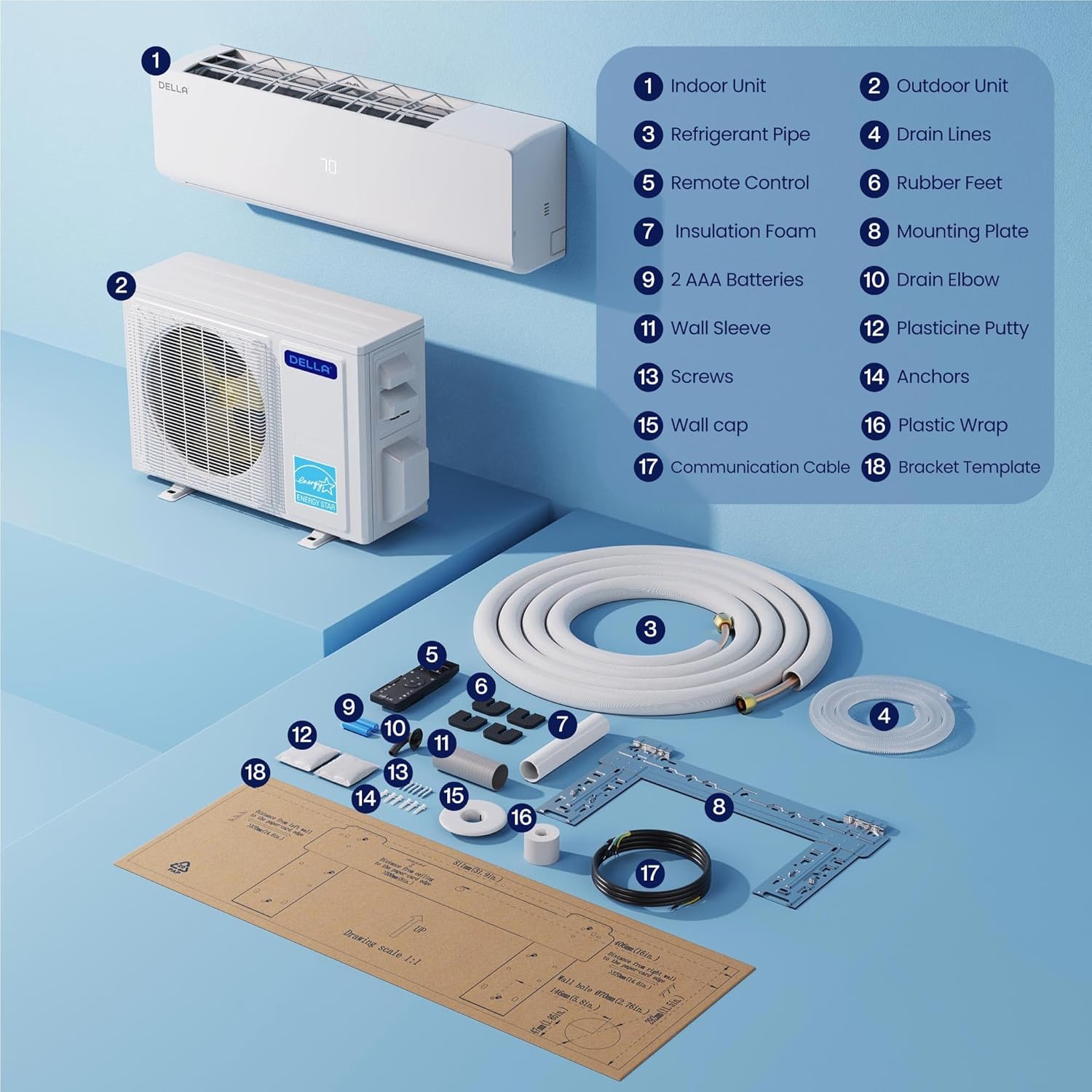
Image: A detailed diagram of the DELLA Mini Split remote control, highlighting various buttons and their corresponding functions such as mode selection, fan speed, temperature adjustment, and special features.
- אויף / אַוועק: מאַכט די אַפּאַראַט אויף אָדער אַוועק.
- מאָדע: Cycles through Cool, Heat, Dry (Dehumidify), Fan Only, and Auto modes.
- טעמפּעראַטור אַרויף/אַראָפּ: אַדזשאַסץ די געבעטן טעמפּעראַטור.
- פאַן גיכקייַט: Selects fan speed (Quiet, Low, Mid Low, Mid, Mid High, High, Turbo).
- Airflow (Swing): Controls vertical and horizontal louver movement for optimal air distribution.
- איך פיל מאָדע: Senses room temperature at the remote control for precise comfort.
- שלאָפן מאָדע: אַדזשאַסטירט טעמפּעראַטור און ווענטילאַטאָר גיכקייט פֿאַר באַקוועמען שלאָף און ענערגיע שפּאָרן.
- טיימער: Sets a specific time for the unit to turn on or off.
- עקאָ מאָדע: אָפּטימיזירט אָפּעראַציע פֿאַר מאַקסימום ענערגיע עפעקטיווקייט.
5.2 Smart App Control (Della+ App)
Control your DELLA Mini Split from anywhere using the Della+ app, compatible with Google Assistant and Alexa. The app provides advanced features including scheduling, geo-location, and detailed control over modes and settings.
Video: Demonstration of the Della+ mobile application interface, showcasing features like mode selection, fan speed adjustment, airflow control, scheduling, and timer settings for the mini split air conditioner.
- ווייַט קאָנטראָל: Adjust settings from your smartphone.
- סקעדזשולינג: Program daily or weekly operation schedules.
- געא-לאקאציע: Automatically adjust settings based on your proximity to home.
- קול קאָנטראָל: אינטעגרירן מיט אַלעקסאַ אָדער גוגל אַסיסטאַנט פֿאַר הענט-פֿרײַ אָפּעראַציע.

Image: Screenshots of the Della+ app showing various control screens, including temperature setting, mode selection, timer functions, and smart home integration options.
6. וישאַלט
Regular maintenance ensures the longevity and efficient operation of your DELLA Mini Split Air Conditioner.
6.1 פילטער רייניקונג
Clean the air filters regularly (every 2-4 weeks, depending on usage) to maintain air quality and efficiency. Refer to the detailed instructions in the full user manual (PDF) for filter removal and cleaning procedures.
6.2 רייניקונג פון דער דרויסנדיקער איינהייט
Keep the outdoor unit clear of debris, leaves, and other obstructions. Periodically clean the coils with a soft brush or vacuum cleaner. Ensure proper drainage from the outdoor unit.
6.3 Self-Clean Function
The unit features a PureClean tech self-clean function that stops dust buildup and defrosts the indoor unit, keeping your air fresher with advanced sterilization. Activate this function via the remote control or Della+ app as needed.
7. טראָובלעשאָאָטינג
איידער איר קאָנטאַקטירט קונה שטיצע, רעאַגירטview די פאלגענדע געוויינטלעכע פראבלעמען און לייזונגען:
| פּראָבלעם | מעגלעך סיבה | לייזונג |
|---|---|---|
| אַפּאַראַט טוט נישט קער אויף. | No power, tripped circuit breaker, remote control batteries dead. | קאָנטראָלירט די מאַכט צושטעל, ריסעט די קרייַז ברעאַקער, פאַרבייטן די באַטעריעס פון די ווייַט קאָנטראָל. |
| נישט גענוג קילן/הייצן. | שמוציקע לופט פילטערס, פארשטאפטע דרויסנדיקע איינהייט, אומרעכטע מאָדע/טעמפּעראַטור איינשטעלונג, נידריג קילשטאָף. | Clean filters, clear obstructions, verify settings, contact technician for refrigerant check. |
| ומגעוויינטלעך ראַש. | לויזע טיילן, פארשטאפונג פון ווענטילאַטאָר, נאָרמאַלע אַרבעטס-גערוישן (למשל, קילשטאָף-פלוס). | Inspect for loose parts, clear obstructions. If persistent or loud, contact technician. |
For issues not listed here or if solutions do not resolve the problem, please contact DELLA customer support.
8. ספּעסאַפאַקיישאַנז
| שטריך | דעטאַל |
|---|---|
| סאָרט נאָמען | דעלא |
| מאָדעל נומער | TL-9K1VB-19S-I+O |
| קאָאָלינג קאַפּאַציטעט | 9000 BTU / ה |
| באַהיצונג קאַפּאַסיטי | 10000 BTU / ה |
| SEER2 ראַנג | 19 SEER2 |
| מאַכט צושטעלן | 115 וו / 60 הז / 1 פ |
| מאַקסימום אַרייַנשרייַב מאַכט | 750 וואטס |
| פּונקט וואָג | 19.8 פונט (אינעווייניקסטע איינהייט) |
| Product Dimensions (Indoor) | 31.94 X 8 X 11.5 אינטשעס |
| קאַווערידזש שטח | ביז 400 קוואַדראַט פֿוס |
| ראַש מדרגה | Ultra silent at only 28 dBa |
| ספּעציעלע פֿעיִקייטן | Dehumidifier, Fast Cooling, Remote Control, WiFi Enabled, 4D Air Flow, I Feel Mode, 24 Hour Timer, Sleep Mode, ECO Energy Saving Mode, Multiple Fan Speeds, Turbo Function, PureClean Tech |
9. וואָראַנטי און שטיצן
DELLA offers a limited lifetime warranty for this product, ensuring unmatched support and peace of mind. For any inquiries or technical assistance, please contact DELLA customer support.
- קונה שטיצן: Available for technical assistance.
- קערט: 30-טאָג גרינגע צוריקקער פּאָליטיק.

Image: Graphic illustrating DELLA's lifetime coverage, highlighting best-in-class support and no additional costs.
For more detailed information, please refer to the official באַניצער מאַנואַל (פּדף).
Ask a question about this manual
Ask about setup, troubleshooting, compatibility, parts, safety, or missing instructions. Manuals+ will review the question and use this page’s manual context to help answer it.