
1. הקדמה
This manual provides comprehensive instructions for the installation, operation, and maintenance of the EARU Electric 3-Phase Voltage and Overcurrent Protector, Model EARU-1008. This device is designed to safeguard 3-phase electrical systems by continuously monitoring voltage and current, offering protection against over-voltagE, אונטער-וואָלtage, overcurrent, and phase failure. It is suitable for industrial and commercial applications requiring reliable electrical monitoring and protection.
2. זיכערקייַט אינפֿאָרמאַציע
ווארענונג: געפאַר פון עלעקטרישן קלאַפּ. אינסטאַלאַציע און וישאַלט זאָל נאָר דורכגעפירט ווערן דורך קוואַליפֿיצירטע פּערסאָנעל.
- שטענדיק אָפּשטעקן די מאַכט איידער איר אינסטאַלירן אָדער סערוויסן דעם מיטל.
- פאַרזיכערן געהעריק גראַונדינג צו פאַרמייַדן עלעקטריקאַל קלאַפּ.
- באַשטעטיקן אַז אַלע וויירינג קאַנעקשאַנז זענען זיכער און ריכטיק לויט די וויירינג דיאַגראַמע.
- ניצט נישט דעם אפאראט אויב עס זעט אויס צעבראכן.
- אַדכיר צו אַלע היגע און נאציאנאלע עלעקטריקאַל קאָודז.
3. פּראָדוקט איבערview
3.1. שליסל פֿעיִקייטן
- Real-time 3-Phase Monitoring: Displays live voltage (L1, L2, L3) and current (L1, L2, L3) values.
- פולשטענדיק שוץ: Safeguards against over-voltagE, אונטער-וואָלtage, overcurrent, and phase failure.
- אַדזשאַסטאַבאַל פּאַראַמעטערס: User-configurable settings for protection thresholds and recovery delays.
- Automatic Phase Failure Reset: Detects and automatically resets after phase anomalies.
- High-Visibility LED Display: Bright red LED for clear readings in various lighting conditions.
- דין רעלס בארג: Easy integration into standard electrical panels.
- Clear Terminal Labeling: Simplified installation with clearly marked input and output terminals.
3.2. קאָמפּאָנענטן און אַרויסווייַזונג
The device features a clear LED display and intuitive control buttons for configuration. The display shows real-time voltage and current for each phase, along with indicators for protection status.
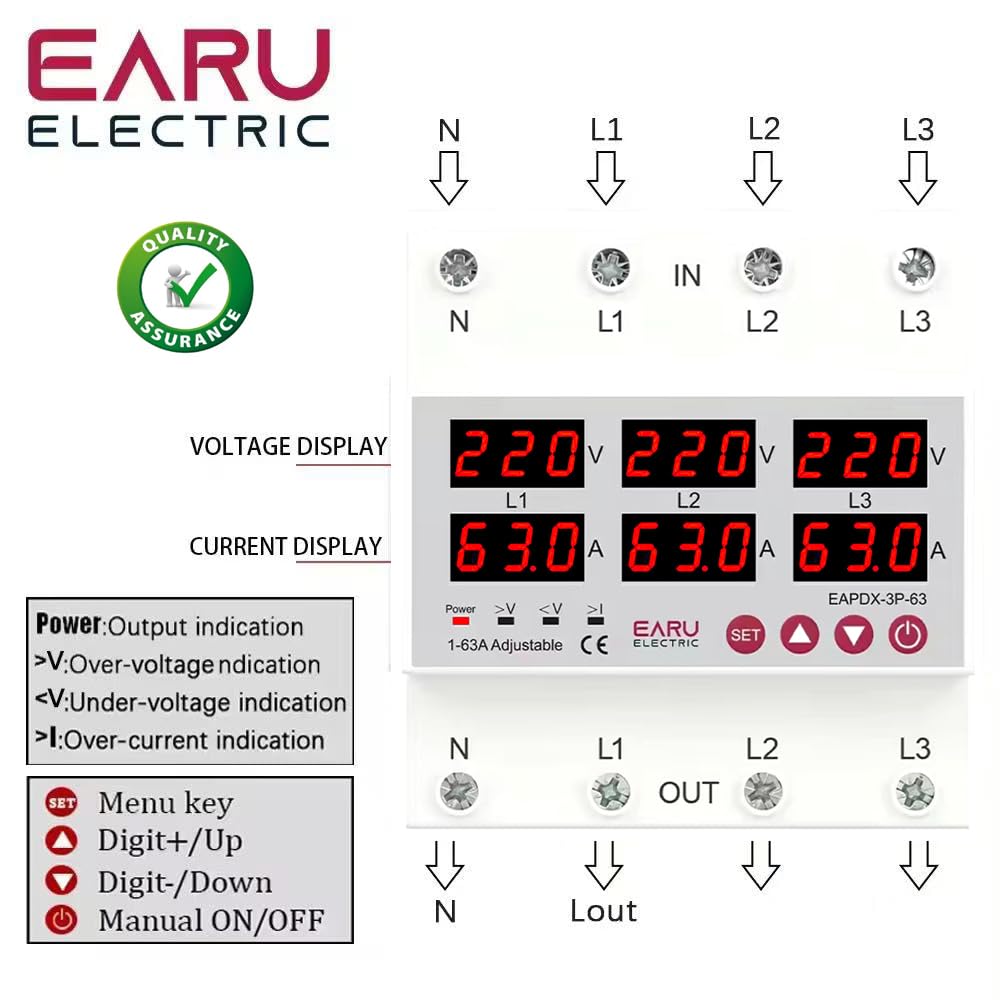
בילד 3.2.1: פראָנט view of the EARU Electric Voltage Protector, showing the LED display for L1, L2, L3 voltage and current, along with control buttons (SET, Up, Down, Power) and protection indicators. Terminal labels for N, L1, L2, L3 (IN and OUT) are also visible.

בילד 3.2.2: A perspective view highlighting the product features and the input/output terminals (N, L1, L2, L3) at the top and bottom of the device. This image emphasizes the physical layout and connection points.
4. סעטאַפּ און ייַנמאָנטירונג
4.1. מאַונטינג
The EARU-1008 is designed for DIN rail mounting. Securely attach the device to a standard 35mm DIN rail within an electrical enclosure.
4.2. וויירינג קאַנעקשאַנז
Refer to the wiring diagram below for correct connections. Ensure all connections are tight and properly insulated.
- Connect the incoming neutral (N) and phase lines (L1, L2, L3) to the 'IN' terminals.
- Connect the outgoing neutral (N) and phase lines (L1, L2, L3) to the 'OUT' terminals.
- טאָפּל טשעק אַלע קאַנעקשאַנז איידער אַפּלייינג מאַכט.

בילד 4.2.1: Detailed wiring diagram for the EARU Electric Voltage Protector, showing connections for N, L1, L2, L3 for both input and output. The diagram illustrates how to integrate the protector into a 3-phase electrical system.
5. אַפּערייטינג ינסטרוקטיאָנס
5.1. ערשטע אויפשטעל
Once wired, apply power to the device. The LED display will illuminate, showing the real-time voltage און קראַנט פֿאַר יעדער פאַזע.
5.2. ווייַז ינדיקאַטאָרס
- V: Voltage אַרויסווייַזן.
- A: קראַנט אַרויסווייַזן.
- מאַכט: Output indication.
- >V: איבער-וואָלtage אָנווייַז.
- <V: אונטער-וואָלtage אָנווייַז.
- > איך: איבער-קראַנט אינדיקאַציע.
5.3. באַשטעטיקן פּאַראַמעטערס
Use the 'SET' button to enter the configuration menu and the 'Up' and 'Down' keys to adjust values. Press 'SET' again to confirm and move to the next parameter. Hold 'SET' for 3 seconds to enter settings mode.

בילד 5.3.1: A detailed guide to setting various protection parameters on the EARU Electric Voltage Protector. This includes overvoltage, ונדעראָלtage, overcurrent, and recovery delay settings, with default values and adjustment ranges.
Key adjustable parameters include:
- אָווערוואָלtage שוץ איינשטעלונג: Range 230-300V (Default 270V).
- אָווערוואָלtage שוץ צוריקקריגן סעטינג: Range 225-295V (Default 265V).
- אָווערוואָלtage Recovery Delay: Range 1-500s (Default 30s).
- אָווערוואָלtagטריפּ פאַרהאַלטונג: Range 0.1-30s (Default 1.0s).
- אונטערוואָלtage שוץ איינשטעלונג: Range 140-210V (Default 170V).
- אונטערוואָלtage שוץ צוריקקריגן סעטינג: Range 145-215V (Default 175V).
- אונטערוואָלtagטריפּ פאַרהאַלטונג: Range 0.1-30s (Default 1.0s).
- Overcurrent Protection Setting: Range 1-63A (Default 30A).
- Overcurrent Trip Delay: Range 0.1-30s (Default 1.0s).
- Voltage & Current Manual Error Calibration: Adjust for accuracy, range -9.5% to +9.5% (Default 0%).
- Power-on Delay Setting: Adjustable Range: 1-500S (Default: 10s).
5.4. Manual ON/OFF
The power button allows for manual switching of the device output.
6. וישאַלט
The EARU-1008 is designed for minimal maintenance. However, periodic checks are recommended:
- האַלטן די מיטל ריין און פריי פון שטויב און דעבריס.
- Periodically inspect wiring connections for tightness and signs of wear.
- זיכער מאַכן אַז די ווענטילאַציע אַרום דעם אַפּאַראַט איז גענוג צו פאַרמייַדן איבערהיצונג.
7. טראָובלעשאָאָטינג
אויב די דעווייס אַרבעט נישט ווי געריכט, באַטראַכט די פאלגענדע:
- קיין דיספּלעי/קיין מאַכט: Check the main power supply and all wiring connections.
- Protection Trip: Identify the active protection indicator (>V, <V, >I). Check the corresponding voltage or current levels. The device will automatically reset once conditions return to normal, based on configured recovery delays.
- Phase Failure: The device automatically detects and responds to phase failures, initiating a cut-off and auto-reset once the phase is restored.
- פאַלש רידינגז: If readings appear inaccurate, consider performing a manual error calibration as described in Section 5.3.
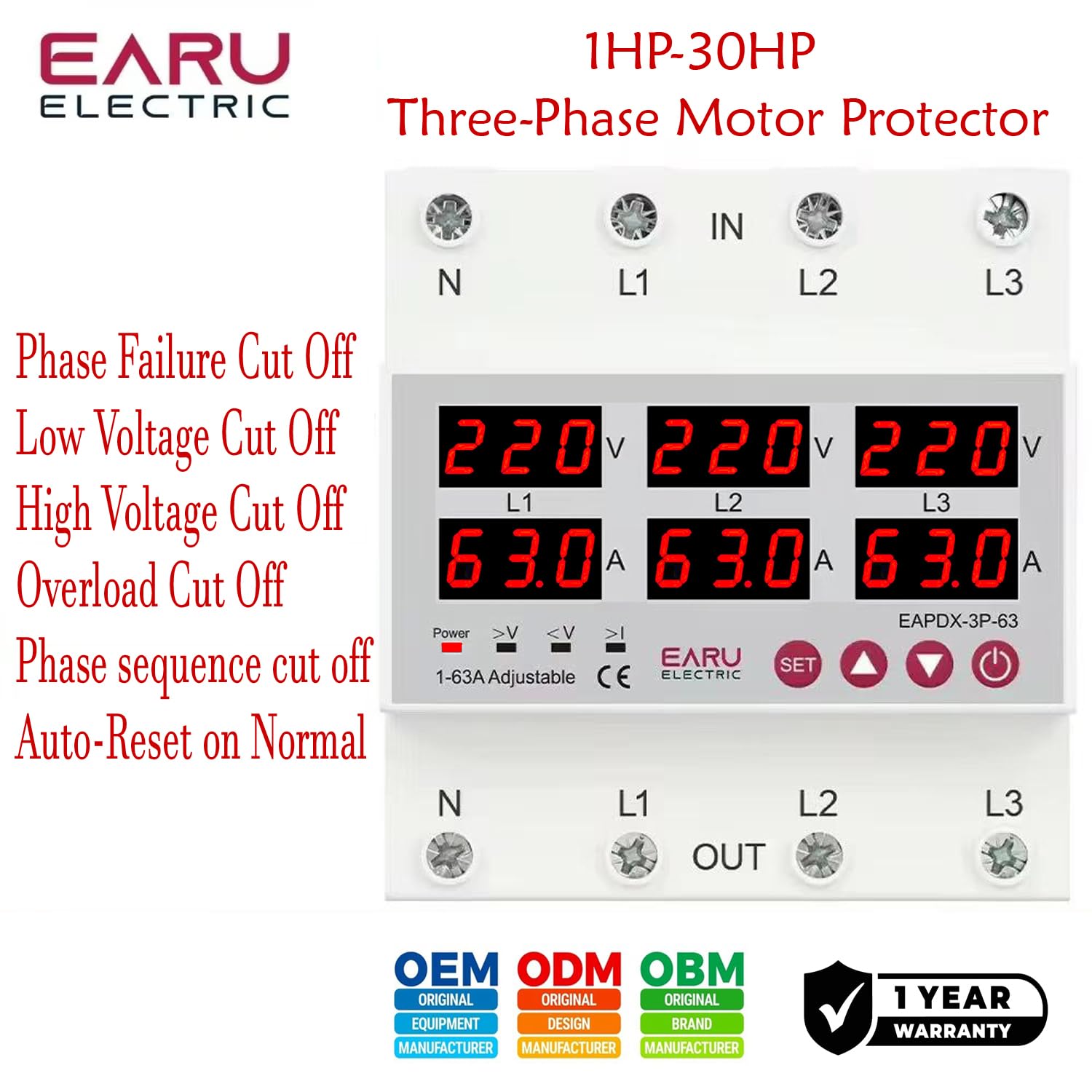
בילד 7.1: This image highlights the various protection features of the EARU Electric Voltage Protector, including phase failure cut-off, low voltage cut-off, high voltage cut-off, overload cut-off, phase sequence cut-off, and auto-reset on normal conditions. These are key aspects for troubleshooting protection trips.
8. ספּעסאַפאַקיישאַנז
| פּאַראַמעטער | ווערט |
|---|---|
| סאָרט | EARU |
| מאָדעל | EARU-1008 |
| רייטאַד צושטעלן וואָלtage | AC 3*220V (N-L1/L2/L3) / 440V |
| רייטאַד אָפטקייַט | 50/60 הז |
| איבער קראַנט שוץ סעטטינג קייט | 1-63A (Default 30A) |
| איבער וואָלtage שוץ סעטטינג קייט | 230-300V (דעפאָלט 270V) |
| אונטער וואָלtage שוץ סעטטינג קייט | 140-210V (דעפאָלט 170V) |
| פּראָדוקט דימענשאַנז | 20 X 10 X 20 סענטימעטער |
| פּונקט וואָג | 450 ג |
| מאַונטינג טיפּ | DIN רעלס |

בילד 8.1: This image provides a visual representation of the EARU Electric Voltage Protector's dimensions and a table of key technical specifications, including voltage, frequency, and protection ranges.
9. וואָראַנטי און שטיצן
9.1. וואָראַנטי
The EARU Electric Voltage Protector (Model EARU-1008) comes with a 1-יאָר פאַבריקאַנט ס וואָראַנטי פֿון דעם קויפֿדאַטום, וואָס דעקט חסרונות אין מאַטעריאַלן און אַרבעט אונטער נאָרמאַלן באַנוץ. ביטע באַהאַלטן אייער קויפֿבאַווייַז פֿאַר וואָראַנטי-קליימז.
9.2. קונה שטיצן
For technical assistance, troubleshooting, or warranty inquiries, please contact EARU customer support through your retailer or the official EARU website. Provide your model number (EARU-1008) and a detailed description of the issue for efficient service.