
1. הקדמה
This manual provides essential instructions for setting up, operating, maintaining, and troubleshooting your FUNYET 2-in-1 Laptop, Model FUN01-05. This device features a 14.1-inch Full HD touchscreen, an Intel Core i7-1265U processor, 16GB RAM, and a 512GB SSD, running Windows 11 Pro. Its 360-degree reversible screen allows for versatile usage modes.
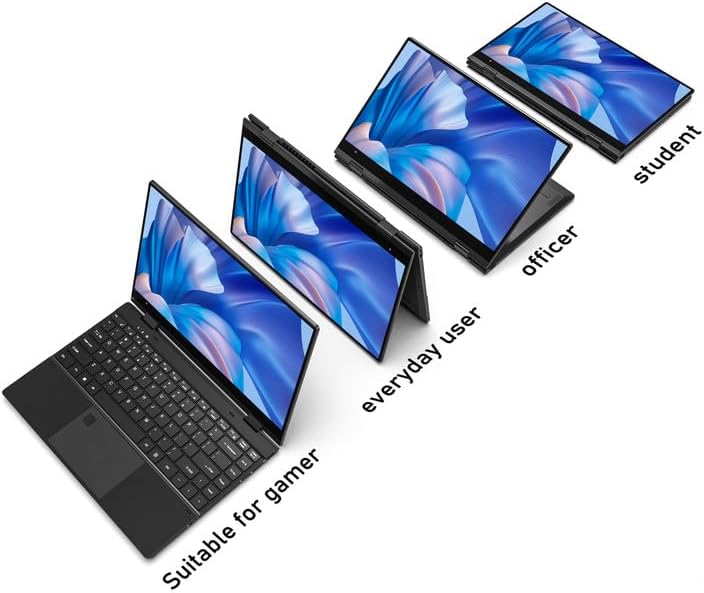
Figure 1: FUNYET 2-in-1 Laptop showcasing its versatile modes.
2. פּעקל אינהאַלט
באַשטעטיקן אַז אַלע זאכן זענען פאַראַן אין פּעקל:
- FUNYET 2-in-1 Touch Screen Laptop
- אַק אַדאַפּטער
- וואָראַנטי קאַרד
- אינסטרוקציעס (דיזער מאַנואַל)
3. סעטאַפּ
3.1 ערשטע אויפלאדונג און אײַנשאַלטן
- Connect the AC adapter to the DC-IN port on the laptop and plug it into a power outlet.
- Allow the laptop to charge for at least 30 minutes before initial use.
- Press and hold the Power Button (located on the side) until the screen illuminates.
3.2 ווינדאָוס 11 פּראָ סעטאַפּ
Follow the on-screen prompts to complete the Windows 11 Pro initial setup. This includes selecting your region, language, connecting to a Wi-Fi network, and creating a user account.
3.3 פינגערפּרינט לייענער סעטאַפּ
For enhanced security and quick access, set up the fingerprint reader:
- גיי צו Windows סעטטינגס > אַקאַונטס > לאָגין אָפּציעס.
- Under "Windows Hello Fingerprint," click "Set up" and follow the instructions to register your fingerprint.

Figure 2: Backlit keyboard and integrated fingerprint reader.
4. אַפּערייטינג ינסטרוקטיאָנס
4.1 מאַכט מאַנאַגעמענט
- מאַכט אויף: דרוק די מאַכט קנעפּל.
- שלאָפן מאָדע: Briefly press the Power Button or close the lid.
- שאַט אַראָפּ: גיי צו סטארט מעניו > מאַכט > אויסלעשן.
- ריסטאַרט: גיי צו סטארט מעניו > מאַכט > ריסטאַרט.
4.2 2-in-1 Modes
The laptop's 360-degree hinge allows for four primary modes:
- Notebook Mode: סטאַנדאַרט לאַפּטאַפּ קאָנפיגוראַציע פֿאַר טייפּינג און פּראָדוקטיוויטי.
- שטאַנד מאָדע: Fold the keyboard back to prop up the screen for viewאינהאַלט.
- געצעלט מאָדע: Position the laptop in an inverted 'V' shape, ideal for touch interaction or presentations in confined spaces.
- טאַבלעט מאָדע: Fold the screen completely back against the base for a tablet experience.

Figure 3: Different operational modes of the 2-in-1 laptop.
4.3 Touchscreen and Keyboard
- טאָוטשסקרעען: ניצט דזשעסטשערז ענלעך צו אַ סמאַרטפאָון אָדער טאַבלעט פֿאַר נאַוויגאַציע און ינטעראַקציע.
- באַקלייט קלאַוויאַטור: The keyboard features a backlight for use in low-light conditions. The backlight can typically be toggled or adjusted using function keys (e.g., Fn + F5).
4.4 קאַנעקטיוויטי
Your laptop supports various connectivity options:
- Wi-Fi 6: For high-speed wireless internet access. Connect via Windows Settings > Network & Internet > Wi-Fi.
- בלועטאָאָטה 5.2: For connecting wireless peripherals like headphones, mice, or keyboards. Pair devices via Windows Settings > Bluetooth & devices.
- פּאָרץ: The laptop includes various ports for external devices.

Figure 4: Laptop ports and their functions.
בנימצא פּאָרץ:
- DC-IN (Power Input)
- USB 3.1 Type-C (Video Output, Data Transfer, Charging)
- Audio Port (Headphones/Microphone)
- מאַכט קנעפּל
- TF Card Slot (for storage expansion up to 1TB)
- וסב 3.1 טיפּ-א
5. וישאַלט
5.1 רייניקונג
- ניצט אַ ווייכן, לינט-פֿרייע שטאָף צו רייניקן דעם עקראַן און דעם אויסערן.
- פֿאַר שווערע פֿלעקן, דampווישט דעם שטאָף לײַכט מיט וואַסער אָדער אַ פאַרשטעלן-זיכערן רייניגער.
- פֿאַרמײַדן שטרענגע כעמיקאַלן, אַברייסיווס, אָדער איבערגעטריבענע נעץ.
5.2 באַטערי קער
- כּדי צו פֿאַרגרעסערן די לעבן פֿון דער באַטעריע, זאָלט איר נישט אָפֿט אויסלאָדן די באַטעריע פֿולשטענדיק.
- האַלט דעם לאַפּטאָפּ אין אַ קיל, טרוקן אָרט ווען עס איז נישט אין באַנוץ פֿאַר לענגערע פּעריאָדן.
- The laptop features a 38 Watt-hour Lithium-Ion battery, providing up to 8 hours of usage.
5.3 טערמאַל מאַנאַגעמענט
The laptop is designed with an improved thermal system to maintain optimal operating temperatures. Ensure proper airflow by not blocking the ventilation openings, especially during intensive tasks.

Figure 5: Laptop thermal design for efficient cooling.
6. טראָובלעשאָאָטינג
אויב איר טרעפט פּראָבלעמען, פּרוּווט די פֿאָלגנדיקע גרונטלעכע טראָובלעשווטינג טריט:
- קיין מאַכט: זיכער מאַכן אַז דער AC אַדאַפּטער איז זיכער פארבונדן צו ביידע דעם לאַפּטאַפּ און אַ אַרבעטנדיקער עלעקטרישער אַוטלעט. פּרוּווט אַן אַנדער אַוטלעט.
- עקראַן ווײַזט זיך נישט: פֿאַרבינדט אַן עקסטערנעם מאָניטאָר צו קאָנטראָלירן צי די פּראָבלעם איז מיטן לאַפּטאָפּ'ס דיספּליי. ריסטאַרט דעם לאַפּטאָפּ.
- פּאַמעלעך פאָרשטעלונג: Close unnecessary applications. Check for Windows updates. Ensure sufficient free storage space.
- Wi-Fi/בלוטוט פראבלעמען: Toggle Wi-Fi/Bluetooth off and on in Windows Settings. Restart the laptop. Check router/device connections.
- ווייַז גליטשיז: Ensure your Windows operating system and graphics drivers are up to date. This can often resolve display anomalies.
- ניט ריספּאַנדאַבאַל טאָוטשסקרעען: ריסטאַרט דעם לאַפּטאָפּ. מאַכט זיכער אַז דער עקראַן איז ריין און פריי פון שמוץ.
For persistent issues, refer to the support section or contact customer service.
7. ספּעסאַפאַקיישאַנז
| שטריך | דעטאַל |
|---|---|
| סאָרט | FUNYET |
| מאָדעל נאָמען | Magbook |
| מאָדעל נומער | FUN01-05 |
| פאַרשטעלן גרייס | 14.1 אינטשעס |
| ווייַז האַכלאָטע | 1920 x 1080 פּיקסעלס (FHD) |
| ווייַז טיפּ | LCD, Touchscreen, Glossy Finish |
| פּראַסעסער | Intel Core i7-1265U (up to 4.8 GHz, 8 Cores, 12 Threads) |
| באַראַן | 16 גיגאבייט DDR4 (3733 מעגהערץ) |
| סטאָרידזש | 512 GB SSD (PCIE x 4), expandable up to 1TB with TF card |
| אָפּערייטינג סיסטעם | Windows 11 פּראָ |
| גראַפיקס | אינטעגרירטע אינטעל איריס קסע גראַפיקס |
| ווירעלעסס קאַנעקטיוויטי | Wi-Fi 6, בלועטוט 5.2 |
| פּאָרץ | USB 3.1 Type-A, USB 3.1 Type-C, DC-IN, Audio Jack, TF Card Slot |
| אַפּאַראַט | Front 2 MP |
| זיכערהייַט | דערקענונג פון פינגערפּרינט |
| באַטערי | 38 Watt Hours Lithium Ion (up to 8 hours) |
| וואָג | 3 פונט |
| דימענסיעס (L x B x H) | 12.7" x 8.6" x 0.6" |
8. וואָראַנטי און שטיצן
8.1 וואָראַנטי אינפֿאָרמאַציע
Your FUNYET 2-in-1 Laptop comes with a 2-יאָר לימיטעד וואָראַנטי. This warranty covers manufacturing defects and hardware malfunctions under normal use. Please retain your proof of purchase for warranty claims.
אין דערצו, אַ 180-טאָג פריי צוריקקומען פּאָליטיק is offered from the date of purchase.
8.2 קונה שטיצן
For technical assistance, warranty claims, or any product-related inquiries, please contact FUNYET customer support:
- טעלעפאָן שטיצן: +1 800-986-9631 (English phone support available)
- אָנליין שטיצן: 24/7 instant online support is available. Please visit the official FUNYET webפּלאַץ פֿאַר קאָנטאַקט דעטאַילס.