
Pinmoco G700412K-RST
Pinmoco TV Stand User Manual
Model: G700412K-RST
1. הקדמה
Thank you for choosing the Pinmoco TV Stand. This entertainment center is designed to accommodate TVs up to 47 inches, offering a stylish and functional solution for your living room or bedroom. Its open-shelf design promotes air circulation for electronics and provides ample storage for media devices and accessories. This manual provides essential information for assembly, usage, and maintenance to ensure safe and optimal performance of your TV stand.
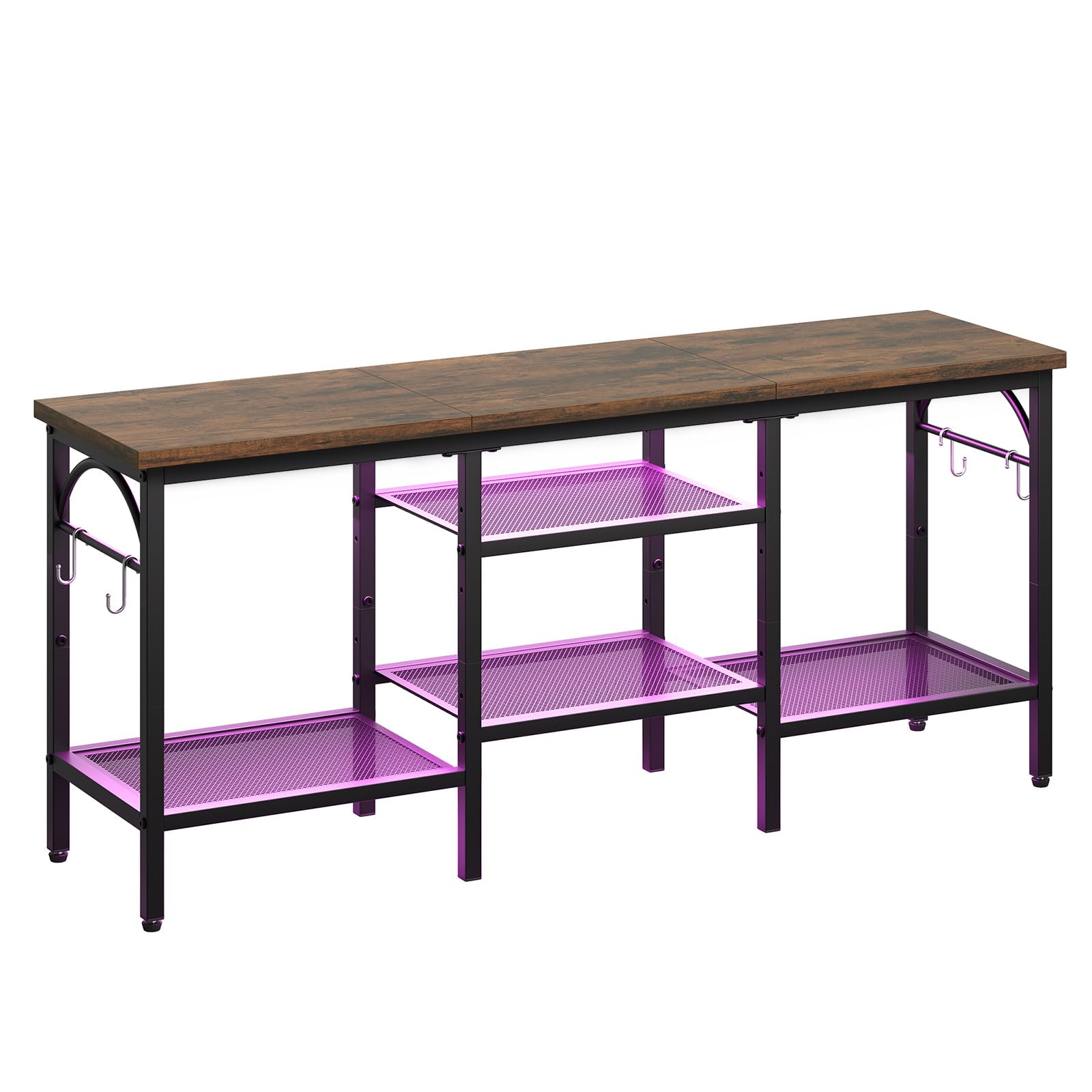
Figure 1: Pinmoco TV Stand (Rustic Brown)
2. זיכערקייַט אינפֿאָרמאַציע
ביטע ליינט און פארשטייט אלע אינסטרוקציעס איידער איר צוזאמענשטעלט און ניצט דעם פראדוקט. נישט נאכפאלגן די אינסטרוקציעס קען רעזולטירן אין שאדן אדער שאדן צום פראדוקט.
- האַלט אַלע קליינע טיילן און פּאַקאַדזשינג מאַטעריאַלן אַוועק פון קינדער.
- Ensure all connections are secure before placing any items on the stand.
- Do not overload the shelves. Refer to the Specifications section for weight limits.
- Place the TV stand on a flat, stable, and level surface to prevent tipping.
- Avoid exposing the stand to direct sunlight or extreme humidity to prolong its lifespan.
- שטיי נישט און קלעטער נישט אויף דעם טעלעוויזיע שטאנד.
- ניצט נאָר די צוגעשטעלטע ייַזנוואַרג פֿאַר אַסעמבאַלינג.
3. פּעקל אינהאַלט
איידער איר שטעלט עס צונויף, זאָלט איר זיכער מאַכן אַז אַלע קאָמפּאָנענטן וואָס זענען אויסגערעכנט אונטן זענען פאַראַן און נישט געשעדיגט. אויב עס פעלט אָדער זענען געשעדיגט עטלעכע טיילן, ביטע קאָנטאַקטירט קונה שטיצע.
- אויבערשטע פּאַנעל (האָלץ)
- מעטאַל ראַם קאָמפּאָנענטן
- Mesh Shelves (2 large, 2 small)
- Adjustable Feet
- Hooks (4 pieces)
- פֿאַרזאַמלונג האַרדווער (שרויף, אַלען שליסל)
- ינסטראַקשאַנז מאַנואַל
4. סעטאַפּ און אַסעמבלי
Assembly typically takes 30-45 minutes and requires an Allen wrench (provided). Follow these general steps:
- אויספּאַקן און אידענטיפיצירן טיילן: Carefully remove all components from the packaging. Lay them out on a clean, soft surface to prevent scratches. Refer to the parts list to ensure all pieces are present.
- צוזאַמענשטעלן דעם הויפּט ראַם: Connect the vertical metal frame components using the provided screws and Allen wrench. Ensure all connections are finger-tight at this stage.
- צוטשעפּען פּאָליצעס: Insert the mesh shelves into their designated slots within the frame. Secure them with screws. The two larger shelves typically form the bottom tier, and the two smaller shelves form the middle tier.
- אינסטאַלירן אויבערשטע פּאַנעל: Place the wooden top panel onto the assembled frame. Secure it using the appropriate screws.
- צוטשעפּען כוקס: Secure the four hooks to the side frames as desired for additional storage.
- פאַרשטייַפן אַלע סקרוז: Once all components are in place, systematically tighten all screws to ensure the stand is stable and secure. Do not overtighten.
- סטרויערן פֿיס: Install the adjustable feet on the bottom of the stand. Adjust them as needed to level the stand on uneven surfaces.
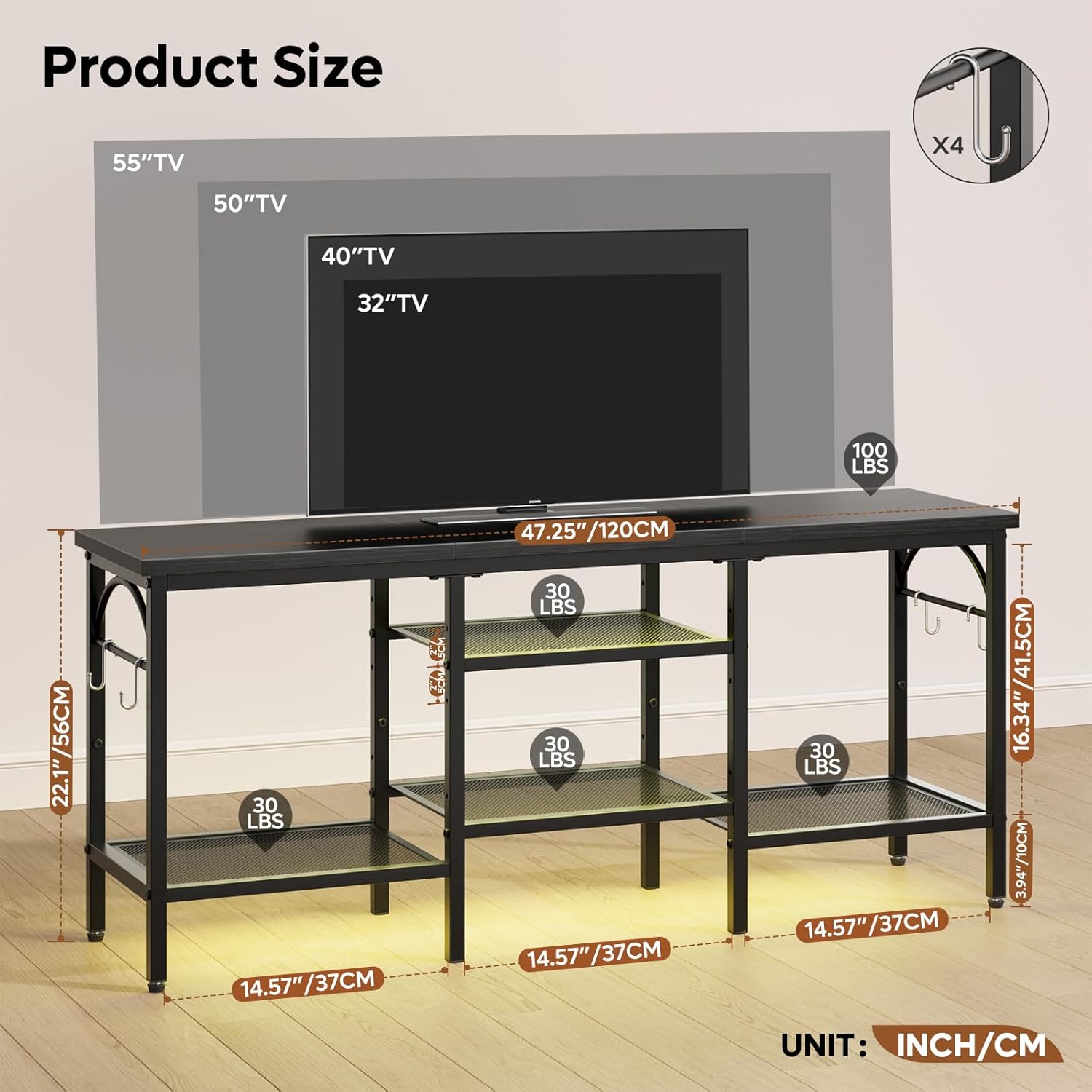
פיגור 2: פּראָדוקט דימענסיעס און וואָג קאַפּאַציטעטן
5. באַניץ
This TV stand is designed for versatile use in various rooms. Follow these guidelines for optimal use:
- טעלעוויזיע אָרט: Carefully place your TV on the top panel. Ensure the TV's base fits securely within the stand's dimensions. This stand is suitable for TVs up to 47 inches.
- Media Device Organization: Utilize the open mesh shelves to store game consoles (e.g., Xbox, PlayStation), media players, soundbars, and other electronic devices. The open design helps prevent overheating.
- קאַבלע פאַרוואַלטונג: The open structure allows for easy routing and management of cables, helping to keep your entertainment area tidy.
- אַקסעסערי סטאָרידזש: Use the side hooks for hanging headphones, remote controls, or other small accessories. The lower shelves can also store books, DVDs, or decorative items.

Figure 3: TV Stand in use with various media devices
6. וישאַלט
Regular maintenance will help preserve the appearance and functionality of your TV stand.
- רייניקונג: ווישן סערפאַסיז מיט אַ ווייך, דamp שטאָף. פֿאַרמײַדט שאַרפֿע כעמיקאַלן אָדער אַברייסיוו רייניגער, וואָס קענען שאַטן די ענדיקונג.
- שטויב: רעגולער ווישן שטויב פון די פּאָליצעס און ראַם צו פאַרמייַדן אָנזעצונג.
- ייַזנוואַרג טשעק: קאָנטראָלירט פּעריִאָדיש אַלע שרויפן און פֿאַרבינדונגען צו זיכער מאַכן אַז זיי בלייבן פֿעסט. פֿעסטשטײַערט ווידער אויב נייטיק.
- ענוויראָנמענטאַל זאָרגן: While designed for durability, avoid prolonged exposure to extreme temperatures or moisture.
7. טראָובלעשאָאָטינג
| פּראָבלעם | מעגלעך סיבה | לייזונג |
|---|---|---|
| דער שטאַנד איז וואָקלדיק/נישט סטאַביל. | Screws are loose; uneven surface. | Ensure all screws are tightened. Adjust the leveling feet on the bottom of the stand. Move to a flat surface. |
| טיילן פעלן בעתן צוזאמענשטעלן. | פּאַקאַדזשינג טעות. | Double-check all packaging materials. Contact customer support with your model number and a description of the missing part. |
| TV does not fit on the stand. | TV size exceeds stand capacity. | This stand is designed for TVs up to 47 inches. Verify your TV's dimensions against the stand's top panel dimensions. |
8. ספּעסאַפאַקיישאַנז
| שטריך | דעטאַל |
|---|---|
| סאָרט | Pinmoco |
| מאָדעל נומער | G700412K-RST |
| מאַטעריאַל | Wood (top panel), Metal (frame, shelves) |
| קאָליר | Rustic Brown (wood), Black (metal) |
| פּראָדוקט דימענשאַנז | 47 X 12 X 22 אינטשעס (לענג רענטגענ ברייט רענטגענ הייך) |
| פּונקט וואָג | 18.5 פונט |
| טעלעוויזיע גרייס קאַמפּאַטאַבילאַטי | אַרויף צו 47 אינטשעס |
| ספּעציעלע פֿעיִקייטן | Open storage shelves, Soundbar shelf, 4 hooks, Adjustable feet |
| אַסעמבלי פארלאנגט | יא |
9. וואָראַנטי און שטיצן
Specific warranty information for the Pinmoco TV Stand G700412K-RST is not provided in this manual. For warranty details, product support, or to inquire about replacement parts, please refer to the product packaging or contact Pinmoco customer service directly through their official webפּלאַץ אָדער די זיצער ווו די פּראָדוקט איז פּערטשאַסט.
Ask a question about this manual
Ask about setup, troubleshooting, compatibility, parts, safety, or missing instructions. Manuals+ will review the question and use this page’s manual context to help answer it.