
1. הקדמה און פּראָדוקט איבערview
This manual provides detailed instructions for the installation, operation, and maintenance of your WALI Vertical Dual Monitor Wall Mount, Model 012ARMV-49. This mount is designed to support two monitors in a stacked configuration, optimizing desk space and providing ergonomic viewינג אַנגלעס.
The mount supports displays from 17 to 49 inches, with a maximum weight capacity of 44 lbs (20 kg) per arm. It is compatible with VESA 75x75mm and 100x100mm mounting patterns. Key features include flexible tilt, swivel, and height adjustments, along with 360-degree rotation for versatile screen positioning.
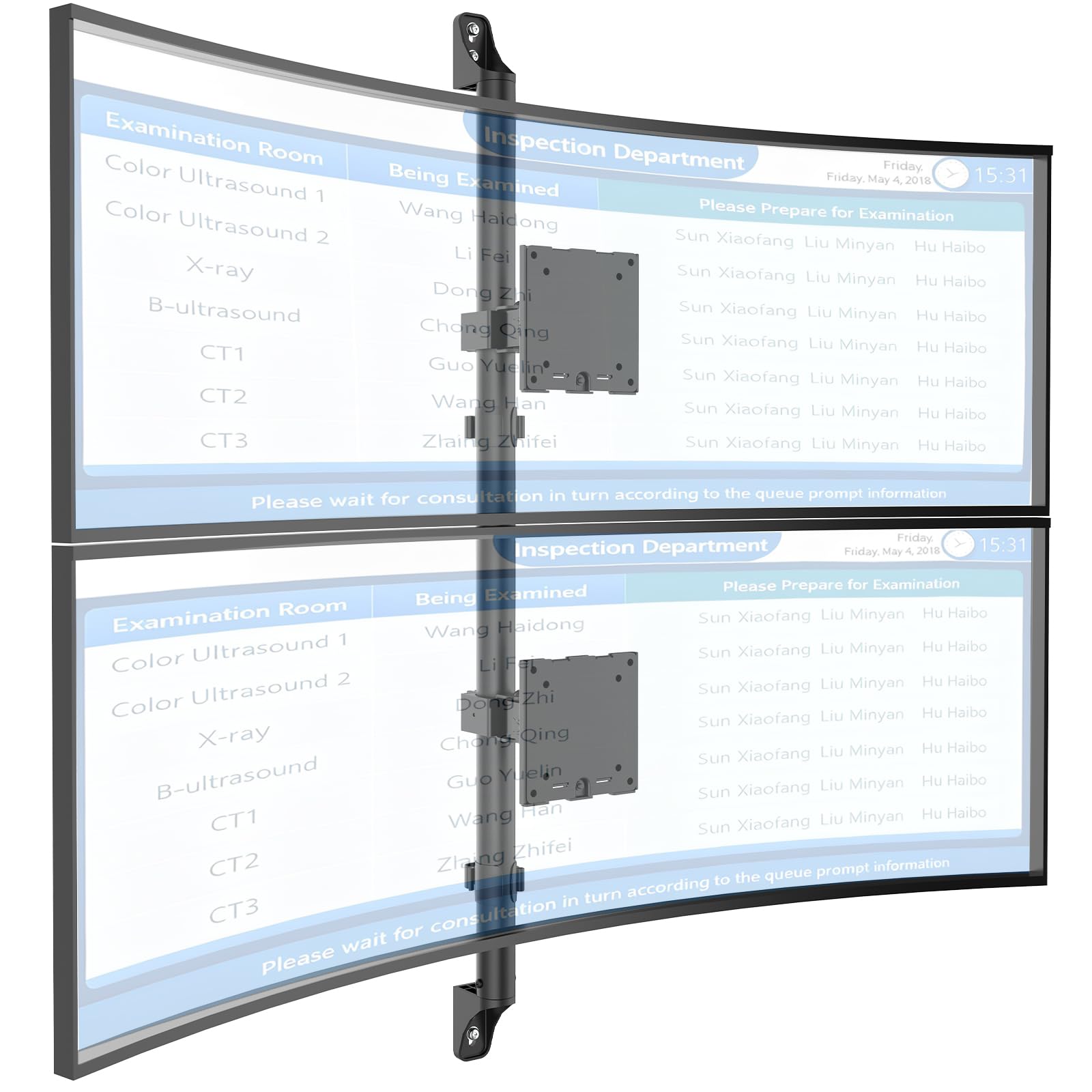
Figure 1: WALI Vertical Dual Monitor Wall Mount with two curved monitors.
2. זיכערקייַט אינפֿאָרמאַציע
ביטע ליינט און פארשטייט אלע אינסטרוקציעס איידער איר אינסטאלירט און ניצט עס. אויב איר טוט עס נישט, קען דאס פירן צו פערזענליכע שאדן אדער שאדן פאר אייגנטום. האלט דעם מאנואל פאר שפעטערדיגע רעפערענץ.
- וואָג קאַפּאַציטעט: Do not exceed the maximum weight capacity of 44 lbs (20 kg) per monitor. Exceeding this limit can result in serious injury or product failure.
- מאָניטאָר גרייס: Ensure your monitors are within the supported size range of 17-49 inches.
- VESA קאַמפּאַטאַבילאַטי: Verify your monitor's VESA mounting pattern (75x75mm or 100x100mm) before installation.
- וואַנט טיפּ: This mount is designed for installation on concrete/brick walls or wooden studs. Do not install on drywall alone.
- פאַכמאַן ינסטאַלירונג: אויב איר זענט נישט זיכער וועגן דעם אינסטאַלאַציע פּראָצעס אָדער וואַנט טיפּ, קאָנסולטירט אַ קוואַליפֿיצירטן פאַכמאַן.
- מאָווינג טיילן: האַלט הענט און פינגער ווײַט פֿון באַוועגלעכע טיילן בעת אַדזשאַסטמענט כּדי צו פֿאַרמײַדן צוקוועטשן.
- קינדער: Keep small parts and packaging materials away from children, as they may pose a choking hazard.
3. פּעקל אינהאַלט
Verify that all components are present and undamaged. If any parts are missing or damaged, contact WALI customer support.
- 1 x WALI Vertical Dual Monitor Wall Mount (Black)
- Mounting Hardware Kit (includes screws, washers, wall anchors for masonry, and self-tapping screws for wood)
- באַניצער מאַנואַל
4. ספּעסאַפאַקיישאַנז
| שטריך | באַשרייַבונג |
|---|---|
| מאַונטינג טיפּ | וואנט בארג |
| באַוועגונג טיפּ | אַרטיקיאַלייטינג |
| סאָרט | WALI |
| מאַטעריאַל | Dual aerospace-grade aluminum mounting brackets, High-strength steel pole |
| קאָליר | שוואַרץ |
| קאַמפּאַטאַבאַל דעוויסעס | Monitor, Television |
| מאַקסימום טילט ווינקל | 20 דיגריז |
| Minimum Supported Screen Size | 17 אינטשעס |
| Maximum Supported Screen Size | 49 אינטשעס |
| מאָדעל נומער | 012ARMV-49 |
| VESA קאַמפּאַטאַבילאַטי | 75 קס 75 מם, 100 קס 100 מם |
| וואָג קאַפּאַסיטי | 44 לבס (20 קג) פּער אָרעם |
5. סעטאַפּ און ייַנמאָנטירונג
Follow these steps carefully to install your WALI Vertical Dual Monitor Wall Mount.
5.1 וואַנט צוגרייטונג
- ידענטיפיצירן וואנט טיפּ: This mount is suitable for wooden studs, solid concrete walls, and brick walls.
- Locate Studs (for wood walls): Use a stud finder to locate the center of a wooden stud. Mark the drilling locations.
- מאַרקירן דרילינג לאָקאַציעס: Hold the wall plate against the wall at your desired height and mark the screw holes. Ensure it is level.

Figure 2: Wall compatibility for installation.
5.2 Attaching the Wall Plate
- בויער פּילאָט האָלעס: Drill pilot holes at the marked locations. The size of the drill bit will depend on your wall type and the provided hardware.
- זיכערע וואַנט פּלאַטע: Attach the wall plate to the wall using the appropriate screws and anchors for your wall type. Ensure it is firmly secured.

Figure 3: Securing the wall mount plate.
5.3 Attaching VESA Plates to Monitors
- Remove Original Stand: Carefully remove the original stand from your monitors.
- צוטשעפּען VESA טעלער: Align the VESA plate with the mounting holes on the back of your monitor. Use the provided screws to secure the plate. Ensure the plate is oriented correctly for vertical stacking.
5.4 Mounting Monitors to the Arm
- Slide Arm onto Wall Base: Carefully slide the monitor arm assembly onto the secured wall base.
- Attach Monitors: With assistance, carefully lift each monitor and slide its VESA plate onto the corresponding arm bracket. Ensure it clicks securely into place.
- Secure Monitors: Use the safety screws or clips to prevent accidental dislodgement of the monitors from the arms.

Figure 4: Monitor arm assembly and attachment points.
5.5 קאַבלע מאַנאַגעמענט
- רוט קאַבלעס: Utilize the integrated cable management system to route monitor cables neatly along the arm and down the wall pole.
- זיכער קאַבלעס: Use the provided clips or ties to secure the cables, preventing clutter and ensuring a clean setup.

Figure 5: Integrated cable management system.
6. אפערירן אינסטרוקציעס (אַדזשאַסטמאַנץ)
The WALI Vertical Dual Monitor Wall Mount offers various adjustments for optimal viewאין טרייסט.
- הייך אַדזשאַסטמאַנט: The monitors can be adjusted vertically along the main pole. Loosen the adjustment screws on the arm brackets, slide the monitors to the desired height, and then re-tighten the screws. The maximum height adjustment is 28.74 inches.
- טילט אַדזשאַסטמאַנט: Tilt the monitors up to +50 degrees or down to -20 degrees to reduce glare and find your preferred viewינג ווינקל.
- סוויוואַל אַדזשאַסטמאַנט: Swivel the monitors up to +/-90 degrees horizontally for collaborative work or to adjust the viewינג ריכטונג.
- ראָוטיישאַן: Rotate the monitors 360 degrees to switch between landscape and portrait orientations.

Figure 6: Tilt, Swivel, and Rotation adjustments.

Figure 7: Full motion adjustment range and dimensions.
7. וישאַלט
Regular maintenance ensures the longevity and safe operation of your monitor mount.
- רייניקונג: ווישט דעם באַרג מיט אַ ווייכן, דamp שטאָף. פֿאַרמײַדט אַברייסיוו רייניגער אָדער סאָלווענטן.
- טשעק טייטנאַס: Periodically check all screws and connections to ensure they are tight and secure. Re-tighten if necessary.
- דורכקוקן פֿאַר שעדיקן: Regularly inspect the mount for any signs of wear, damage, or corrosion. Discontinue use and contact support if any issues are found.
8. טראָובלעשאָאָטינג
If you encounter issues with your WALI Vertical Dual Monitor Wall Mount, refer to the following common problems and solutions:
- Monitor Sags or Does Not Hold Position:
- Ensure the monitor weight is within the 44 lbs (20 kg) per arm limit.
- Tighten the tension adjustment screws on the arm joints using the included tool.
- באַרג פילט זיך נישט סטאַביל:
- Verify that the wall plate is securely fastened to the wall with appropriate anchors for your wall type.
- Check that all connections between the arm and the VESA plates are tight.
- Difficulty Adjusting Monitor Position:
- Loosen the tension adjustment screws slightly if the movement is too stiff.
- Ensure no cables are obstructing the movement of the arms.
9. וואָראַנטי און שטיצן
Your WALI Vertical Dual Monitor Wall Mount comes with a 10-יאָר וואָראַנטי, קאַווערינג חסרונות אין מאַטעריאַלס און ווערקמאַנשיפּ אונטער נאָרמאַל נוצן.
For technical assistance, missing parts, or warranty claims, please contact WALI customer support. Our experienced and friendly US-based customer support team is available to assist you 7 days a week.
קאָנטאַקט אינפֿאָרמאַציע: Refer to the WALI webזייטל אדער פּראָדוקט פּאַקאַדזשינג פֿאַר די מערסט אַקטועלע קאָנטאַקט דעטאַלן.