
1. הקדמה
This manual provides instructions for the safe assembly, operation, maintenance, and troubleshooting of your EYESUN Exercise Bike Model QM-530W. Please read this manual thoroughly before using the product and retain it for future reference.
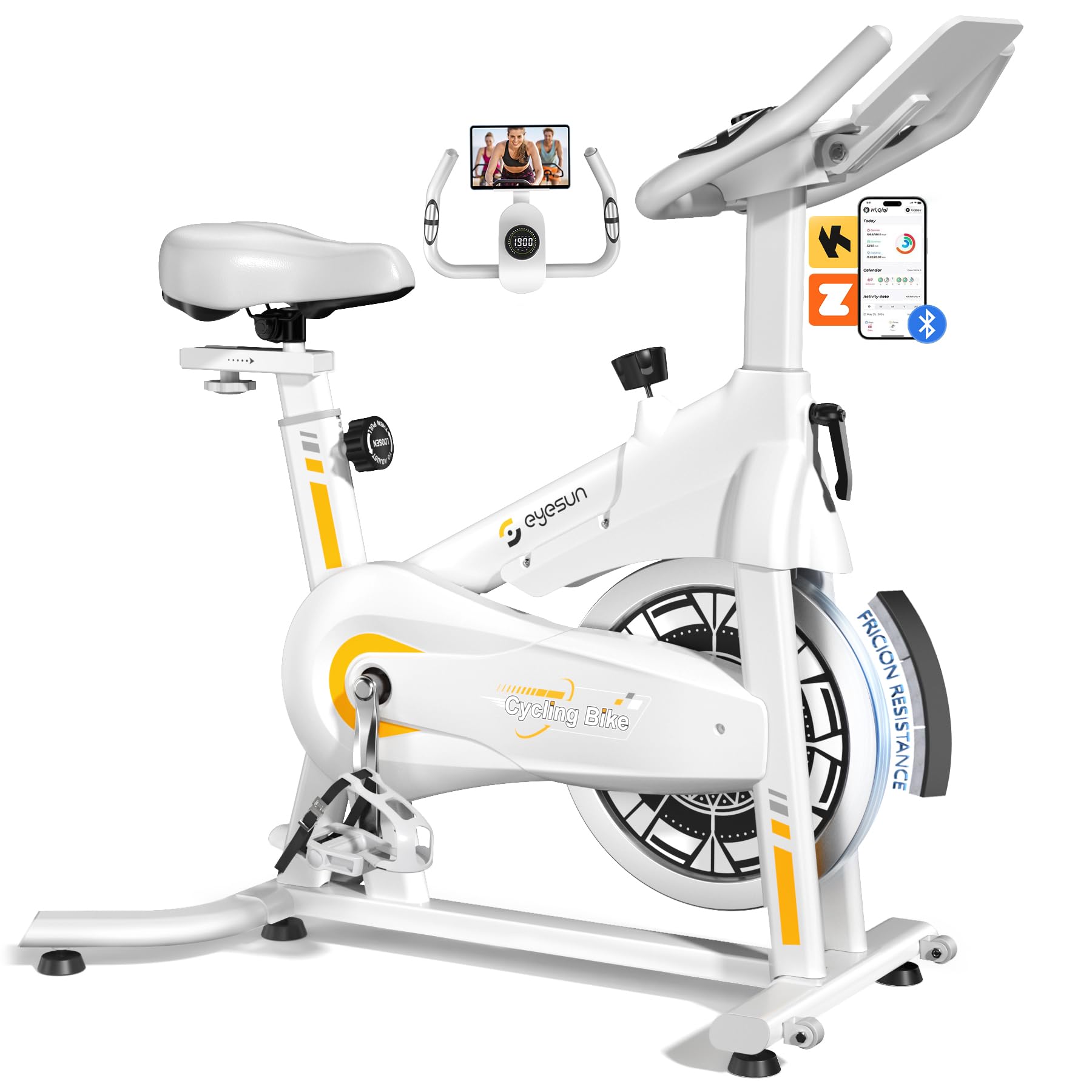
Image 1: EYESUN Exercise Bike QM-530W, White & Yellow model.
2. זיכערקייַט אינפֿאָרמאַציע
Before beginning any exercise program, consult with your physician. It is essential to understand and follow all safety precautions to prevent injury and ensure proper operation of the exercise bike.
- זיכער מאַכן אַז אַלע טיילן זענען זיכער באַפעסטיקט איידער יעדן נוצן.
- Place the exercise bike on a flat, stable surface. Use a mat underneath to protect flooring and reduce noise.
- האַלטן קינדער און פּעץ אַוועק פון די ויסריכט בעשאַס אָפּעראַציע.
- טראָגט פּאַסיקע אַטלעטישע שיך און קליידער. פֿאַרמייַדט לויזע קליידער וואָס קענען זיך פֿאַרהאַנגען אין באַוועגלעכע טיילן.
- די מאַקסימום באַניצער וואָג קאַפּאַציטעט פֿאַר דעם בייק איז 330 פונט (150 ק"ג).
- The resistance bar functions as an emergency stop. Press it down firmly to stop the flywheel immediately.
- Adjustable cage pedals are designed to keep your feet secure during exercise. Ensure your feet are properly secured before starting.
- שטיי נישט אַראָפּ פֿון וועלאָסיפּעד ביז די פֿליִראָד האָט זיך גאָר אָפּגעשטעלט.

Image 2: Illustration of the exercise bike's sturdy construction and body muscles engaged during use.
3. פּעקל אינהאַלט
וועריפיצירט אז אלע קאמפאנענטן זענען פאראן איידער איר הייבט אן צוזאמענשטעלן. אויב עפעס טיילן פעלן אדער זענען געשעדיגט, קאנטאקטירט קאסטומער סופארט.
- הויפּט ראַם (פאַר-אַסעמבאַלד)
- האַנדלעבאַר אַסעמבלי
- זיץ פּאָסטן און זיץ
- פראָנט און דערציען סטאַביליזערס
- פּעדאַלז (לינקס און רעכט)
- לקד מאָניטאָר
- האַרדווער קיט (באָלץ, וואַשערס, ניסלעך, מכשירים)
- באַניצער מאַנואַל
4. אַסעמבלי אינסטרוקציעס
The EYESUN Exercise Bike is designed for quick assembly, with approximately 80% of the unit pre-assembled. Typical assembly time is around 25 minutes.
- צוטשעפּען סטאַביליזאַטאָרן: באַפעסטיקט די פראָנט און הינטערשטע סטאַביליזאַטאָרן צום הויפּט ראַם מיט די צוגעשטעלטע באָלץ און וואַשערס. מאַכט זיכער אַז זיי זענען פעסט אָנגעצויגן.
- ינסטאַלירן פּעדאַלז: אידענטיפיצירט די לינקע (L) און רעכטע (R) פּעדאַלן. די לינקע פּעדאַל שרויפן קעגן זייגער, און די רעכטע פּעדאַל שרויפן זייגער. דריקט זיי אין די קראַנק אָרעמס און פֿעסט אָנצינדן מיט אַ שליסל.
- בארג זיץ: שטעקט אריין דעם זיץ-פּאָסטן אין דעם הויפּט ראַם און אַדזשאַסטירט צו אייער געוואונטשענע הייך. באַפעסטיקט מיטן אַדזשאַסטמענט קנעפּל. באַפעסטיקט דעם זיץ צום זיץ-פּאָסטן.
- צוטשעפּען די האַנטלבאַר: Slide the handlebar assembly into the front post. Adjust the height and secure with the adjustment knob.
- Connect LCD Monitor: Connect the sensor cable from the main frame to the back of the LCD monitor. Ensure the connection is vertical and perpendicular to the flywheel for accurate data tracking. Mount the LCD monitor onto the handlebar post.
Video 1: Detailed assembly guide for the EYESUN Exercise Bike. This video demonstrates step-by-step installation of components.
5. אַדזשאַסטמאַנץ
Proper adjustment of the bike ensures comfort and effectiveness during your workout.
5.1 אַוועקזעצן אַדזשאַסטמאַנט
- הייך: Loosen the adjustment knob on the vertical seat post. Raise or lower the seat until your leg has a slight bend at the knee when the pedal is at its lowest point. Tighten the knob securely.
- פאָרויס / צוריק: Loosen the adjustment knob under the seat. Slide the seat forward or backward to achieve a comfortable position relative to the handlebars. Ensure your knees are aligned with the balls of your feet when pedals are horizontal. Tighten the knob securely.
5.2 האַנטל אַדזשאַסטמענט
- Loosen the adjustment knob on the handlebar post. Raise or lower the handlebars to a comfortable height that allows for a relaxed upper body posture. Tighten the knob securely.
5.3 קעגנשטעל אַדזשאַסטמענט
- The resistance knob is located on the main frame. Turn the knob clockwise to increase resistance and counter-clockwise to decrease resistance.
- To engage the emergency brake, press the resistance knob down firmly.

Image 3: Visual guide for adjusting handlebar and seat positions for various user heights.
Video 2: Demonstration of adjusting the seat and handlebar for optimal user comfort.
6. Operating the Exercise Bike
6.1 על-סי-די מאָניטאָר פונקציעס
The upgraded LCD monitor tracks your workout data in real-time.
- צייט: די געדויער פון אייער טרענירונג.
- גיכקייַט: איצטיקע סייקלינג גיכקייט.
- דיסטאַנסע: גאַנץ דיסטאַנץ באדעקט בעת די טריינינג.
- קאַלאָריעס: עסטימאַטעד קאַלאָריעס פארברענט.
- דויפעק: Heart rate (if connected to a compatible sensor, not included).
- אָדאָמעטער: גאַנץ אַקומולירטע דיסטאַנץ.
Ensure the APP sensor cable is correctly connected to the flywheel for accurate data tracking.

Image 4: Close-up of the digital LCD display and proper sensor cable connection.
6.2 אַפּ אינטעגראַציע
The exercise bike supports Bluetooth connectivity for integration with fitness applications.
- קאַמפּאַטאַבאַל אַפּפּס: FantomFite, KINOMAP, and Zwift.
- דאַטאַ סינק: Supports syncing with Google Fit and Apple Health for comprehensive fitness tracking.
- טאַבלעט האָלדער: Use the built-in tablet holder to enjoy music or videos while riding, or to view your fitness app.

Image 5: Illustration of the exercise bike's compatibility with popular fitness applications.
ווידעא 3: איבערview of the LCD monitor and Bluetooth connectivity features.
7. וישאַלט
רעגולערע אויפהאלטונג גאראנטירט די לאנגעוויטי און זיכערע אפעראציע פון אייער עקסערסייז בייק.
- רייניקונג: ווישן אַראָפּ די בייק מיט אַדamp טוך נאך יעדן באניץ צו באזייטיגן שווייס און שטויב. פארמיידט שווארצע רייניגער.
- דורכקוק: קאָנטראָלירט פּעריִאָדיש אַלע באָלץ, ניסלעך און באַוועגלעכע טיילן פֿאַר פעסטקייט און אָפּנוץ. פֿעסטשטעלט אַלע לויזע פֿעסטערס.
- שמירן: The belt drive system is designed to be low maintenance and quiet. No lubrication is typically required for the belt.
- סטאָרידזש: When not in use, store the bike in a dry, cool place away from direct sunlight and moisture. The built-in transport wheels allow for easy relocation.

Image 6: Features like the smooth belt drive and stable U-shaped bottom contribute to low maintenance and durability.

Image 7: The space-saving design and transport wheels facilitate easy movement and storage.
8. טראָובלעשאָאָטינג
If you encounter issues with your EYESUN Exercise Bike, refer to the following common problems and solutions.
| פּראָבלעם | מעגלעך סיבה | לייזונג |
|---|---|---|
| Squeaking or grinding noise during operation | Loose components; debris in flywheel area; worn belt. | Check and tighten all bolts and nuts. Inspect flywheel area for foreign objects. If noise persists, contact support. |
| Inaccurate LCD monitor readings | Sensor cable not connected properly; low battery in monitor. | Ensure the APP sensor cable is securely and vertically connected to the monitor. Replace monitor batteries if necessary. |
| קעגנשטעל נישט טשאַנגינג | Resistance knob mechanism issue. | Check if the resistance knob is fully engaged. If the mechanism feels loose or unresponsive, contact support. |
| Wobbly seat or handlebars | אַדזשאַסטמענט קנעפּלעך נישט גענוג צוגעצויגן. | Ensure all seat and handlebar adjustment knobs are tightened firmly after positioning. |
9. ספּעסאַפאַקיישאַנז
| שטריך | דעטאַל |
|---|---|
| מאָדעל נומער | QM-530W |
| פּראָדוקט דימענשאַנז | 100.08 X 50.55 X 106.93 סענטימעטער (39.4 X 19.9 X 42.1 אינטשעס) |
| פּונקט וואָג | 21.32 קג (47 לבס) |
| מאַקסימום וואָג קאַפּאַציטעט | 330 לבס (150 קג) |
| דרייוו סיסטעם | גאַרטל דרייוו |
| מאַטעריאַל | אַללוי סטיל |
| קעגנשטעל מעקאַניזאַם | Friction (Adjustable Brake Pad) |
| ספּעציעלע פֿעיִקייטן | Adjustable Pedal, Adjustable Resistance Level, Adjustable Seat, Flywheel |
| רעקאָמענדירטע באַניצער הייך | 4'8" to 6'1" (142 cm to 185 cm) |
| Inseam Range | 25"–35" (63.5 cm – 89 cm) |
| מאַכט מקור (מאָניטאָר) | באַטעריע געטריבן (באַטעריעס אַרייַנגערעכנט) |
10. וואָראַנטי און שטיצן
EYESUN provides a 24-חודש זאָרג-פריי וואָראַנטי for your exercise bike. This warranty covers manufacturing defects and ensures product quality.
For any questions, concerns, or warranty claims, please contact EYESUN customer service:
- בליצפּאָסט: support@eyesun.net
- Customer support is available 24/7.