
Ledwood PLAYKARAOKE
Ledwood PLAYKARAOKE Portable Karaoke Speaker
ינסטראַקשאַנז מאַנואַל
הקדמה
א דאנק פארן קויפןasing the Ledwood PLAYKARAOKE Portable Karaoke Speaker. This manual provides essential information for the safe and efficient operation of your device. Please read it thoroughly before use and retain it for future reference.
וויכטיק סאַפעטי אינפֿאָרמאַציע
- שטעלט נישט אויס דעם אפאראט צו וואסער אדער איבעריגע פייכטקייט.
- ויסמיידן עקסטרעם טעמפּעראַטורעס.
- פרובירט נישט צו צענעמען אדער פאררעכטן דעם אפאראט אליין. לאָזט איבער אלע סערוויסעס צו קוואַליפֿיצירטע פּערסאָנעל.
- האַלטן אויס פון דערגרייכן פון קינדער.
- ניצט נאָר דעם צוגעשטעלטן טשאַרדזשינג קאַבל און אַדאַפּטער.
- זיכער מאַכן אַז עס איז גענוג ווענטילאַציע בעת נוצן און אויפלאָדן.
פּעקל אינהאַלט
ביטע קאָנטראָלירט אַז אַלע זאכן זענען פאַראַן:
- Ledwood PLAYKARAOKE Portable Karaoke Speaker
- 2 ווירעלעסס מייקראָופאָונז
- טשאַרדזשינג קאַבל (USB-C)
- באַניצער מאַנואַל
- 32GB USB Key
פּראָדוקט איבערview
The Ledwood PLAYKARAOKE is a compact and powerful portable karaoke speaker designed for entertainment. It features a 120W output, dynamic RGB LED lighting, and multiple connectivity options.
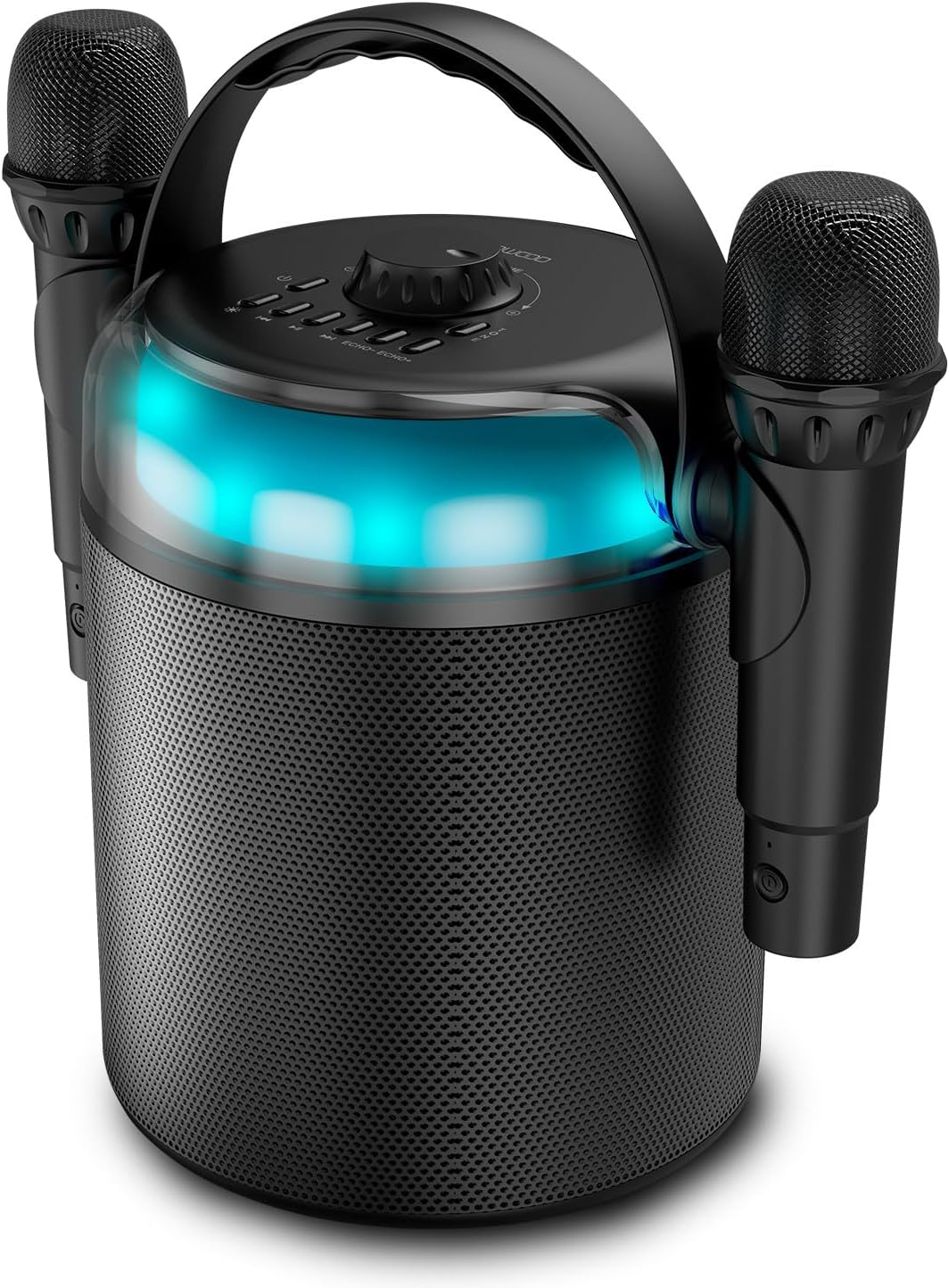
Figure 1: Ledwood PLAYKARAOKE Speaker with Microphones
This image shows the main unit of the Ledwood PLAYKARAOKE speaker, a cylindrical black device with a handle on top. Two wireless microphones are securely attached to the sides of the speaker. A blue LED light band is visible around the top section of the speaker.
קאָנטראָל פּאַנעל

פיגורע 2: Top קאָנטראָל פּאַנעל
דאָס בילד גיט אַ בילד פֿון אויבן אַראָפּ view of the speaker's control panel. It features a large central volume knob, a power button, buttons for LED light control, playback controls (play/pause, skip), and echo adjustment for the microphones.
Familiarize yourself with the buttons and ports on the device:
- באַנד קנעפּל: אַדזשאַסטירט די אַלגעמיינע געזונט רעזולטאַט.
- מאַכט קנעפּל: טורנס די רעדנער אויף אָדער אַוועק.
- געפירט ליכט קנעפּל: Cycles through LED light effects or turns them off.
- פּלייבאַק קאָנטראָלס: שפּילן/פּויזע, פֿריִערדיקער שפּור, נעקסטער שפּור.
- Echo Controls (Echo-, Echo+): Adjusts the echo effect on the microphones.
- מאָדע קנעפּל: Switches between input sources (Bluetooth, USB, MicroSD, AUX, COAX).
- Vocal Effects Button: Cycles through different vocal effects (Man, Woman, Monster, Child, Reverb).
- וסב פּאָרט: פֿאַר USB דרייוו ווידערשפּיל.
- מיקראָסד קאָרט שפּעלטל: פֿאַר מיקראָSD קאַרטל ווידערשפּיל.
- AUX אַרייַנשרייַב: 3.5mm audio input for external devices.
- COAX Input: Coaxial audio input.
- טשאַרדזשינג פּאָרט: USB-C port for charging the speaker.
סעטאַפּ
1. טשאַרדזשינג די ספּיקער
- Connect the provided USB-C charging cable to the charging port on the speaker.
- Connect the other end of the cable to a suitable USB power adapter (not included) or a powered USB port.
- די טשאַרדזשינג אינדיקאַטאָר ליכט וועט זיך אָנצינדן. א פולע טשאַרדזשינג נעמט אַרום 4 שעה.
- אַמאָל גאָר באפוילן, דיסקאַנעקט די טשאַרדזשינג קאַבלע.
2. פּאָווערינג אויף / אויסגעלאשן
- צו אָנפאַנגען, דריקן און האַלטן די מאַכט קנעפּל until the LED lights illuminate and you hear an audible prompt.
- צו האַלטן אַוועק, דריקן און האַלטן די מאַכט קנעפּל again until the LED lights turn off.
3. Pairing Wireless Microphones
The two wireless microphones are typically pre-paired with the speaker. If they do not connect automatically:
- פאַרזיכערן אַז די רעדנער איז פּאַוערד אויף.
- Insert batteries into the microphones (if not already installed).
- Power on each microphone. They should automatically connect to the speaker.
- If connection issues persist, refer to the Troubleshooting section.
אַפּערייטינג ינסטראַקשאַנז
1. בלועטאָאָטה קאַנעקשאַן
- Power on the speaker. It will automatically enter Bluetooth pairing mode (indicated by a flashing LED).
- אויף אייער סמאַרטפאָון, טאַבלעט, אָדער אַנדער בלוטוט-ענייבאַלד מיטל, אַקטיוויזירט בלוטוט און זוכט פֿאַר בנימצא דעוויסעס.
- Select "Ledwood PLAYKARAOKE" from the list.
- Once connected, the speaker will emit an audible confirmation, and the LED will stop flashing.
- איר קענט איצט שפּילן אַודיאָ פֿון אייער פֿאַרבונדענעם מיטל דורך דעם רעדנער.
2. יו-עס-בי/מייקראָ-עס-די ווידערשפּיל
- Insert a USB drive or microSD card (with audio files) into the corresponding port/slot on the speaker.
- The speaker should automatically switch to USB/MicroSD mode and begin playing audio. If not, press the מאָדע קנעפּל צו אויסקלויבן די ריכטיגע איינגאבע.
- ניצן די פּלייבאַק קאָנטראָלס (Play/Pause, Previous Track, Next Track) to manage your music.
3. AUX/COAX Input
- Connect an external audio device (e.g., TV, PC) to the speaker using a 3.5mm AUX cable or a coaxial cable (not included).
- דרוק די מאָדע קנעפּל repeatedly until the speaker switches to AUX or COAX input mode.
- Play audio from your external device. The speaker will output the sound.
4. אַדזשאַסטינג באַנד
דרייען די גרויסע באַנד קנעפּל on the top panel clockwise to increase volume and counter-clockwise to decrease volume.
5. Using Vocal Effects
While using the microphones:
- דרוק די Vocal Effects Button to cycle through the available vocal effects: Man, Woman, Monster, Child, and Reverb.
- ניצן די אפקלאנג - און Echo + buttons to adjust the intensity of the echo effect on your voice.
6. LED ליכט עפֿעקטן
דרוק די געפירט ליכט קנעפּל to cycle through different dynamic RGB LED light patterns or to turn the lights off.
וישאַלט
- רייניקונג: ווישט אָפּ דעם רעדנער מיט אַ ווייכן, טרוקענעם שטאָף. ניצט נישט קיין שרײַבנדיקע רייניגערס אדער סאָלווענטן.
- סטאָרידזש: האַלט דעם אַפּאַראַט אין אַ קיל, טרוקן אָרט אַוועק פון דירעקט זונשייַן און עקסטרעמע טעמפּעראַטורן.
- באַטערי זאָרגן: For optimal battery life, charge the speaker fully before long periods of storage and recharge it every few months.
טראָובלעשאָאָטינג
| פּראָבלעם | מעגלעך לייזונג |
|---|---|
| דער רעדנער גייט נישט אן. | זיכער מאַכן אַז די באַטאַרייע איז אויפגעלאָדן. פֿאַרבינדט דעם טשאַרדזשינג קאַבל און פּרוּווט ווידער. |
| קיין קלאַנג פֿון רעדנער. |
|
| מיקראָפאָנען אַרבעטן נישט. |
|
| בלועטוט פֿאַרבינדונג נישט סטאַביל. |
|
ספּעסאַפאַקיישאַנז
- מאָדעל: Ledwood PLAYKARAOKE
- רעזולטאַט מאַכט: 120 וו
- ספּיקער דריווערס: 4" (10 cm) Woofer, 1.25" Tweeter
- בלועטאָאָטה ווערסיע: 5.1
- באַטאַרייע לעבן: אַרויף צו 3 שעה (ביי 70% באַנד)
- טשאַרדזשינג צייט: בעערעך 4 שעה
- אַרייַנשרייַב פּאָרץ: USB, MicroSD, AUX (3.5mm), COAX
- מיקראָפאָן: 2 ווירעלעסס מייקראָופאָונז
- וואָקאַלע עפֿעקטן: Man, Woman, Monster, Child, Reverb (5 effects)
- LED לייץ: דינאַמיש RGB
- רעדנער דימענשאַנז (H x W x D): 215 X 168 X 168 מם
- Microphone Dimensions (H x Dia): 175 רענטגענ 50 מם
- אַרייַנגערעכנט אַקסעסעריז: 32GB USB Key
וואָראַנטי און שטיצן
For warranty information and technical support, please refer to the warranty card included with your product or visit the official Ledwood webזייטל. האַלט דיין קויפן באַווייַז פֿאַר קיין וואָראַנטי קליימז.
Ask a question about this manual
Ask about setup, troubleshooting, compatibility, parts, safety, or missing instructions. Manuals+ will review the question and use this page’s manual context to help answer it.