
LD Systems LDS-DAVE15G4X
LD Systems DAVE 15 G4X PA System User Manual
Model: LDS-DAVE15G4X
1. הקדמה
The LD Systems DAVE 15 G4X is a powered compact PA system designed for various live sound applications, including DJs, live bands, and solo entertainers. This system comprises a 15-inch subwoofer and two 8-inch satellites, delivering a total peak power of 2060 Watts. It features an integrated 6-channel mixer, versatile input options, Bluetooth connectivity, and advanced DSP technology for clear and powerful sound reproduction.
This manual provides essential information for the safe and efficient setup, operation, and maintenance of your DAVE 15 G4X PA system. Please read it thoroughly before initial use and keep it for future reference.
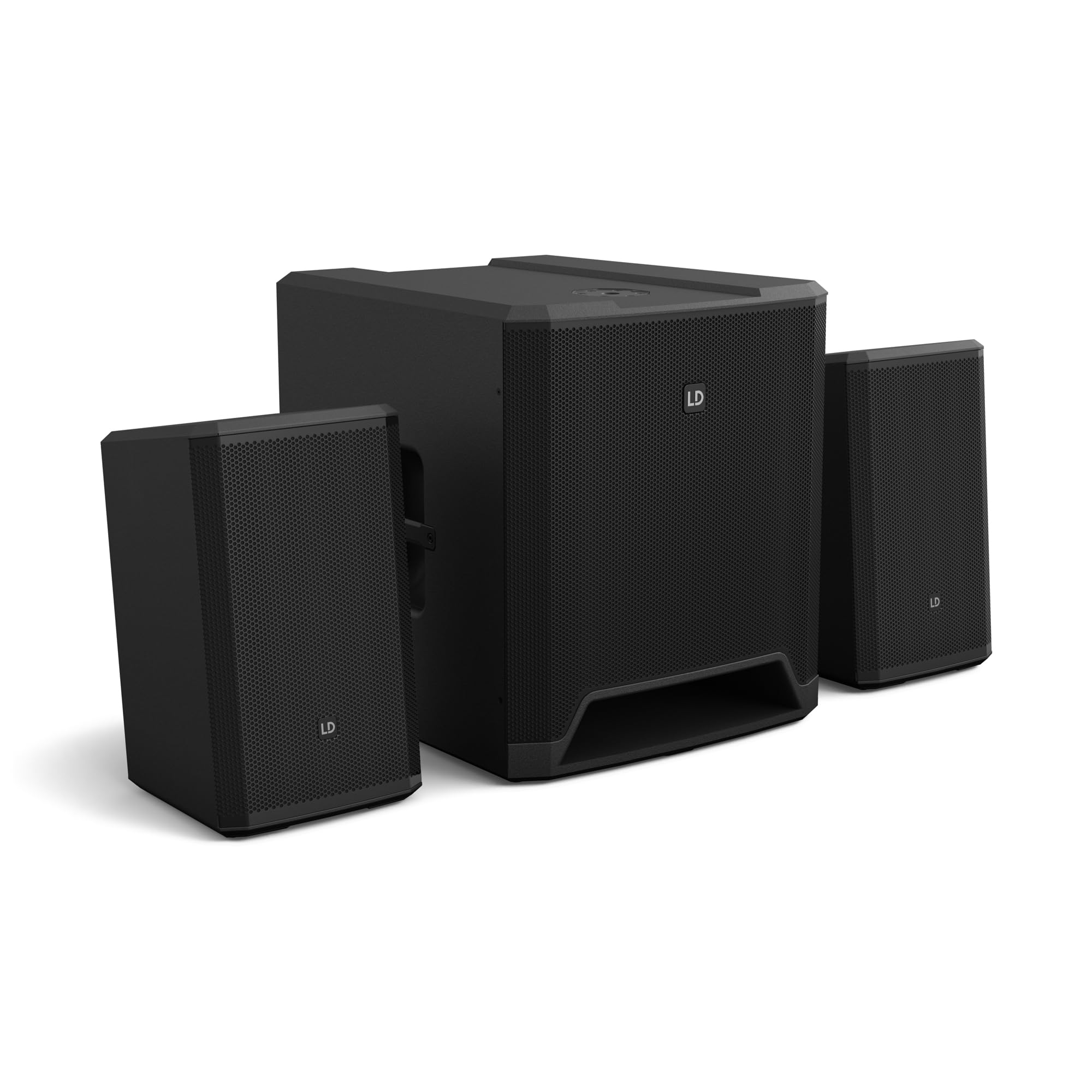
פיגורע 1: איבערview of the LD Systems DAVE 15 G4X PA System components.
2. זיכערקייַט אינסטרוקציעס
שטענדיק אָבסערווירן די פאלגענדע זיכערהייט מיטלען צו פאַרמייַדן עלעקטרישע קלאַפּ, פייַער אָדער שאָדן:
- פאַרזיכערן די מאַכט צושטעלן וואָלtage matches the rating on the unit.
- דו זאלסט נישט ויסשטעלן די אַפּאַראַט צו רעגן אָדער נעץ.
- נישט עפענען דעם סיasinג; רעפֿערירט אַלע סערוויסינג צו קוואַליפֿיצירטע פּערסאָנעל.
- שטעלן די אַפּאַראַט אויף אַ סטאַביל, גלייַך ייבערפלאַך.
- זיכער מאַכן אַז עס איז גענוג ווענטילאַציע אַרום דעם אַפּאַראַט.
- ויסמיידן פּלייסינג אַבדזשעקץ אויף שפּיץ פון די אַפּאַראַט.
- Disconnect power before cleaning or moving the unit.
3. סעטאַפּ
Proper setup is crucial for optimal performance and safety. Follow these steps to assemble your DAVE 15 G4X system:
3.1 אַנפּאַקינג און פּלייסמאַנט
- Carefully unpack all components: one 15-inch subwoofer and two 8-inch satellite speakers.
- Place the subwoofer on a stable, flat surface.
- Position the satellite speakers. They can be placed on speaker stands (not included) or mounted on a T-stand above the subwoofer (accessories sold separately).

פיגורע 2: עקסample of a stereo setup with one satellite speaker mounted on a pole above the subwoofer. Speaker pole not included.

פיגורע 3: עקסample of a stereo setup with both satellite speakers on separate poles. Speaker poles not included.

פיגורע 4: עקסample of a cluster mode setup with both satellite speakers mounted on a T-stand above the subwoofer. Speaker pole not included.
3.2 פֿאַרבינדן די רעדנערס
- Connect the two satellite speakers to the "SAT LEFT" and "SAT RIGHT" outputs on the rear panel of the subwoofer using appropriate speaker cables.
- Ensure secure connections.

Figure 5: Rear panel connections of the DAVE 15 G4X subwoofer, including power input, satellite outputs, and various audio inputs.
3.3 מאַכט קאַנעקשאַן
- Connect the supplied power cable to the "POWER INPUT" on the subwoofer's rear panel.
- Plug the other end into a suitable AC power outlet.
- Ensure the power switch is in the "OFF" position before connecting to power.
4. אַפּערייטינג די מיקסער
The DAVE 15 G4X features an integrated 6-channel mixer for connecting various audio sources. Familiarize yourself with the control panel:

פיגורע 6: דעטאַילעד view of the DAVE 15 G4X mixer control panel, showing input controls, EQ, reverb, and mode selection.
4.1 Input Channels 1 & 2 (Mono)
- אויסוואל פון איינגאבע טיפ: Use the "SELECT" button to toggle between Microphone (MIC), High-Impedance Instrument (HI-Z), or Line-level (LINE) input.
- געווינען קאָנטראָל: Adjust the "HIGH" knob for input sensitivity.
- 2-באַנד עק: Use the "LOW" and "HIGH" knobs to adjust bass and treble frequencies for each channel.
- ריווערב: Select one of three reverb presets (SMALL, LARGE, PLATE) and adjust the "REVERB" knob for the desired effect level.
4.2 Input Channels 3 & 4 (Stereo Line)
- These inputs are designed for stereo line-level sources such as keyboards, synthesizers, or drum machines.
- Adjust the "INPUT 3/4" knob for the overall volume of these channels.
4.3 Input Channels 5 & 6 (Digital/Bluetooth)
- SPDIF אַרייַנשרייַב: Connect a digital audio source via the SPDIF TOSLINK input on the rear panel.
- Bluetooth Pairing: Press and hold the "HOLD TO LINK" button to activate Bluetooth pairing mode. זוכן פֿאַר "LD Systems DAVE 15 G4X" on your device and connect.
- מקור סעלעקציע: Use the "SOURCE" button to switch between SPDIF and Bluetooth inputs.
- Adjust the "INPUT 5/6" knob for the overall volume of these channels.
4.4 הויפּט קאָנטראָלן
- הויפּט באַנד: The large "MAIN" knob controls the overall output volume of the system.
- SUB Volume: Adjust the "SUB" knob to control the volume level of the subwoofer.
- הויך באַנד: Adjust the "HIGH" knob to control the volume level of the satellite speakers.
- מאָדע פּרעסעץ: Use the "SELECT" button under "MODE" to choose between different setup presets (e.g., Stereo, Cluster Mode) for optimized sound dispersion.
5. וישאַלט
Regular maintenance ensures the longevity and optimal performance of your DAVE 15 G4X PA system.
- רייניקונג: Use a soft, dry cloth to wipe down the surfaces. For stubborn dirt, a slightly damp cloth can be used, followed by a dry cloth. Avoid abrasive cleaners or solvents, as they may damage the polyurea coating.
- ווענטילאַטיאָן: Ensure that all ventilation openings remain clear of dust and debris to prevent overheating.
- סטאָרידזש: When not in use for extended periods, store the system in a dry, dust-free environment. Consider using protective covers or bags (accessories sold separately) to prevent damage.
- קאַבלע פאַרוואַלטונג: קאָנטראָלירט רעגולער אַלע קייבלס פֿאַר סימנים פֿון אָפּנוץ אָדער שאָדן. פֿאַרבייטן גלייך אַלע געשעדיגטע קייבלס.
6. טראָובלעשאָאָטינג
If you encounter issues with your DAVE 15 G4X system, refer to the following common problems and solutions:
6.1 קיין קלאַנג אַרויסגאַנג
- טשעק מאַכט: Ensure the system is powered on and the power cable is securely connected. Verify the "POWER" indicator light is illuminated.
- באַנד לעוועלס: Confirm that the "MAIN," "SUB," and "HIGH" volume knobs are turned up. Check individual channel gain controls.
- אַרייַנשרייַב סעלעקציע: Ensure the correct input source is selected for the active channel (e.g., MIC, HI-Z, LINE, SPDIF, Bluetooth).
- קאַבלע קאַנעקשאַנז: Verify all audio cables (input sources, satellite speakers) are correctly and securely connected.
- מקור מיטל: Check if your audio source device (microphone, instrument, media player) is functioning correctly and outputting sound.
6.2 פארדרייטער אדער אומקלארער קלאנג
- אַרייַנשרייַב געווינס: Reduce the input gain for the affected channel if the "SIGNAL" or "LIMIT" indicator lights are constantly red.
- בעל באַנד: Lower the "MAIN" volume if the overall sound is distorted.
- EQ סעטטינגס: Adjust the EQ (LOW, HIGH) settings on individual channels to improve clarity.
- קאַבלע קוואַליטעט: Ensure you are using high-quality, shielded audio cables.
6.3 בלוטוט פֿאַרבינדונג פּראָבלעמען
- פּערינג מאָדע: Ensure the DAVE 15 G4X is in Bluetooth pairing mode (press and hold "HOLD TO LINK").
- מיטל זעבארקייט: Make sure Bluetooth is enabled on your source device and it is discoverable.
- דיסטאַנסע: Keep your Bluetooth device within the effective range of the PA system.
- ינטערפיראַנס: מאַך אַוועק פון אנדערע וויירליס דעוויסעס וואָס קען פאַרשאַפן ינטערפיראַנס.
- פאַרגעסן מיטל: If previously paired, try "forgetting" the DAVE 15 G4X on your device and re-pairing.
7. ספּעסאַפאַקיישאַנז
Detailed technical specifications for the LD Systems DAVE 15 G4X PA System:
| שטריך | באַשרייַבונג |
|---|---|
| מאָדעל נאָמען | LDS-DAVE15G4X |
| רעדנער טיפּ | Powered 2.1 PA System |
| סובוואָאָפער גרייס | 15 אינטשעס |
| Satellite Speaker Size | 2 רענטגענ 8 אינטשעס |
| שפּיץ רעזולטאַט מאַכט | 2060 וואטס |
| מיקסער טשאַנאַלז | 6-Channel Integrated Mixer |
| קאַנעקטיוויטי טעכנאָלאָגיע | Bluetooth, SPDIF TOSLINK, XLR, 1/4" Jack, RCA |
| מאַונטינג טיפּ | Floor Standing (Subwoofer), Pole Mount (Satellites) |
| פּראָדוקט דימענסיעס (סאַבוואָאָפער) | 20"ד x 19"ברייט x 21"ה (אומגעפער) |
| פּונקט וואָג | 119 pounds (total system approximate) |
| אַרייַנגערעכנט קאַמפּאָונאַנץ | LDDAVE15G4X (Subwoofer, 2 Satellites, Power Cable) |
| דספּ טעכנאָלאָגיע | DynX DSP (Gen.2), FIR Filters |
| קאַבינעט מאַטעריאַל | Durable Polyurea Coating |
8. וואָראַנטי אינפֿאָרמאַציע
Warranty terms and conditions for the LD Systems DAVE 15 G4X PA System are typically provided with your purchase documentation or can be found on the official LD Systems webזייטל. ביטע באַהאַלטן אייער קויפן באַווייַז פֿאַר קיין וואָראַנטי קליימז.
פֿאַר דיטיילד וואָראַנטי אינפֿאָרמאַציע, ביטע באַזוכן די LD Systems official webפּלאַץ or contact your authorized dealer.
9. קונה שטיצן
Should you require technical assistance, service, or have questions regarding your LD Systems DAVE 15 G4X PA System, please contact LD Systems customer support or your local authorized dealer.
For further support and resources, please visit the LD Systems official webפּלאַץ.
Ask a question about this manual
Ask about setup, troubleshooting, compatibility, parts, safety, or missing instructions. Manuals+ will review the question and use this page’s manual context to help answer it.