
1. הקדמה
Thank you for choosing the Pro Breeze 40L Smart Dehumidifier. This manual provides important information regarding the safe operation, installation, use, and maintenance of your appliance. Please read this manual thoroughly before use and retain it for future reference.
This dehumidifier is designed to efficiently remove excess moisture from the air, helping to prevent mold, mildew, and condensation in spaces up to 50 m².
2. וויכטיק סאַפעטי אינסטרוקציעס
שטענדיק פֿאָלגן די גרונטלעכע זיכערהייט מיטלען ווען איר ניצט עלעקטרישע אַפּאַראַטן צו רעדוצירן דעם ריזיקאָ פֿון פֿײַער, עלעקטרישן קלאַפּ און שאָדן.
- לייענען אַלע ינסטראַקשאַנז קערפאַלי איידער אַפּערייטינג די אַפּפּליאַנסע.
- פאַרזיכערן די וואָלtagדי ווערט וואָס איז אָנגעגעבן אויף דער ראַנג־עטיקעט פּאַסט צו אייער עלעקטרישער נעץ־וואָלומעןtage.
- טונקט נישט איין דעם אפּאַראַט, עלעקטרישע שנור, אדער שטעקער אין וואַסער אדער אַנדערע פליסיקייטן.
- Do not operate the appliance with a damaged cord or plug, or after it malfunctions or has been dropped or damaged in any manner.
- האַלטן די אַפּפּליאַנסע אויס פון דערגרייכן פון קינדער און פּעץ.
- Always unplug the appliance when not in use, before cleaning, or before moving.
- מאַכן זיכער אַז די אַפּפּליאַנסע איז געשטעלט אויף אַ סטאַביל, פלאַך ייבערפלאַך.
- בלאָקירט נישט די לופט-איינגעגאַנגען אדער -אויסגאַנגען. האַלט אַ מינימום 20 ס״מ פּלאַץ אַרום דעם אַפּאַראַט.
- דער מיטל איז בלויז פֿאַר דרינענדיק נוצן.
- Do not use in bathrooms or other excessively humid environments where water may splash onto the unit.
3. פּראָדוקט איבערview
3.1 קאַמפּאָונאַנץ
The Pro Breeze 40L Smart Dehumidifier features a compact design with integrated controls and a water tank. It includes a continuous drainage option and mobility wheels for easy placement.
בילד: פראָנט view of the Pro Breeze 40L Smart Dehumidifier, highlighting its dimensions (52cm height, 28cm depth, 35.5cm width) and key features like smart app control, laundry mode, 5.5L tank, and low energy consumption.
3.2 קאָנטראָל פּאַנעל און ווייַז
The dehumidifier is equipped with an intuitive touch control panel and an LED display for easy operation and monitoring of humidity levels.

Image: A hand interacting with the touch control panel of the dehumidifier, showing the digital display and various function buttons.
4. סעטאַפּ
4.1 אַנפּאַקינג
- נעמט פֿאָרזיכטיק אַרויס דעם לופט-טרוקענער פֿון זײַן פּאַקעט.
- אַראָפּנעמען אַלע פּאַקאַדזשינג מאַטעריאַלן, אַרייַנגערעכנט אַלע פּראַטעקטיוו פילמען אָדער טייפּס.
- Inspect the appliance for any signs of damage. If damaged, do not operate and contact customer support.
4.2 פּלייסמאַנט
Place the dehumidifier on a firm, level surface in the desired room. Ensure there is at least 20 cm of clear space around all sides of the unit to allow for proper airflow.

Image: A person easily moving the dehumidifier across a wooden floor in a living room, demonstrating its portability with four swivel wheels.
4.3 מאַכט קאַנעקשאַן
Plug the power cord into a grounded electrical outlet. Ensure the outlet meets the power requirements specified in the 'Specifications' section.
4.4 קאָנטינויִערלעכע דריינאַדזש (אָפּציאָנאַל)
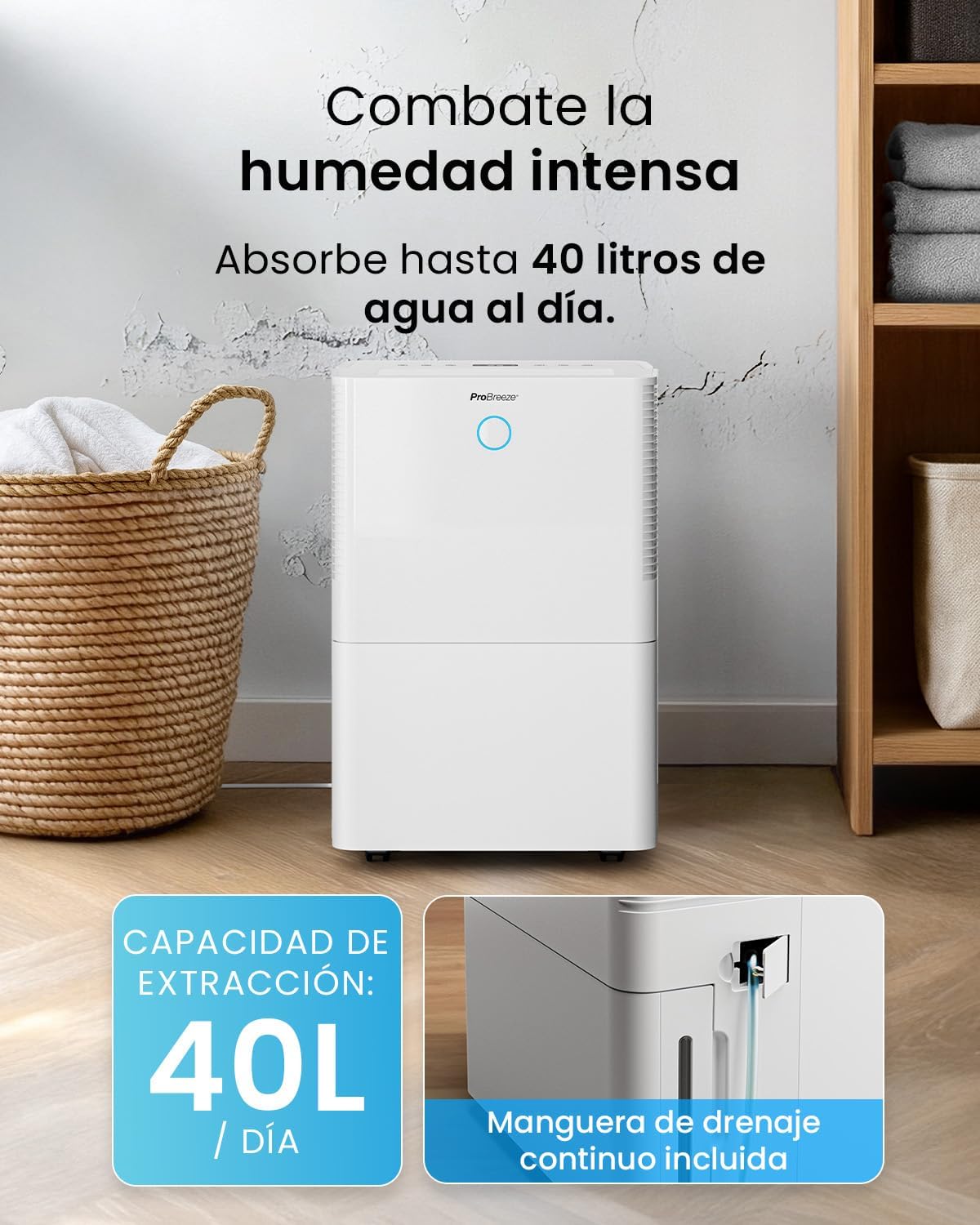
For continuous operation without needing to empty the water tank, attach the included drainage hose. Connect one end to the drainage port on the back of the unit and the other end to a suitable drain or container that is lower than the drainage port.

בילד: נאָענט-אַרויף view of the dehumidifier's side, showing the continuous drainage hose connected and leading to a floor drain.
5. אַפּערייטינג ינסטרוקטיאָנס
5.1 מאַכט אויף / אַוועק
דרוק די מאַכט button on the control panel to turn the unit on or off.
5.2 איינשטעלן די געוואונטשענע הומידיטי
The dehumidifier features an automatic sensor that continuously measures room humidity. Use the הומידיטי buttons to set your desired humidity level between 30% and 80%.

Image: A family relaxing in a living room with the dehumidifier operating. An overlay illustrates the humidity indicator lights: Blue for >50% (Low), Green for 50-70% (Medium), and Red for <70% (High).
5.3 אַפּערייטינג מאָדעס
- אָטאַמאַטיק מאָדע: The unit will automatically adjust its operation to maintain the set humidity level.
- קעסיידערדיק מאָדע: The dehumidifier will operate continuously regardless of the humidity level, ideal for very damp באדינגונגען.
- וועש מאָדע: This mode is designed to accelerate the drying of clothes indoors by running at maximum fan speed and continuous dehumidification.
- שלאָפן מאָדע: Reduces fan speed and dims the display for quiet operation during the night.

Image: A woman smiling while placing clothes on a drying rack next to the dehumidifier, illustrating the accelerated laundry drying feature.

Image: A family watching television in a dimly lit living room, with the dehumidifier operating quietly in the foreground, indicating its silent operation and night mode features.
5.4 טייַמער פֿונקציע
ניצן די טיימער button to set a 24-hour timer for automatic power on or off. This allows you to schedule operation according to your needs.

Image: A close-up of a smartphone screen displaying the Pro Breeze app's 24-hour timer function, allowing users to schedule the dehumidifier's operation.
6. Wi-Fi Connectivity and App Control
The Pro Breeze 40L Smart Dehumidifier can be controlled remotely via the free Pro Breeze app, compatible with both Alexa and Google Home.
6.1 אַפּ אינסטאַלאַציע און פּערינג
- Download the Pro Breeze app from your smartphone's app store.
- Follow the in-app instructions to create an account and pair your dehumidifier.
- Ensure your dehumidifier is powered on and your smartphone is connected to a 2.4GHz Wi-Fi network during the pairing process.
6.2 ווײַטקאָנטראָל פֿעיִטשערז
דורך דער אַפּ, קענט איר:
- Turn the dehumidifier on/off.
- Adjust humidity settings.
- Select operating modes (Auto, Continuous, Laundry, Sleep).
- Set and manage the 24-hour timer.
- Monitor current room humidity.

Image: A woman using a smartphone to control the dehumidifier, with icons for Amazon Alexa and Google Home indicating voice control compatibility.
7. וישאַלט
רעגולערע אויפהאלטונג גאראנטירט אפטימאלע פאָרשטעלונג און לענגלעבעדיקייט פון אייער לופט-טרוקענער.
7.1 רייניקונג די לופט פילטער
דער לופט פילטער זאָל ווערן ריין געמאַכט יעדע צוויי וואָכן אָדער אָפטער, דיפּענדינג אויף באַניץ און לופט קוואַליטעט.
- קער אַוועק און אָפּשטעקן די דעהומידיפיער.
- אַראָפּנעמען דעם לופט פילטער פֿון דער הינטערשטער זײַט פֿון דער אַפּאַראַט.
- וואַשט דעם פילטער מיט וואַרעם, זייפֿיקן וואַסער. שווענקט גוט אויס און לאָזט עס גאָר טרוקן ווערן אין דער לופֿט איידער איר לייגט עס צוריק אַרײַן.
- Do not operate the dehumidifier without the filter installed.
7.2 ליידיקן און רייניקן דעם וואַסער טאַנק
When the water tank is full, the unit will automatically shut off and an indicator light will illuminate. Empty the tank and clean it regularly to prevent mold and bacteria growth.
- פֿאָרזיכטיק אַרויסציען דעם וואַסער טאַנק פֿון דער פֿראָנט פֿון דער אַפּאַראַט.
- גיסן אויס די געזאמלט וואַסער.
- Clean the tank with mild detergent and water. Rinse thoroughly.
- Reinsert the dry tank firmly into the dehumidifier.

Image: The dehumidifier in operation, with an overlay indicating its 40L/day extraction capacity and the continuous drainage hose option.
7.3 פונדרויסנדיק רייניקונג
ווישן די יקסטיריער פון די דעהומידיפיער מיט אַ ווייך, דamp שטאָף. דו זאלסט נישט נוצן אַברייסיוו קלינערז אָדער סאָלוואַנץ.
8. טראָובלעשאָאָטינג
If you encounter issues with your dehumidifier, refer to the following table before contacting customer support.
| פּראָבלעם | מעגלעך סיבה | לייזונג |
|---|---|---|
| דער לופט-טרוקענער צינדט זיך נישט אן. | No power; Power cord not plugged in; Water tank full or not correctly inserted. | Check power supply; Plug in power cord; Empty and reinsert water tank correctly. |
| קיין וואַסער נישט געזאַמלט. | Room humidity too low; Temperature too low; Air filter blocked; Continuous drainage hose connected. | Increase desired humidity setting; Ensure room temperature is above 5°C; Clean air filter; Disconnect continuous drainage hose if collecting water in tank. |
| אַפּאַראַט איז טומלדיק. | Unit not on a level surface; Air filter blocked; Fan obstruction. | Place on a flat, stable surface; Clean air filter; Check for obstructions in fan area. |
| Wi-Fi פֿאַרבינדונג פּראָבלעמען. | Incorrect Wi-Fi password; Not connected to 2.4GHz network; Router too far. | Verify password; Connect to 2.4GHz Wi-Fi; Move unit closer to router or use a Wi-Fi extender. |
9. ספּעסאַפאַקיישאַנז
- סאָרט: פּראָ בריז
- מאָדעל נאָמען: PB-D-32W-W
- נעץ עקסטראַקציע: ביז 40 ליטער/טאָג
- וואַסער טאַנק קאַפּאַציטעט: 5.3 ליטער
- רעקאַמענדיד צימער גרייס: ביז 50 מ² (538 קוואַדראַט פֿוס)
- דימענשאַנז (L x W x H): 27.5 X 35.5 X 52.2 סענטימעטער
- וואָג: 16.36 קג
- נומער פון ספּידז: 3
- ספּעציעלע פֿעיִקייטן: Smart App Control, Automatic Humidity Sensor, Automatic Shut-off, 24-hour Timer, Laundry Mode, Sleep Mode, Continuous Drainage
- ראַש מדרגה: <49dB
10. וואָראַנטי און שטיצן
For warranty information and customer support, please refer to the documentation included with your purchase or visit the official Pro Breeze website. Ensure you have your model number (PB-D-32W-W) and proof of purchase available when contacting support.
פאַבריקאַנט: איין רעטאַיל גרופע