
1. הקדמה
The MiBOXER ML5 5-in-1 LED Controller is designed for versatile smart lighting applications, integrating Matter over WiFi and 2.4GHz wireless control. This controller supports five output modes: RGB, RGBW, RGB+CCT, CCT, and single color, offering flexibility for various LED strip configurations. It is compatible with the Matter protocol, enabling broad interoperability with smart home ecosystems such as Apple Home, Google Home, Amazon Alexa, and Samsung SmartThings. This manual provides essential information for the safe installation, operation, and maintenance of your ML5 controller.
2. זיכערקייַט אינפֿאָרמאַציע
- זיכער מאַכן אַז די מאַכט איז אָפּגעטיילט איידער ינסטאַלירונג אָדער וישאַלט צו פאַרמייַדן עלעקטרישע קלאַפּ.
- This device is designed for indoor use only. Avoid exposure to moisture or extreme temperatures.
- דו זאלסט נישט יקסיד די ספּעסיפיעד אַרייַנשרייַב וואָלtage (DC12V~48V).
- Consult a qualified electrician if you are unsure about any installation steps.
- האַלטן די מיטל אַוועק פון קינדער.
3. פּראָדוקט איבערview
3.1 שליסל פֿעיִקייטן
- Certified Matter Over WiFi: Supports Matter standard protocol for multi-platform collaboration.
- Wide Compatibility: Works with products from different brands that comply with the Matter ecosystem.
- Simple Configuration: Easy pairing via QR code.
- 5-in-1 Functionality: Supports RGB, RGBW, RGB+CCT, CCT, and single color LED strips.
- 2.4G RF Wireless Control: Allows control via MiBOXER 2.4GHz remotes.
- אַרייַנשרייַב וואָלtage: DC12V~48V.
3.2 וואָס איז אין דער קעסטל
- 1 x MiBOXER ML5 5-in-1 LED Controller
3.3 פּראָדוקט קאַמפּאָונאַנץ

בילד 3.3.1: Top view of the MiBOXER ML5 controller, showing input terminals, output terminals, and control buttons (Link, Frequency, Mode).

בילד 3.3.2: אַנגגאַלד view of the MiBOXER ML5 controller, highlighting its compact design and connection points.

בילד 3.3.3: The MiBOXER ML5 controller alongside its retail packaging and a small instruction leaflet.
4. ספּעסאַפאַקיישאַנז
| שטריך | דעטאַל |
|---|---|
| סאָרט | מיבאָקסער |
| מאָדעל נומער | ML5 |
| קאָליר | ווייַס |
| דרינענדיק / דרויסנדיק באַניץ | דרינענדיק |
| ספּעציעלע שטריך | 2.4G RF wireless, Matter Over WiFi |
| ליכט מקור טיפּ | געפירט |
| מאַכט מקור | DC12V~48V (LED) |
| מאַטעריאַל | פּלאַסטיק |
| פּונקט וואָג | 2.72 אונסעס |
| נומער לענג | 30 Meters (Control Distance) |

בילד 4.1: Dimensional drawing of the ML5 controller (124mm x 38mm x 23mm) and its packaging (125mm x 39mm x 29mm), with a gross weight of 0.078 KGS.
5. סעטאַפּ און ייַנמאָנטירונג
5.1 וויירינג דיאַגראַמז
The ML5 controller supports various LED strip configurations. Ensure correct polarity and voltage matching for your LED strips. Connect the DC12V~48V power supply to the input terminals and the LED strip to the corresponding output terminals.

בילד 5.1.1: Connection diagrams for Single Color (V+, W), Dual White (V+, CW, WW), and RGB (V+, R, G, B) LED strip configurations. An AC to DC power adapter is shown connecting to the controller's input.

בילד 5.1.2: Connection diagrams for RGBW (V+, R, G, B, W) and RGB+CCT (V+, R, G, B, CW, WW) LED strip configurations. An AC to DC power adapter is shown connecting to the controller's input.
5.2 Pairing and Network Connection
The ML5 controller supports Matter over WiFi and 2.4GHz RF pairing.
- ענין פּאָרינג: Long press the "Link" button for 3 seconds to activate Matter pairing mode. Follow the instructions in your Matter-compatible smart home app (e.g., Apple Home, Google Home, Amazon Alexa, Samsung SmartThings) to scan the QR code on the device for easy pairing.
- 2.4GHz RF Remote Pairing: Short press the "Link" button 3 times to activate 2.4GHz remote pairing mode. Refer to your MiBOXER 2.4GHz remote's manual for specific pairing instructions.
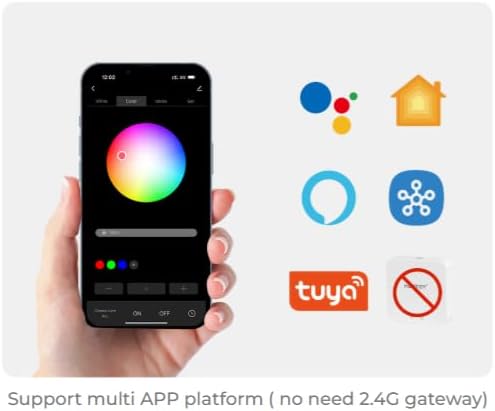
בילד 5.2.1: Illustration of a smartphone app interface for controlling LED lighting, featuring a color wheel and compatibility logos for Google Home, Apple Home, Amazon Alexa, Samsung SmartThings, and Tuya.
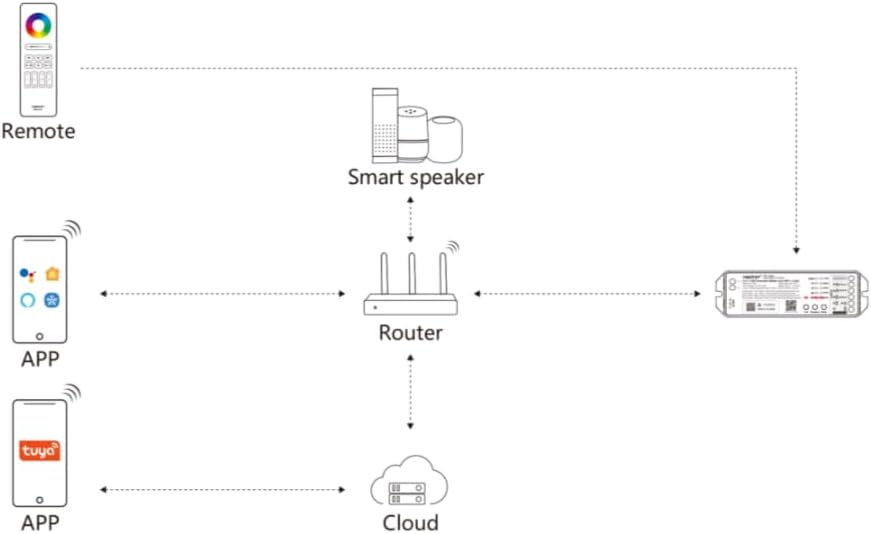
בילד 5.2.2: Diagram illustrating the ML5 controller's connectivity: it connects to a router, which then allows control via mobile apps (Matter-compatible and Tuya) and smart speakers (e.g., Alexa, Google Assistant).
6. אַפּערייטינג ינסטרוקטיאָנס
6.1 מאָדע סעלעקציע
- באַשטימען רעזולטאַט מאָדעס: Short press the "Mode" button to cycle through the five output modes (RGB, RGBW, RGB+CCT, CCT, Single Color). Ensure the connected LED strip matches the selected mode.
6.2 אַפּ קאָנטראָל
Once paired with your smart home ecosystem via Matter, you can control the ML5 controller using your preferred smart home app. Functions typically include:
- Turning lights On/Off.
- Adjusting brightness (dimming).
- Changing colors (for RGB, RGBW, RGB+CCT modes).
- Adjusting color temperature (for CCT, RGB+CCT modes).
- Setting scenes and schedules.
6.3 2.4GHz RF Remote Control
If paired with a MiBOXER 2.4GHz RF remote, you can control the controller directly. Refer to your specific remote's manual for detailed button functions, which typically include:
- אויף / אַוועק.
- אַדזשאַסטמאַנט פון ברייטנאַס.
- Color selection.
- Mode switching (e.g., dynamic effects).
7. וישאַלט
- רייניקט דעם אַפּאַראַט מיט אַ ווייכן, טרוקענעם שטאָף. ניצט נישט קיין שאַרפע כעמיקאַלן אָדער אַברייסיוו רייניגער.
- זאָרגט פֿאַר געהעריקע ווענטילאַציע אַרום דעם קאָנטראָללער כּדי צו פֿאַרמייַדן איבערהיצונג.
- רעגולער קאָנטראָלירן אַלע קאַנעקשאַנז פֿאַר זיכערהייט און אָרנטלעכקייט.
8. טראָובלעשאָאָטינג
| פּראָבלעם | מעגלעך סיבה | לייזונג |
|---|---|---|
| די על-אי-די סטריפּ צינדט זיך נישט אָן. | קיין עלעקטרע, נישט ריכטיקע וויירינג, דעפעקטיווע LED סטריפּ. | Check power supply connection. Verify wiring matches the selected mode. Test LED strip with another power source if possible. |
| Cannot pair with Matter app. | Controller not in pairing mode, WiFi issue, incorrect QR code scan. | Long press "Link" button for 3 seconds. Ensure your smartphone is on the same 2.4GHz WiFi network. Rescan QR code. |
| 2.4GHz remote not working. | ווײַטקאָנטראָל נישט געפּאָרט, ווײַטקאָנטראָל באַטעריע נידעריק, שטערונג. | Short press "Link" button 3 times to enter pairing mode, then pair with remote. Replace remote battery. Reduce interference sources. |
| Incorrect colors or modes. | Wrong output mode selected. | Short press "Mode" button to cycle to the correct output mode for your LED strip. |
9. וואָראַנטי און שטיצן
MiBOXER products are designed for reliability and performance. For warranty information and technical support, please refer to the official MiBOXER webזייטל אדער קאָנטאַקט אייער הענדלער. האַלט אייער קויף קוויטל פֿאַר וואָראַנטי קליימז.
פֿאַר ווייטערדיקע הילף, קענט איר באַזוכן די MiBOXER Store on Amazon.