
הקדמה
This manual provides detailed instructions for the installation, operation, and maintenance of the SEQURE 120A Brushless Electronic Speed Controller (ESC) with Escape32 firmware. This high-performance ESC is designed for various RC applications, including crawler cars, climbing cars, and model ships, offering robust power delivery and advanced control features.
פּראָדוקט פֿעיִקייטן
- רעזולטאַט קאַפּאַציטעט: Continuous Current 120A, Peak Current 150A. Input Voltage: DC 7V-33.6V (2-8S LiPo).
- פאַנגקשאַנז: Forward, backward, and brake, specifically designed for 1/10 RC crawler cars, climbing cars, and RC boats.
- BEC רעזולטאַט: Adjustable outputs of 5V/10A, 6V/10A, 7.2V/10A, 8.2V/10A, and 12V/10A, capable of directly powering external devices like receivers and servos.
- Signal Protocol Support: Compatible with Dshot (All), PWM, Oneshot, Multishot, and other signal protocols.
- זיכערקייַט שוץ: כולל נידעריק וואָלומעןtage protection, temperature protection, locked rotor protection, and current protection.
- Programming Tool: Visual programming parameter adjustment tool supports motor timing, throttle calibration, current detection, motor steering, and telemetry signal settings.
- פּראַסעסער: Adopts a 32-bit high-performance STM32G071 processor with a working frequency up to 64MHz and maximum 128KHz PWM frequency.
- היץ דיסיפּיישאַן: Equipped with a high-power MOSFET and CNC metal radiator for effective heat dissipation under high current loads, ensuring stable and continuous operation.
- RGB LED Light: Onboard RGB LED color light settings allow for customized multiple LED colors.
ספּעסאַפאַקיישאַנז
The following table details the technical specifications of the SEQURE 120A Brushless ESC:
| פּאַראַמעטער | ווערט |
|---|---|
| מאָדעל נאָמען | SQESC 28120 |
| פּראַסעסער | STM32G071 |
| אַרייַנשרייַב וואָלtage | DC 7V-33.6V (2-8S LiPo) |
| קעסיידערדיק קראַנט | 120 א |
| מאַקסימום קראַנט | 150 א |
| BEC רעזולטאַט | 5V/10A, 6V/10A, 7.2V/10A, 8.2V/10A, and 12V/10A (Adjustable via soldering) |
| שטיצן פירמוואַרע | Escape32 |
| Signal Protocols | Dshot (All), PWM, Oneshot, Multishot, etc. |
| Programmable Parameter Adjustment | געשטיצט |
| אַקסעלעראַטאָר קאַלאַבריישאַן | געשטיצט |
| Boost Timing Setting | געשטיצט |
| קראַנט דעטעקטיאָן | געשטיצט |
| Telemetry Signal | געשטיצט |
| Steering Setting of the Motor | געשטיצט |
| RGB געפירט לייץ | געשטיצט |
| מאַכט קאַבלע | 14AWG |
| אַפּפּליקאַטיאָן סינעריאָוז | RC crawler cars, climbing cars, Tracklayers, RC boat models |
| פּראָדוקט דימענשאַנז | 50mm (L) x 20mm (W) x 20.5mm (H) (approx. 1.9 x 0.78 x 0.8 inches) |
| פּונקט וואָג | 1.76 אונסעס |
פֿאַר אַ וויזועלע איבערבליקview of the product parameters, refer to the image below:

פיגורע 1: Detailed product parameters for the SEQURE 120A Brushless ESC.
The ESC features a robust design with a metal aluminum radiator for efficient heat dissipation, ensuring stable performance even under demanding conditions.

פיגורע 2: Metal Aluminum Radiator for efficient heat dissipation.
The compact dimensions of the ESC are designed for easy integration into various RC models.

פיגורע 3: Physical dimensions of the SEQURE 120A Brushless ESC.
סעטאַפּ
Proper installation and wiring are crucial for the safe and optimal performance of your SEQURE 120A ESC. Follow these steps carefully:
1. וויירינג קאַנעקשאַנז
Connect the ESC to your motor, battery, and receiver as illustrated below. Ensure all connections are secure and correctly polarized.
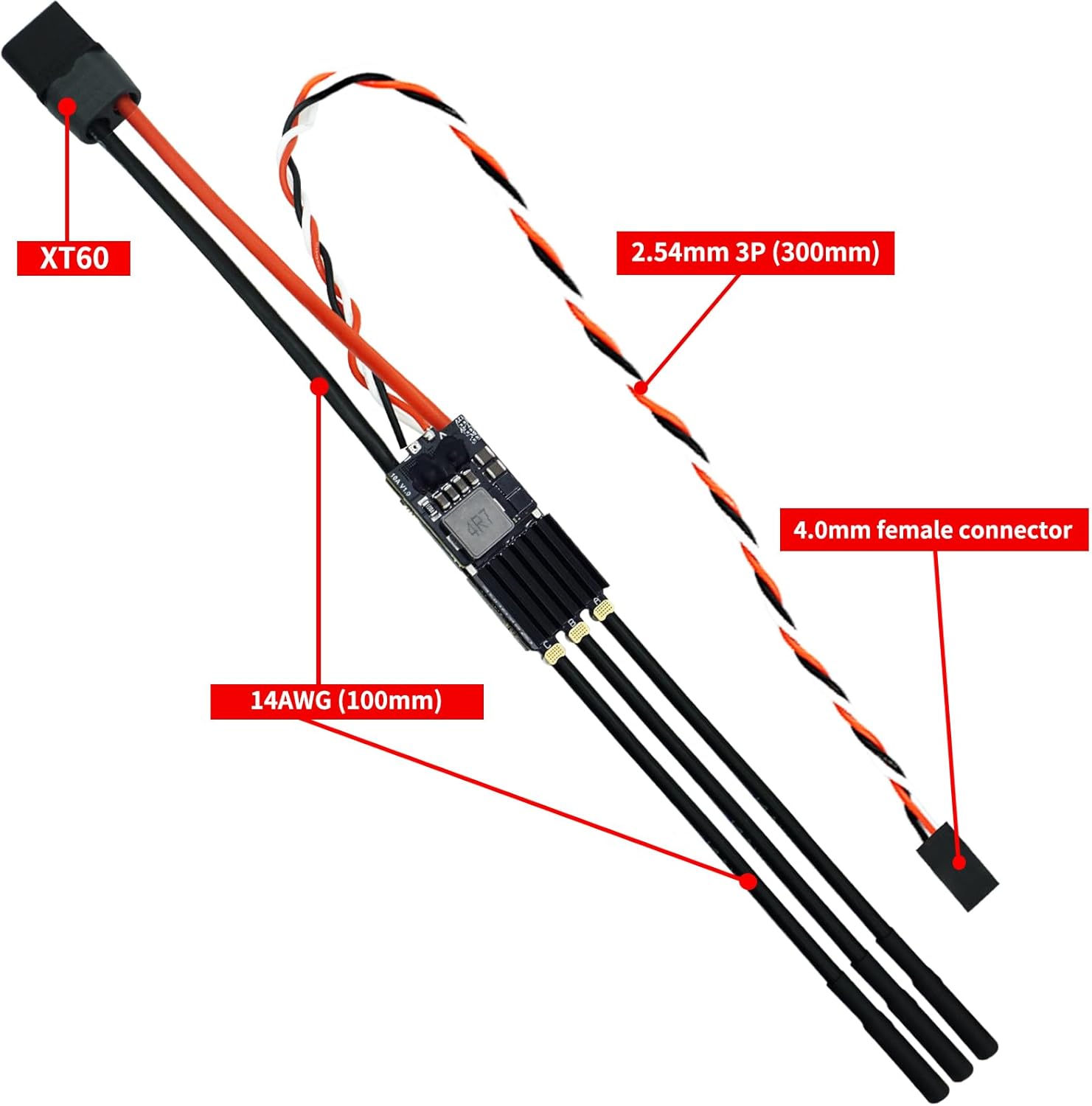
פיגורע 4: ESC Wiring Diagram. Connect the XT60 to the battery, 4.0mm female connectors to the motor, and the 2.54mm 3P (300mm) cable to the receiver.
- באַטערי קשר: Use the XT60 connector for connecting to your LiPo battery (2-8S).
- מאָטאָר קשר: Connect the three 4.0mm bullet connectors to your brushless motor. Ensure correct phase matching for proper motor rotation.
- ריסיווער קשר: Plug the 2.54mm 3P (300mm) cable into the throttle channel of your RC receiver.
- מאַכט קאַבלע: The ESC is equipped with 14AWG power cables for robust current handling.
2. BEC חלקtagE אַדזשאַסטמאַנט
The built-in BEC (Battery Eliminator Circuit) provides adjustable output voltages to power your receiver and servos. The available output options are 5V, 6V, 7.2V, 8.2V, and 12V, all at 10A. To adjust the BEC voltage, you must solder the corresponding joints on the ESC board. Refer to the diagram below for specific soldering points.

פיגורע 5: BEC Voltage Adjustment via Soldering. Carefully solder the designated pads to select the desired output voltage.
וואָרענען:
- Ensure proper soldering techniques to avoid short circuits or damage to the ESC.
- Always disconnect the battery before making any soldering adjustments.
- באַשטעטיקן דעם אויסגעקליבענעם באַנדtage matches the requirements of your receiver and servos to prevent damage.
3. Initial Power-On and Throttle Calibration
After all connections are made, perform an initial power-on and throttle calibration:
- Ensure your transmitter is turned on and the throttle stick is at its lowest position.
- Connect the battery to the ESC. The ESC will automatically detect the throttle signal.
- Follow the instructions provided by your visual programming parameter adjustment tool for precise throttle calibration. This ensures the ESC accurately interprets your transmitter's throttle input.
4. Programming Parameter Adjustment
The SEQURE 120A ESC supports a visual programming parameter adjustment tool. This tool allows you to configure various settings, including:
- מאָטאָר טיימינג
- Throttle Calibration (as mentioned above)
- קראַנט דעטעקטיאָן
- Motor Steering (Forward/Reverse)
- Telemetry Signal
- RGB LED Light Settings
Refer to the specific software documentation for the visual programming tool for detailed instructions on how to connect and adjust these parameters.
אַפּערייטינג ינסטראַקשאַנז
Once the ESC is properly set up and calibrated, you can begin operating your RC model. The ESC supports various signal protocols and operational modes.
1. Signal Protocols
The ESC supports a wide range of signal protocols, including Dshot (All versions), PWM, Oneshot, and Multishot. Ensure your flight controller or receiver is configured to output a compatible signal.
2. Motor Steering and Direction
The ESC allows for programmable motor steering settings. You can configure the motor to operate in forward, reverse, or with braking functionality, which is particularly useful for RC crawler cars and climbing cars.
- פֿאָרווערטס: נאָרמאַל אָפּעראַציע.
- פאַרקערט: Allows the motor to spin in the opposite direction.
- בראַקעס: Provides braking action for controlled stops.
Adjust these settings using the visual programming parameter adjustment tool as needed for your specific application.
3. Boost Timing Setting
The ESC supports boost timing adjustments, which can optimize motor performance for specific applications. Adjusting boost timing can affect motor efficiency and power output. Experiment with these settings carefully, monitoring motor and ESC temperatures.
4. זיכערהייט שוץ
The SEQURE 120A ESC incorporates several safety features to protect itself and your RC model:
- נידעריק וואָלtagE שוץ: Prevents over-discharge of the battery by reducing or cutting power when the battery voltage פאלט אונטער א זיכערן שוועל.
- טעמפּעראַטור שוץ: Reduces power or shuts down the ESC if it reaches an unsafe operating temperature.
- פארשפארט ראָוטער שוץ: Detects if the motor is stalled and prevents damage by cutting power.
- איצטיקע שוץ: זיכערהייטן קעגן איבערגעטריבענע קראַנט ציען.
Always monitor your model's behavior and temperatures during operation, especially after making parameter adjustments.
The SEQURE 120A ESC is versatile and suitable for various RC applications, including:

פיגורע 6: Application scenarios for the SEQURE 120A Brushless ESC.
וישאַלט
Regular maintenance helps ensure the longevity and reliable performance of your SEQURE 120A ESC.
- רייניקונג: Keep the ESC clean and free from dust, dirt, and moisture. Use a soft brush or compressed air to remove debris. Avoid using liquids directly on the ESC.
- קשר טשעקס: Periodically inspect all wiring connections (battery, motor, receiver) for signs of wear, corrosion, or looseness. Secure any loose connections.
- היץ מאַנאַגעמענט: Ensure the metal aluminum radiator is clear of obstructions to allow for optimal airflow and heat dissipation. Avoid operating the ESC in enclosed spaces without adequate ventilation.
- Firmware דערהייַנטיקונגען: Check the SEQURE official website or support channels for any available firmware updates for the Escape32. Follow update instructions carefully.
- סטאָרידזש: When not in use, store the ESC in a dry, cool place, away from direct sunlight and extreme temperatures. Disconnect it from the battery.
טראָובלעשאָאָטינג
If you encounter issues with your SEQURE 120A ESC, refer to the following common troubleshooting steps:
No Power / No Response
- קאָנטראָלירן די באַטאַרייע: Ensure the battery is fully charged and properly connected to the XT60 connector.
- טשעק קאַנעקשאַנז: Verify all power cables (14AWG) are securely connected and free from damage.
- BEC רעזולטאַט: Confirm the BEC voltage is correctly set and providing power to the receiver. Check receiver power indicator.
Motor Not Spinning / Erratic Behavior
- גערגל קאַלאַבריישאַן: Re-perform throttle calibration using your visual programming tool.
- מאָטאָר קאַנעקשאַנז: Ensure the three motor phase wires are correctly and securely connected to the 4.0mm bullet connectors.
- Signal Protocol: Verify that the ESC's signal protocol setting matches your receiver/flight controller output (Dshot, PWM, etc.).
- Motor Steering: Check motor steering settings in the programming tool.
- מניעות: Ensure the motor is not physically obstructed or jammed.
אָוווערכיטינג
- לופט לויפן: Ensure the ESC's metal radiator has adequate airflow. Remove any obstructions.
- לאָדן: Reduce the load on the motor/ESC. This could be due to an oversized propeller, gearing, or excessive weight.
- צייט: If boost timing is adjusted, try reducing it.
- אַרייַנשרייַב וואָלtage: פאַרזיכערן די אַרייַנשרייַב וואָלtage (2-8S LiPo) is within the specified range.
געפירט ינדיקאַטאָרס
Observe the RGB LED lights on the ESC. Different colors or flashing patterns may indicate specific status or error conditions. Refer to the visual programming tool's documentation for a detailed explanation of LED codes.
If the problem persists after attempting these steps, contact SEQURE customer support for further assistance.
וואָראַנטי און שטיצן
The SEQURE 120A Brushless ESC is manufactured with high-quality components and undergoes rigorous testing. For warranty information and terms, please refer to the purchase documentation or contact your retailer.
For technical support, troubleshooting assistance, or inquiries regarding your SEQURE product, please visit the official SEQURE website or contact their customer service department. You can often find support resources, FAQs, and contact information on the brand's official channels.
פאַבריקאַנט: SEQURE
ASIN: B0FB8T6ZPS
רעקאַמענדיד עלטער: 14 יאר און העכער
וואָס איז אין די קעסטל: 1 x electric speed controller with BEC