
Divoom D-Ditoo5M
Divoom Ditoo 5M Portable Karaoke Speaker User Manual
Model: D-Ditoo5M
1. הקדמה
א דאנק פארן קויפןasing the Divoom Ditoo 5M Portable Karaoke Speaker. This all-in-one sound system combines a portable speaker with a wireless microphone, FM radio, Bluetooth, MicroSD, and USB playback capabilities. It is designed for versatile use in various environments, including home, travel, and parties. Please read this manual carefully to ensure proper operation and to maximize your product experience.
ווידעא: איבערview of the Divoom Ditoo 5M Portable Karaoke Speaker's features and usage scenarios.
2. וואָס איז אין דער קעסטל
באַשטעטיקן אַז אַלע קאָמפּאָנענטן זענען פאַראַן אין דער פּאַקעט:
- Divoom Ditoo 5M Portable Karaoke Speaker
- ווירעלעסס מיקראָפאָן
- וסב- C קאַבלע
- באַניצער מאַנואַל (דעם דאָקומענט)

Image: The Divoom Ditoo 5M speaker, wireless microphone, USB-C cable, and user manual as included components.
3. פּראָדוקט איבערview
The Divoom Ditoo 5M features a retro computer design with a pixel art display and tactile mechanical keys. It includes a built-in speaker and a wireless microphone for karaoke functions.
שליסל פֿעיִקייטן:
- 15 וואט שטאַרקער געזונט: Equipped with 19-core 48mm speakers and dual passive membranes for immersive audio.
- Built-in Lossless Microphone: For clear vocal input during karaoke or recording.
- Pixel Art Display: Customizable display for pixel art, animations, and text.
- Multi-mode Audio Playback: Supports Bluetooth 5.0, FM Radio, USB, and MicroSD card.
- נאָך פאַנגקשאַנז: Clock & Alarm, Sunset Sleep Aid, Sound Factory, Scoreboard & Timer, Pixel Mini Games.
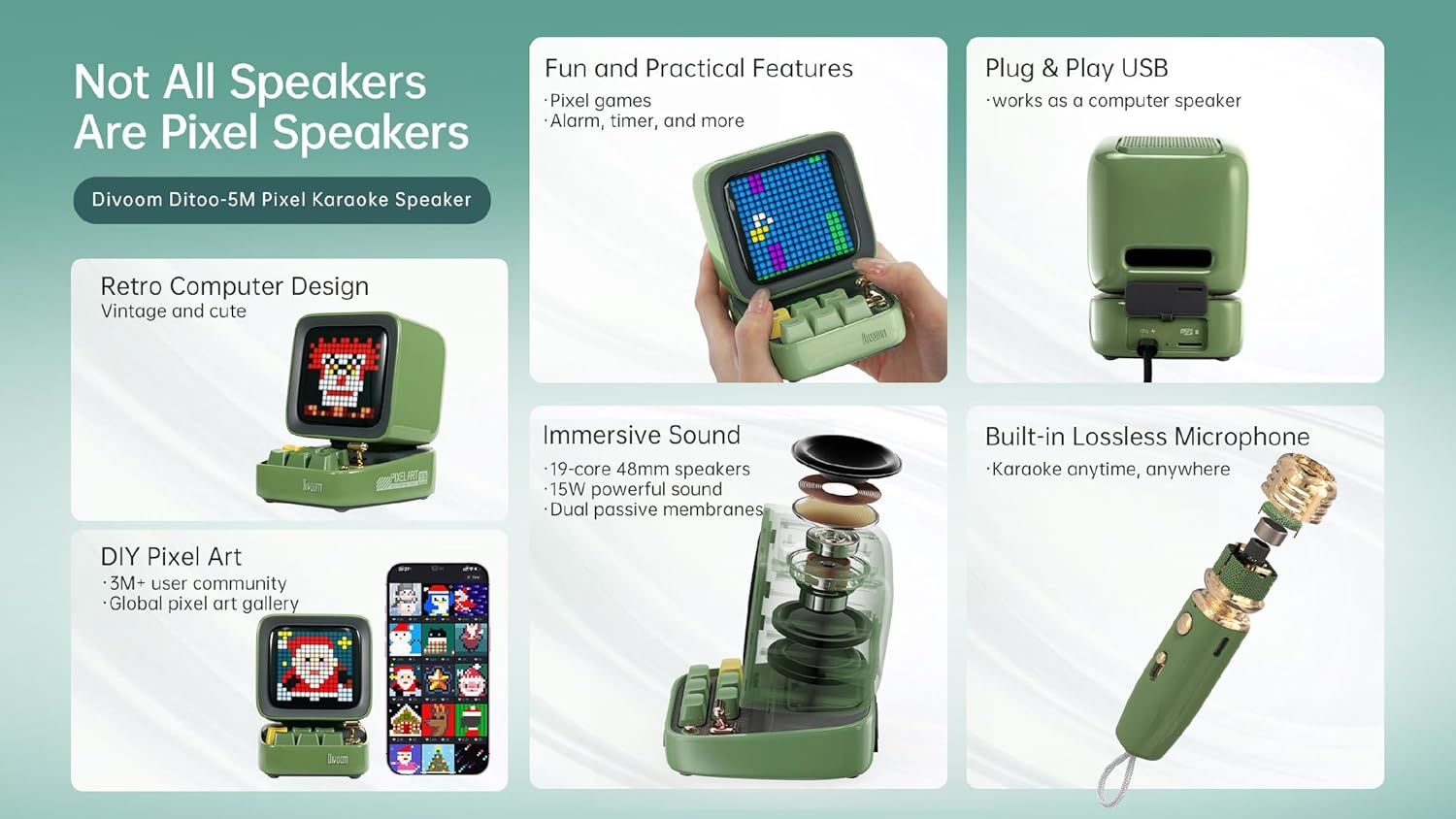
בילד: דעטאַלירט view of the Divoom Ditoo 5M speaker's internal sound components and the built-in microphone structure.
Craftsmanship Details:
- Piano Lacquer Finish: Provides a sleek and premium texture.
- באַטערי ינדיקאַטאָר ליכט: For clear visibility of battery life.
- Silicone Base: Ensures stable placement on surfaces.

בילד: נאָענט-אַרויף views highlighting the piano lacquer finish, battery indicator, and silicone base of the Divoom Ditoo 5M speaker.
4. סעטאַפּ
4.1 טשאַרדזשינג די מיטל
Before first use, fully charge the Divoom Ditoo 5M speaker and the wireless microphone using the provided USB-C cable. Connect the USB-C cable to the charging port on the device and a compatible USB power adapter (not included).
4.2 פּאַוערינג אויף / אַוועק
Press and hold the power button on the speaker to turn it on or off. The pixel display will illuminate upon powering on.
5. אַפּערייטינג ינסטרוקטיאָנס
5.1 בלועטאָאָטה קאַנעקשאַן
- פאַרזיכערן אַז די רעדנער איז פּאַוערד אויף.
- אַקטיווירן בלועטוט אויף דיין סמאַרטפאָון, טאַבלעט, אָדער אַנדער קאָמפּאַטיבל מיטל.
- זוכן פֿאַר "Divoom Ditoo 5M" in the list of available Bluetooth devices.
- Select the device to pair. A confirmation sound will indicate a successful connection.
5.2 FM ראַדיאָ אָפּעראַציע
- Switch the speaker to FM radio mode (refer to the device's controls for mode selection).
- Use the navigation buttons to scan for available radio stations.
- Adjust the volume using the dedicated controls.
5.3 MicroSD & USB Playback
- Insert a MicroSD card into the TF card slot or a USB drive into the USB port.
- The speaker will automatically detect and begin playing audio fileס פון די סטאָרידזש מיטל.
- ניצט די רעדנער'ס קאָנטראָלס צו נאַוויגירן צווישן לידער און סטרויערן די באַנד.
5.4 Karaoke Function with Wireless Microphone
The Ditoo 5M offers an integrated karaoke experience with its wireless microphone.
- Ensure both the speaker and wireless microphone are charged and powered on.
- The microphone should automatically pair with the speaker.
- Select a karaoke mode (e.g., Singer, Studio, Pop Song, Child, Robot, Host, Original) using the speaker's controls or the Divoom app.
- Adjust the microphone volume to your preference.

Image: The Divoom Ditoo 5M speaker and microphone, illustrating the available karaoke modes and microphone volume adjustment.
5.5 Pixel Art Creation
Customize the speaker's display with your own pixel art, animations, or text using the dedicated Divoom mobile application.
- אראפקאפיע און ינסטאַלירן די Divoom אַפּ אויף דיין סמאַרטפאָנע.
- Connect the speaker to the app via Bluetooth.
- Access the pixel art creation tools within the app to design and display custom visuals.

Image: A user interacting with the Divoom app to create and display pixel art on the Ditoo 5M speaker.
5.6 Pixel Mini Games
The Ditoo 5M includes 15 engaging mini-games for entertainment.
- Navigate to the games section on the speaker's interface or through the Divoom app.
- Select a game (e.g., Pixel Bee, Starfighter, Gomoku, Magic 8-Ball, Dice, Snake, Flying Bird, Frogger, Pixel Racer, Bouncing Ball).
- Use the speaker's keys for game controls.

Image: The Divoom Ditoo 5M speaker showcasing its pixel mini-games feature.
5.7 PC Speaker Functionality
The Ditoo 5M can function as a PC speaker and its microphone can be used for recording.
- Connect the speaker to your PC using an OTG USB cable (not included).
- Select the Ditoo 5M as the audio output device in your computer's sound settings.
- The integrated microphone can also be selected as an input device for communication or recording.

Image: The Divoom Ditoo 5M speaker connected to a computer, demonstrating its use as a PC speaker.
5.8 נאָך פֿעיִקייטן
- זייגער און אַלאַרם: Set alarms and display time.
- Sunset Sleep Aid: Features soothing nature and animal sounds to assist with sleep.
- Sound Factory: Includes 23 instruments and 96 sound effects for an immersive audio experience.
- Scoreboard & Timer: Practical tools for various activities.

Image: The Divoom Ditoo 5M speaker demonstrating its additional features including clock, sleep aid, sound factory, and scoreboard.
6. וישאַלט
- רייניקונג: ניצט אַ ווייכע, טרוקענע שטאָף צו רייניקן דעם רעדנער און מיקראָפאָן. ניצט נישט קיין שרײַבנדיקע רייניגערס אדער סאָלווענטן.
- סטאָרידזש: האַלט דעם אַפּאַראַט אין אַ קיל, טרוקן אָרט אַוועק פון דירעקט זונשייַן און עקסטרעמע טעמפּעראַטורן.
- באַטערי זאָרגן: כדי צו פארלענגערן די לעבן פון די באַטעריע, זאָלט איר נישט אָפט אויסלאָדן די באַטעריע. לאָדט דאָס אַפּאַראַט רעגולער אויף, אפילו אויב עס ווערט נישט גענוצט פֿאַר לענגערע צייטן.
7. טראָובלעשאָאָטינג
| פּראָבלעם | מעגלעך לייזונג |
|---|---|
| די מיטל טוט נישט מאַכט אויף. | Ensure the device is fully charged. Connect to a power source using the USB-C cable. |
| קען נישט פאַרבינדן דורך בלוטוט. | Ensure Bluetooth is enabled on your device and the speaker is in pairing mode. Move closer to the speaker. Try restarting both devices. |
| מיקראָפאָן טוט נישט אַרבעטן. | Ensure the microphone is charged and powered on. Check if it's paired with the speaker. Adjust microphone volume. |
| קיין קלאַנג פֿון רעדנער. | Check volume levels on both the speaker and the connected device. Ensure the correct input source is selected. |
8. ספּעסאַפאַקיישאַנז
- סאָרט: דיוואָם
- מאָדעל: D-Ditoo5M
- קאַנעקטיוויטי: Bluetooth 5.0, USB Port, MicroSD(TF) Card Slot, FM Radio, Wireless Microphone Link
- מאַכט מקור: איינגעבויטע ריטשאַרדזשאַבאַל ליטהיום-יאָן באַטאַרייע
- רעדנער רעזולטאַט: 15 וו
- קאַמפּאַטאַבאַל דעוויסעס: Smartphone, Tablet, USB devices
- מעדיע טיפּ: Micro SD, USB
- אַרייַנגערעכנט קאַמפּאָונאַנץ: Speaker, Wireless Microphone, USB-C Cable, User Manual
- ספּעציעלע פֿעיִקייטן: All-in-one karaoke system with FM radio and multiple playback options
9. וואָראַנטי און שטיצן
For warranty information and technical support, please refer to the official Divoom webזייטל אדער קאָנטאַקט אייער לאקאלן דיסטריביאַטאָר. האַלט אייער קויף קוויטל פֿאַר וואָראַנטי קליימז.
אָנליין שטיצן: באַזוכן www.divoom.com פֿאַר אָפֿט געשטעלטע פֿראַגעס, פּראָדוקט רעגיסטראַציע, און קאָנטאַקט אינפֿאָרמאַציע.
Ask a question about this manual
Ask about setup, troubleshooting, compatibility, parts, safety, or missing instructions. Manuals+ will review the question and use this page’s manual context to help answer it.